

Relationships Archives - gettectonic.com - Page 8
Tectonic Salesforce Implementation Partner

Choosing a 2025 Salesforce Solutions Partner

Salesforce has revolutionized how companies manage customer relationships, offering a powerful CRM platform that drives efficiency, productivity, and sales growth. However, fully unlocking its potential requires more than just subscribing to the platform. Successful deployment, seamless integration, and tailored customization are critical to maximizing Salesforce’s benefits. That’s where selecting the right Salesforce Cloud Solutions Partner becomes crucial. This guide will walk you through the key factors to consider when choosing a Salesforce implementation partner to ensure a successful deployment and seamless integration tailored to your business needs. Why You Need a Salesforce Cloud Solutions Partner The Salesforce ecosystem is vast and complex, offering a range of tools, services, and integrations that can be overwhelming without the right guidance. From pricing options to technical aspects of Salesforce Sales Cloud, implementation, and integrations, the right partner can simplify the process. A skilled Salesforce Cloud Solutions Partner can: Choosing the right partner can significantly impact your Salesforce journey, ensuring a smooth transition and long-term success. Key Factors to Consider When Choosing a Partner 1. Assess Expertise and Experience Salesforce implementation requires technical proficiency and industry-specific expertise. Look for a partner who: Additionally, ensure the partner is skilled in services you may require, such as Salesforce Outlook Integration or trial configurations. 2. Evaluate Customization Capabilities Every business is unique, and your Salesforce CRM must reflect that. A capable partner will tailor the platform to your needs, including: Customization ensures your Salesforce environment fits your business like a glove, optimizing operations and delivering maximum ROI. 3. Look for a Holistic Approach to Integration Salesforce excels at integrating with various platforms to streamline workflows. Choose a partner who offers: A well-integrated system simplifies operations, enhances productivity, and positions your business for scalable success. 4. Ensure Support and Training Salesforce implementation is only the beginning; ongoing support and training are critical to success. Your partner should offer: Continuous support ensures your team fully leverages Salesforce, adapting to new features and growing with the platform. 5. Prioritize Pricing Transparency Salesforce offers flexible pricing plans, but implementation costs can vary. Ensure your partner provides: Pricing transparency helps you plan effectively and avoid surprises during your Salesforce journey. Conclusion Selecting the right Salesforce Cloud Solutions Partner is a critical decision that can profoundly impact your business’s efficiency and growth. By focusing on expertise, customization, integration, and support, you can ensure a smooth Salesforce implementation that maximizes your investment. A trusted partner doesn’t just implement Salesforce; they become an integral part of your success, helping you scale confidently and adapt to future challenges. For tailored guidance on selecting the ideal Salesforce partner or learning more about best practices for Salesforce CRM implementation, explore our detailed insights and resources. Make an informed choice and set your organization up for long-term success with Salesforce. Like Related Posts Who is Salesforce? Who is Salesforce? Here is their story in their own words. From our inception, we’ve proudly embraced the identity of Read more Salesforce Marketing Cloud Transactional Emails Salesforce Marketing Cloud Transactional Emails are immediate, automated, non-promotional messages crucial to business operations and customer satisfaction, such as order Read more Salesforce Unites Einstein Analytics with Financial CRM Salesforce has unveiled a comprehensive analytics solution tailored for wealth managers, home office professionals, and retail bankers, merging its Financial Read more AI-Driven Propensity Scores AI plays a crucial role in propensity score estimation as it can discern underlying patterns between treatments and confounding variables Read more


Read More
AI Sales Agents Explained

AI Sales Agents Explained

If you were to ask a sales rep why they chose a job in sales, they’d probably tell you something like, “I love helping to people. I’m ambitious and goal-oriented, and no two days are ever the same.” The reality, however, is that a lot of time in sales isn’t spent selling. Recent data suggests that sales reps dedicate only 28% of their time to actual selling, with the rest swallowed up by administrative tasks and non-revenue-generating work. To ease this burden, sales teams are turning to AI sales agents, enabling them to focus more on building relationships and closing deals. Below, we explore the different types of AI sales agents and how businesses are using them to increase productivity, efficiency, and revenue. What is an AI sales agent? AI sales agents are autonomous applications that analyze and learn from sales and customer data to perform tasks with little or no human intervention. These agents can manage a wide range of activities, from top-of-funnel tasks like nurturing leads via email outreach, answering questions, booking meetings, and generating quotes to more integrated sales support like buyer roleplays and coaching. Unlike simple workflow automation, AI agents are capable of learning, enabling them to improve efficiency and act independently based on data and analysis. They often plug directly into existing CRMs, with pre-built capabilities or customizable configurations for specific business needs. Types of AI sales agents There are two primary types of AI sales agents: The ability to autonomously analyze data, create action plans, and execute them sets modern AI sales agents apart from traditional sales tools and bots. Key features of AI sales agents Benefits of AI sales agents Future trends for AI sales agents In the early days, AI in sales served primarily as a co-pilot — summarizing insights and assisting with tasks like forecasting. It often required significant human input and created siloed data challenges. Today, AI agents autonomously augment human teams, empowering them to focus on high-value tasks like building relationships. In the near future, AI sales agents are expected to handle increasingly complex workflows and multi-step processes across diverse channels. Potential advancements include: These developments promise to unlock new possibilities for efficiency, personalization, and customization in sales teams. AI sales agents pushing teams into a new era According to recent data, sales leaders are focusing on improving sales enablement, targeting new markets, and adopting new tools and technologies to drive growth. Challenges like scaling personalized interactions and hitting quotas are top of mind. AI sales agents directly address these needs, transforming sales organizations by enabling teams to offload repetitive work to autonomous systems while maintaining quality and personalization. Who uses AI sales agents? AI sales agents are used by sales teams to manage tasks such as lead qualification, follow-ups, meeting scheduling, and coaching. By handling repetitive activities, these agents free up reps to focus on relationship-building and closing deals, ultimately driving better outcomes for both teams and customers. Like Related Posts Who is Salesforce? Who is Salesforce? Here is their story in their own words. From our inception, we’ve proudly embraced the identity of Read more Salesforce Unites Einstein Analytics with Financial CRM Salesforce has unveiled a comprehensive analytics solution tailored for wealth managers, home office professionals, and retail bankers, merging its Financial Read more AI-Driven Propensity Scores AI plays a crucial role in propensity score estimation as it can discern underlying patterns between treatments and confounding variables Read more Tectonic’s Successful Salesforce Track Record Salesforce Technology Services Integrator – Tectonic has successfully delivered Salesforce in a variety of industries including Public Sector, Hospitality, Manufacturing, Read more

Read More
salesforce master details relationships

Master-detail and Lookup Relationships in Salesforce

Understanding Data Relationships in Salesforce: Master-Detail vs. Lookup Relationships In Salesforce, data is structured using three fundamental elements: Objects, Fields, and Records. Objects act as tables in a database, fields represent columns, and records serve as rows. To efficiently manage and access data while maintaining consistency, data relationships play a pivotal role. These relationships define how records in one object are connected to those in another, enabling seamless organization and interaction. Among the most common types of data relationships in Salesforce are Master-Detail and Lookup Relationships. The primary distinction between these two lies in their level of dependency: This article delves into the details, benefits, and practical applications of these relationships, along with a head-to-head comparison. Master-Detail Relationship in Salesforce A Master-Detail Relationship creates a strong dependency between two Salesforce objects, where one serves as the parent (master) and the other as the child (detail). Key Features Example: Order Management For every order, multiple products (order line items) may be included. If the parent order is deleted, all related order line items are also deleted. Additionally, rollup summary fields can calculate the total number of line items or their combined value. Benefits Lookup Relationship in Salesforce A Lookup Relationship represents a more flexible association between objects, where the child object is less dependent on the parent. Key Features Example: Product Catalog In this scenario, order line items reference specific products. If a product is deleted, the related line items remain, but their references are cleared. Benefits Master-Detail vs. Lookup Relationships Feature Master-Detail Relationship Lookup Relationship Dependency Strong (child depends on parent) Weak (child independent of parent) Cascade Delete Yes No Rollup Summary Fields Supported Not supported (use RollUp Magic) Security Settings Inherited from parent Independent Flexibility Less flexible Highly flexible Overcoming Lookup Relationship Limitations with RollUp Magic One notable limitation of lookup relationships is the lack of support for rollup summary fields. This gap can be bridged with the tool RollUp Magic. Key Features of RollUp Magic Conclusion Master-detail and lookup relationships are essential tools in Salesforce for managing data associations. For organizations leveraging lookup relationships, tools like RollUp Magic, GridMate, or clearMDM enhance data management by enabling rollup summary fields, elevating reporting and analytics capabilities. By understanding the nuances of these object relationships, you can better organize and manage your Salesforce data to meet your business needs effectively. Like Related Posts Who is Salesforce? Who is Salesforce? Here is their story in their own words. From our inception, we’ve proudly embraced the identity of Read more Salesforce Marketing Cloud Transactional Emails Salesforce Marketing Cloud Transactional Emails are immediate, automated, non-promotional messages crucial to business operations and customer satisfaction, such as order Read more Salesforce Unites Einstein Analytics with Financial CRM Salesforce has unveiled a comprehensive analytics solution tailored for wealth managers, home office professionals, and retail bankers, merging its Financial Read more AI-Driven Propensity Scores AI plays a crucial role in propensity score estimation as it can discern underlying patterns between treatments and confounding variables Read more
Read More

CXM Revolution

The CXM Revolution: How Salesforce is Redefining Customer Relationships From Data Management to Experience Orchestration In today’s hyper-connected world, customers don’t just want transactions—they expect seamless, personalized journeys at every touchpoint. Salesforce has evolved beyond traditional CRM into a full Customer Experience Management (CXM) powerhouse, helping enterprises transform customer interactions into competitive advantages. CRM vs. CXM: The Critical Shift Traditional CRM Modern CXM Tracks contacts, deals, and cases Maps the entire customer journey Reactive support & sales Proactive, predictive engagement Siloed departments Unified, cross-functional collaboration Manual processes AI-driven automation & personalization Salesforce’s CXM suite now includes:✔ Marketing Cloud – Hyper-personalized omnichannel campaigns✔ Customer 360 – Single source of truth for all customer data✔ Einstein AI – Predictive insights & next-best actions✔ Experience Cloud – Branded portals & self-service hubs✔ Slack Integration – Real-time team collaboration 5 Steps to Unlock Salesforce’s CXM Power 1. Break Down Silos with Customer 360 ❌ Old Way: Disconnected sales, service, and marketing data.✅ CXM Approach: A unified customer profile that updates in real time across all teams.📌 Example: A retail brand merges online purchases, in-store visits, and support tickets into one view—enabling personalized loyalty rewards. 2. Predict Needs with AI (Before Customers Ask) ❌ Old Way: Waiting for customers to reach out with issues.✅ CXM Approach: Einstein AI flags: 3. Design Frictionless Journeys with Marketing Cloud ❌ Old Way: Generic email blasts to entire lists.✅ CXM Approach: Journey Builder triggers: 4. Empower Customers with Self-Service (Experience Cloud) ❌ Old Way: Long hold times for basic requests.✅ CXM Approach: AI-powered portals where customers can: 5. Close the Loop with Slack-First Collaboration ❌ Old Way: Teams working in disconnected systems.✅ CXM Approach: Slack channels that auto-alert: Why CXM is the Future (And Why You Can’t Afford to Wait) Companies leveraging Salesforce as a CXM platform report:📈 30% increase in customer lifetime value⏱️ 25% shorter sales cycles💡 40% improvement in first-contact resolution The Bottom Line Salesforce is no longer just a CRM—it’s an experience engine. Businesses that fail to adopt a CXM mindset risk:❌ Losing customers to competitors with better personalization❌ Higher operational costs from inefficient processes❌ Missed revenue from untapped AI-driven opportunities 🚀 The time to act is now. Whether you’re a Salesforce beginner or a seasoned user, CXM isn’t the future—it’s today’s competitive necessity. Ready to transform your customer experience? Let’s talk strategy. Like Related Posts Who is Salesforce? Who is Salesforce? Here is their story in their own words. From our inception, we’ve proudly embraced the identity of Read more Salesforce Marketing Cloud Transactional Emails Salesforce Marketing Cloud Transactional Emails are immediate, automated, non-promotional messages crucial to business operations and customer satisfaction, such as order Read more Salesforce Unites Einstein Analytics with Financial CRM Salesforce has unveiled a comprehensive analytics solution tailored for wealth managers, home office professionals, and retail bankers, merging its Financial Read more AI-Driven Propensity Scores AI plays a crucial role in propensity score estimation as it can discern underlying patterns between treatments and confounding variables Read more

Read More
Gen AI Unleased With Vector Database

Knowledge Graphs and Vector Databases

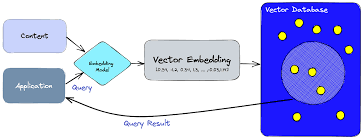
The Role of Knowledge Graphs and Vector Databases in Retrieval-Augmented Generation (RAG) In the dynamic AI landscape, Retrieval-Augmented Generation (RAG) systems are revolutionizing data retrieval by combining artificial intelligence with external data sources to deliver contextual, relevant outputs. Two core technologies driving this innovation are Knowledge Graphs and Vector Databases. While fundamentally different in their design and functionality, these tools complement one another, unlocking new potential for solving complex data problems across industries. Understanding Knowledge Graphs: Connecting the Dots Knowledge Graphs organize data into a network of relationships, creating a structured representation of entities and how they interact. These graphs emphasize understanding and reasoning through data, offering explainable and highly contextual results. How They Work Strengths Limitations Applications Vector Databases: The Power of Similarity In contrast, Vector Databases thrive in handling unstructured data such as text, images, and audio. By representing data as high-dimensional vectors, they excel at identifying similarities, enabling semantic understanding. How They Work Strengths Limitations Applications Combining Knowledge Graphs and Vector Databases: A Hybrid Approach While both technologies excel independently, their combination can amplify RAG systems. Knowledge Graphs bring reasoning and structure, while Vector Databases offer rapid, similarity-based retrieval, creating hybrid systems that are more intelligent and versatile. Example Use Cases Knowledge Graphs vs. Vector Databases: Key Differences Feature Knowledge Graphs Vector Databases Data Type Structured Unstructured Core Strength Relational reasoning Similarity-based retrieval Explainability High Low Scalability Limited for large datasets Efficient for massive datasets Flexibility Schema-dependent Schema-free Challenges in Implementation Future Trends: The Path to Convergence As AI evolves, the distinction between Knowledge Graphs and Vector Databases is beginning to blur. Emerging trends include: This convergence is paving the way for smarter, more adaptive systems that can handle both structured and unstructured data seamlessly. Conclusion Knowledge Graphs and Vector Databases represent two foundational technologies in the realm of Retrieval-Augmented Generation. Knowledge Graphs excel at reasoning through structured relationships, while Vector Databases shine in unstructured data retrieval. By combining their strengths, organizations can create hybrid systems that offer unparalleled insights, efficiency, and scalability. In a world where data continues to grow in complexity, leveraging these complementary tools is essential. Whether building intelligent healthcare systems, enhancing recommendation engines, or powering semantic search, the synergy between Knowledge Graphs and Vector Databases is unlocking the next frontier of AI innovation, transforming how industries harness the power of their data. Like Related Posts Who is Salesforce? Who is Salesforce? Here is their story in their own words. From our inception, we’ve proudly embraced the identity of Read more Salesforce Unites Einstein Analytics with Financial CRM Salesforce has unveiled a comprehensive analytics solution tailored for wealth managers, home office professionals, and retail bankers, merging its Financial Read more AI-Driven Propensity Scores AI plays a crucial role in propensity score estimation as it can discern underlying patterns between treatments and confounding variables Read more Tectonic’s Successful Salesforce Track Record Salesforce Technology Services Integrator – Tectonic has successfully delivered Salesforce in a variety of industries including Public Sector, Hospitality, Manufacturing, Read more
Read More
Salesforce prompt builder

Salesforce Prompt Builder

Salesforce Prompt Builder: Field Generation Prompt Template What is a Prompt? A prompt is a set of detailed instructions designed to guide a Large Language Model (LLM) in generating relevant and high-quality output. Just like chefs fine-tune their recipes through testing and adjustments, prompt design involves iterating on instructions to ensure that the LLM delivers accurate, actionable results. Effective prompt design involves “grounding” your prompts with specific data, such as business context, product details, and customer information. By tailoring prompts to your particular needs, you help the LLM provide responses that align with your business goals. Like a well-crafted recipe, an effective prompt consists of both ingredients and instructions that work together to produce optimal results. A great prompt offers clear directions to the LLM, ensuring it generates output that meets your expectations. But what does an ideal prompt template look like? Here’s a breakdown: What is a Field Generation Prompt Template? The Field Generation Prompt Template is a tool that integrates AI-powered workflows directly into fields within Lightning record pages. This template allows users to populate fields with summaries or descriptions generated by an LLM, streamlining interactions and enhancing productivity during customer conversations. Let’s explore how to set up a Field Generation Prompt Template by using an example: generating a summary of case comments to help customer service agents efficiently review a case. Steps to Create a Field Generation Prompt Template 1. Create a New Rich Text Field on the Case Object 2. Enable Einstein Setup 3. Create a Prompt Template with the Field Generation Template Type 4. Configure the Prompt Template Workspace Optional: You can also use Flow or Apex to incorporate additional merge fields. 5. Preview the LLM’s Response Example Prompt: Scenario:You are a customer service representative at a company called ENForce.com, and you need a quick summary of a case’s comments. Record Merge Fields: Instructions: vbnetCopy codeFollow these instructions precisely. Do not add information not provided. – Refer to the “contact” as “client” in the summary. – Use clear, concise, and straightforward language in the active voice with a friendly, informal, and informative tone. – Include an introductory sentence and closing sentence, along with several bullet points. – Use a variety of emojis as bullet points to make the list more engaging. – Limit the summary to no more than seven sentences. – Do not include any reference to missing values or incomplete data. 6. Add the “Case Summary” Field to the Lightning Record Page 7. Generate the Summary By following these steps, you can leverage Salesforce’s Prompt Builder to enhance case management processes and improve the efficiency of customer service interactions through AI-assisted summaries. Like Related Posts Who is Salesforce? Who is Salesforce? Here is their story in their own words. From our inception, we’ve proudly embraced the identity of Read more Salesforce Marketing Cloud Transactional Emails Salesforce Marketing Cloud Transactional Emails are immediate, automated, non-promotional messages crucial to business operations and customer satisfaction, such as order Read more Salesforce Unites Einstein Analytics with Financial CRM Salesforce has unveiled a comprehensive analytics solution tailored for wealth managers, home office professionals, and retail bankers, merging its Financial Read more AI-Driven Propensity Scores AI plays a crucial role in propensity score estimation as it can discern underlying patterns between treatments and confounding variables Read more

Read More
Why Tracking Business Metrics Matters More Than You Think

Why Tracking Business Metrics Matters More Than You Think

Without measurement, a business is flying by the seat of its pants. In business, as in many areas of life, tracking progress is essential for growth. For example, one individual has been tracking cycling times on the same routes for over five years, and while performance has slowed, improvements in other areas, like taking more time off with family and building stronger client relationships, have been evident. Despite this, many businesses still fail to measure enough, particularly when it comes to understanding key performance indicators. A recent Salesforce survey found that 60% of small businesses rely primarily on cash flow as their key metric, often neglecting other important indicators of business health. For many, the primary measure of success is simply how much money is in the bank account, which, while important, is only a small part of the larger picture. The importance of measurement and metrics for business success and growth cannot be over emphasized. By tracking the right indicators, businesses gain a competitive edge and the ability to adapt and thrive in an ever-changing market. The Importance of Measurement Today, measuring business performance is more critical than ever for several reasons: Key Metrics to Measure While industry-specific metrics are important, there are several universal indicators that every management team should focus on. Thanks to new digital tools, gathering and analyzing these metrics is easier than ever, offering a comprehensive view of a business’s health. The Consequences of Not Measuring Without measurement, businesses are essentially operating without road signs. Small businesses, in particular, may not measure enough, while larger organizations may suffer from “analysis paralysis” by over-measuring and becoming overwhelmed by data. Measurement makes a difference. Just as an individual may track cycling times without measuring other variables like weight or diet, businesses must decide which metrics are most relevant to their success. While some aspects of business may be left unmeasured, others—such as sales, margins, and marketing performance—are vital for growth and strategic decision-making. In conclusion, businesses that embrace measurement are better equipped to navigate challenges, seize opportunities, and ultimately, thrive in a competitive market. Like Related Posts Who is Salesforce? Who is Salesforce? Here is their story in their own words. From our inception, we’ve proudly embraced the identity of Read more Salesforce Marketing Cloud Transactional Emails Salesforce Marketing Cloud Transactional Emails are immediate, automated, non-promotional messages crucial to business operations and customer satisfaction, such as order Read more Salesforce Unites Einstein Analytics with Financial CRM Salesforce has unveiled a comprehensive analytics solution tailored for wealth managers, home office professionals, and retail bankers, merging its Financial Read more AI-Driven Propensity Scores AI plays a crucial role in propensity score estimation as it can discern underlying patterns between treatments and confounding variables Read more

Read More
Autonomous Agents on the Agentforce Platform

Leveraging Agentforce

At Dreamforce 2024, Salesforce customers showcased the power of Agentforce by creating over 10,000 autonomous agents, each designed to address specific business challenges. The message was clear: “If you can describe it, Agentforce can do it.” By leveraging Agentforce, customers are able to create a flexible, on-demand digital workforce that operates without limitations, making it easy to build and deploy agents using familiar Salesforce tools and language. Why This Matters: Recent Salesforce research reveals that U.S. consumers often spend up to nine hours interacting with customer service to resolve a single issue. Moreover, 67% of consumers are frustrated when their issues aren’t resolved immediately and may abandon one-third of customer service interactions. This presents a massive opportunity to enhance the customer experience with AI-powered agents. “Piloting Agentforce made a noticeable difference during our busiest period — back-to-school season. We saw a 40% increase in case resolution, surpassing the performance of our old bot. Agentforce helps manage routine tasks, allowing our service teams to focus on more complex cases.” – Kevin Quigley, Director of Process Improvement, Wiley What’s New: Several new solutions are now available to all customers: Going Deeper: Agentforce is fully integrated into the Salesforce Platform, combining powerful data, AI, and the Salesforce Customer 360 ecosystem. This integration unlocks infinite agent capacity and proactive actions across all roles and channels, with full context on every customer interaction. Industry-Specific Examples: Agentforce’s flexibility allows it to serve various industries with tailored solutions: Customer & Analyst Quotes: “Agentforce is enhancing Saks’ ability to provide personalized customer support, automating routine tasks like order tracking, which allows our teams to focus on delivering a high-touch experience.” – Mike Hite, Chief Technology Officer, Saks Global “With Agentforce, OpenTable is automating routine tasks, saving time for our reps to focus on strengthening customer relationships and providing exceptional service to diners and restaurants worldwide.” – George Pokorny, Senior VP of Global Customer Success, OpenTable “By integrating Agentforce with Data Cloud and MuleSoft, we’re unlocking the full potential of our data, driving faster decisions and reimagining how we serve clients.” – Caroline Basyn, Chief Digital & IT Officer, The Adecco Group “Agentforce will revolutionize ezCater’s food management services, blending AI and human interaction to ensure seamless, personalized experiences for every customer.” – Erin DeCesare, CTO, ezCater Like Related Posts Who is Salesforce? Who is Salesforce? Here is their story in their own words. From our inception, we’ve proudly embraced the identity of Read more Salesforce Marketing Cloud Transactional Emails Salesforce Marketing Cloud Transactional Emails are immediate, automated, non-promotional messages crucial to business operations and customer satisfaction, such as order Read more Salesforce Unites Einstein Analytics with Financial CRM Salesforce has unveiled a comprehensive analytics solution tailored for wealth managers, home office professionals, and retail bankers, merging its Financial Read more AI-Driven Propensity Scores AI plays a crucial role in propensity score estimation as it can discern underlying patterns between treatments and confounding variables Read more

Read More
salesforce government digital transformation

Salesforce Drives Digital Transformation in Governmental Agencies

How Salesforce Drives Digital Transformation in Governmental Agencies in 2025 In the evolving digital age, government agencies face an increasing demand to modernize their services, improve citizen engagement, and deliver seamless digital experiences. These organizations require transformational technologies that not only streamline internal operations but also adopt a citizen-first approach. Salesforce emerges as a key enabler of this transformation, empowering government agencies with tools to build unified, transparent platforms while fostering efficiency and enhancing citizen interaction. Leveraging Salesforce Commerce Cloud and Salesforce CRM, agencies can overcome common challenges and embrace a more digitally enabled public sector. Let’s explore the pressing challenges government agencies face and how Salesforce provides practical, scalable solutions to address them. 1. Citizen Engagement and Accessibility: Bridging the Digital Divide Challenge: Citizens now expect government services to be as user-friendly and accessible as private-sector experiences. Lengthy response times, disconnected platforms, and inconsistent experiences across digital and physical touchpoints erode trust and hinder accessibility. Solution: 2. Data Security and Compliance: Safeguarding Citizen Trust Challenge: Handling sensitive citizen data requires robust security and strict compliance with regulations like GDPR, CCPA, and other local data privacy laws. Solution: 3. Legacy Systems and Integration: Modernizing Infrastructure Challenge: Legacy systems often limit agility, making it difficult to integrate new technologies and slowing the pace of digital transformation. Solution: 4. Budget Constraints: Implementing Cost-Effective Solutions Challenge: Budget limitations often hinder the adoption of new technologies, especially those requiring significant upfront investment. Solution: 5. Efficient Service Delivery: Streamlining Workflows Challenge: Paper-heavy, bureaucratic processes delay service delivery and frustrate both staff and citizens. Solution: 6. Data-Driven Decision-Making: Analytics for Informed Policies Challenge: Generating actionable insights from vast amounts of data is challenging, affecting policymaking and government efficiency. Solution: 7. Enhancing Collaboration: A Unified Workforce Challenge: Siloed departments hinder collaboration and reduce overall productivity, making it difficult to provide cohesive citizen services. Solution: 8. Real-Time Responsiveness: Meeting Citizen Expectations Challenge: Citizens expect real-time support and proactive communication from government agencies. Delays lead to frustration and diminished trust. Solution: Transforming Government Services with Salesforce Salesforce Commerce Cloud and Salesforce CRM are tailored to address public sector challenges in 2025. By leveraging these tools, government agencies can: Salesforce offers a clear path to a digitally empowered future, enabling government agencies to meet today’s demands while laying the foundation for innovation. Ready to Transform?If your agency is ready to embrace digital transformation, streamline operations, and enhance citizen services, Salesforce can help you get there. Let’s discuss how Salesforce solutions, supported by expert implementation, can drive meaningful change for your organization and your citizens. Like1 Related Posts Who is Salesforce? Who is Salesforce? Here is their story in their own words. From our inception, we’ve proudly embraced the identity of Read more Salesforce Marketing Cloud Transactional Emails Salesforce Marketing Cloud Transactional Emails are immediate, automated, non-promotional messages crucial to business operations and customer satisfaction, such as order Read more Salesforce Unites Einstein Analytics with Financial CRM Salesforce has unveiled a comprehensive analytics solution tailored for wealth managers, home office professionals, and retail bankers, merging its Financial Read more AI-Driven Propensity Scores AI plays a crucial role in propensity score estimation as it can discern underlying patterns between treatments and confounding variables Read more

Read More
Transforming Fundraising for Nonprofits

Leverage AI to Enhance Customer Retention

Leverage AI to Enhance Customer Retention and Reduce Churn Customer churn is among the most expensive challenges businesses face—and one of the hardest to tackle. Predictive and generative AI technologies offer an immediate opportunity to boost retention rates. When applied strategically, these tools can revolutionize how customer service and support teams operate, creating measurable improvements in retention and overall customer satisfaction. A recent McKinsey & Company study highlights the impact of AI in customer service. One company reported a 14% increase in issue resolution and a 9% reduction in issue handling time with generative AI. Requests to escalate to a manager dropped by 25%, and employee retention in service roles improved. When every percentage point matters, AI’s ability to engage and retain customers (and employees) can significantly affect your bottom line and business success. The Cost of Poor Customer Service on Retention Retaining existing customers is far more cost-effective than acquiring new ones. Happy, long-term customers are also more likely to purchase additional products or services, making upselling and cross-selling efforts easier. However, poor customer service experiences—such as lengthy hold times, repeating information, or unhelpful chatbot interactions—can damage customer relationships and lead to churn. As Salesforce points out, these four signs indicate broken customer service: To address these challenges, a seamless, data-driven approach to customer service is essential. Prevent Churn with CRM + AI Customer data spans multiple touchpoints, from website visits to call center interactions. Without a unified view, even the most skilled service teams struggle to deliver exceptional experiences. A solution like Salesforce Service Cloud, enhanced by AI tools such as Agentforce Service Agents, empowers teams to: By combining predictive analytics with a unified customer experience platform, businesses can deliver personalized, proactive service that fosters loyalty. Retention Agent: The AI Solution for Customer Retention Retention Agent, part of Tectonic’s Agentforce suite, leverages AI to identify at-risk customers and equip sales, service, and support teams with actionable insights. It provides recommendations for re-engagement strategies, personalized offers, and targeted communications to prevent costly churn. Here’s how Retention Agent works: By integrating AI into customer service operations, businesses can stay ahead of churn, improve satisfaction, and build stronger, longer-lasting customer relationships. Like Related Posts Who is Salesforce? Who is Salesforce? Here is their story in their own words. From our inception, we’ve proudly embraced the identity of Read more Salesforce Marketing Cloud Transactional Emails Salesforce Marketing Cloud Transactional Emails are immediate, automated, non-promotional messages crucial to business operations and customer satisfaction, such as order Read more Salesforce Unites Einstein Analytics with Financial CRM Salesforce has unveiled a comprehensive analytics solution tailored for wealth managers, home office professionals, and retail bankers, merging its Financial Read more AI-Driven Propensity Scores AI plays a crucial role in propensity score estimation as it can discern underlying patterns between treatments and confounding variables Read more

Read More

Ushering in the Era of AI-Driven Workforces

Agentforce: Ushering in the Era of AI-Driven Workforces “Agentforce is redefining what’s possible in business and beyond, ushering in a new era of AI abundance and limitless workforces that augment every employee, build deeper customer relationships, and drive unprecedented growth and profitability.”— Marc Benioff, Salesforce CEO Key Features and Takeaways Out-of-the-Box AI Agents Agentforce introduces pre-built, customizable agents that are deployable with low-code or no-code tools, working tirelessly across any channel. Its first generally available solution, the Agentforce Service Agent, surpasses traditional chatbots by handling a diverse range of tasks—from simple inquiries to complex scenarios. Key capabilities include: Seamless Integration with Salesforce Platform Agentforce eliminates the complexity of building AI solutions from scratch. Unlike other platforms that demand intricate data integration and custom automation, Agentforce is fully embedded within the Salesforce ecosystem. With Agentforce, businesses can: Always-On Automation Agentforce operates independently of human intervention. Agents can be triggered by changes in data, predefined business rules, or pre-built automations, ensuring uninterrupted workflows. This blend of autonomous operation and human collaboration creates a symbiotic relationship between people and AI, enhancing productivity and customer satisfaction. A Competitive Edge in the AI Space Salesforce emphasizes that Agentforce goes beyond chatbots and copilots, setting a new benchmark for enterprise AI. In a strategic swipe at competitors, Marc Benioff likened rival offerings—like Microsoft’s Dynamics 365 AI agents—to “Clippy 2.0,” critiquing their inaccuracies and risks of corporate data leaks. By contrast, Agentforce builds on Salesforce’s proven Einstein AI platform, ensuring reliability, scalability, and secure integration. Redefining Customer Success Agentforce isn’t just about automation—it’s about driving outcomes. By enabling businesses to automate complex processes, deepen customer relationships, and scale operations, it paves the way for limitless growth in the age of AI. Ready to transform your workforce? With Agentforce, the future of AI-driven business is already here. Like Related Posts Who is Salesforce? Who is Salesforce? Here is their story in their own words. From our inception, we’ve proudly embraced the identity of Read more Salesforce Marketing Cloud Transactional Emails Salesforce Marketing Cloud Transactional Emails are immediate, automated, non-promotional messages crucial to business operations and customer satisfaction, such as order Read more Salesforce Unites Einstein Analytics with Financial CRM Salesforce has unveiled a comprehensive analytics solution tailored for wealth managers, home office professionals, and retail bankers, merging its Financial Read more AI-Driven Propensity Scores AI plays a crucial role in propensity score estimation as it can discern underlying patterns between treatments and confounding variables Read more

Read More
How to Connect Multiple Data Sources in Power BI Desktop

How to Connect Multiple Data Sources in Power BI Desktop

In today’s data-driven world, the ability to analyze diverse data sources can set a business apart. With Power BI Desktop, a Microsoft tool, analysts can seamlessly integrate data from various platforms and transform raw information into actionable insights. For instance, you could combine Excel-based sales figures with financial data from SQL Server and customer information from Salesforce into an interactive report. Mastering these techniques can be easier through structured learning, such as Microsoft Power BI courses, which offer practical insights into leveraging this powerful tool. This guide will help you connect, combine, and visualize multiple data sources in Power BI Desktop to make smarter, data-driven decisions. Why Combine Multiple Data Sources? Organizations often face the challenge of managing data stored across disparate systems. Financial records may reside in SQL Server, sales data in Excel, and customer information in cloud platforms like Salesforce. Insights from these datasets are often hidden unless they are integrated. Using Power BI Desktop, you can load multiple data sources into a unified model, providing a comprehensive view that enables better analysis and decision-making. Getting Started with Power BI Desktop Before integrating datasets, ensure you have Power BI Desktop installed. The tool is available for download from the official Power BI website. Once installed, launch Power BI Desktop to begin connecting your data sources. Step-by-Step Guide 1. Connecting Your First Data Source Follow these steps to connect to your first data source: At this stage, you can use Power Query Editor to clean and transform the data as needed. 2. Adding Additional Data Sources Enhance your report by adding more data sources: For example, you could link an Excel file for sales data, a SQL Server database for product details, and Azure for supplementary information, all within a single report. 3. Combining Data from Multiple Sources To merge data from different sources into a cohesive model: This process creates a unified data model that allows for cross-tabulation and advanced visualizations. 4. Using Power Query Editor for Data Transformation Before combining datasets, you may need to clean and transform the data. Use Power Query Editor to: Access Power Query Editor by selecting Transform Data on the Home tab. 5. Creating Visualizations with Combined Data With your unified data model, you can create compelling visualizations: 6. Refreshing Data Connections Power BI Desktop enables you to refresh data connections effortlessly, ensuring your reports stay updated: Best Practices for Connecting Multiple Data Sources Conclusion Integrating multiple data sources in Power BI Desktop empowers businesses to uncover deep insights and make informed decisions. By following these steps, you can connect, aggregate, and visualize diverse datasets with ease. To further enhance your expertise, explore free resources or consider professional courses to master the versatility of Power BI Desktop—a vital tool for data professionals and business analysts. Like Related Posts Who is Salesforce? Who is Salesforce? Here is their story in their own words. From our inception, we’ve proudly embraced the identity of Read more Salesforce Marketing Cloud Transactional Emails Salesforce Marketing Cloud Transactional Emails are immediate, automated, non-promotional messages crucial to business operations and customer satisfaction, such as order Read more Salesforce Unites Einstein Analytics with Financial CRM Salesforce has unveiled a comprehensive analytics solution tailored for wealth managers, home office professionals, and retail bankers, merging its Financial Read more AI-Driven Propensity Scores AI plays a crucial role in propensity score estimation as it can discern underlying patterns between treatments and confounding variables Read more

Read More

Simplify Data Management with Salesforce Schema Builder

Simplify Data Management with Salesforce Schema Builder and Tectonic Gone are the days of manually checking and cross-referencing data! Spending hours—or even involving multiple team members—to ensure data accuracy before presenting it to key stakeholders is a thing of the past. Today, Salesforce admins and developers are turning to built-in tools like Schema Builder to streamline data management. This intuitive graphical interface makes it easier to view, edit, and understand data models with confidence. Imagine effortlessly showing stakeholders or new teammates how data flows through your systems. With Schema Builder, you can achieve this and so much more. This powerful Salesforce tool enables you to: Let’s dive into what makes Schema Builder such a game-changer for admins and developers alike! What is Schema Builder in Salesforce? Schema Builder empowers Salesforce admins to easily edit or visualize data models in alignment with business goals. Whether you’re designing new objects, building relationships, or troubleshooting existing models, Schema Builder provides a dedicated space for managing complex data architectures. How to Access Schema Builder Schema Builder is a built-in Salesforce tool and is simple to access: That’s it—you’re ready to begin! Top Features of Schema Builder Schema Builder is an essential tool for managing Salesforce objects and relationships. Here are two standout features that make it invaluable for administrators: 1. Design Flexibility Schema Builder allows admins to easily add components to a schema, such as: This flexibility enables admins to tailor schemas to meet unique business needs, ensuring data is organized for optimal usability. 2. Simplified Object Creation Creating custom objects to store business data is a common task for Salesforce admins. With Schema Builder, these objects can be created quickly and efficiently, saving time and effort. How Does Schema Builder Work? Schema Builder provides an intuitive drag-and-drop interface that simplifies the process of visualizing and editing your Salesforce data model. One of the tool’s greatest advantages is its ability to present your data model without altering the underlying objects and relationships. For example, if you need to onboard a new hire or explain your data architecture to stakeholders, Schema Builder serves as the perfect visual aid. Impact Analysis with Schema Builder Beyond data visualization, Schema Builder supports impact analysis, helping businesses avoid costly mistakes when making changes to their Salesforce setup. For example, Schema Builder can display all object fields within your Salesforce org, giving you a comprehensive view of potential impacts before making adjustments. This feature ensures that workload changes, process updates, and business decisions are based on accurate and complete information. Pros and Cons of Salesforce Schema Builder While Schema Builder offers many benefits, it’s important to be aware of its limitations. Advantages Disadvantages Available in both Salesforce Classic and Lightning. Real-time data modifications can deploy errors if changes aren’t carefully reviewed. Usable by anyone with Customize Application permission. Limited visibility into dependencies between linked fields. Provides real-time updates for Salesforce changes. Potential risk of unintentional changes to critical fields, impacting other departments. Visualizes relationships between Salesforce objects and fields. Drag-and-drop user interface simplifies schema design. Conclusion: Make the Most of Schema Builder with Tectonic At Tectonic, we understand that Salesforce’s tools and technology are constantly evolving. Schema Builder is a prime example of how Salesforce enables admins to: Want to learn more about Salesforce tools that can help your business scale? Let us know! We specialize in helping organizations streamline their Salesforce solutions with innovative tools and strategies. Take Salesforce to the Next Level with Tectonic If you’re ready to extend Salesforce’s capabilities without writing a single line of code, look no further than Tectonic. Our no-code platform integrates seamlessly with Salesforce, empowering your teams to: With Tectonic, you can accelerate project timelines, reduce development costs, and bring processes to market faster—all while improving efficiency and scalability. Contact us today to learn more about how Tectonic can help your organization unlock the full potential of Salesforce. Let’s transform your data workflows into a competitive advantage! Like Related Posts Who is Salesforce? Who is Salesforce? Here is their story in their own words. From our inception, we’ve proudly embraced the identity of Read more Salesforce Marketing Cloud Transactional Emails Salesforce Marketing Cloud Transactional Emails are immediate, automated, non-promotional messages crucial to business operations and customer satisfaction, such as order Read more Salesforce Unites Einstein Analytics with Financial CRM Salesforce has unveiled a comprehensive analytics solution tailored for wealth managers, home office professionals, and retail bankers, merging its Financial Read more AI-Driven Propensity Scores AI plays a crucial role in propensity score estimation as it can discern underlying patterns between treatments and confounding variables Read more

Read More
salesforce manufacturing sales service experience case study

Manufacturing Deep Dive into Salesforce Winter 25 Release

The Salesforce Winter ’25 release is packed with game-changing updates tailored to manufacturers. With features designed to optimize asset management, inventory, and sales agreements, Salesforce is redefining how manufacturers stay competitive in today’s fast-paced market. Let’s explore the key highlights. Connected Assets The enhanced Connected Assets functionality is a standout feature in this release. By leveraging advanced IoT integrations, manufacturers can monitor and manage equipment in real time, enabling predictive maintenance and reducing downtime. Picture this: foreseeing potential machine issues before they escalate. This proactive approach helps manufacturers schedule maintenance at optimal times, saving both time and money. Enhanced visibility into asset performance also empowers teams to make data-driven decisions, boosting operational efficiency. Asset Service Lifecycle Management The Asset Service Lifecycle Management updates streamline the entire lifecycle of an asset—from installation to decommissioning. For manufacturers, where equipment performance is pivotal, these updates are a game-changer. Key features include: These enhancements not only improve service delivery but also boost customer satisfaction by keeping production schedules on track. Inventory Search and Transfer Efficient inventory management is critical for manufacturers, and the Inventory Search and Transfer update addresses this need directly. By improving visibility and accessibility, manufacturers can operate with greater agility and responsiveness, ensuring smooth operations even under tight timelines. Sales Agreement Enhancements Sales agreements are a cornerstone of manufacturing transactions, and the Winter ’25 release introduces significant improvements to streamline this process. These enhancements reduce negotiation time, minimize risks of misunderstandings, and enable manufacturers to close deals faster—key advantages in a competitive market. Sales Agreement Summary To complement these updates, the new Sales Agreement Summary feature provides a concise overview of all active agreements, including key dates, terms, and stakeholders. This enhanced visibility fosters better collaboration among teams and helps businesses stay ahead of their goals. Why It Matters for Manufacturers Salesforce’s Winter ’25 release is more than just an update—it’s a tool kit for driving growth and operational excellence. From predictive asset management to streamlined inventory control and faster sales cycles, these innovations empower manufacturers to: Ready to Transform?Leverage these powerful tools to gain a competitive edge. At Tectonic, we specialize in guiding manufacturers through their Salesforce journey, helping you maximize the impact of these updates. Reach out to our team today to get started! Like Related Posts Who is Salesforce? Who is Salesforce? Here is their story in their own words. From our inception, we’ve proudly embraced the identity of Read more Salesforce Marketing Cloud Transactional Emails Salesforce Marketing Cloud Transactional Emails are immediate, automated, non-promotional messages crucial to business operations and customer satisfaction, such as order Read more Salesforce Unites Einstein Analytics with Financial CRM Salesforce has unveiled a comprehensive analytics solution tailored for wealth managers, home office professionals, and retail bankers, merging its Financial Read more AI-Driven Propensity Scores AI plays a crucial role in propensity score estimation as it can discern underlying patterns between treatments and confounding variables Read more

Read More
essential sales invoice tips

Essential Sales Invoice Tips

Clear, accurate sales invoices make the payment process straightforward, helping to reduce customer service inquiries and ensuring a smoother revenue lifecycle. By designing an invoicing process that balances organizational needs with customer convenience, businesses can increase both satisfaction and timely payments.

Read More
gettectonic.com