Sales Archives - gettectonic.com - Page 106
Salesforce Mobilepush

Salesforce Mobilepush

Salesforce MobilePush is included in Corporate and Enterprise editions. Salesforce Marketing Cloud’s MobilePush feature powers the creation and delivery of notifications to encourage app usage. To effectively target your notifications, leverage user data from various channels. Push notifications, resembling SMS text messages and mobile alerts, are exclusive to users who have installed your app. Each mobile platform – iOS, Android, Fire OS, Windows, and BlackBerry – has its own services supporting push functionality. To send a push notification in Salesforce Marketing Cloud (SFMC), utilize the Outbound Message template in MobilePush. You can send push messages to mobile devices based on demographic attributes, including rich media content like images or videos. Push notifications operate as brief messages sent directly from app publishers to users’ mobile devices. Users don’t need to actively use the app or their phones to receive these notifications. They serve as a prompt and efficient means for brands to convey important information. In Salesforce, you can employ push notifications to notify sales managers of changes in opportunities or alert service agents to cases requiring immediate attention. These notifications can be configured for any object based on criteria set up in Salesforce Flow automation. The key distinction between a push notification and an app notification lies in their impact on users. A push notification brings users to the application, initiating engagement, while an in-app notification guides users within the app. The working principle is that push notifications can be received at any time, while in-app notifications are effective only when the application is open. Like1 Related Posts Who is Salesforce? Who is Salesforce? Here is their story in their own words. From our inception, we’ve proudly embraced the identity of Read more Salesforce Marketing Cloud Transactional Emails Salesforce Marketing Cloud Transactional Emails are immediate, automated, non-promotional messages crucial to business operations and customer satisfaction, such as order Read more Salesforce Unites Einstein Analytics with Financial CRM Salesforce has unveiled a comprehensive analytics solution tailored for wealth managers, home office professionals, and retail bankers, merging its Financial Read more AI-Driven Propensity Scores AI plays a crucial role in propensity score estimation as it can discern underlying patterns between treatments and confounding variables Read more
Read More
Salesforce Sales Cloud

Salesforce Sales Cloud Advantages

What are Salesforce Sales Cloud advantages? Salesforce Sales Cloud is a customer relationship management (CRM) platform designed to support sales, marketing and customer support in both business-to-business (B2B) and business-to-customer (B2C) contexts. Advantages of Salesforce Sales Cloud: Salesforce Sales Cloud Advantages: Salesforce Sales Cloud is a prominent tool from the world of CRM that helps companies of all sizes and from different industry verticals sell smarter and quicker. A business that is looking for the best implementation of the sales cloud can employ a Salesforce consulting company and leverage myriad advantages, such as centralized customer data, improved collaboration, logging interactions, and business process automation. Whether you are from the manufacturing industry or the financial services sector, having a sales cloud is imperative for your business growth. Why? Let’s discuss and help you understand the importance of having an experienced consulting partner when you launch Salesforce Sales Cloud. What is So Special About Salesforce Sales Cloud? Businesses need a solution that can help in handling leads, contacts, accounts, and opportunities in a seamless manner. It is here that the Sales Cloud comes into play with its advanced capabilities and the power of AI. Not only does this cloud tool centralized customer data, but also aids collaboration among different teams. According to a report by Ventino teams, Sales Cloud has claimed 38.2 percent of the market share and leads as the best cloud solution. There are multiple reasons for its huge popularity among businesses; some of them are as follows – If you are considering leveraging Salesforce Sales Cloud in your organization, contact Tectonic today. Tectonic is please to announce our Sales Cloud Implementation Solutions. Like Related Posts Who is Salesforce? Who is Salesforce? Here is their story in their own words. From our inception, we’ve proudly embraced the identity of Read more Salesforce Marketing Cloud Transactional Emails Salesforce Marketing Cloud Transactional Emails are immediate, automated, non-promotional messages crucial to business operations and customer satisfaction, such as order Read more Salesforce Unites Einstein Analytics with Financial CRM Salesforce has unveiled a comprehensive analytics solution tailored for wealth managers, home office professionals, and retail bankers, merging its Financial Read more AI-Driven Propensity Scores AI plays a crucial role in propensity score estimation as it can discern underlying patterns between treatments and confounding variables Read more
Read More
Salesforce Order Management

Salesforce Order Management Explained

What is Salesforce Order Management? It’s a platform for managing orders, customer records, fulfillment, inventory visibility, payments and invoicing, and customer care.

Read More
Marketing Cloud Cloudpages

Salesforce Marketing Cloud Cloudpages

Utilize the CloudPages builder in Marketing Cloud Engagement to effortlessly publish targeted marketing content across multiple channels. CloudPages, a feature within Salesforce Marketing Cloud, offers drag-and-drop tools and pre-built templates for creating and publishing landing pages, preference center pages, and more. Salesforce Marketing Cloud empowers efficient marketing processes and streamlined customer relationship management. It enables the creation of customer profiles and tracking of interactions across various channels, including email, social media, and web interactions. CloudPages facilitates the automatic saving of Smart Capture block data, addition of default content versions to multiple destinations, and the design and preview of content in the audience’s format. For customer experience, CloudPages ensures a seamless process where prospects view and convert on pages using capture forms, with their data instantly updated in relevant Data Extensions. They are efficiently added to Journey Builder flows and receive tailored marketing communications promptly. Organize information for specific destinations, such as landing pages or microsites, with a Cloud Pages collection. Landing pages, created with Cloud Pages, can include custom forms with Ampscript and can be embedded in emails and websites. CloudPages smart capture forms can be used as a Journey Builder Entry Event. The difference between landing pages and CloudPages lies in CloudPages being an application within Marketing Cloud that can publish to various destinations, including Landing Pages. Marketing Cloud Engagement, with the inclusion of Cloud Pages, aids in conversions by providing a drag-and-drop interface for easy creation of landing pages, eliminating the need for complex coding. To create a landing page in Marketing Cloud, navigate to Web Studio > Cloud Pages, create a new collection, and within it, click ‘Create’ and select ‘Landing Page.’ Building CloudPages is user-friendly, featuring a drag-and-drop interface with templated layouts, content blocks, and dynamic content options. It allows easy insertion of text, images, buttons, forms, and more. Salesforce Marketing Cloud differs from Pardot, with Pardot being closely integrated with sales on the Salesforce core platform, while Marketing Cloud operates as a separate application. Landing pages are still crucial, as research indicates that businesses with more landing pages tend to experience higher conversion rates. The term “landing page” refers to a campaign-specific page with a single call to action and no website navigation. Insider tips for using Cloud Pages include making content relevant with Dynamic Content blocks, avoiding information overload, ensuring mobile-friendliness, and experimenting with different page versions for optimal performance. Content updated September 2023. Like2 Related Posts Who is Salesforce? Who is Salesforce? Here is their story in their own words. From our inception, we’ve proudly embraced the identity of Read more Salesforce Marketing Cloud Transactional Emails Salesforce Marketing Cloud Transactional Emails are immediate, automated, non-promotional messages crucial to business operations and customer satisfaction, such as order Read more Salesforce Unites Einstein Analytics with Financial CRM Salesforce has unveiled a comprehensive analytics solution tailored for wealth managers, home office professionals, and retail bankers, merging its Financial Read more AI-Driven Propensity Scores AI plays a crucial role in propensity score estimation as it can discern underlying patterns between treatments and confounding variables Read more

Read More
Talkdesk Dialer for Salesforce

Talkdesk Dialer for Salesforce

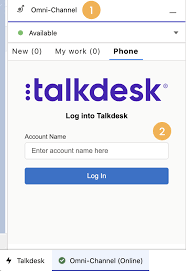
Forge Meaningful Customer Connections with Talkdesk Proactive Outbound Engagement™-Talkdesk Dialer for Salesforce Talkdesk Proactive Outbound Engagement™ is a comprehensive suite of outbound voice and digital capabilities integrated into the Talkdesk CX Cloud™ contact center platform. This suite includes versatile dialing modes tailored for every scenario, such as Talkdesk Preview Dialer, Talkdesk Dialer, Advanced Dialer, Talkdesk Dialer for Salesforce, and Automated Notifications. Maximize contact rates by reaching customers when and how they prefer to be contacted while ensuring high-quality interactions that reflect the level of service your customers deserve. Enhance Agent Productivity to Maximize Outbound Success Tools like the Talkdesk Preview Dialer can significantly increase outbound call volume, driving connect rates from 5 to 15 or more per hour and boosting revenue by up to 200-300%. Intelligently manage outbound call pacing to filter out unproductive calls like voicemails, busy signals, and no answers, optimizing agent productivity. Launch Strategic Campaigns Effortlessly Leverage highly configurable dialing options and advanced campaign management tools to maximize contact rates through precise targeting and segmentation. The Advanced Dialer supports customizable campaign and dialing configurations to accommodate virtually any outreach and retry strategy. Empower Agents with Smart Dialing Modes Equip agents with predictive, power, progressive, preview, and agentless dialing modes, complemented by a patented AI-driven answering machine detection algorithm. Salesforce Quick Campaign, part of the Talkdesk Dialer for Salesforce™ product, allows manual selection of Salesforce records for dialing using preview or power dialing modes. Streamlined List Management for Seamless Operations Set up calling lists effortlessly by uploading a CSV file or pushing records from Salesforce, other CRMs, or business systems via an API. Web leads can be seamlessly integrated into ongoing campaigns for immediate dialing, ensuring every hot lead is promptly engaged. Ensure Quality Connections with Talkdesk Dialer for Salesforce™ Talkdesk Dialer, fully embedded within the Salesforce UI, offers power and preview dialing to balance productivity with call quality and personalized customer interactions. Deliver Efficient and Proactive Notifications Go beyond voice calls with Talkdesk Automated Notifications, anticipating customer needs through automated event-triggered SMS notifications. Configure rules and content for each notification to deliver highly personalized messages that enhance efficiency and customer satisfaction. Robust Reporting and Insights While pre-set out-of-the-box reporting tools are currently unavailable for Talkdesk Dialer for Salesforce, Salesforce users can leverage standard Salesforce reporting functionality to create custom reports. Talkdesk Dialer™ is designed to automate the dialing process, maximize outbound call volume, and facilitate meaningful connections with customers while ensuring compliance with regulatory requirements. Learn more about our solutions crafted to optimize every customer interaction at talkdesk.com. Like1 Related Posts Who is Salesforce? Who is Salesforce? Here is their story in their own words. From our inception, we’ve proudly embraced the identity of Read more Salesforce Marketing Cloud Transactional Emails Salesforce Marketing Cloud Transactional Emails are immediate, automated, non-promotional messages crucial to business operations and customer satisfaction, such as order Read more Salesforce Unites Einstein Analytics with Financial CRM Salesforce has unveiled a comprehensive analytics solution tailored for wealth managers, home office professionals, and retail bankers, merging its Financial Read more AI-Driven Propensity Scores AI plays a crucial role in propensity score estimation as it can discern underlying patterns between treatments and confounding variables Read more

Read More

AI in Sales Enablement

automation, and personalization to enhance sales processes, increase customer engagement, and drive revenue growth. Companies are working with AI to improve analysis of all customer contact points to both identify leads and weigh lead quality. That includes ingesting information from web pages, email campaigns, phone calls, and much more.

Read More
Talkdesk Dialer for Salesforce

Talkdesk Dialer for Salesforce

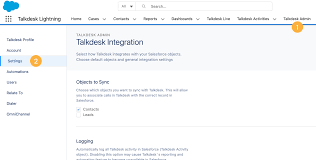
Talkdesk Dialer for Salesforce™ Guide Compatibility and ConfigurationTalkdesk Dialer for Salesforce™ is fully compatible with the Conversations app. It is crucial for the dialer to recognize the agent’s login session in the Salesforce Connector, also known as Salesforce’s phone widget or phone CTI. Ensure this connection is correctly configured by following the instructions in the article Please login in Salesforce Connector. Features and Dialing ModesTalkdesk Dialer for Salesforce enables agents and salespeople to automatically dial a list of Salesforce records, including Contacts, Leads, Accounts, Cases, and Opportunities. It offers two dialing modes: Preview Mode: Agents can review records before calls are initiated and choose to start the call or skip to another record.Power Mode: Calls are launched automatically one after the other, with a defined delay between calls.Getting StartedTo start using the dialer, follow these steps: Create a dialer list.Create a Talkdesk campaign.Add the dialer lists you want to call to the Talkdesk campaign.Start dialing.Creating a Dialer ListGo to Dialer Lists and click New.Select a Salesforce object (Contacts, Leads, Accounts, Cases, Opportunities) and choose multiple list views of that object to be part of the same dialer list.Set the following attributes:Type: Dialing or Do Not Call.Priority: Determines the order of calls when multiple lists are part of a campaign.Sorting Order: Choose any field from the Salesforce object to order the records.For more details, refer to How to use Salesforce Dialer Lists. Creating a Talkdesk CampaignEnsure you have Talkdesk Dialer for Salesforce creation permission. If not, follow the instructions in Setting up and Configuring Talkdesk Dialer for Salesforce. Navigate to the Talkdesk Campaigns tab in the Talkdesk Lightning app or click the Dialer button in a record list view. Click New Talkdesk Campaign and follow the wizard steps: Name and Description: Provide a name and description for your campaign.Dialing Mode: Choose either Preview or Power mode and configure the behavior.Preview Time: Set the time agents have to review record information before dialing.Delay Between Calls: In Power mode, set the time between the end of one call and the start of the next.When a Call Starts: Decide if the modal with record information should be open.Set the campaign’s start and end dates, time range, timezone, retry attempts for failed calls, and assign agents. Add up to 10,000 records from Dialing and Do Not Call lists. The records will be deduplicated based on phone numbers. Any records in both lists will not be added to the campaign. Configure campaign settings to reflect updates to dialer lists as long as the campaign status is not Finished. Editing a CampaignGo to the Talkdesk Campaigns list and click the edit button next to the campaign you want to edit.You can edit all attributes, except the object type, for campaigns that are Ready or Incomplete.Dialing Through a CampaignGo to the Talkdesk Campaigns page via the Dialer button in a list view or the Talkdesk Campaigns tab.Click the campaign name and then Start Dialing.Agents can pause and resume the campaign. The campaign ends for all agents when a user with permission clicks Finish.General Notes and ConsiderationsPermissions: Agents see campaign records based on their Salesforce permissions. Talkdesk permissions for creating and editing campaigns only apply on the Talkdesk Campaigns page.Campaign Statuses:Scheduled: Ready to start, not yet reached Start Date.Incomplete: Missing agents or dialer lists, cannot be dialed.Ready: Ready to be started by assigned agents.Running: Currently running, cannot be edited.Expired: Passed End Date but can be edited and rerun.Finished: Completed, cannot be edited or rerun.By following these guidelines, you can effectively use Talkdesk Dialer for Salesforce to enhance your dialing campaigns and improve sales and customer service efficiency. Like Related Posts Who is Salesforce? Who is Salesforce? Here is their story in their own words. From our inception, we’ve proudly embraced the identity of Read more Salesforce Marketing Cloud Transactional Emails Salesforce Marketing Cloud Transactional Emails are immediate, automated, non-promotional messages crucial to business operations and customer satisfaction, such as order Read more Salesforce Unites Einstein Analytics with Financial CRM Salesforce has unveiled a comprehensive analytics solution tailored for wealth managers, home office professionals, and retail bankers, merging its Financial Read more AI-Driven Propensity Scores AI plays a crucial role in propensity score estimation as it can discern underlying patterns between treatments and confounding variables Read more
Read More
Salesforce IT consulting methodologies

IT Consulting Methodologies

In the domain of IT consulting project management and IT consulting methodologies, the selection of a project management methodology tailored to the project type, size, and complexity is pivotal. Various methodologies, including waterfall, agile, scrum, kanban, and hybrid, bring their own set of advantages and disadvantages.

Read More
Causes of Data Loss

Causes of Data Loss

Amidst the unprecedented challenges faced by organizations worldwide, many are swiftly enacting their business continuity plans to mitigate operational disruptions. Unquestionably, a cornerstone of these plans is data protection and recovery, especially for companies reliant on Salesforce for critical data storage. The potential impact of data loss or compromise on business operations cannot be overstated and could reverberate throughout the entire organization. Despite the current global situation, it’s essential to recognize that the majority of Salesforce data loss incidents aren’t tied to major disasters. Instead, they often stem from everyday mishaps. The key is to anticipate these incidents and implement robust recovery strategies. Let’s examine the top four causes of data loss in Salesforce, as revealed by insights gathered from 2,000 Salesforce customers: Human Error: Integration Errors: Migration Errors: Bad Code: The repercussions of data loss within an organization are far-reaching, encompassing increased labor costs, reputational damage, revenue loss, and compliance fines. Moreover, the longer Salesforce data remains inaccessible, the greater the risk and costs associated with data loss. To safeguard against such risks, a comprehensive backup and recovery solution is imperative. While native options like the Recycle Bin or Weekly Export offer limited capabilities, a proactive approach, such as leveraging Salesforce AppExchange partner solutions like Own, significantly enhances data protection and recovery readiness. In conclusion, while Salesforce ensures robust platform security and availability, data protection ultimately rests with the end user. As Salesforce discontinues its last-resort data recovery service, organizations must prioritize proactive backup and recovery practices to safeguard critical data and maintain business continuity effectively. Explore comprehensive solutions like Own to bolster your data protection efforts and mitigate the impact of potential data loss incidents. Like Related Posts Who is Salesforce? Who is Salesforce? Here is their story in their own words. From our inception, we’ve proudly embraced the identity of Read more Salesforce Marketing Cloud Transactional Emails Salesforce Marketing Cloud Transactional Emails are immediate, automated, non-promotional messages crucial to business operations and customer satisfaction, such as order Read more Salesforce Unites Einstein Analytics with Financial CRM Salesforce has unveiled a comprehensive analytics solution tailored for wealth managers, home office professionals, and retail bankers, merging its Financial Read more AI-Driven Propensity Scores AI plays a crucial role in propensity score estimation as it can discern underlying patterns between treatments and confounding variables Read more
Read More
gettectonic.com