
Salesforce AppExchange Archives - gettectonic.com - Page 4
Business Card Scanner App for Salesforce

Business Card Scanner App for Salesforce

Can I Scan a Business Card into Salesforce? Yes, you can scan a business card into Salesforce if your scanning system can create a CSV file or import data into Excel, which can then be saved as a .csv file. This resulting file can be uploaded to Salesforce. And there are several Business Card Scanner App for Salesforce solutions. Business Card Scanner App for Salesforce Does Salesforce Have a Business Card Scanner? Yes, Salesforce can utilize CamCard for Salesforce, a top OCR software that allows you to batch scan and digitize multiple business cards with unrivaled accuracy. Does CamCard Sync with Salesforce? Yes, CamCard perfectly integrates with customized Salesforce fields, making lead and contact management easier and more efficient on mobile. With a standard subscription, you can save unlimited cards to your Salesforce account. Is the CamCard App Free? CamCard offers many features, such as dating when you received a card, grouping cards received at one location, writing notes on each card, and searching by keywords, locations, or dates. The app is free, which is an added benefit. Is Scan to Salesforce Free? Yes, Scan to Salesforce allows you to instantly and accurately scan business cards and upload data to Salesforce for free. You can keep contacts in the iOS/Android app or sync them to your phone. How Do I Install Scan to Salesforce? Other Business Card Scanning Solutions: Using Outlook for Business Card Scanning: If you prefer more tools, consider those that import to Outlook and then use Salesforce’s Outlook integration tool to sync with Salesforce. This adds an extra step but offers more flexibility in choosing business card scanning software. Direct Integration with Salesforce: These options provide a variety of ways to seamlessly integrate business card data into Salesforce, ensuring efficient and accurate data management. Content updated March 2025. Like1 Related Posts Who is Salesforce? Who is Salesforce? Here is their story in their own words. From our inception, we’ve proudly embraced the identity of Read more Salesforce Marketing Cloud Transactional Emails Salesforce Marketing Cloud Transactional Emails are immediate, automated, non-promotional messages crucial to business operations and customer satisfaction, such as order Read more Salesforce Unites Einstein Analytics with Financial CRM Salesforce has unveiled a comprehensive analytics solution tailored for wealth managers, home office professionals, and retail bankers, merging its Financial Read more AI-Driven Propensity Scores AI plays a crucial role in propensity score estimation as it can discern underlying patterns between treatments and confounding variables Read more

Read More
Salesforce Einstein Automate Explained

Salesforce Einstein Automate Explained

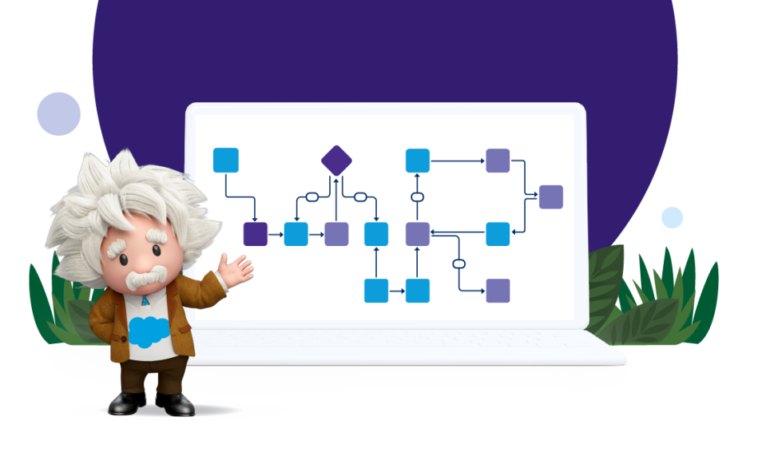
Introducing Einstein Automate, a comprehensive workflow automation solution by Salesforce, empowering individuals and businesses to boost productivity. With AI-infused bots, flows, and components, the new Flow Orchestrator transforms intricate processes into dynamic, industry-relevant experiences. Moreover, the new MuleSoft Composer for Salesforce enables every member of an organization to seamlessly integrate data from multiple systems into Salesforce, without the need for writing code. Leveraging pre-built resources from AppExchange and OmniStudio further accelerates the implementation of automation initiatives. Recognizing the digital imperative faced by organizations today, Einstein Automate offers automation capabilities tailored for every business function and industry. This solution enables individuals across companies to construct intelligent workflows and integrate data across systems effortlessly, using clicks instead of code. The Flow Orchestrator, a low-code workflow development tool, empowers users to compose workflows automating complex, multi-user processes and approvals. AI-generated next steps and recommendations expedite projects and processes, identifying bottlenecks and streamlining operations. Discover over 700 automation solutions on the new Einstein Automate collection page on Salesforce AppExchange, including solutions for robotic process automation (RPA), Einstein Bots, Flow Templates, Actions and Components, MuleSoft Connectors, Process Libraries, and partner solutions. These pre-built solutions allow organizations to implement automation quickly, without the need to build from scratch. OmniStudio provides businesses with no-code tools and pre-built guided experiences to deliver digital-first and industry-specific experiences to customers across multiple devices and channels. With features like dynamic, guided screen flows and the ability to gather data from any document, image, or legacy system, OmniStudio enhances user experience and boosts productivity. Einstein Next Best Action automatically presents recommendations and flow actions to users, while Einstein Recommendation Builder enables personalized recommendations. With updates across various features like Article Answers, External Services, and Model Sharing, Salesforce continues to enhance the capabilities of its automation tools, ensuring seamless integration and improved efficiency across the platform. Content updated August 2023. Like1 Related Posts Who is Salesforce? Who is Salesforce? Here is their story in their own words. From our inception, we’ve proudly embraced the identity of Read more Salesforce Marketing Cloud Transactional Emails Salesforce Marketing Cloud Transactional Emails are immediate, automated, non-promotional messages crucial to business operations and customer satisfaction, such as order Read more Salesforce Unites Einstein Analytics with Financial CRM Salesforce has unveiled a comprehensive analytics solution tailored for wealth managers, home office professionals, and retail bankers, merging its Financial Read more AI-Driven Propensity Scores AI plays a crucial role in propensity score estimation as it can discern underlying patterns between treatments and confounding variables Read more
Read More
Salesforce AppExchange

Implementing Tools From AppExchange Salesforce

How to install Salesforce AppExchange tools.  Salesforce AppExchange tools are great applications to extend your Salesforce instance. The AppExchange is full of solutions that allow you to easily add extended capabilities to your Salesforce org. Note that you’ll need the permission “Download AppExchange Packages” to do this. Many organizations will have their Salesforce Administrator or a third party Salesforce Partner like Tectonic assist. To get started, follow these steps: 1. Navigate to the Salesforce AppExchange. Do this in a new browser tab. And if you’re not logged in, log in and make sure that your org is connected to your trailblazer.me account.2. Look for a solution to install.3. After reading through the app listing, you can select Get It Now.4. Decide which environment to install the app in. It’s best practice to install and test in a sandbox first, Tectonic can assist.5. Verify that you agree with the terms and conditions and any other prompts for information.6. You’ll be redirected to sign in to your org.7. Now select who the app should be installed for – everyone, admins only, or custom.8. After a moment, the app installation will be complete and your app will be visible on your list of managed packages. Salesforce AppExchange tools Downloading and installing apps from the AppExchange can be tricky. Tectonic is here to help. Contact us today if you need assistance selecting, downloading, or implementing tools from the Salesforce AppExchange. Like Related Posts Who is Salesforce? Who is Salesforce? Here is their story in their own words. From our inception, we’ve proudly embraced the identity of Read more Salesforce Marketing Cloud Transactional Emails Salesforce Marketing Cloud Transactional Emails are immediate, automated, non-promotional messages crucial to business operations and customer satisfaction, such as order Read more Salesforce Unites Einstein Analytics with Financial CRM Salesforce has unveiled a comprehensive analytics solution tailored for wealth managers, home office professionals, and retail bankers, merging its Financial Read more AI-Driven Propensity Scores AI plays a crucial role in propensity score estimation as it can discern underlying patterns between treatments and confounding variables Read more

Read More
Causes of Data Loss

Causes of Data Loss

Amidst the unprecedented challenges faced by organizations worldwide, many are swiftly enacting their business continuity plans to mitigate operational disruptions. Unquestionably, a cornerstone of these plans is data protection and recovery, especially for companies reliant on Salesforce for critical data storage. The potential impact of data loss or compromise on business operations cannot be overstated and could reverberate throughout the entire organization. Despite the current global situation, it’s essential to recognize that the majority of Salesforce data loss incidents aren’t tied to major disasters. Instead, they often stem from everyday mishaps. The key is to anticipate these incidents and implement robust recovery strategies. Let’s examine the top four causes of data loss in Salesforce, as revealed by insights gathered from 2,000 Salesforce customers: Human Error: Integration Errors: Migration Errors: Bad Code: The repercussions of data loss within an organization are far-reaching, encompassing increased labor costs, reputational damage, revenue loss, and compliance fines. Moreover, the longer Salesforce data remains inaccessible, the greater the risk and costs associated with data loss. To safeguard against such risks, a comprehensive backup and recovery solution is imperative. While native options like the Recycle Bin or Weekly Export offer limited capabilities, a proactive approach, such as leveraging Salesforce AppExchange partner solutions like Own, significantly enhances data protection and recovery readiness. In conclusion, while Salesforce ensures robust platform security and availability, data protection ultimately rests with the end user. As Salesforce discontinues its last-resort data recovery service, organizations must prioritize proactive backup and recovery practices to safeguard critical data and maintain business continuity effectively. Explore comprehensive solutions like Own to bolster your data protection efforts and mitigate the impact of potential data loss incidents. Like Related Posts Who is Salesforce? Who is Salesforce? Here is their story in their own words. From our inception, we’ve proudly embraced the identity of Read more Salesforce Marketing Cloud Transactional Emails Salesforce Marketing Cloud Transactional Emails are immediate, automated, non-promotional messages crucial to business operations and customer satisfaction, such as order Read more Salesforce Unites Einstein Analytics with Financial CRM Salesforce has unveiled a comprehensive analytics solution tailored for wealth managers, home office professionals, and retail bankers, merging its Financial Read more AI-Driven Propensity Scores AI plays a crucial role in propensity score estimation as it can discern underlying patterns between treatments and confounding variables Read more
Read More
Salesforce Document Generation

Generating Documents in Salesforce

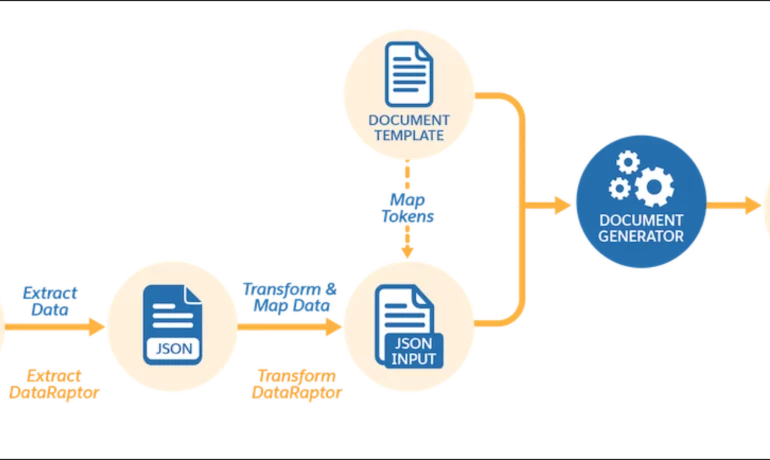
Salesforce document generation poses a challenge for businesses, given the intricacies of integration involved. Fortunately, a variety of tools are available for generating documents in Salesforce, and Tectonic is well-equipped to assist in their successful implementation. Salesforce Industries Document Generation empowers businesses to craft and manage accurate documents linked to standard Salesforce objects, encompassing contracts, opportunities, orders, quotes, and custom objects. For a more dynamic approach, Salesforce OmniStudio Document Generation facilitates the creation of documents using Microsoft Word and Microsoft PowerPoint templates. These templates can incorporate values from any JSON-based data within the text, including data sourced from various Salesforce objects. This versatile tool enables the generation of contracts, proposals, quotes, reports, non-disclosure agreements, service agreements, and more. Salesforce Industries Document Generation seamlessly integrates with Vlocity Insurance, Vlocity Health, communications, media, energy, utilities, government, and beyond. Vlocity Analytics, another valuable component, offers pre-built measurement tools that seamlessly integrate with Salesforce Reports, Dashboards, and Einstein. The Salesforce AppExchange boasts an extensive array of over 200 document generation tools. Your Salesforce partner can assist in selecting, installing, and implementing the most suitable options based on your business requirements. With Document Generation, you can generate contracts, proposals, quotes, reports, non-disclosure agreements, job offers, service agreements, and so on. You can generate documents using the specified sample client-side or server-side OmniScripts. You can also create your own OmniScripts by cloning and customizing the sample OmniScript to generate documents. Client-Side document generation is a synchronous process that results in a downloadable preview of the generated documents. You can generate documents from Microsoft Word (.docx), Microsoft PowerPoint (.pptx), and Web templates. These templates can include values from any JSON-based data in the text, including data from any Salesforce object. You can optionally convert the resulting documents to .pdf format. Server-Side document generation is available in both the OmniStudio Foundation and Salesforce Industries packages. Server-Side document generation is an asynchronous process that’s best for large and rendering-heavy documents and for document generation in batches. The Server-Side document generation service is secure and scalable and is hosted on Salesforce Hyperforce. The generated document is stored in your Salesforce org, and is attached to the object for which it’s generated. You can use Apex Classes, sample Integration Procedures, or a sample OmniScript to generate documents. Client-Side document generation supports Customer Community Plus, Customer Community, and Partner Community users to generate documents using client-side OmniScripts. Server-Side document generation supports Customer Community Plus, Customer Community, and Partner Community users to generate documents using the singleDocxServersideLwc server-side OmniScript. With the right licenses, Document Generation is available in the Salesforce Industries package. Metering measures resource utilization levels and throttling controls resource access and use based on defined rules. Metering measures the number of server-side documents that are generated by an org hourly and daily. The default hourly and daily limits for processing server-side document generation requests are 1,000 per org and 24,000 per org respectively. Throttling maintains consistency and resilience of the server-side document generation service by managing incoming server-side document generation requests from multiple orgs. Throttling can also prevent service degradation caused by high volume of requests at peak hours by blocking requests that exceed the default limits. The request details are saved in the Document Generation Processes entity. You can retrieve the blocked requests and later retry the server-side document generation. No matter what your specific document generation needs, Tectonic simplifies the process of getting your system up and running seamlessly, whether it’s through Salesforce Quickstarts or comprehensive implementation services. Content updated in 2February 2024, Shannan Hearne. Like1 Related Posts Who is Salesforce? Who is Salesforce? Here is their story in their own words. From our inception, we’ve proudly embraced the identity of Read more Salesforce Marketing Cloud Transactional Emails Salesforce Marketing Cloud Transactional Emails are immediate, automated, non-promotional messages crucial to business operations and customer satisfaction, such as order Read more Salesforce Unites Einstein Analytics with Financial CRM Salesforce has unveiled a comprehensive analytics solution tailored for wealth managers, home office professionals, and retail bankers, merging its Financial Read more AI-Driven Propensity Scores AI plays a crucial role in propensity score estimation as it can discern underlying patterns between treatments and confounding variables Read more

Read More
gettectonic.com