Salesforce Integration Archives - gettectonic.com - Page 3
Data Analytics for Disease Management

Data Analytics for Disease Management

Healthcare IT advancements, especially electronic health records (EHRs), have made it easier to gather and store data, which, in turn, fuels population health initiatives and improves patient outcomes. The Agency for Healthcare Research and Quality highlights that using health IT tools can significantly enhance chronic disease management by promoting efficient care delivery, information-sharing, and patient education. However, selecting and adopting the right analytics tools remains challenging. Here are five essential data analytics tools that healthcare providers can leverage for effective chronic disease management.

Read More
Automate LinkedIn Outreach with We-Connect

Automate LinkedIn Outreach with We-Connect

Automate LinkedIn Outreach with We-Connect’s New Salesforce Integration Sales and marketing teams can now streamline their LinkedIn outreach and lead management efforts with We-Connect’s powerful new integration for Salesforce, the world’s leading CRM platform. We-Connect, the premier LinkedIn automation tool, has officially launched its native integration with Salesforce, enabling seamless synchronization of contact data, campaign metrics, and outreach activity. This integration provides sales and marketing teams with a unified platform to manage all LinkedIn outreach efforts directly within Salesforce’s familiar interface. Transforming LinkedIn Outreach for Sales and Marketing Teams Traditionally, LinkedIn outreach happens outside CRM systems, leaving teams without a clear way to track campaign effectiveness. Sales reps often resort to manual searches on LinkedIn rather than leveraging data already housed in their CRM. The We-Connect and Salesforce integration revolutionizes this process by: Key Features of the Integration A Game-Changer for Outreach Efforts “Our new Salesforce integration brings LinkedIn outreach into a single, unified platform,” said Gary Egan, Product Manager at We-Connect. “With this integration, sales and marketing teams can stay aligned, act on real-time insights, and scale their outreach efforts like never before.” By consolidating LinkedIn activities within Salesforce, teams can better measure campaign performance, maintain a consistent buyer journey, and boost efficiency—all while leveraging Salesforce’s powerful CRM capabilities. For more details, visit the We-Connect Salesforce Integration page. About We-Connect Founded in 2018, We-Connect is the leading LinkedIn automation tool for sales, marketing, recruiting, and business professionals. Its advanced features help users automate LinkedIn interactions, connect with the right people, and generate high-quality leads effortlessly. We-Connect empowers professionals to build meaningful relationships, drive growth, and achieve their business goals with efficiency and precision. Learn more about how We-Connect transforms LinkedIn outreach at We-Connect.io. Like Related Posts Who is Salesforce? Who is Salesforce? Here is their story in their own words. From our inception, we’ve proudly embraced the identity of Read more Salesforce Marketing Cloud Transactional Emails Salesforce Marketing Cloud Transactional Emails are immediate, automated, non-promotional messages crucial to business operations and customer satisfaction, such as order Read more Salesforce Unites Einstein Analytics with Financial CRM Salesforce has unveiled a comprehensive analytics solution tailored for wealth managers, home office professionals, and retail bankers, merging its Financial Read more AI-Driven Propensity Scores AI plays a crucial role in propensity score estimation as it can discern underlying patterns between treatments and confounding variables Read more


Read More
Reasons to Automate Your Sales Commission Process

Reasons to Automate Your Sales Commission Process

Optimizing your sales commission process through automation can create significant efficiencies, reduce errors, and increase team satisfaction across the organization. Sales commission software provides the real-time data and transparency that today’s sales, finance, and revenue operations (RevOps) teams need to keep pace with business growth. Here are four key benefits of implementing automated commission software: 1. Real-Time Visibility into the Commission Process Sales commission software offers instant access to commission data for reps, managers, and executives. This real-time visibility empowers sales reps to stay focused on high-value deals, knowing their commission data is accurate and transparent. Sales managers can use metrics like quota attainment and earned commissions to track team performance and motivate reps effectively. Automating commission tracking also streamlines end-of-month reporting for finance and RevOps, eliminating the need for manual calculations. And with transparent, accessible data, sales reps can trust the accuracy of their earnings without having to double-check formulas or request manual verifications—freeing them to focus on closing more deals. 2. Increased Productivity Across Teams Manually calculating commissions is both time-consuming and prone to errors, which can erode trust and impact productivity across sales, finance, and RevOps. Automating this process reduces human error and saves teams hours of administrative work, allowing them to redirect energy toward business-critical activities. Manual commission management can also limit scalability; each change in team structure or territory often requires a full recalibration in spreadsheets. With automated software, these adjustments are streamlined, allowing for seamless scalability and supporting growth without adding manual overhead. 3. Improved Accuracy in Commission Calculations Replacing unhappy sales reps is costly, and one common cause of dissatisfaction is inaccurate commission calculations. Studies show nearly 90% of spreadsheets contain errors, and in a process as complex as commission calculation, these errors can lead to mistrust and turnover. Automating commissions removes the risk of errors, helping keep reps happy and reducing friction between sales and finance. A reliable, accurate commission process means reps can trust the data, while finance teams can confidently manage compensation without chasing down mistakes. Few things negatively impact employee focus and loyalty than feeling cheated at payday. 4. Enhanced Access to Data and Actionable Insights Sales commission software does more than calculate earnings—it collects and organizes critical data on sales performance. With these insights, organizations can identify areas for improvement, analyze trends, and optimize their sales strategies. Transform Your Organization with Automated Commission Management Automating your sales commission process isn’t just about efficiency—it’s a powerful way to build trust, enable productivity, and make data-driven decisions that drive growth. By leveraging dedicated incentive compensation management tools, you can empower your teams, reduce operational burdens, and maximize the impact of your sales data. Like1 Related Posts Who is Salesforce? Who is Salesforce? Here is their story in their own words. From our inception, we’ve proudly embraced the identity of Read more Salesforce Marketing Cloud Transactional Emails Salesforce Marketing Cloud Transactional Emails are immediate, automated, non-promotional messages crucial to business operations and customer satisfaction, such as order Read more Salesforce Unites Einstein Analytics with Financial CRM Salesforce has unveiled a comprehensive analytics solution tailored for wealth managers, home office professionals, and retail bankers, merging its Financial Read more AI-Driven Propensity Scores AI plays a crucial role in propensity score estimation as it can discern underlying patterns between treatments and confounding variables Read more

Read More
Salesforce and Stripe Integration

Salesforce and Stripe Integration

Processing weekly payments can often become time-consuming, with organizations spending significant time just tracking payments post-invoice. Timely updates on payment processing have been a longstanding priority, particularly for companies needing flexible payment options to meet beneficiary needs. The integration of Stripe with Salesforce addresses these challenges, offering a streamlined, efficient solution. Salesforce and Stripe Integration. With a focus on faster processing, this integration enhances payment management, invoicing, and financial oversight. Here’s an overview of the benefits that Stripe and Salesforce integration brings to businesses. Key Benefits of Integrating Stripe with Salesforce Modern businesses demand efficient, seamless transactions. Here are some of the major advantages of combining Stripe and Salesforce: Why Businesses Should Consider Salesforce and Stripe Integration Having implemented this integration for various clients, we have seen how it supports efficient operations. Here are a few reasons why businesses should consider this approach: Simplify Payments with Salesforce and Stripe Integration The Stripe and Salesforce integration represents a transformative opportunity for businesses to improve operational efficiency and customer experience. Beyond a simple tool pairing, this integration paves the way for scalable, complex business operations. Successful integration, however, requires knowledgeable professionals who understand the nuances of customization to fit each organization’s unique needs. Reach out to experienced experts to optimize your integration and harness its full potential. Like Related Posts Who is Salesforce? Who is Salesforce? Here is their story in their own words. From our inception, we’ve proudly embraced the identity of Read more Salesforce Marketing Cloud Transactional Emails Salesforce Marketing Cloud Transactional Emails are immediate, automated, non-promotional messages crucial to business operations and customer satisfaction, such as order Read more Salesforce Unites Einstein Analytics with Financial CRM Salesforce has unveiled a comprehensive analytics solution tailored for wealth managers, home office professionals, and retail bankers, merging its Financial Read more AI-Driven Propensity Scores AI plays a crucial role in propensity score estimation as it can discern underlying patterns between treatments and confounding variables Read more

Read More
Salesforce Flows and LeanData

Salesforce Flows and LeanData

Mastering Opportunity Routing in Salesforce Flows While leads are essential at the top of the funnel, opportunities take center stage as the sales process advances. In Salesforce, the opportunity object acts as a container that can hold multiple contacts tied to a specific deal, making accurate opportunity routing crucial. Misrouting or delays at this stage can significantly impact revenue and forecasting, while manual processing risks incorrect assignments and uneven distribution. Leveraging Salesforce Flows for opportunity routing can help avoid these issues. Salesforce Flows and LeanData. What Is Opportunity Routing? Opportunity routing is the process of assigning open opportunities to the right sales rep based on specific criteria like territory, deal size, industry, or product type. The goal is to ensure every opportunity reaches the right person quickly, maximizing the chance to close the deal. Opportunity routing also helps prioritize high-potential deals, improving pipeline efficiency. Challenges of Manual Routing Manual opportunity routing can lead to several challenges: Benefits of Automating Routing with Salesforce Flows Using Salesforce Flows for opportunity routing offers many benefits: Setting Up Opportunity Routing in Salesforce Flows Here’s an outline for setting up opportunity routing in Salesforce: Managing Complex Salesforce Flows Opportunity routing in Salesforce Flows is powerful, but managing complex sales environments can be challenging: How LeanData Enhances Opportunity Routing LeanData extends Salesforce routing capabilities with advanced, no-code automation and auditing features: Salesforce Flows and LeanData Whether using Salesforce Flows or LeanData, the goal is to optimize time to revenue. While Salesforce Flows offer a robust foundation, organizations without dedicated admins or developers may face challenges in making frequent updates. LeanData provides greater flexibility and real-time automation, helping to streamline the routing process and drive revenue growth. Like Related Posts Who is Salesforce? Who is Salesforce? Here is their story in their own words. From our inception, we’ve proudly embraced the identity of Read more Salesforce Marketing Cloud Transactional Emails Salesforce Marketing Cloud Transactional Emails are immediate, automated, non-promotional messages crucial to business operations and customer satisfaction, such as order Read more Salesforce Unites Einstein Analytics with Financial CRM Salesforce has unveiled a comprehensive analytics solution tailored for wealth managers, home office professionals, and retail bankers, merging its Financial Read more AI-Driven Propensity Scores AI plays a crucial role in propensity score estimation as it can discern underlying patterns between treatments and confounding variables Read more

Read More
Slack Fuels Productivity

Set Up Salesforce and Slack Integration

Set Up Salesforce and Slack Integration for Sales Elevate and Salesforce Channels To use Sales Elevate or Salesforce channels in Slack, establish a connection between Salesforce and Slack. This setup allows your team members to access these features seamlessly. You can map Salesforce accounts to corresponding Slack accounts to ensure the right individuals access the right tools. Note: You must have Salesforce Admin permissions to complete the setup in Salesforce. Prepare Your Salesforce Org Before connecting Salesforce and Slack, complete the following steps in Salesforce: Step 1: Create and Configure a Salesforce Integration User An Integration User ensures proper permissions and prevents disconnection if your personal Salesforce account is deactivated or updated. Step 2: Allow the Integration User to Bypass SSO If your organization uses single sign-on (SSO), you’ll need to bypass it for the Integration User to complete authentication. Step 3: Assign Permissions to the Integration User Grant the Integration User access to Salesforce objects and fields used in Slack. Connect Slack to Salesforce With your Integration User ready, connect your Salesforce org to Slack. You can connect up to 25 Salesforce orgs to Slack. Step 1: Request a Connection in Slack Step 2: Approve the Connection in Salesforce Step 3: Activate the Connection in Slack Manually Map Member Accounts If you opt out of automatic mapping, you can manually map accounts: Remove Member Mapping Salesforce Admins can remove and reset member mappings: Assign Access to Salesforce Tools in Slack Manage access to Sales Elevate and Salesforce channels by assigning the Slack Elevate User permission set in Salesforce: This configuration streamlines collaboration, giving your team access to powerful Salesforce tools directly in Slack. Like1 Related Posts Who is Salesforce? Who is Salesforce? Here is their story in their own words. From our inception, we’ve proudly embraced the identity of Read more Salesforce Marketing Cloud Transactional Emails Salesforce Marketing Cloud Transactional Emails are immediate, automated, non-promotional messages crucial to business operations and customer satisfaction, such as order Read more Salesforce Unites Einstein Analytics with Financial CRM Salesforce has unveiled a comprehensive analytics solution tailored for wealth managers, home office professionals, and retail bankers, merging its Financial Read more AI-Driven Propensity Scores AI plays a crucial role in propensity score estimation as it can discern underlying patterns between treatments and confounding variables Read more

Read More
Telemynd CharmHealth and Salesforce

Telemynd CharmHealth and Salesforce

Telemynd Integrates CharmHealth EHR with Salesforce to Scale Nationwide Care Telemynd, a leading behavioral health practice, has integrated its CharmHealth electronic health record (EHR) system with the Salesforce CRM platform to expand its services nationwide. This integrated tech stack enhances patient experiences, personalizes care, and streamlines clinical workflows across the organization. At the 2024 CharmHealth user conference, Charmalot2024, Roger Murray, Vice President of Product & Marketing at Telemynd, and Venky Chellappa, Vice President of Sales & Marketing at CharmHealth, discussed the partnership’s impact on scaling Telemynd’s operations. Key Takeaways: Partnership Rooted in Pandemic Response The partnership between Telemynd and CharmHealth began during the COVID-19 pandemic, when Telemynd needed to quickly expand its telehealth services. CharmHealth’s technology facilitated this growth, allowing Telemynd to deliver mental health services to thousands of patients across the U.S. through telehealth. “We were figuring it [telehealth] out together,” said Murray, reflecting on how both teams adapted to the rapid changes. Today, Telemynd delivers over 60,000 hours of care annually, serving both military and civilian patients nationwide. Seamless Integration: CharmHealth and Salesforce CharmHealth’s adaptable EHR platform was designed with integration in mind, allowing Telemynd to combine the strengths of Salesforce and CharmHealth. “Salesforce helps us maintain a positive user experience for patients and providers,” explained Murray. “But we wanted to continue using our CharmHealth EHR. We worked to make the interfaces between the two systems bidirectional for a seamless experience.” All clinical activities, including charting, notes, and revenue cycle management (RCM), take place in CharmHealth, while patient engagement, follow-ups, and outcomes reporting happen through Salesforce. The integration was achieved by enabling the necessary APIs for a smooth flow of information. Chellappa emphasized the collaboration’s success: “We made a commitment to Roger and his team to support them. When they succeed, we succeed.” Mutual Growth Through Partnership This collaboration has extended beyond Salesforce integration, with many solutions developed for Telemynd influencing CharmHealth’s broader product development. Though the API functionality remains proprietary to Telemynd, the insights gained have driven improvements to CharmHealth’s EHR platform. Murray highlighted the strength of the partnership, noting, “The same engineering team at CharmHealth has worked with us for years. Their commitment to our growth has been invaluable.” As a result of this partnership, Telemynd has rapidly expanded its reach, showcasing how mental health services can be scaled effectively. Both companies credit their ongoing collaboration and open communication as key drivers of their mutual success. Like Related Posts Who is Salesforce? Who is Salesforce? Here is their story in their own words. From our inception, we’ve proudly embraced the identity of Read more Salesforce Marketing Cloud Transactional Emails Salesforce Marketing Cloud Transactional Emails are immediate, automated, non-promotional messages crucial to business operations and customer satisfaction, such as order Read more Salesforce Unites Einstein Analytics with Financial CRM Salesforce has unveiled a comprehensive analytics solution tailored for wealth managers, home office professionals, and retail bankers, merging its Financial Read more AI-Driven Propensity Scores AI plays a crucial role in propensity score estimation as it can discern underlying patterns between treatments and confounding variables Read more

Read More
Salesforce ERP Integration

Salesforce ERP Integration

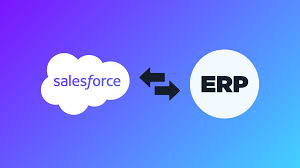
Unlock the Power of Salesforce and ERP Integration Salesforce is known worldwide for its unmatched capabilities as a CRM platform. But when integrated with an ERP system, the potential multiplies. Together, they create a cohesive environment where workflows are streamlined, financial processes are optimized, decision-making is enhanced, and customer relationships are improved—all within one unified system. However, you might have questions like: How does ERP integration with Salesforce work? or What are the benefits of this integration? Let’s jump in and answer all your questions! What is ERP and Its Benefits? ERP (Enterprise Resource Planning) is software that integrates multiple business functions into a single platform. It enables you to manage key processes like human resources, accounting, sales, inventory, compliance, and order management. What makes ERP systems unique is the shared database that gives all employees access to the same real-time information across departments. While different from a CRM platform, ERP can be integrated with Salesforce to further boost business efficiency and productivity. Key benefits of an ERP system include: How Do Salesforce and ERP Work Together? Salesforce focuses on managing customer relationships, sales, marketing, and service operations. In contrast, ERP systems handle core business processes like finance, human resources, and supply chain management. When Salesforce and ERP are integrated, they create a seamless data flow between both systems. This integration synchronizes key data, like transactions and customer information, providing unified visibility across departments. It enhances efficiency and delivers better customer experiences by offering personalized services. Why Integrate Your ERP with Salesforce? While Salesforce helps manage customer relationships, integrating it with an ERP system offers additional advantages: Types of Salesforce – ERP Integrations There are various ways to integrate Salesforce with an ERP, depending on your business needs: Choosing the Right ERP to Integrate with Salesforce Not sure which ERP system is right for your Salesforce integration? Consider the following factors: ERP Systems Compatible with Salesforce Salesforce’s flexibility allows it to integrate with most ERP systems, including Sage Intacct, Sage X3, Sage 300, Sage 100, Sage 50 US, and Acumatica, among others. This flexibility ensures you can find the right ERP for your business operations. Key Functionalities with Salesforce – ERP Integration Here are some essential features you can expect from Salesforce and ERP integration: Best Practices for Seamless Integration To ensure a smooth Salesforce and ERP integration, follow these best practices: Conclusion Integrating an ERP system with Salesforce CRM can transform your business by unlocking new levels of productivity, efficiency, and growth. As your integration partner, Tectonic offers expertise in Salesforce and third-party ERP systems. Ready to streamline your operations and boost performance? Contact us today to start your ERP-Salesforce integration journey! Like1 Related Posts Who is Salesforce? Who is Salesforce? Here is their story in their own words. From our inception, we’ve proudly embraced the identity of Read more Salesforce Marketing Cloud Transactional Emails Salesforce Marketing Cloud Transactional Emails are immediate, automated, non-promotional messages crucial to business operations and customer satisfaction, such as order Read more Salesforce Unites Einstein Analytics with Financial CRM Salesforce has unveiled a comprehensive analytics solution tailored for wealth managers, home office professionals, and retail bankers, merging its Financial Read more AI-Driven Propensity Scores AI plays a crucial role in propensity score estimation as it can discern underlying patterns between treatments and confounding variables Read more

Read More
Salesforce and SnapLogic Integration

Salesforce and SnapLogic Integration

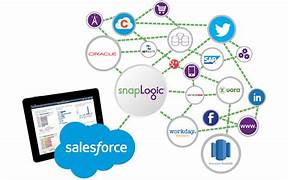
Salesforce and SnapLogic integrations couldn’t be easier with the Tray platform’s robust Salesforce and SnapLogic connectors, which can connect to any service without the need for separate integration tools. Salesforce provides customer relationship management service software, and has a complementary suite of enterprise applications as well. These are focused on customer service, marketing automation, analytics, and application development. It is the market leader in CRM solutions. The latest Salesforce connector v8.7 exposes the v46.0 of Salesforce’s REST API. More information can be found on their primary API documentation (v1) site. Encountering issues while authenticating with Salesforce, especially during the integration of a third-party app like Tray, may result from Salesforce blocking the application. Salesforce’s default settings or specific organizational security policies can automatically block third-party apps that administrators have not pre-authorized. This is a standard precaution to prevent unauthorized access. Steps to Unblock an App in Salesforce: Use cases In each of these examples, Lead Scoring and Prioritization Objective: Automatically score and prioritize leads based on their attributes and activities. Steps: This example leverages AI for lead classification while combining it with traditional data processing for a comprehensive lead scoring system. Like Related Posts Who is Salesforce? Who is Salesforce? Here is their story in their own words. From our inception, we’ve proudly embraced the identity of Read more Salesforce Marketing Cloud Transactional Emails Salesforce Marketing Cloud Transactional Emails are immediate, automated, non-promotional messages crucial to business operations and customer satisfaction, such as order Read more Salesforce Unites Einstein Analytics with Financial CRM Salesforce has unveiled a comprehensive analytics solution tailored for wealth managers, home office professionals, and retail bankers, merging its Financial Read more AI-Driven Propensity Scores AI plays a crucial role in propensity score estimation as it can discern underlying patterns between treatments and confounding variables Read more

Read More
Agentforce Advances Copilot and Prompt Builder

Agentforce Advances Copilot and Prompt Builder

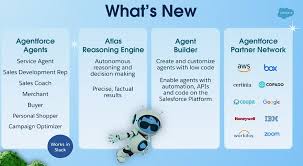
Agentforce was the highlight of the week in San Francisco during Salesforce’s annual Dreamforce conference—and for good reason! Agentforce Advances Copilot and Prompt Builder and that is truly exciting. Agentforce represents a groundbreaking solution that promises to transform how individuals and organizations interact with their CRM. However, as with any major product announcement, it raises many questions. This was evident during Dreamforce, where admins and developers, eager to dive into Agentforce, had numerous queries. Here’s an in-depth look at what Agentforce is, how it operates, and how organizations can leverage it to automate processes and drive value today. Agentforce Advances Copilot and Prompt Builder Many Dreamforce attendees who anticipated hearing more about Einstein Copilot were surprised by the introduction of Agents just before the event. However, understanding the distinctions between the legacy Einstein Copilot and the new Agentforce is crucial. Agentforce Advances Copilot and Prompt Builder. Agentforce Agents are essentially a rebranding of Copilot Agents but with an essential enhancement: they expand the functionality of Copilot to create autonomous agents capable of tasks such as summarizing or generating content and taking specific actions. Here are some key changes in terminology: Just like Einstein Copilot, Agents use user input—an “utterance”—entered into the Agentforce chat interface. The agent translates this utterance into a series of actions based on configurable instructions, and then executes the plan, providing a response. Understanding Agents: Topics A key difference between Einstein Copilot and Agentforce is the addition of “Topics.” Topics allow for greater flexibility and support a broader range of actions. They organize tasks by business function, helping Agents first determine the appropriate topic and then identify the necessary actions. This topic layer reduces confusion and ensures the correct action is taken. With this structure, Agentforce can support many more custom actions compared to Copilot’s 15-20, significantly expanding capabilities. Understanding Agents: Actions Actions in Agentforce function similarly to those in Einstein Copilot. These are the tasks an agent executes once it has identified the right plan. Out-of-the-box actions are available right away, providing a quick win for organizations looking to implement standard actions like opportunity summarization or sales emails. For more customized use cases, organizations can create bespoke actions using Apex, Flows, Prompts, or Service Catalog items (currently in beta). Understanding Agents: Prompts Whenever an LLM is used, prompts are necessary to provide the right input. Thoughtfully engineered prompts are essential for getting accurate, useful responses from LLMs. This is a key part of leveraging Agent Actions effectively, ensuring better results, reducing errors, and driving productive agent behavior. Prompt Builder plays a crucial role, allowing users to build, test, and refine prompts for Agent Actions, creating a seamless experience between generative AI and Salesforce workflows. How Generative AI and Agentforce Enhance CRM GenAI tools like Agentforce offer exciting enhancements to Salesforce organizations in several ways: However, these benefits are realized only when CRM users adopt and adapt to AI-assisted workflows. Organizations must prioritize change management and training, as most users will need to adjust to this new AI-powered way of working. If your company has already embraced AI, then you are halfway there. If AI hasn’t been introduced to the workforce you need to get started yesterday. Getting Started with Agentforce With all the buzz around Dreamforce, it’s no surprise that many organizations are eager to start using Agentforce. Fortunately, there are immediate opportunities to leverage these tools. The recommended approach is to begin with standard Agent actions, testing out-of-the-box features like opportunity summarization or creating close plans. From there, organizations can make incremental tweaks to customize actions for their specific needs. We have all come to expect that just as quickly as we include agentic ai into our processes and flows, Salesforce will add additional features and capabilities. As teams become more familiar with developing and deploying Agent actions, more complex use cases will become manageable, transforming the traditional point-and-click Salesforce experience into a more intelligent, agent-driven platform. Already I find myself asking, “is this an agent person or an ai-agent”? The day is coming, no doubt, when the question will be reversed. Tectonic’s AI Experts Can Help Interested in learning more about Agentforce or need guidance on getting started? Tectonic specializes in AI and analytics solutions within CRM, helping organizations unlock significant productivity gains through AI-based tools that optimize business processes. We are excited to enable you to enable Agentforce to Advance Copilot and Prompt Builder By Tectonic’s Solutions Architect, Shannan Hearne Like1 Related Posts Who is Salesforce? Who is Salesforce? Here is their story in their own words. From our inception, we’ve proudly embraced the identity of Read more Salesforce Marketing Cloud Transactional Emails Salesforce Marketing Cloud Transactional Emails are immediate, automated, non-promotional messages crucial to business operations and customer satisfaction, such as order Read more Salesforce Unites Einstein Analytics with Financial CRM Salesforce has unveiled a comprehensive analytics solution tailored for wealth managers, home office professionals, and retail bankers, merging its Financial Read more AI-Driven Propensity Scores AI plays a crucial role in propensity score estimation as it can discern underlying patterns between treatments and confounding variables Read more
Read More
Vonage Premier for Salesforce Service Cloud Voice

Vonage Premier for Salesforce Service Cloud Voice

HOLMDEL, N.J., Sept. 18, 2024 /PRNewswire/ — Vonage, a global leader in cloud communications helping businesses accelerate their digital transformation and a part of Ericsson (NASDAQ: ERIC), is one of the first contact center providers to join Salesforce’s Bring Your Own Channel for Contact Center as a Service (BYOC for CCaaS) pilot program. With BYOC for CCaaS, Vonage Premier for Salesforce Service Cloud Voice customers will have the ability to integrate Vonage omnichannel and AI-powered capabilities into their existing contact center solutions, including voice, SMS, chat, social messaging apps like WhatsApp, and more – delivering faster resolution times and creating a more native, personalized and meaningful experience for customers by connecting with them on their channel of choice. “We are very excited to have Vonage, a leading Salesforce Service Cloud Voice partner, take this very important step to expand its deep Salesforce integration through BYOC for CCaaS, delivering the omnichannel capabilities – and the APIs to enable them – that create the kind of customer experiences that drive meaningful engagement,” said Tony Flores, Senior Director of Product Management for Salesforce. With BYOC for CCaaS, Vonage Premier for Service Cloud Voice customers will now be able to connect with customers across various communications channels, as well as access data insights and AI-based agent productivity tools, to create a better overall customer journey and a more productive and efficient agent experience. The solution’s single routing and agent capacity model also increases contact center capacity, leading to more customer interactions being resolved better and faster. Workforce Engagement Management (WEM) is also provided through Vonage’s seamless integrations with leading WEM solutions Verint, Calabrio Teleopti, Playvox and injixo, ensuring optimum planning, scheduling, tracking, and management of the contact center workforce. “Today’s contact center agents play a vital role in support of the businesses they represent and in meeting the increasing demands of tech-savvy customers who want to connect from anywhere, on their preferred communications channels,” said Reggie Scales, Acting Head of Applications for Vonage. “These agents are also frequently working from anywhere and need the tools to access critical information to troubleshoot common customer issues and provide real-time customer support. Having all of these capabilities in a single user interface – omnichannel modes of communication coupled with a 360 view of customer information and key knowledge bases – this is the contact center of the future.” A key differentiator for Vonage as a pilot partner in this program is its ability to source a single AI-based Virtual Agent solution for self-service automations across voice and digital channels using Vonage AI studio – while also leveraging Salesforce for all Live Agent Assist and Analytics needs. Vonage can also integrate its own Vonage Communications APIs to power pre-built programmable capabilities for voice, SMS, social and chat, directly into the contact center – all on one combined Salesforce and Vonage platform. This singular view also enhances efficiency by keeping agents and supervisors in a single Salesforce desktop to eliminate application switching and the need to toggle between screens. “Modern contact centers are experiencing increasing pressure and demand to deliver better, more personalized, omnichannel interactions, as well as quicker and more accurate responses to customer issues,” said Jim Lundy, CEO, Founder & Lead Analyst, Aragon Research. “With BYOC for CCaaS, Vonage aims to address the increasing demand for a unified and customizable customer experience across all communication channels, leveraging existing Salesforce platforms and AI-powered insights and automation.” Vonage Premier for Service Cloud Voice is currently available on the Salesforce AppExchange with Salesforce BYOC for CCaaS integrated capabilities now available for customers to pilot. To find out more about Vonage Premier for Service Cloud Voice, visit www.vonage.com. Salesforce, AppExchange, Service Cloud Voice, Einstein and others are among the trademarks of Salesforce, inc. About Vonage Vonage, a global cloud communications leader, helps businesses accelerate their digital transformation. Vonage’s Communications Platform is fully programmable and allows for the integration of Video, Voice, Chat, Messaging, AI and Verification into existing products, workflows and systems. The Vonage conversational commerce application enables businesses to create AI-powered omnichannel experiences that boost sales and increase customer satisfaction. Vonage’s fully programmable unified communications, contact center and conversational commerce applications are built from the Vonage platform and enable companies to transform how they communicate and operate from the office or remotely – providing the flexibility required to create meaningful engagements. Vonage is headquartered in New Jersey, with offices throughout the United States, Europe, Israel and Asia and is a wholly-owned subsidiary of Ericsson (NASDAQ: ERIC), and a business area within the Ericsson Group called Business Area Global Communications Platform. To follow Vonage on X (formerly known as Twitter), please visit twitter.com/vonage. To follow on LinkedIn, visit linkedin.com/company/Vonage/. To become a fan on Facebook, go to facebook.com/vonage. To subscribe on YouTube, visit youtube.com/vonage. SOURCE Vonage Like Related Posts Who is Salesforce? Who is Salesforce? Here is their story in their own words. From our inception, we’ve proudly embraced the identity of Read more Salesforce Marketing Cloud Transactional Emails Salesforce Marketing Cloud Transactional Emails are immediate, automated, non-promotional messages crucial to business operations and customer satisfaction, such as order Read more Salesforce Unites Einstein Analytics with Financial CRM Salesforce has unveiled a comprehensive analytics solution tailored for wealth managers, home office professionals, and retail bankers, merging its Financial Read more AI-Driven Propensity Scores AI plays a crucial role in propensity score estimation as it can discern underlying patterns between treatments and confounding variables Read more
Read More
Cross Cloud Zero-Copy Data

Cross Cloud Zero-Copy Data

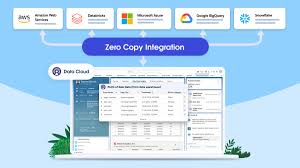
Simplifying Secure Data Access Across Clouds In today’s data-driven world, secure and prompt access to information is crucial. However, with critical analytics data spread across various cloud vendors, achieving this expediency can be challenging. Cross-cloud zero-copy data sharing doesn’t have to be complex. By leveraging your Autonomous Database, you can swiftly establish secure data sharing with your Salesforce CRM Data Stream in just seconds. This guide will walk you through the straightforward process of connecting your Salesforce CRM data to your Autonomous Database using the Salesforce CRM data connector type. Requirements for Salesforce Integration To connect Salesforce CRM data with your Autonomous Database, you’ll need the following: 1. Confirm Data Stream Configuration On the Data Streams Dashboard, verify the Data Stream Name, Data Connector Type, and Data Stream Status. 2. Set Up Your Autonomous Database Create Your Credentials: sqlCopy codeBEGIN DBMS_CLOUD.CREATE_CREDENTIAL( credential_name => ‘<your credential name>’, username => ‘<your salesforce log-in id>’, password => ‘<your salesforce password>’); END; / Create Your Database Link: sqlCopy codeBEGIN DBMS_CLOUD_ADMIN.CREATE_DATABASE_LINK( db_link_name => ‘<your database link name>’, hostname => ‘<your host>.my.salesforce.com’, port => ‘19937’, service_name => ‘salesforce’, ssl_server_cert_dn => NULL, credential_name => ‘<your credential name>’, gateway_params => JSON_OBJECT( ‘db_type’ value ‘salesforce’, ‘security_token’ value ‘<your security token>’)); END; / 3. Check Connectivity Details The HETEROGENEOUS_CONNECTIVITY_INFO view provides information on credential and database link requirements for external databases. For example: sqlCopy codeSELECT database_type, required_port, sample_usage FROM heterogeneous_connectivity_info WHERE database_type = ‘salesforce’; 4. Demonstration: Connecting to Salesforce Data Follow these steps to connect to your Salesforce CRM organization using the Salesforce Data Cloud Sales synthetic data in the Account_Home Data Stream: 5. Set Up Connectivity Using DBMS_CLOUD.CREATE_CREDENTIAL, create the necessary credentials to connect to Salesforce. Then, use DBMS_CLOUD_ADMIN.CREATE_DATABASE_LINK to establish the database link. Once configured, execute the SELECT statement against the ACCOUNT data to verify successful connection. 6. Utilize Zero-Copy Data Sharing With zero-copy data access to the Salesforce CRM Data Lake ACCOUNT object, you can: Conclusion As demonstrated, secure and efficient cross-cloud zero-copy data access can be straightforward. By following these simple steps, you can bypass cumbersome ETL operations and gain immediate, secure access to your Salesforce CRM data. This approach eliminates the overhead of complex data pipelines and provides you with real-time access to critical business data. Like Related Posts Who is Salesforce? Who is Salesforce? Here is their story in their own words. From our inception, we’ve proudly embraced the identity of Read more Salesforce Marketing Cloud Transactional Emails Salesforce Marketing Cloud Transactional Emails are immediate, automated, non-promotional messages crucial to business operations and customer satisfaction, such as order Read more Salesforce Unites Einstein Analytics with Financial CRM Salesforce has unveiled a comprehensive analytics solution tailored for wealth managers, home office professionals, and retail bankers, merging its Financial Read more AI-Driven Propensity Scores AI plays a crucial role in propensity score estimation as it can discern underlying patterns between treatments and confounding variables Read more
Read More
Impact of EHR Adoption

Impact of EHR Adoption

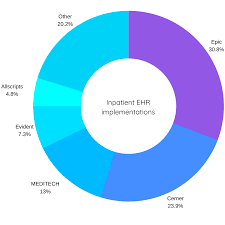
Fueled by the availability of chatbot interfaces like Chat-GPT, generative AI has become a key focus across various industries, including healthcare. Many electronic health record (EHR) vendors are integrating the technology to streamline administrative workflows, allowing clinicians to focus more on patient care. Whether you see EHR adoption as easy or challenging, the Impact of EHR Adoption will be positive. Generative AI and EHR Efficiency As defined by the Government Accountability Office (GAO), generative AI is “a technology that can create content, including text, images, audio, or video, when prompted by a user.” Generative AI systems learn patterns from vast datasets, enabling them to generate new, similar content using machine learning algorithms and statistical models. One of the areas where generative AI shows promise is in automating EHR workflows, which could alleviate the burden on clinicians. Epic’s AI-Driven Innovations Phil Lindemann, vice president of data and analytics at Epic, noted that generative AI is ideal for automating repetitive tasks. One application under testing allows the technology to draft patient portal message responses for clinicians to review and send. This could save time and let doctors spend more time with patients. Another project focuses on summarizing updates to a patient’s record since their last visit, offering a quick synopsis for the provider. Epic is also exploring how generative AI could help patients better understand their health records by translating complex medical terms into more accessible language. Additionally, the system can translate this information into various languages, enhancing patient education across diverse populations. However, Lindemann emphasized that while AI offers valuable tools, it is not a cure-all for healthcare’s challenges. “We see it as a translation tool,” he said, acknowledging the importance of targeted use cases for successful implementation. Oracle Health’s Clinical Digital Assistant Oracle Health is beta-testing a generative AI chatbot aimed at reducing administrative tasks for healthcare professionals. The Clinical Digital Assistant summarizes patient information and generates automated clinical notes by listening to patient-provider conversations. Physicians can interact with the tool during consultations, asking for relevant patient data without breaking eye contact with the patient. The assistant can also suggest actions based on the discussion, which providers must review before finalizing. Oracle plans to make this tool widely available by the second quarter of 2024, with the goal of easing clinician workloads and improving the patient experience. eClinicalWorks and Ambient Listening Technology In partnership with sunoh.ai, eClinicalWorks is utilizing generative AI-powered ambient listening technology to assist with clinical documentation. This tool automatically drafts clinical notes based on patient conversations, which clinicians can then review and edit as necessary. Girish Navani, CEO of eClinicalWorks, highlighted the potential for generative AI to become a personal assistant for doctors, streamlining documentation tasks and reducing cognitive load. The integration is expected to be available to customers in early 2024. MEDITECH’s AI-Powered Discharge Summaries MEDITECH is collaborating with Google to develop a generative AI tool focused on automating hospital discharge summaries. These summaries, which are crucial for care coordination, are often time-consuming for clinicians to create, especially for patients with longer hospital stays. The AI system generates draft summaries that clinicians can review and edit, aiming to speed up discharges and reduce clinician burnout. MEDITECH is working with healthcare organizations to validate the technology before a general release. Helen Waters, executive vice president and COO of MEDITECH, stressed the importance of careful implementation. The goal is to ensure accuracy and build trust among clinicians so that generative AI can be successfully integrated into clinical workflows. The Impact of EHR Adoption EHR systems have transformed healthcare, improving care coordination and decision support. However, EHR-related administrative burdens have also contributed to clinician burnout. A 2019 study found that 40% of physician burnout was linked to EHR use. By automating time-consuming EHR tasks, generative AI could help reduce this burden and improve clinical efficiency. Like Related Posts Who is Salesforce? Who is Salesforce? Here is their story in their own words. From our inception, we’ve proudly embraced the identity of Read more Salesforce Unites Einstein Analytics with Financial CRM Salesforce has unveiled a comprehensive analytics solution tailored for wealth managers, home office professionals, and retail bankers, merging its Financial Read more AI-Driven Propensity Scores AI plays a crucial role in propensity score estimation as it can discern underlying patterns between treatments and confounding variables Read more Tectonic’s Successful Salesforce Track Record Salesforce Technology Services Integrator – Tectonic has successfully delivered Salesforce in a variety of industries including Public Sector, Hospitality, Manufacturing, Read more
Read More
Liberty Bank and Salesforce

Liberty Bank and Salesforce

Liberty Bank, based in Middletown, Connecticut, announced on September 5th an expanded partnership with Salesforce, the world’s leading AI-powered CRM platform, to enhance its customer engagement efforts. Liberty Bank and Salesforce. By integrating Salesforce’s Financial Services Cloud, Marketing Cloud, MuleSoft, and Salesforce Shield, Liberty Bank aims to deliver more personalized, efficient, and enriched services. This strategic investment will further position Liberty Bank as a leader in customer satisfaction and loyalty within the community banking sector. “We set out to find a strategic partner that truly understands the unique nature of banking and puts the customer first,” said David W. Glidden, Liberty Bank President and CEO. “As we continue our mission to ‘Build the Community Bank of the Future,’ having the best partners is crucial to elevating our customer experience. With Salesforce’s innovative CRM solutions, we’re investing in the future to meet the evolving needs of our customers, team members, and communities, and to exceed their expectations.” Salesforce’s platform will enable Liberty Bank to streamline operations and gain deeper insights into customers’ financial journeys, ensuring a seamless and personalized banking experience. The Financial Services Cloud offers tools specifically tailored to the banking industry, allowing for faster time-to-value. Set to roll out next year, this transformation will allow Liberty Bank to prioritize customer financial goals while maintaining a high level of service and support. “Banks of all sizes are under pressure to innovate and deliver more personalized experiences. By leveraging CRM, data, and AI, Liberty Bank will gain a comprehensive view of its customers, enabling its teams to build stronger relationships and improve overall productivity.”Greg Jacobi, VP & GM of Banking and Lending at Salesforce. About Liberty Bank Founded in 1825, Liberty Bank is the nation’s oldest and largest independent mutual bank. With nearly $8 billion in assets, Liberty operates 56 branches across Connecticut and two in Massachusetts. It provides a full range of services, including consumer and commercial banking, cash management, home mortgages, business loans, insurance, and investment services. The bank has been named a ‘Top Workplace’ by the Hartford Courant every year since 2012 and recognized as a Best-In-State Bank in Connecticut by Forbes in 2021, 2022, and 2023. For more information, visit www.liberty-bank.com. Liberty Bank and Salesforce. Interested in discussing Salesforce for your financial institution? Contact Tectonic today. Like Related Posts Who is Salesforce? Who is Salesforce? Here is their story in their own words. From our inception, we’ve proudly embraced the identity of Read more Salesforce Marketing Cloud Transactional Emails Salesforce Marketing Cloud Transactional Emails are immediate, automated, non-promotional messages crucial to business operations and customer satisfaction, such as order Read more Salesforce Unites Einstein Analytics with Financial CRM Salesforce has unveiled a comprehensive analytics solution tailored for wealth managers, home office professionals, and retail bankers, merging its Financial Read more AI-Driven Propensity Scores AI plays a crucial role in propensity score estimation as it can discern underlying patterns between treatments and confounding variables Read more
Read More
gettectonic.com