Salesforce Archives - gettectonic.com - Page 156
Salesforce Revenue Cloud

Salesforce Revenue Cloud

What is Salesforce Revenue Cloud? It’s a comprehensive revenue management solution that seamlessly streamlines your entire revenue lifecycle, all powered by the Salesforce Customer 360 Platform. Revenue Cloud provides you with the CPQ (Configure, Price, Quote) capabilities to facilitate swift deal closing and selling. Easily configure, price, and quote complex solutions with precision. The platform automates billing and cash collection, with Salesforce’s recurring billing engine supporting various charge types, sales orders, and payment schedules. Subscription management is also a breeze, fostering efficient revenue growth. Built on the expansive and scalable Salesforce capabilities, Revenue Cloud allows you to deliver exceptional, personalized end-user experiences. It unifies your revenue processes with 360-degree customer view data, driving automation across the entire product-to-cash journey. Discover how Revenue Cloud empowers customers to buy across channels, adapt to evolving business models, and navigate changes in the business landscape by talking to Tectonic today. At Tectonic, we understand the challenges faced by IT professionals when integrating new tools into their infrastructure. Salesforce Revenue Cloud seamlessly integrates with Sales Cloud and Service Cloud, ensuring compatibility with your existing sales, marketing, finance, HR, and CDP platforms. Partner with Tectonic to implement Salesforce Revenue Cloud seamlessly into your custom Salesforce ecosystem, avoiding technical debt, complex systems, and unnecessary downtime or learning curves. Revenue Cloud puts you in control of revenue growth across every channel. As part of Salesforce Customer 360, it unifies data throughout the entire revenue lifecycle. Connect all your revenue processes on a single platform, launch new revenue streams, optimize efficiency, and transform the B2B buying journey. Tectonic, in collaboration with Salesforce Revenue Cloud, offers a unified product catalog to ensure consistent products and pricing across all channels. Flexibility to move across direct, partner, and digital channels is enhanced, with improved data quality and security for smarter and faster data-driven decisions. The Guided Selling configuration wizard assists reps in finding the right products with the correct configuration rules and bundling for comprehensive and compliant quoting solutions. Accelerating deal execution without compromising margins, Tectonic and Salesforce Revenue Cloud enable your sales reps to model deal scenarios, streamline approvals, and offer pre-agreed upon discounts. Generate quotes aligned with branding, product, and legal guidelines using pre-built templates, product literature libraries, and dynamic terms and conditions. Track orders and quotes seamlessly across multiple fulfillment platforms, with contracts and subscriptions easily traceable. Invoices from CPQ order objects contain fields for both the CPQ and billing modules, supporting amend and renew processes. Customized billing and approvals adapt to exceptions, with stakeholders able to approve via email, mobile, Chatter, or within Salesforce. Integrated revenue management on the number one CRM platform allows you to control revenue complexity and growth effectively. Salesforce Revenue Cloud caters to businesses in need of negotiated sales, self-service orders, controls and compliance, products and pricing, billing and collections, revenue reporting, licensing and permitting, and more. Contact Tectonic today to discover how much power Salesforce Revenue Cloud can add to your custom Salesforce integration. Like2 Related Posts Who is Salesforce? Who is Salesforce? Here is their story in their own words. From our inception, we’ve proudly embraced the identity of Read more Salesforce Marketing Cloud Transactional Emails Salesforce Marketing Cloud Transactional Emails are immediate, automated, non-promotional messages crucial to business operations and customer satisfaction, such as order Read more Salesforce Unites Einstein Analytics with Financial CRM Salesforce has unveiled a comprehensive analytics solution tailored for wealth managers, home office professionals, and retail bankers, merging its Financial Read more AI-Driven Propensity Scores AI plays a crucial role in propensity score estimation as it can discern underlying patterns between treatments and confounding variables Read more
Read More
Salesforce Heroku

Extending Heroku

Heroku is a cloud Platform as a Service (PaaS) based on containers. It provides developers with an elegant, flexible, and user-friendly platform to deploy, manage, and scale modern applications, offering the simplest path to bring apps to market. Extending Heroku can be accomplished by building add-ons, developing plug ins for Heroku CLI and more. Extending Heroku As of November 28th, 2022, Heroku discontinues its free tier, resulting in the shutdown of free Heroku Dynos, Postgres, and Redis servers. According to the Heroku Documentation, non-Enterprise users will witness the deletion of free databases starting from this date. For Enterprise users, hobby-dev databases associated with an Enterprise Account or Team will be converted to the mini tier. Regarding size limits, the maximum slug size after compression is 500 MB, a threshold that should accommodate most apps comfortably. In terms of the Heroku API, it is rate-limited at 5,000 requests per connection per day. Any attempt to exceed this limit results in a 429 Too Many Requests status, with the response message indicating when the next API request can be expected. AWS, an Infrastructure as a Service (IaaS) platform, provides developers with the necessary products to establish a development environment. In contrast, Heroku operates as a Platform as a Service (PaaS), offering a ready-to-use environment for developers to deploy code, perform simple configurations, and run applications. Extending the Heroku platform is possible through various means: Review Apps Review Apps on Heroku execute code in GitHub pull requests within isolated Heroku apps that can be easily disposed of. Each Review App is assigned a unique URL, providing an excellent avenue for proposing, testing, and merging code changes. Configuration options allow for automatic or manual creation of Review Apps from the app’s Pipeline page, requiring both Heroku Pipelines and GitHub integration for utilization. For users new to Review Apps, the setup involves connecting the pipeline to the corresponding GitHub repository in the Heroku Dashboard’s Settings tab. Additionally, configuring an app.json may be necessary for those unfamiliar with Review Apps, with sensitive config variable values set in the pipeline’s settings. Permissions for all Review Apps and CI Apps within a pipeline are managed through the pipeline access tab. The process of creating Review Apps involves deploying the HEAD commit of the associated branch when manually created or automatically when a pull request is opened. Review Apps are automatically destroyed upon the closure of the associated pull request. Viewing and managing Review Apps can be done through links available in GitHub’s pull request Conversation tab or the Heroku Dashboard’s Review Apps column. The app.json file in the app’s GitHub repo configures Review Apps, while sensitive environment variables are set in the Review App config vars section of the pipeline’s settings. Environments in app.json follow a similar pattern to Heroku CI, and Review Apps support the “environments” key. Review App names rely on randomness to prevent collisions, and a postdeploy script in the app.json file facilitates one-time setup tasks for the app and databases. A release phase allows for continuous execution with each change to a pull request. An optional pr-predestroy script in app.json runs when Review Apps are destroyed after the associated pull request is merged or closed. Injected environment variables, such as HEROKU_APP_NAME, HEROKU_BRANCH, and HEROKU_PR_NUMBER, provide essential information for scripting and automation. Content updated December 2022. Like Related Posts Who is Salesforce? Who is Salesforce? Here is their story in their own words. From our inception, we’ve proudly embraced the identity of Read more Salesforce Marketing Cloud Transactional Emails Salesforce Marketing Cloud Transactional Emails are immediate, automated, non-promotional messages crucial to business operations and customer satisfaction, such as order Read more Salesforce Unites Einstein Analytics with Financial CRM Salesforce has unveiled a comprehensive analytics solution tailored for wealth managers, home office professionals, and retail bankers, merging its Financial Read more AI-Driven Propensity Scores AI plays a crucial role in propensity score estimation as it can discern underlying patterns between treatments and confounding variables Read more

Read More
Salesforce Standard Objects

Salesforce Standard Objects

Standard objects in Salesforce are crafted to support various business functions, including marketing, sales, services, and support. They play a pivotal role in managing workflows and efficiently handling comprehensive data. The following are examples of Salesforce standard objects: Account, Campaign. Contact, and Opportunity. Definition of Standard Objects: Salesforce Standard Objects Identifying and Searching for Standard Objects in Salesforce: To view all standard and custom objects available in your organization, click the plus icon (+). Record tabs provide access to specific object records, allowing users to view, edit, and create records from a list. Standard Objects Related to Accounts: Examples of standard objects related to accounts include accounts, contacts, opportunities, leads, products, campaigns, cases, users, contracts, reports, and dashboards. Custom objects, on the other hand, store unique information created by users. List of Main Standard Objects: Difference Between Standard Objects and Custom Objects: Standard objects, like accounts and contacts, come with Salesforce by default, while custom objects are created by users to store unique information. Identifying Standard and Custom Objects: Custom objects can have unique fields, relationships, and logic tailored to specific business needs. Standard objects are pre-built by Salesforce. Relationship Between Standard Objects: An example is the relationship between Account and Contacts, often a one-to-many lookup relationship where the Account ID is a field on a Contact, representing the association between the two. Editing Standard Objects: Users cannot rename certain standard objects designed for specific functions, but customization is available for custom objects and reports. Field Limit for Standard Objects: An organization cannot have more than 800 custom fields, with specific limits per object depending on the edition. Standard Object ID in Salesforce: Salesforce IDs usually have 15 or 18 characters, and the object ID refers to the first three characters from the Salesforce ID. For example, an Account object ID may appear as “001F000000gkM5s.” Person Account in Salesforce: Person Account is not a standalone object but shares features like page layouts, compact layouts, and record types with object-like functionalities, using Contact fields when viewing Account fields. Like2 Related Posts Who is Salesforce? Who is Salesforce? Here is their story in their own words. From our inception, we’ve proudly embraced the identity of Read more Salesforce Marketing Cloud Transactional Emails Salesforce Marketing Cloud Transactional Emails are immediate, automated, non-promotional messages crucial to business operations and customer satisfaction, such as order Read more Salesforce Unites Einstein Analytics with Financial CRM Salesforce has unveiled a comprehensive analytics solution tailored for wealth managers, home office professionals, and retail bankers, merging its Financial Read more AI-Driven Propensity Scores AI plays a crucial role in propensity score estimation as it can discern underlying patterns between treatments and confounding variables Read more

Read More
Can You Use Salesforce for Project Management

Can You Use Salesforce for Project Management?

Salesforce has evolved beyond its CRM origins, offering a plethora of functionalities. However, managing projects directly within Salesforce presents challenges as it lacks full project management capabilities. Yet, there are three viable options: Option 1: Basic Project Management Features in Salesforce For small teams with modest needs, leveraging built-in Salesforce features alongside platform customization may suffice initially. While these features—such as Salesforce Tasks, Chatter, Reports, Dashboards, and Process Builder—offer basic functionality, they may fall short for most teams as projects grow in complexity. Option 2: Project Management Apps External to Salesforce As project needs expand, integrating well-known external project management tools like Microsoft Project, Asana, Monday.com, or Smartsheet becomes a common choice. However, such integration necessitates customizations, often involving Salesforce admins and external consultants, increasing implementation costs and posing data security challenges. Additionally, limitations like limited data sharing, delayed data access, and potential integration disruptions during Salesforce updates may arise. Option 3: Salesforce-native Project Management Apps on AppExchange Opting for PM apps built specifically for Salesforce and available on AppExchange offers a seamless alternative. Leading examples include Inspire Planner, TaskRay, Mission Control, and Milestones PM+. These native apps offer several advantages: Integration: Built using Salesforce technology, native apps seamlessly integrate with standard and custom Salesforce objects, eliminating the need for additional integration efforts. Flexibility: Native apps allow extensive customization, enabling users to tailor them to specific needs by adding custom objects, fields, workflow rules, and more. Integration with other AppExchange apps further expands functionality. 360-degree View of Customer: Associating projects with other Salesforce objects provides real-time visibility into customer activities, facilitating comprehensive reporting and analysis. Security: Native apps inherit Salesforce’s robust security infrastructure, ensuring data security and compliance with existing security settings and sharing rules. Real-time Reporting: Synced data enables real-time reporting and analytics, offering insights into key trends and bottlenecks. Automation: Native apps leverage Salesforce’s Process Builder for powerful automation, enabling automated project launches, task assignments, and role-based task allocations based on predefined templates. Organizations have three main options for project management with Salesforce. While built-in features cater to basic needs, external project management tools require integration efforts and may encounter limitations. On the other hand, Salesforce-native project management apps from AppExchange offer seamless integration, flexibility, and enhanced functionality. Ultimately, the choice depends on your organization’s needs and priorities. For assistance developing your Salesforce org for better project management, contact Tectonic today. Like1 Related Posts Who is Salesforce? Who is Salesforce? Here is their story in their own words. From our inception, we’ve proudly embraced the identity of Read more Salesforce Marketing Cloud Transactional Emails Salesforce Marketing Cloud Transactional Emails are immediate, automated, non-promotional messages crucial to business operations and customer satisfaction, such as order Read more Salesforce Unites Einstein Analytics with Financial CRM Salesforce has unveiled a comprehensive analytics solution tailored for wealth managers, home office professionals, and retail bankers, merging its Financial Read more AI-Driven Propensity Scores AI plays a crucial role in propensity score estimation as it can discern underlying patterns between treatments and confounding variables Read more

Read More
Salesforce CPQ

Salesforce for Government and Public Sector Solutions

Transform your system of record into a system of engagement to manage mission-critical programs effectively. Achieve superior long-term outcomes by incorporating apps that seamlessly connect EHR data, treatment plans, and patient preferences. Utilize top-tier commercial CRM capabilities while adhering to compliance standards such as FedRAMP, DoD IL2/4, SOC, and more. Ensure stakeholders have secure access to critical information on any device, allowing IT to focus on innovation and employees to engage with collaborative tools.

Read More
Salesforce Logo

Retirement of Salesforce Data Recovery Service

In July 2020, Salesforce announced that they were retiring their last-resort Data Recovery Service because it did not meet their high standards of customer success and trust. Then, in March 2021, they reversed their decision and reintroduced the Data Recovery Service. Editor’s note: This post was updated on February 7, 2022, with the latest information and resources. Read about the new option here. As a result of tremendous customer feedback early last year, we reinstated our Data Recovery Service. At that time, we heard that you relied on this functionality as your backup and restore strategy, as there was no other Salesforce native capability available. We are very pleased to announce that in fall 2021, we launched Salesforce Backup and Restore, built natively on the Salesforce Platform. We’ve co-designed these services with customers, and we intend to deliver the performance, speed, and scale you’ve come to expect from the platform while continuing to provide additional ways to innovate and extend these capabilities through our vibrant ecosystem. Backup and Restore not only replaces Data Recovery Service but also offers an experience beyond that original service—providing a simple, elegant point-and-click interface to create and manage backups and restore as it best suits your business. To support customers in this scenario, Salesforce has launched Salesforce Backup replacing Salesforce Data Recovery Service, which automatically creates backup copies of business data and empowers any organization to restore data and recover, in just a few clicks, from even worst-case scenarios. And, as always, Salesforce AppExchange is home to a rich partner ecosystem that provides robust backup and restore solutions for customers today. A list of AppExchange partners who offer these solutions can be found here. As both native and partner solutions are available to our entire customer base, Sale3sforce has retired their Data Recovery Service. Like Related Posts Who is Salesforce? Who is Salesforce? Here is their story in their own words. From our inception, we’ve proudly embraced the identity of Read more Salesforce Marketing Cloud Transactional Emails Salesforce Marketing Cloud Transactional Emails are immediate, automated, non-promotional messages crucial to business operations and customer satisfaction, such as order Read more Salesforce Unites Einstein Analytics with Financial CRM Salesforce has unveiled a comprehensive analytics solution tailored for wealth managers, home office professionals, and retail bankers, merging its Financial Read more AI-Driven Propensity Scores AI plays a crucial role in propensity score estimation as it can discern underlying patterns between treatments and confounding variables Read more
Read More
Marketing Cloud Filters

Marketing Cloud Filters

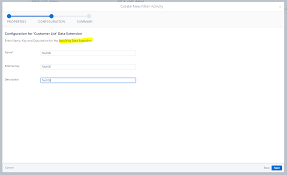
When crafting a filter, you establish conditions that the system assesses for each subscriber or data extension row to determine qualification for the segment. For each condition, you can choose the profile attribute, field column, or measure to evaluate, specify the operator for comparing values, and define the value for comparison.

Read More
Lucidchart Salesforce Integration

Lucidchart Salesforce Integration

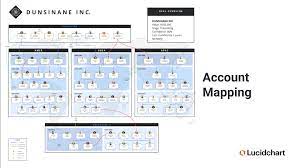
Salesforce makes cloud-based software designed to help businesses find more prospects, close more deals, and wow customers with amazing service. Lucidchart Salesforce Integration. In Lucidchart, you can import Salesforce account, opportunity, contact, activity, and task data to create dynamic account maps that align your entire revenue team. Easily visualize and understand relationships between key prospects, identify gaps in the buying team, and see the best path to win. These account maps also help sales leadership assess the health of a deal and improve forecasting. With bi-directional sync, any changes made in Lucidchart will instantly be reflected in Salesforce and vice versa. With Lucidchart, you can also import your Salesforce schema to create entity-relationship diagrams that help teams identify areas for optimization and map future changes to your CRM architecture. Lucidchart even offers exclusive Salesforce shapes and templates so you can standardize documentation within your company. Key features Lucidchart Salesforce Integration Lucidchart is a visual workspace that allows sales orgs to visualize their accounts, build scalable processes, and align their revenue team to find the best path to sale and close bigger deals, faster. – Customers must have an Enterprise Lucidchart license – Customers must purchase an add-on to use account mapping features with external data sources Like Related Posts Who is Salesforce? Who is Salesforce? Here is their story in their own words. From our inception, we’ve proudly embraced the identity of Read more Salesforce Marketing Cloud Transactional Emails Salesforce Marketing Cloud Transactional Emails are immediate, automated, non-promotional messages crucial to business operations and customer satisfaction, such as order Read more Salesforce Unites Einstein Analytics with Financial CRM Salesforce has unveiled a comprehensive analytics solution tailored for wealth managers, home office professionals, and retail bankers, merging its Financial Read more AI-Driven Propensity Scores AI plays a crucial role in propensity score estimation as it can discern underlying patterns between treatments and confounding variables Read more

Read More
gettectonic.com