Salesforce Managed Services Archives - gettectonic.com - Page 5
Cloud Based Managed Services

Cloud Based Managed Services

At Tectonic, our aim is to enable you to concentrate on your business operations while we handle the intricacies of technology. Our team oversees all technology assets and evaluates your IT systems to ensure your employees have the necessary equipment to support their work. We work diligently in the background to maintain the seamless functioning of your business, encompassing tasks such as consistent backups, 24/7 server monitoring, event logging, and more. Cloud Based Managed Services. Managed Cloud Cloud managed services, or managed cloud, refer to applications, services, or ecosystems in the cloud managed by a third-party organization. These services include IT tasks like engineering on demand, operations management, 24/7 help desk support, hosting, and implementation. Cloud-based service involves the organized administration of cloud computing products and services. It encompasses processes, strategies, policies, and technology used to control and maintain public and private clouds, hybrid clouds, or multicloud environments. Cloud infrastructure managed services involve companies like Microsoft, AWS, HubSpot, IBM, and Google Cloud. This allows businesses to receive personalized tech support from specialists in specific software providers. Examples of cloud-based services include file storage and backup, web-based email, and project management tools. SaaS cloud service providers include Dropbox, G Suite, Microsoft Office 365, and Slack. While cloud service providers are cost-effective, they lack the robustness of fully managed IT services. With Tectonic, managed cloud services provide scalable solutions, offering benefits like consistent backups, disaster recovery, and flexibility to adapt to changing business requirements without downtime. Managed services differ from SaaS as they go beyond software provision, often handling networking and hardware requirements. Managed cloud services offer hybrid IT and cloud administration, with providers offering unique values in areas like migration, optimization, security, and configuration. Advantages of Managed Cloud Service Providers (MCSPs) include resource optimization, cloud service integration, and predictable spending. However, potential drawbacks include high costs, optimization impacting performance, and security risks due to multi-tenancy. Amid the global COVID-19 pandemic, cloud adoption has surged, with companies embracing remote work models. Businesses increasingly partner with cloud managed service providers to optimize IT infrastructure, address regulatory compliance, and ensure security in the cloud environment. Local servers, physically located on-premises or in private data centers, are not considered cloud services. They host applications, websites, or services within a specific organization’s infrastructure. Like Related Posts Who is Salesforce? Who is Salesforce? Here is their story in their own words. From our inception, we’ve proudly embraced the identity of Read more Salesforce Marketing Cloud Transactional Emails Salesforce Marketing Cloud Transactional Emails are immediate, automated, non-promotional messages crucial to business operations and customer satisfaction, such as order Read more Salesforce Unites Einstein Analytics with Financial CRM Salesforce has unveiled a comprehensive analytics solution tailored for wealth managers, home office professionals, and retail bankers, merging its Financial Read more AI-Driven Propensity Scores AI plays a crucial role in propensity score estimation as it can discern underlying patterns between treatments and confounding variables Read more

Read More
Data Collection

Improved Engagement with Salesforce Personalization

Salesforce Personalization: Transforming Engagement into Personal Connections. Gain improved engagement with Salesforce Personalization. In the current business environment, customers demand personalized experiences across various channels. They are seeking to be recognized and valued by the brands they choose. The absence of such tailored interactions can lead customers to opt for competitors who fulfill this expectation. Enter Salesforce Personalization to the rescue. Salesforce Personalization is a dynamic tool designed to enable companies to craft personalized experiences for their customers. By employing AI-driven automation, this solution caters to billions of individuals globally. By making each recipient feel valued and significant. And by capturing individual insights and delivering optimized experiences. Salesforce Personalization is instrumental in boosting conversion rates, enhancing engagement, and nurturing brand loyalty. How Salesforce Personalization Improves Engagement To comprehend how Salesforce Personalization operates, it’s essential to first define marketing ROI (Return on Investment). This metric gauges the effectiveness of a company’s marketing endeavors comparing the revenue generated against the campaign’s operational costs. Calculating marketing ROI empowers companies to identify the most successful campaigns and allocate resources accordingly. Salesforce Personalization initiates its process by capturing individual insights through comprehensive behavioral tracking, data aggregation, and affinity modeling. These insights are then processed by marketer-friendly, customizable algorithms that make real-time decisions in less than 30 milliseconds, ensuring relevance at a 1-to-1 level in every interaction. With Salesforce Personalization, companies gain the ability to synchronize engagement across all channels. Information gathered about a customer’s interactions on one channel can be utilized to enhance their experiences on the same channel or any other. This seamless integration results in a personalized customer experience, regardless of the current engagement channel. Furthermore, Salesforce Personalization empowers companies to conduct tests and analyses of experiences. With continuous A/B testing, reporting, and analysis, companies can optimize personalization campaigns and customer engagement strategies. This iterative process allows you to enhance your marketing ROI continually and deliver increasingly personalized experiences to their customers. Get improved engagement with Salesforce Personalization. Salesforce Personalization is as a targeted tool for companies to elevate conversion rates, amplify engagement, and cultivate customer loyalty. By capturing individual insights and delivering optimized experiences, it establishes a seamless, personalized journey for customers across all channels. With ongoing optimization and analysis, companies can refine their marketing ROI, delivering ever more personalized experiences. Connect with Tectonic today to explore how Salesforce Personalization can elevate engagement with your customers, community, constituents, patients, or anyone you communicate with. Like Related Posts Salesforce AI Einstein Next Best Action Salesforce AI Einstein Next Best Action is a feature designed to identify the most effective actions available to agents and Read more Demandbase Salesforce Integration The integration of Demandbase with Salesforce creates a seamless connection between Demandbase One and your Salesforce CRM, establishing a bidirectional Read more Box and Salesforce Integration What is Box and Salesforce integration? Together, Box and Salesforce integration bring you seamless solutions that make it easy for Read more Case Study: Tribal Nation Resorts and Casinos-Hospitality and Gaming-Salesforce Service/Marketing Clouds Tribal Nation with 3 Casinos, 2 Hotels and 1 Golf Course.  In total the Resorts and Casinos offer more than Read more

Read More
Salesforce Service Cloud

Improved Agent Efficiency With Salesforce Service Cloud Customization

Are your service representatives finding the Lightning Service Console too cluttered? Salesforce Service Cloud customization to the rescue! Whether you’re planning to optimize your Service Cloud or seeking quick enhancements for your service team, there’s a plethora of features and tips available to boost the efficiency of your Service Cloud. If you haven’t implemented a console app for your customer service teams yet, you’re overlooking valuable time-saving functionalities. Console features differ slightly between Lightning and Classic. This guide focuses on the Service Cloud Lightning Console – for Classic feature details, refer to Salesforce Help or contact Tectonic. Split View with Salesforce Service Cloud Customization: Console Navigation: Workspace Tabs and Subtabs: Utility Bar Features: Like2 Related Posts Who is Salesforce? Who is Salesforce? Here is their story in their own words. From our inception, we’ve proudly embraced the identity of Read more Salesforce Marketing Cloud Transactional Emails Salesforce Marketing Cloud Transactional Emails are immediate, automated, non-promotional messages crucial to business operations and customer satisfaction, such as order Read more Salesforce Unites Einstein Analytics with Financial CRM Salesforce has unveiled a comprehensive analytics solution tailored for wealth managers, home office professionals, and retail bankers, merging its Financial Read more AI-Driven Propensity Scores AI plays a crucial role in propensity score estimation as it can discern underlying patterns between treatments and confounding variables Read more
Read More
Salesforce Sales Cloud

Planning for Einstein Sales Cloud

Salesforce Sales Cloud is a powerful catalyst for your organization’s business expansion, representing a significant investment in the growth of your enterprise. By incorporating Sales Cloud Einstein with your Sales Cloud instance, along with your sales and marketing teams, can operate at an enhanced level of efficiency. The key to success lies in meticulous planning for the implementation of Sales Cloud Einstein. The enormous potential of the Einstein Platform is a potential gamechanger. Launched in 2016, during the Dreamforce conference, Einstein is a solution that combines AI, CRM data, and processes assisted with analytical techniques. It optimizes the capabilities of the entire Salesforce platform. By offering multiple functions and tools based on machine learning and deep learning in order to make processes more intelligent. Planning for Einstein Sales Cloud shortens your time to success. In the pre-enablement phase, a comprehensive understanding of your business challenges and priorities is imperative. Armed with this knowledge, you can identify the specific Sales Cloud Einstein features that align with your organizational goals. Ensuring alignment across your teams facilitates the measurement of success throughout the implementation process. Identifying challenges within the organization, such as data overload, time constraints, vague processes, and difficulty in recognizing opportunities at risk, sets the stage for a strategic implementation. Beginning with a small, diverse group of users allows you to test and fine-tune the selected Sales Cloud Einstein features. A Partner for Planning for Einstein Sales Cloud Leverage Salesforce or your implementation partner’s tools to ensure the richness, utility, and cleanliness of your CRM data. Transitioning into the enablement stage involves setting up Sales Cloud Einstein in your sandbox org, activating chosen features, and testing compatibility with existing architecture, workflows, and Lightning components. Effective communication with users is crucial during this stage, outlining the goals and features of Sales Cloud Einstein. Providing SMART goals—specific, measurable, achievable, relevant, and time-bound—facilitates the measurement of implementation success. Key performance indicators may include lead conversion rate increases, closed-won rate increases, opportunity pipeline growth, or reduced time to close opportunities. As you prepare to go live in your Salesforce org, assign Sales Cloud Einstein licenses to a diverse user group, including power users, a pilot group, and representatives from various departments. A successful post-enablement stage involves gathering feedback from users, measuring return on investment (ROI), and expanding user groups. Essential stages for a successful Sales Cloud Einstein implementation encompass: Planning for Sales Cloud Einstein Plan your Sales Cloud Einstein rollout in three stages: pre-enablement, enablement, and post-enablement. For those without an implementation partner, Salesforce’s setup guide offers a step-by-step walkthrough of the above stages. Like1 Related Posts Who is Salesforce? Who is Salesforce? Here is their story in their own words. From our inception, we’ve proudly embraced the identity of Read more Salesforce Marketing Cloud Transactional Emails Salesforce Marketing Cloud Transactional Emails are immediate, automated, non-promotional messages crucial to business operations and customer satisfaction, such as order Read more Salesforce Unites Einstein Analytics with Financial CRM Salesforce has unveiled a comprehensive analytics solution tailored for wealth managers, home office professionals, and retail bankers, merging its Financial Read more AI-Driven Propensity Scores AI plays a crucial role in propensity score estimation as it can discern underlying patterns between treatments and confounding variables Read more
Read More
Salesforce

Mobile Connect Salesforce

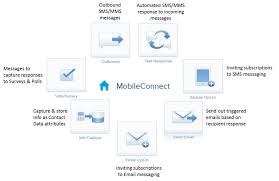
Create, send, receive, and track SMS and MMS text messages using MobileConnect. Send alerts and transactional messages to subscribers using templates and a drag-and-drop interface. How does mobile connect work? Simple. By matching the end user to their mobile phone number, Mobile Connect empowers the user to confirm his/her identity online, and authorize transactions such as payments, sharing only the personal data that’s essential for completing the transaction. A list of essential tasks to help you get started using MobileConnect. Like Related Posts Who is Salesforce? Who is Salesforce? Here is their story in their own words. From our inception, we’ve proudly embraced the identity of Read more Salesforce Marketing Cloud Transactional Emails Salesforce Marketing Cloud Transactional Emails are immediate, automated, non-promotional messages crucial to business operations and customer satisfaction, such as order Read more Salesforce Unites Einstein Analytics with Financial CRM Salesforce has unveiled a comprehensive analytics solution tailored for wealth managers, home office professionals, and retail bankers, merging its Financial Read more AI-Driven Propensity Scores AI plays a crucial role in propensity score estimation as it can discern underlying patterns between treatments and confounding variables Read more

Read More
Salesforce

Approval Process Salesforce

Approval processes take automation one step further, letting you specify a sequence of steps that are required to approve a record. An approval process automates how records are approved in Salesforce. An approval process specifies each step of approval, including from whom to request approval and what to do at each point of the process. Users can’t see which approval process is triggered when they click Submit for Approval. Familiarize users on the criteria for each approval process and what each approval process does. If the record doesn’t meet the entry criteria or if they’re not an allowed submitter for any approval processes, Salesforce displays an error. Terminology Approval Actions An approval action occurs when all required approvers approve a step. Approval Process An approval process automates how records are approved in Salesforce. An approval process specifies each step of approval, including from whom to request approval and what to do at each point of the process. Approval Request An approval request is an email, Salesforce app notification, Lightning Experience notification, or Chatter post. The approval request notifies the recipients that a record was submitted for them to approve. Approval Steps Approval steps define the chain of approval for a particular approval process. Each step determines: The first step specifies what to do if a record doesn’t advance to that step. Later steps specify what happens if an approver rejects the request. Assigned Approver The assigned approver is the user responsible for responding to an approval request. Delegated Approver A delegated approver is someone appointed by an assigned approver as an alternate for approval requests. Email Approval Response Email approval response lets users respond to approval requests by replying to an email notification. Initial Submission Actions An initial submission action occurs when a user first submits a record for approval. By default, the record is locked. Final Approval Actions Final approval actions occur when all required approvals are obtained. Final Rejection Actions A final rejection action occurs when an approver rejects the request and it moves to the final rejection state. Outbound Message An outbound message sends information to a designated endpoint, like an external service. You can configure outbound messages from Setup. Configure the external endpoint and use SOAP API to create a listener for the messages. Process Instance A process instance represents one instance of an approval process. A new process instance is created each time a record is submitted for approval. Process Instance Node A process instance node represents an instance of an approval step. The system creates a process instance node each time a record enters a step in an approval process. The system doesn’t create a process instance node when the record doesn’t meet the step criteria, or the approval process instance is completed without entering the step. Recall Actions A recall action occurs when a submitted approval request is recalled. By default, the record is unlocked. Record Locking Record locking prevents users from editing a record, regardless of field-level security or sharing settings. By default, Salesforce locks records that are pending approval. Only admins can edit locked records. Like2 Related Posts Who is Salesforce? Who is Salesforce? Here is their story in their own words. From our inception, we’ve proudly embraced the identity of Read more Salesforce Marketing Cloud Transactional Emails Salesforce Marketing Cloud Transactional Emails are immediate, automated, non-promotional messages crucial to business operations and customer satisfaction, such as order Read more Salesforce Unites Einstein Analytics with Financial CRM Salesforce has unveiled a comprehensive analytics solution tailored for wealth managers, home office professionals, and retail bankers, merging its Financial Read more AI-Driven Propensity Scores AI plays a crucial role in propensity score estimation as it can discern underlying patterns between treatments and confounding variables Read more

Read More
public sector and tribal governent

What is BI in Salesforce?

Salesforce BI helps to create fast, digestible reports to help you make informed decisions at the right time. Salesforce Einstein is a leading business intelligence software solution that will help streamline your operations. Read on in this insight to learn how Salesforce BI capabilities including Tableau rank in the Gartner Magic Quadrant. Make the right decision every time using analytics that go beyond business intelligence software. See why Gartner named Salesforce (Tableau) a Leader in the Gartner® Magic Quadrant™ for Analytics and Business Intelligence Platforms for the 11th consecutive year. Data and analytics leaders must use analytics and BI platforms to support the needs of IT, analysts, consumers and data scientists. While integration with cloud ecosystems and business applications is a key selection requirement, buyers also need platforms to support openness and interoperability. Analytics and business intelligence (ABI) platforms enable less technical users, including business people, to model, analyze, explore, share and manage data, and collaborate and share findings, enabled by IT and augmented by artificial intelligence (AI). For several years, the Magic Quadrant for Analytic and Business Intelligence Platforms has emphasized visual self-service for end users augmented by AI to deliver automated insights. While this remains a significant use case, the ABI platform market will increasingly need to focus on the needs of the analytic content consumer and business decision makers. To achieve this, automated insights must be relevant in context of a user’s goals, actions and workflow. Many platforms are adding capabilities for users to easily compose low-code or no-code automation workflows and applications. This blend of capabilities is helping to expand the vision for analytics beyond simply delivering datasets and presenting dashboards. Today’s ABI platforms can deliver enriched contextualized insights, refocus attention on decision-making processes and ultimately take actions that will deliver business value. In addition to the increasing consumer design focus trend, we see other key market trends, including the need for improved governance of analytic content creation and dissemination, and the demand for a headless, open architecture. For example, a headless ABI platform would decouple the metrics store from the front-end presentation layer, enabling more interoperability with competitive products. ABI platform functionality includes the following 12 critical capabilities, which have been updated to reflect areas of market change, differentiation and customer demand: Gartner added three new critical capabilities as part of our metrics store evaluation criteria this year:  ABI platforms have always been about measurement. For decades, the slicing and dicing of measures by their dimensional attributes was synonymous with the act of performing business intelligence. However, over the last decade, the focus on metrics and measurement was overshadowed by data visualization. As data visualization became the most conspicuous capability, some business executives began to conflate ABI platforms with data visualization — as if ABI platforms are glorified chart wizards. This misconception minimizes much of the work performed and the business value delivered by ABI platforms. Establishing metrics stores as a critical capability to execute makes it clear that defining and communicating performance measures throughout an organization is one of the key purposes of an ABI platform. Analytics collaboration is a combination of many features (such as Slack/Teams integration, action frameworks) that collectively improve an organization’s ability to make decisions with consensus. Data science integration reflects the increasing likelihood that a business analyst may want to use data science to test certain hypotheses, and that data scientists will need to leverage features such as data prep and data visualization. In addition, Gartner is changing “catalogs” to “analytic catalogs” to emphasize a set of requirements that are not being met by ABI platform vendors today. Most large enterprises have thousands of reports built across multiple ABI platforms, but consumers in these organizations have no easy way to access these reports. The name change to analytic catalogs reflects the need for ABI platform vendors to deliver analytic content with the consumer in mind. Three critical capabilities were removed from our evaluation criteria: security, natural language generation (NLG; rolled into data storytelling) and cloud analytics (which will no longer be considered a platform capability, but instead a go-to-market strategy covered in the Magic Quadrant). And one of the security sub-criteria, about the granularity of authorization (e.g., row-based security) has been moved to the enterprise reporting capability. Salesforce (Tableau) Tableau, a Salesforce company, is a Leader in this Magic Quadrant. Its products are mainly focused on visual-based exploration that enables business users to access, prepare, analyze and present findings in their data. CRM Analytics, formerly Tableau CRM, provides augmented analytics capabilities for analysts and citizen data scientists. Tableau has global operations and serves clients of all sizes. In 2022, Tableau reinforced its augmented consumer vision to provide contextualized insights with deeper integration with Salesforce Data Cloud. IT also improved decision intelligence by bringing domain-aware insights into action with Revenue Intelligence and other Salesforce-native apps. The extensible design and x-platform integrations (Salesforce Flow, MuleSoft, UiPath and Looker) further enable composable analytics to bring insights into workflow with agility. Strengths Cautions Like Related Posts Who is Salesforce? Who is Salesforce? Here is their story in their own words. From our inception, we’ve proudly embraced the identity of Read more Salesforce Marketing Cloud Transactional Emails Salesforce Marketing Cloud Transactional Emails are immediate, automated, non-promotional messages crucial to business operations and customer satisfaction, such as order Read more Salesforce Unites Einstein Analytics with Financial CRM Salesforce has unveiled a comprehensive analytics solution tailored for wealth managers, home office professionals, and retail bankers, merging its Financial Read more AI-Driven Propensity Scores AI plays a crucial role in propensity score estimation as it can discern underlying patterns between treatments and confounding variables Read more
Read More
Cloud First

A Salesforce Architect’s Thoughts on User Experience

The intersection of Salesforce User Experience (UX) Design and Architecture in the Salesforce ecosystem is making traction. As User Experience Designer and Strategy Designer certifications were launched by Salesforce, architects are increasingly venturing into UX to create comprehensive and well thought out solutions. This collaboration, emphasizing the importance of user experience, has the potential to increase project success through efficient, scalable, and sustainable designs, particularly for Certified Technical Architects (CTAs). User Interaction and Adoption are important considerations for architects, requiring a focus on understanding user interactions to guide effective decisions. The method of creating a user story, showing what the user needs to accomplish, assists the designers in creating solutions that are user friendly By mapping the user journey and data flow through process and journey mapping, architects gain insights into necessary objects, relationships, and high-touchpoint objects influencing Large Data Volumes (LDV). Understanding user expectations informs architects about necessary record ownership changes, conversions, security, and data visibility requirements. Salesforce UX Certifications The recent emphasis on UX design in Salesforce, marked by certifications like Strategy Designer and User Experience Designer, has prompted useful discussions within the Salesforce architect community. Personal experience completing these certifications underscores the importance of architects embracing UX design, especially on the path to becoming a Certified Technical Architect. The incorporation of journey mapping into solution design, as discovered through creating process and journey maps from CTA scenarios, has proven invaluable. The synergy between architects and UX designers manifests as they collaborate to seamlessly integrate visual and technical elements. Thus resulting in cohesive, user-friendly solutions. Despite distinct areas of expertise, both roles converge on considering user needs, business requirements, and personas, fostering pivotal collaboration that ensures functional and aesthetically pleasing systems. A user-centric approach is crucial for architects in solving problems and ensuring holistic solutions. Process mapping facilitates identifying record ownership changes, conversions, security, and data visibility requirements. Higher Probability of Success is achieved by considering the users’ interactions. Building solutions that prioritize simplicity, reducing project complexity and enhancing user understanding. Performance, Scalability, and Usage must be factored into architectural considerations. Architects need to understand system usage, scalability needs, and performance to create efficient systems capable of handling increased usage. Additionally, architects should prioritize efficiency by identifying large data volume objects and designing for scalability. Return on Investment (ROI) through Sustainability is a key factor for project success. Architects should consider both adoption and sustainable design, ensuring long-term value. ROI-driven decisions should permeate the design process. Minimizing potential rework and supporting evolving technology and business requirements. Salesforce UX in Design Process Incorporating user experience design early in the design process enhances project success by avoiding costly redesigns and ensuring the final product meets user needs. Architects must prioritize sustainability. Then they can create designs that maximize ROI and provide long-term value to the organization. User experience design is integral for architects. While providing a framework for understanding user interactions and optimizing the Salesforce solutions the arcitects design and build. Embracing UX design and collaborating effectively, architects can create systems that are not only functional and efficient but also intuitive and enjoyable to use. When designing custom Salesforce solutions, the architect should always consider the end user. At Tectonic, our entire team of Salesforce consultants focus on delivering an application that meets everyone’s expectations. Contact us today. Like1 Related Posts Who is Salesforce? Who is Salesforce? Here is their story in their own words. From our inception, we’ve proudly embraced the identity of Read more Salesforce Marketing Cloud Transactional Emails Salesforce Marketing Cloud Transactional Emails are immediate, automated, non-promotional messages crucial to business operations and customer satisfaction, such as order Read more Salesforce Unites Einstein Analytics with Financial CRM Salesforce has unveiled a comprehensive analytics solution tailored for wealth managers, home office professionals, and retail bankers, merging its Financial Read more AI-Driven Propensity Scores AI plays a crucial role in propensity score estimation as it can discern underlying patterns between treatments and confounding variables Read more

Read More

Box and Salesforce Integration

What is Box and Salesforce integration? Together, Box and Salesforce integration bring you seamless solutions that make it easy for teams to securely collaborate on the most critical content in Box, without leaving Salesforce. It easily connects with other Apps to share and store the data. Box allows users to create, edit, update, and share files/folders with Salesforce. It has a highly secured authentication process and a customizable user permission to access the files/folders. Your teams and customers expect amazing digital experiences, no matter what tools they use — which means you must deliver a consistent content experience across every app. Together, Box and Salesforce bring you seamlessly integrated solutions. The result? Better customer engagements, faster resolution on support cases, and seamless signatures so organizations can quickly go from quote to cash. Content is at the core of business today — and a driving force for your sales teams. Our integration empowers sales reps to collaborate on content directly in Salesforce, while your organization’s documents are centralized in Box to streamline processes, engage customers, and accelerate sales cycles. With Box for Salesforce, account teams can easily and securely access and share relevant files from any device, no matter if they’re at home, in the office, or out in the field. Box – Secure File Sharing — From file creation and sharing, to e-signing and retention — one secure place for it all.  Like Related Posts Who is Salesforce? Who is Salesforce? Here is their story in their own words. From our inception, we’ve proudly embraced the identity of Read more Salesforce Marketing Cloud Transactional Emails Salesforce Marketing Cloud Transactional Emails are immediate, automated, non-promotional messages crucial to business operations and customer satisfaction, such as order Read more Salesforce Unites Einstein Analytics with Financial CRM Salesforce has unveiled a comprehensive analytics solution tailored for wealth managers, home office professionals, and retail bankers, merging its Financial Read more AI-Driven Propensity Scores AI plays a crucial role in propensity score estimation as it can discern underlying patterns between treatments and confounding variables Read more

Read More
gettectonic.com