Google Archives - gettectonic.com - Page 18
What is Omni-Channel Salesforce

What is Omni-Channel Salesforce?

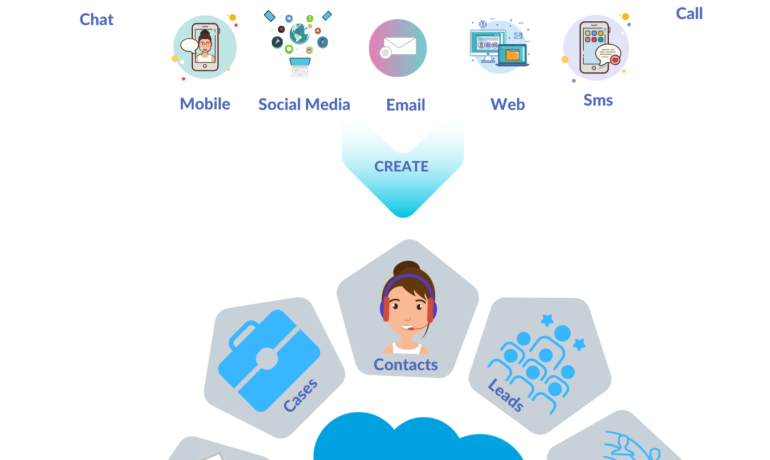
What is Omni-Channel Salesforce? Omni-Channel is a Salesforce feature designed for Customer Service and Console applications that automates the routing of various work items, such as Leads and Cases, to agents. It ensures that work items are assigned to agents based on their capacity, priority, skill set, and other criteria. Features of Omni-Channel Benefits Omni-Channel in Salesforce Enhanced Omni-Channel Setting Up and Using Omni-Channel Key Differences: Multichannel vs. Omni-Channel Route Work with Omni-Channel Omni-Channel is a flexible, customizable feature, and you can configure it declaratively—that is, without writing code. Use Omni-Channel to manage the priority of work items, which makes it a cinch to route important work items to agents quickly. Manage your agents’ capacity to take on work items so that they’re given only the number of assignments that they can handle. You can also define which agents can work on different types of assignments. For example, you can create one group of agents to respond to leads and sales inquiries, and another group that helps customers with support questions. Omni-Channel routes work requests to the most available and qualified support agents in the app. You can also provide real-time operational intelligence to support supervisors with Omni Supervisor. Agents no longer have to pick and choose work assignments manually from a queue, which saves everyone in your call center time, effort, and brainpower. Because it’s easier for agents to work on their assignments, they can assist your customers faster and more effectively and close assignments more quickly. Routing logic is applied when work is assigned to an owner. If field values on the work item are changed after the item is routed, the routing logic isn’t reapplied. Omni-Channel is supported in both Lightning Experience (recommended) and Salesforce Classic. You can run Omni-Channel in both standard and console apps. Route Work with Omni-Channel Use Omni-Channel to route work items to queues, agents, skills, and even Einstein Bots (on supported channels). Depending on your business needs, you can use different ways to route work, including Omni-Channel flows. Omni-Channel routes work based on the defined routing logic. When an agent is assigned a work item, they can accept it to begin working on it or decline it. When a work item is declined, Omni-Channel releases the agent’s capacity consumed by the work item. But the declined work item remains owned by the declining agent until the work is routed again. If the agent declines a work item or doesn’t accept the work item in the specified time period, Omni-Channel doesn’t try to route that work item to that agent again. If an agent accepts the work, they can transfer the work to another agent. NOTE We recommend using Enhanced Omni-Channel. Enhanced Omni-Channel features better and more extensive experiences for agents and supervisors than Standard Omni-Channel, and future Omni-Channel features are developed on Enhanced Omni-Channel. See Compare Standard and Enhanced Omni-Channel and Enable Omni-Channel. Set Up Omni-Channel Set up Omni-Channel to route any type of incoming work item to the most qualified, available support agents in your call center. Omni-Channel integrates seamlessly into both console and standard apps. NOTE We recommend using Enhanced Omni-Channel. Enhanced Omni-Channel features better and more extensive experiences for agents and supervisors than Standard Omni-Channel, and future Omni-Channel features are developed on Enhanced Omni-Channel. See Compare Standard and Enhanced Omni-Channel and Enable Omni-Channel. Test Your Omni-Channel Implementation Now that you’ve got Omni-Channel set up and enabled, test your implementation to make sure it’s working correctly. To test your implementation, route a work item to yourself. Sit back and relax. You’ll see an incoming request notification in Omni-Channel within a few seconds. Manage Agents, Queues, and Skills with Omni Supervisor Manage agents, queues, and skills in Omni Supervisor. Get to Know the Omni Supervisor TabsSupervisors can check the health of their call center in real time using the Agents, Queues Backlog, Assigned Work, and Skills Backlog tabs in Omni Supervisor. These tabs let supervisors see which work items are open and active, who’s assigned to what, and other details such as open capacities and average wait times for customers. Provide Customer Support for Real-Time Channels with Omni-Channel Service customers using their preferred means of real-time communication, including phone, messaging, or chat in standard and enhanced channels. You can accept and manage these types of support requests in Omni-Channel. If needed, while helping a customer, you can reach out to your supervisor to get support. Use the Omni-Channel Component to Work with CustomersTo begin receiving inbound requests from customers or to make outbound contacts, log in to the Omni-Channel component and update your status to indicate that you’re available. If you don’t see the Omni-Channel component in your app, check with your admin. Use the Omni-Channel Component to Work with Customers To begin receiving inbound requests from customers or to make outbound contacts, log in to the Omni-Channel component and update your status to indicate that you’re available. If you don’t see the Omni-Channel component in your app, check with your admin. When you mark your status as available in Omni-Channel, you begin receiving work requests, like phone calls. Work items assigned to you appear in Omni-Channel until you complete, transfer, or decline them. TIP By default, phone calls are taken through the same speakers and microphone your system device uses. To take calls through different audio devices, click the Settings icon on the Omni-Channel component and choose your preferred devices under Input and Output. The devices you choose are only set only for your current browser. For example, if you choose a device for Google Chrome, that device isn’t set for Mozilla Firefox. This feature isn’t available in Apple Safari browser. If you set up a service channel to use the tab-based capacity model, Omni-Channel determines agent capacity based on the open tabs. Each tab is a session for a specific work item. To close the work item and remove it from your Omni-Channel instance, close the tab for that item. The tab-based capacity model releases an agent’s capacity


Read More
Salesforce Slack

Slack Process Automation

Salesforce’s Slack team collaboration tool extends beyond facilitating communication across channels; it empowers users to automate routine processes seamlessly through the Workflow Builder tool. This feature, available in Slack, offers a range of tools to streamline processes both within and outside Slack, all without the need for coding. Slack process automation improves the power and usage of the collaboration tool. The versatility of workflows is vast, accommodating simple to complex processes that can connect with various apps and services, not limited to Slack and Salesforce alone. With over 2,400 apps in the Slack App Directory, integration possibilities are extensive. Should a pre-built app fall short, customization options allow tailoring to specific business needs without the necessity for coding expertise. Building a workflow primarily requires identifying routine business processes suitable for automation, whether through app installation or custom Workflow Builder creation. The absence of coding prerequisites makes this accessible to a broader audience. Workflow Builder considers any series of sequential, repeatable tasks aimed at achieving a specific goal as a viable process for automation. Since Salesforce’s acquisition of Slack in 2021, the platform has become a pivotal collaboration tool within and beyond the Salesforce ecosystem. Its popularity has surged, particularly in remote-based work environments, where integrations with various applications synchronize data into Slack, providing a single, accurate source accessible to all team members. This, coupled with automation features directly accessible from the Slack app, significantly reduces manual task durations. Eight highly recommended Slack automations, facilitated through pre-built templates, cover various aspects, including recruiting, lead management, deal alerts, quote-to-invoice processes, project status tracking, time tracking, support case management, and even creative applications like hue light automation. Tectonic offers expertise in custom Slack integrations with Salesforce projects. Companies can explore how Slack enhances team collaboration and process automation by connecting with us. Slack Workflows Importantly, Slack workflows extend beyond Salesforce integration, working seamlessly with other platforms such as Zapier, Centro, Google Sheets, AttendanceBot, Polly, Datadog, Fellow, Automate.io, BirthdayBot, Jira, Workstreams, ToDoBot, Workast, Simple Poll, and more. The Workflow Builder feature enables the creation of predefined triggers and steps to automate processes directly within the Slack app. Triggers can be manually selected, initiated by emoticon selections, or set to run automatically. Once triggered, the workflow’s steps unfold in the selected order, allowing the seamless execution of various tasks. Process Automation in Slack The possibilities for automation using Workflow Builder in Slack are extensive, ranging from employee onboarding, customer support, content and communication review, to sales lead and marketing campaign management, request approval processes, and beyond. Slack, in conjunction with Tectonic, stands ready to bring these envisioned automations to life for organizations seeking enhanced efficiency and collaboration. Like Related Posts Who is Salesforce? Who is Salesforce? Here is their story in their own words. From our inception, we’ve proudly embraced the identity of Read more Salesforce Marketing Cloud Transactional Emails Salesforce Marketing Cloud Transactional Emails are immediate, automated, non-promotional messages crucial to business operations and customer satisfaction, such as order Read more Salesforce Unites Einstein Analytics with Financial CRM Salesforce has unveiled a comprehensive analytics solution tailored for wealth managers, home office professionals, and retail bankers, merging its Financial Read more AI-Driven Propensity Scores AI plays a crucial role in propensity score estimation as it can discern underlying patterns between treatments and confounding variables Read more

Read More
Cloud Based Managed Services

Cloud Based Managed Services

At Tectonic, our aim is to enable you to concentrate on your business operations while we handle the intricacies of technology. Our team oversees all technology assets and evaluates your IT systems to ensure your employees have the necessary equipment to support their work. We work diligently in the background to maintain the seamless functioning of your business, encompassing tasks such as consistent backups, 24/7 server monitoring, event logging, and more. Cloud Based Managed Services. Managed Cloud Cloud managed services, or managed cloud, refer to applications, services, or ecosystems in the cloud managed by a third-party organization. These services include IT tasks like engineering on demand, operations management, 24/7 help desk support, hosting, and implementation. Cloud-based service involves the organized administration of cloud computing products and services. It encompasses processes, strategies, policies, and technology used to control and maintain public and private clouds, hybrid clouds, or multicloud environments. Cloud infrastructure managed services involve companies like Microsoft, AWS, HubSpot, IBM, and Google Cloud. This allows businesses to receive personalized tech support from specialists in specific software providers. Examples of cloud-based services include file storage and backup, web-based email, and project management tools. SaaS cloud service providers include Dropbox, G Suite, Microsoft Office 365, and Slack. While cloud service providers are cost-effective, they lack the robustness of fully managed IT services. With Tectonic, managed cloud services provide scalable solutions, offering benefits like consistent backups, disaster recovery, and flexibility to adapt to changing business requirements without downtime. Managed services differ from SaaS as they go beyond software provision, often handling networking and hardware requirements. Managed cloud services offer hybrid IT and cloud administration, with providers offering unique values in areas like migration, optimization, security, and configuration. Advantages of Managed Cloud Service Providers (MCSPs) include resource optimization, cloud service integration, and predictable spending. However, potential drawbacks include high costs, optimization impacting performance, and security risks due to multi-tenancy. Amid the global COVID-19 pandemic, cloud adoption has surged, with companies embracing remote work models. Businesses increasingly partner with cloud managed service providers to optimize IT infrastructure, address regulatory compliance, and ensure security in the cloud environment. Local servers, physically located on-premises or in private data centers, are not considered cloud services. They host applications, websites, or services within a specific organization’s infrastructure. Like Related Posts Who is Salesforce? Who is Salesforce? Here is their story in their own words. From our inception, we’ve proudly embraced the identity of Read more Salesforce Marketing Cloud Transactional Emails Salesforce Marketing Cloud Transactional Emails are immediate, automated, non-promotional messages crucial to business operations and customer satisfaction, such as order Read more Salesforce Unites Einstein Analytics with Financial CRM Salesforce has unveiled a comprehensive analytics solution tailored for wealth managers, home office professionals, and retail bankers, merging its Financial Read more AI-Driven Propensity Scores AI plays a crucial role in propensity score estimation as it can discern underlying patterns between treatments and confounding variables Read more

Read More
Salesforce Integration

Salesforce Integrations for Sales and Marketing Teams

First Understand Salesforce Integrations Salesforce integrations involve establishing seamless connections between Salesforce and diverse third-party applications. These applications range from marketing automation tools and customer service software to accounting programs. The purpose is to facilitate a smooth exchange of data, ultimately enhancing Salesforce’s overall functionality. Salesforce integrations for sales and marketing teams brings all the applications needed for the relationship with prospects into one place. Salesforce’s Integration Ecosystem While Salesforce boasts a robust integration ecosystem, featuring over 3,000 integrations available on its AppExchange marketplace. Users can leverage various integration approaches: Salesforce Integrations for Sales and Marketing While there’s no complete universal list of essential Salesforce integrations for sales and marketing, several widely-used integrations cater to diverse needs: No-code Data Automation Integrations: Analytics and Reporting Integrations: Email Marketing Automation Integration: Data Storage Integration: Communications Apps Integrations: Project Management Tools Integration: Account Management Integration: CRM Tools Integration: Helpdesk Integrations: Feedback Tools Integration: These integrations facilitate efficient data handling, analytics, communication, project management, and more within sales and marketing teams. Integrations for Sales and Marketing Tools Salesforce seamlessly integrates with various tools relevant to Sales and Marketing teams, including but not limited to: Salesforce Integration with Teams and Workday The Salesforce AppExchange Salesforce’s Role in Sales and Marketing Salesforce Marketing Cloud Salesforce and ERP Integration Digital Marketing and Salesforce Salesforce’s Role in Marketing Automation Content updated November 2023. Like Related Posts Who is Salesforce? Who is Salesforce? Here is their story in their own words. From our inception, we’ve proudly embraced the identity of Read more Salesforce Marketing Cloud Transactional Emails Salesforce Marketing Cloud Transactional Emails are immediate, automated, non-promotional messages crucial to business operations and customer satisfaction, such as order Read more Salesforce Unites Einstein Analytics with Financial CRM Salesforce has unveiled a comprehensive analytics solution tailored for wealth managers, home office professionals, and retail bankers, merging its Financial Read more AI-Driven Propensity Scores AI plays a crucial role in propensity score estimation as it can discern underlying patterns between treatments and confounding variables Read more

Read More
Salesforce Slack

What is Slack?

Chances are a co-worker has at least once offered to “Slack” you something—whether it’s a file, a work order, or a phone number. The first time I heard this phrase, I was concerned about potential physical harm, only to learn that “Slack” refers to a messaging application for businesses and much more.  This insight takes a deep dive into Salesforce’s collaborative tool. Slack is a messaging app for businesses that connects people to the information they need.  Many companies utilize Slack from Salesforce as a centralized hub for various purposes. From project collaboration to casual “water cooler” conversations. This is especially vital for remote teams spread across different locations and time zones. At Tectonic, we’ve integrated Slack channels for accounts and Salesforce tools. For projects, events, webinars, and training, fostering seamless communication. Slack is becoming increasingly popular for its compatibility with Salesforce and numerous applications, across diverse workplaces. As opposed to text messaging or emails, Slack is an efficient messaging app making it easier to communicate and organize conversations. To understand Slack, it’s helpful to distinguish between its two primary communication forms. Channels and direct messages (DMs). Slack channels are tailored by users to bring the right people together. By facilitating the sharing of information, files, thoughts, and project details. In contrast, direct messages are private, one-off conversations ideal for topics outside specific channels. Conversations within the channels are transparent and accessible to everyone, except for private channels, marked with a lock symbol. Direct messages, on the other hand, are suited for smaller, individual conversations. Starting a new conversation in the platform is as simple as clicking the compose button and drafting a message. It can be for a specific channel or individual. Mentioning a team member using @team-members-name ensures that they see your message and are notified when it is posted. Emojis Slack’s wide variety of emoji reactions add a fun element, with commonly used emojis like eyes or check marks indicating engagement or task completion. Custom emojis can be created for personalized use or to trigger automated workflows within your Salesforce project.  The eyes emoji, for example, typically means the message reader is taking at a look at whatever was referenced in the post.   Slack customization is a key aspect of its effectiveness. Updating your profile, integrating with your calendar for availability status, and setting relevant notifications. Utilizing shortcuts, apps, and integrations can enhance collaboration efficiency. Tectonic conducts a comprehensive discovery of your organization’s processes to recommend tailored ways this tool can boost your overall efficiency. Sharing files is easy, with seamless integration with popular file storage tools like Dropbox and Google Drive. Slack’s scheduling feature allows you to compose messages and schedule delivery at more appropriate times, making it a valuable organizational time management tool. Users can set their in and out of office times. Thus silencing notifications outside working hours. Slack also has a mobile app so users can stay connected from anywhere. Chat-based Collaboration Comparisons This chat-based collaboration tool that emphasizes communication. Whereas Microsoft Teams is a comprehensive collaboration suite that offers chat, video conference, and integrated document management.  Teams is a part of the Microsoft ecosystem, while Slack is a standalone tool from Salesforce with robust third party integrations. The primary difference between Google Chat and Slack includes search and customization options and the amount of storage offered. Slack offers more customization options, Google Chat offers unlimited storage in Business and Enterprise plans. Slack differs from Skype in that it takes communication to the level of collaboration by bringing together teams, tools, and workflows in a single platform. The sweet spot for Slack seems to be in companies with 20-50 employees. Many businesses are moving away from email and into channels, Away from legacy suites and onto customizable platforms that can connect more easily.  In 2019 the platform broke the 12 million user daily activity level and continues to grow by about 37% every year. Cross-channel Integrations Slack offers thousands of cross-channel integrations with other apps, not just email and Salesforce. This collaborative tool was developed by Slack Technologies, owned by Salesforce. It offers freemium and paid subscription services, and offers text messaging, file and media sharing, voice and video calls, and group chat for team collaboration. Slack has the capacity to support an unlimited number of users per organization, channels per workspace, and over 100,000 users on a channel. All content in the channels is searchable. Thereby making it an easy repository for conversations which ultimately contain a lot of information users want to reference back to.  Slack also offers bookmarking of content, pinning of content and other assorted features for information organization. Default Slack settings encrypt data at rest and data in transit. Data is further protected with tools like Slack Enterprise Key Management, audit logs, and integrations with top data loss prevention providers. Slack received its official name in 2012 from Stewart Butterfield. He replaced the product codename of linefeed with the communication tool which he said was derived from Searchable Log of All Conversation and Knowledge. If you’re curious about how Slack can enhance your Salesforce experience, reach out to Tectonic for a free quote or demo today. Like Related Posts Who is Salesforce? Who is Salesforce? Here is their story in their own words. From our inception, we’ve proudly embraced the identity of Read more Salesforce Marketing Cloud Transactional Emails Salesforce Marketing Cloud Transactional Emails are immediate, automated, non-promotional messages crucial to business operations and customer satisfaction, such as order Read more Salesforce Unites Einstein Analytics with Financial CRM Salesforce has unveiled a comprehensive analytics solution tailored for wealth managers, home office professionals, and retail bankers, merging its Financial Read more AI-Driven Propensity Scores AI plays a crucial role in propensity score estimation as it can discern underlying patterns between treatments and confounding variables Read more

Read More
First-Party vs. Third-Party Cookies

First-Party vs. Third-Party Cookies

First-Party vs. Third-Party Cookies: Key Differences and Implications First-party and third-party cookies play distinct roles in the online experience, particularly in marketing and user engagement. While they share some similarities, their creation, functionality, and reputation differ significantly. What Are Cookies? Cookies are small data files stored on a user’s device to track activity and save information from a website visit. They enhance browsing by personalizing experiences—for example, saving login credentials, remembering preferences, or enabling targeted advertisements. When a user inputs their ZIP code to check the weather or adds items to a shopping cart, cookies store this information for future convenience. Cookies fall into two main categories: first-party and third-party. First-Party Cookies: The User-Friendly Helper First-party cookies are created by the website a user is actively visiting. They enhance the experience by tracking activities such as: These cookies are widely regarded as user-friendly because they focus on improving usability and personalization for the specific site being visited. Third-Party Cookies: The Advertising Workhorse Third-party cookies are set by domains other than the one a user is browsing. Often introduced via scripts or tags, these cookies are typically used for purposes such as: Unlike first-party cookies, third-party cookies have a reputation for being invasive. These persistent cookies remain on a device until deleted and can track users across multiple websites, enabling advertisers to deliver highly targeted campaigns. Do Second-Party Cookies Exist? Second-party cookies involve data-sharing partnerships between companies. For instance, an airline might share first-party data with a car rental service to promote offers to shared customers. While this collaboration facilitates personalized marketing, second-party cookies are more accurately described as shared first-party data rather than a distinct type of cookie. Key Differences Between First-Party and Third-Party Cookies Aspect First-Party Cookies Third-Party Cookies Created By The website a user is visiting External domains added via scripts or tags Purpose Improve user experience (e.g., preferences, login) Primarily used for advertising and tracking Reputation Positive due to usability benefits Often viewed negatively for privacy concerns The Future of Cookies: What’s Next? Growing privacy concerns and stricter regulations are driving changes in cookie usage. Many browsers, including Apple’s Safari and Mozilla’s Firefox, now block third-party cookies by default. Google Chrome has also committed to phasing out third-party cookies, with its Privacy Sandbox APIs offering more user control over tracking. As the reliance on third-party cookies wanes, advertisers and publishers are shifting toward alternative strategies, such as: Last Updated: July 2024 Like Related Posts Who is Salesforce? Who is Salesforce? Here is their story in their own words. From our inception, we’ve proudly embraced the identity of Read more Salesforce Marketing Cloud Transactional Emails Salesforce Marketing Cloud Transactional Emails are immediate, automated, non-promotional messages crucial to business operations and customer satisfaction, such as order Read more Salesforce Unites Einstein Analytics with Financial CRM Salesforce has unveiled a comprehensive analytics solution tailored for wealth managers, home office professionals, and retail bankers, merging its Financial Read more AI-Driven Propensity Scores AI plays a crucial role in propensity score estimation as it can discern underlying patterns between treatments and confounding variables Read more

Read More

Salesforce Integration: Enhancing Your CRM Capabilities

Salesforce is the world’s leading CRM platform, empowering businesses to streamline operations, enhance customer relationships, and drive growth. However, to maximize its potential, integrating Salesforce with third-party applications is essential. By connecting Salesforce with various external tools—such as MailChimp, QuickBooks, WhatsApp, and LinkedIn—organizations can improve efficiency, automate workflows, and unify data across departments. But how can businesses successfully integrate these applications into their Salesforce environment, and what challenges might they face? Let’s explore. What is Salesforce Integration? Salesforce integration refers to the process of connecting Salesforce with third-party applications to facilitate seamless data flow and process automation. These integrations leverage APIs to establish communication between systems, ensuring a unified experience across different business functions such as HR, finance, marketing, and sales. Why is Salesforce Integration Important? Integrating Salesforce with other systems offers several advantages, including: Common Salesforce Integrations and Use Cases Salesforce can be integrated with a variety of platforms to enhance functionality. Some key use cases include: Challenges in Salesforce App Integration While Salesforce integrations bring numerous benefits, they also come with challenges: Tools for Successful Salesforce Integration To facilitate smooth integrations, businesses can leverage the following tools: 1. Salesforce Native Tools These tools enable direct integrations with Salesforce products. Examples include: 2. App-Native Tools Many external applications offer built-in integrations with Salesforce, such as: 3. Third-Party Middleware For more complex integrations, middleware platforms help bridge gaps between systems: Best Practices for Salesforce Integration To ensure a smooth and successful integration, businesses should follow these best practices: Final Thoughts: Should You Integrate Salesforce with Third-Party Apps? Absolutely. Integrating Salesforce with external applications enhances its capabilities, drives efficiency, and unlocks new business opportunities. However, it’s crucial to implement these integrations through a certified Salesforce partner to minimize risks and ensure seamless execution. By following best practices and using the right tools, businesses can maximize their CRM investment and drive long-term success. FAQs Have more questions about Salesforce integration? Get in touch with our certified Salesforce consultants to explore the best integration solutions for your business. Like Related Posts Who is Salesforce? Who is Salesforce? Here is their story in their own words. From our inception, we’ve proudly embraced the identity of Read more Salesforce Marketing Cloud Transactional Emails Salesforce Marketing Cloud Transactional Emails are immediate, automated, non-promotional messages crucial to business operations and customer satisfaction, such as order Read more Salesforce Unites Einstein Analytics with Financial CRM Salesforce has unveiled a comprehensive analytics solution tailored for wealth managers, home office professionals, and retail bankers, merging its Financial Read more AI-Driven Propensity Scores AI plays a crucial role in propensity score estimation as it can discern underlying patterns between treatments and confounding variables Read more

Read More
public sector and tribal governent

What is BI in Salesforce?

Salesforce BI helps to create fast, digestible reports to help you make informed decisions at the right time. Salesforce Einstein is a leading business intelligence software solution that will help streamline your operations. Read on in this insight to learn how Salesforce BI capabilities including Tableau rank in the Gartner Magic Quadrant. Make the right decision every time using analytics that go beyond business intelligence software. See why Gartner named Salesforce (Tableau) a Leader in the Gartner® Magic Quadrant™ for Analytics and Business Intelligence Platforms for the 11th consecutive year. Data and analytics leaders must use analytics and BI platforms to support the needs of IT, analysts, consumers and data scientists. While integration with cloud ecosystems and business applications is a key selection requirement, buyers also need platforms to support openness and interoperability. Analytics and business intelligence (ABI) platforms enable less technical users, including business people, to model, analyze, explore, share and manage data, and collaborate and share findings, enabled by IT and augmented by artificial intelligence (AI). For several years, the Magic Quadrant for Analytic and Business Intelligence Platforms has emphasized visual self-service for end users augmented by AI to deliver automated insights. While this remains a significant use case, the ABI platform market will increasingly need to focus on the needs of the analytic content consumer and business decision makers. To achieve this, automated insights must be relevant in context of a user’s goals, actions and workflow. Many platforms are adding capabilities for users to easily compose low-code or no-code automation workflows and applications. This blend of capabilities is helping to expand the vision for analytics beyond simply delivering datasets and presenting dashboards. Today’s ABI platforms can deliver enriched contextualized insights, refocus attention on decision-making processes and ultimately take actions that will deliver business value. In addition to the increasing consumer design focus trend, we see other key market trends, including the need for improved governance of analytic content creation and dissemination, and the demand for a headless, open architecture. For example, a headless ABI platform would decouple the metrics store from the front-end presentation layer, enabling more interoperability with competitive products. ABI platform functionality includes the following 12 critical capabilities, which have been updated to reflect areas of market change, differentiation and customer demand: Gartner added three new critical capabilities as part of our metrics store evaluation criteria this year:  ABI platforms have always been about measurement. For decades, the slicing and dicing of measures by their dimensional attributes was synonymous with the act of performing business intelligence. However, over the last decade, the focus on metrics and measurement was overshadowed by data visualization. As data visualization became the most conspicuous capability, some business executives began to conflate ABI platforms with data visualization — as if ABI platforms are glorified chart wizards. This misconception minimizes much of the work performed and the business value delivered by ABI platforms. Establishing metrics stores as a critical capability to execute makes it clear that defining and communicating performance measures throughout an organization is one of the key purposes of an ABI platform. Analytics collaboration is a combination of many features (such as Slack/Teams integration, action frameworks) that collectively improve an organization’s ability to make decisions with consensus. Data science integration reflects the increasing likelihood that a business analyst may want to use data science to test certain hypotheses, and that data scientists will need to leverage features such as data prep and data visualization. In addition, Gartner is changing “catalogs” to “analytic catalogs” to emphasize a set of requirements that are not being met by ABI platform vendors today. Most large enterprises have thousands of reports built across multiple ABI platforms, but consumers in these organizations have no easy way to access these reports. The name change to analytic catalogs reflects the need for ABI platform vendors to deliver analytic content with the consumer in mind. Three critical capabilities were removed from our evaluation criteria: security, natural language generation (NLG; rolled into data storytelling) and cloud analytics (which will no longer be considered a platform capability, but instead a go-to-market strategy covered in the Magic Quadrant). And one of the security sub-criteria, about the granularity of authorization (e.g., row-based security) has been moved to the enterprise reporting capability. Salesforce (Tableau) Tableau, a Salesforce company, is a Leader in this Magic Quadrant. Its products are mainly focused on visual-based exploration that enables business users to access, prepare, analyze and present findings in their data. CRM Analytics, formerly Tableau CRM, provides augmented analytics capabilities for analysts and citizen data scientists. Tableau has global operations and serves clients of all sizes. In 2022, Tableau reinforced its augmented consumer vision to provide contextualized insights with deeper integration with Salesforce Data Cloud. IT also improved decision intelligence by bringing domain-aware insights into action with Revenue Intelligence and other Salesforce-native apps. The extensible design and x-platform integrations (Salesforce Flow, MuleSoft, UiPath and Looker) further enable composable analytics to bring insights into workflow with agility. Strengths Cautions Like Related Posts Who is Salesforce? Who is Salesforce? Here is their story in their own words. From our inception, we’ve proudly embraced the identity of Read more Salesforce Marketing Cloud Transactional Emails Salesforce Marketing Cloud Transactional Emails are immediate, automated, non-promotional messages crucial to business operations and customer satisfaction, such as order Read more Salesforce Unites Einstein Analytics with Financial CRM Salesforce has unveiled a comprehensive analytics solution tailored for wealth managers, home office professionals, and retail bankers, merging its Financial Read more AI-Driven Propensity Scores AI plays a crucial role in propensity score estimation as it can discern underlying patterns between treatments and confounding variables Read more

Read More
Einstein Discovery

Einstein Discovery Analysis

Elevate Your Business Outcomes with Einstein Discovery Analysis Einstein Discovery revolutionizes your approach to predictive analytics, allowing you to effortlessly build reliable machine learning models without any coding. Reduce reliance on data science teams with an intuitive model-building wizard and streamlined monitoring process. Transition swiftly from data to actionable insights, ensuring every decision is guided by intelligence. Enhance Your Business Intelligence with Einstein Discovery Incorporate statistical modeling and machine learning into your business intelligence with Einstein Discovery. Seamlessly integrated into your Salesforce environment, operationalize data analysis, predictions, and enhancements with clicks, not code. Developers can utilize the Einstein Prediction Service to access predictions programmatically, while data specialists can predict outcomes within recipes and dataflows. Tableau users can also leverage Einstein Discovery predictions and improvements directly within Tableau. Advanced Analytics Made Simple with Einstein Discovery Einstein Discovery offers a comprehensive suite of business analytics tailored to your specific data needs. Licensing and Permission Requirements for Einstein Discovery To utilize Einstein Discovery, your organization needs the appropriate license, with user accounts assigned relevant permissions. Supported Use Cases and Implementation Tasks Einstein Discovery solutions effectively address common business use cases, typically involving a series of defined implementation tasks. Key Differentiation: Einstein Analytics vs. Einstein Discovery While Einstein Analytics integrates predictive and analytical capabilities within Sales, Service, and Marketing clouds, Einstein Discovery is specifically focused on providing actionable insights and data-driven stories. Key Benefits of Einstein Discovery Supported Data Integration and Functionality Einstein Discovery enables direct integration and import of data from external sources like Hadoop, Oracle, and Microsoft SQL Server. It extracts data from diverse sources, leveraging AI, ML, and statistical intelligence to identify patterns and generate informed predictions. Enhanced Features Einstein Discovery seamlessly integrates insights into Tableau workflows, unlocks insights from unstructured data, fine-tunes prediction accuracy with trending data, handles missing values in datasets, accelerates prediction processing with high-volume writeback, and offers enhanced settings panels for efficient prediction management. Partner with Tectonic for Expert Guidance Collaborate with experienced Salesforce services providers like Tectonic to maximize the benefits of Einstein Discovery, ensuring a seamless implementation process and ongoing support. Empower Your Business with Einstein Discovery Einstein Discovery delivers automated data analysis, interactive visualizations, and predictive insights to elevate decision-making and optimize business operations. Unlock the power of AI-driven analytics within your Salesforce ecosystem to accelerate growth and gain a competitive edge. Like Related Posts Who is Salesforce? Who is Salesforce? Here is their story in their own words. From our inception, we’ve proudly embraced the identity of Read more Salesforce Marketing Cloud Transactional Emails Salesforce Marketing Cloud Transactional Emails are immediate, automated, non-promotional messages crucial to business operations and customer satisfaction, such as order Read more Salesforce Unites Einstein Analytics with Financial CRM Salesforce has unveiled a comprehensive analytics solution tailored for wealth managers, home office professionals, and retail bankers, merging its Financial Read more AI-Driven Propensity Scores AI plays a crucial role in propensity score estimation as it can discern underlying patterns between treatments and confounding variables Read more

Read More
marketing cloud utm parameters

What Are UTM Parameters in Marketing Cloud

What Are UTM Parameters in Marketing Cloud? UTM parameters are essential for tracking the effectiveness of your marketing messages by linking user clicks to actions on your website within Marketing Cloud. Once set up, the Marketing Cloud Engagement tool automatically adds these parameters to the URLs in your messages, enabling detailed performance tracking. You can track five key UTM parameters: source, medium, campaign, term, and content. These parameters are captured in Google Analytics reports, offering insights into your marketing efforts, such as total goal conversions, bounce rate, and average time spent on your site. What is a UTM Code? A UTM (Urchin Tracking Module) code is a text string appended to a URL to help monitor the performance of digital marketing campaigns. UTM codes include up to five key parameters: Campaign, Source, Medium, Content, and Term. UTM Parameter Channel Support: Example URL with UTM Parameters: arduinoCopy codehttps://www.example.com?utm_source=sfmc&utm_medium=email&utm_campaign=TestCampaign&utm_term=MyLink123&utm_content=123456&utm_id=f521708e-db6e-478b-9731-8243a692c2d5&sfmc_id=245678&sfmc_activityid=598741568 Parameter Breakdown: For more on UTM parameters, refer to the Google Analytics documentation. Configuring UTM Parameters in Marketing Cloud Engagement In Google Analytics 4 (GA4), UTM parameters are automatically appended to links in all sent messages unless the domain or subdomain is not on the allowlist in Journey Builder Settings. They will also not apply if click tracking is disabled. Adding UTM Parameters in Salesforce To track UTM parameters in Salesforce, follow these steps: Tracking UTM Parameters in Salesforce There are four primary methods to track UTM parameters and attribution data within Salesforce: Content updated March 2023. Like Related Posts Who is Salesforce? Who is Salesforce? Here is their story in their own words. From our inception, we’ve proudly embraced the identity of Read more Salesforce Marketing Cloud Transactional Emails Salesforce Marketing Cloud Transactional Emails are immediate, automated, non-promotional messages crucial to business operations and customer satisfaction, such as order Read more Salesforce Unites Einstein Analytics with Financial CRM Salesforce has unveiled a comprehensive analytics solution tailored for wealth managers, home office professionals, and retail bankers, merging its Financial Read more AI-Driven Propensity Scores AI plays a crucial role in propensity score estimation as it can discern underlying patterns between treatments and confounding variables Read more

Read More
gettectonic.com