
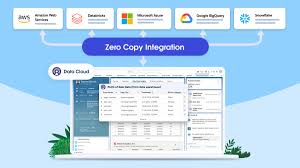
Simplifying Secure Data Access Across Clouds
In today’s data-driven world, secure and prompt access to information is crucial. However, with critical analytics data spread across various cloud vendors, achieving this expediency can be challenging.
Cross-cloud zero-copy data sharing doesn’t have to be complex. By leveraging your Autonomous Database, you can swiftly establish secure data sharing with your Salesforce CRM Data Stream in just seconds. This guide will walk you through the straightforward process of connecting your Salesforce CRM data to your Autonomous Database using the Salesforce CRM data connector type.
Requirements for Salesforce Integration
To connect Salesforce CRM data with your Autonomous Database, you’ll need the following:
- User Login Credentials
- User Security Token
- Organization Hostname – Fully qualified domain name
- Salesforce Data Streams – Configured with Salesforce CRM Data Connector Type
- Salesforce Data Stream Status – Should be ACTIVE
- Standard User Access – Profile privileges to access and read the data
1. Confirm Data Stream Configuration
On the Data Streams Dashboard, verify the Data Stream Name, Data Connector Type, and Data Stream Status.
2. Set Up Your Autonomous Database
Create Your Credentials:
sqlCopy codeBEGIN
  DBMS_CLOUD.CREATE_CREDENTIAL(
    credential_name => '<your credential name>',
    username => '<your salesforce log-in id>',
    password => '<your salesforce password>');
END;
/
Create Your Database Link:
sqlCopy codeBEGIN
  DBMS_CLOUD_ADMIN.CREATE_DATABASE_LINK(
    db_link_name => '<your database link name>',
    hostname => '<your host>.my.salesforce.com',
    port => '19937',
    service_name => 'salesforce',
    ssl_server_cert_dn => NULL,
    credential_name => '<your credential name>',
    gateway_params => JSON_OBJECT(
       'db_type' value 'salesforce',
       'security_token' value '<your security token>'));
END;
/
3. Check Connectivity Details
The HETEROGENEOUS_CONNECTIVITY_INFO view provides information on credential and database link requirements for external databases. For example:
sqlCopy codeSELECT database_type, required_port, sample_usage
FROM heterogeneous_connectivity_info
WHERE database_type = 'salesforce';
4. Demonstration: Connecting to Salesforce Data
Follow these steps to connect to your Salesforce CRM organization using the Salesforce Data Cloud Sales synthetic data in the Account_Home Data Stream:
- Confirm that your Data Stream is using the Salesforce CRM Data Connector Type and is in ACTIVE status.
- Use Data Cloud Data Explorer to validate the data.
- Connect to your Autonomous Database in Oracle Cloud Infrastructure (OCI) and launch SQLPLUS.
- Use SQLPLUS to check the
HETEROGENEOUS_CONNECTIVITY_INFOview for the Salesforce database type. - Attempt a SELECT statement on your Salesforce CRM Account_Home Data Lake object to ensure connectivity.
5. Set Up Connectivity
Using DBMS_CLOUD.CREATE_CREDENTIAL, create the necessary credentials to connect to Salesforce. Then, use DBMS_CLOUD_ADMIN.CREATE_DATABASE_LINK to establish the database link. Once configured, execute the SELECT statement against the ACCOUNT data to verify successful connection.
6. Utilize Zero-Copy Data Sharing
With zero-copy data access to the Salesforce CRM Data Lake ACCOUNT object, you can:
- Cross-Cloud Join: Identify local account representatives by joining the Salesforce CRM ACCOUNT shared object with a local
ACCOUNT_REPStable.sqlCopy codeSELECT a.emp_last_name, a.emp_first_name, a.emp_region, b.id, b.name, b.accountnumber, b.ownership, b.industry FROM account_reps a JOIN Account@mysalesforcelinkjpm b ON a.emp_region = b.billingcountry WHERE b.name LIKE '%Pyramid Construction%'; - Local Copy of Data: Create a local copy of the Salesforce CRM ACCOUNT Data Lake object using a CTAS statement.sqlCopy code
CREATE TABLE sfcrm_account_local AS SELECT ID, NAME, TYPE, BILLINGSTREET, BILLINGCITY, BILLINGSTATE, BILLINGPOSTALCODE, BILLINGCOUNTRY, SHIPPINGSTREET, SHIPPINGCITY, SHIPPINGSTATE, SHIPPINGPOSTALCODE, SHIPPINGCOUNTRY, PHONE, FAX, ACCOUNTNUMBER, INDUSTRY, NUMBEROFEMPLOYEES, OWNERSHIP, RATING FROM account@mysalesforcelinkjpm; - Materialized View: Keep a local version of the Salesforce CRM ACCOUNT Data Lake object in sync with the master by creating a cross-cloud MATERIALIZED VIEW.sqlCopy code
CREATE MATERIALIZED VIEW sfcrm_account_local_mv BUILD IMMEDIATE REFRESH FORCE ON DEMAND AS SELECT ID, ISDELETED, MASTERRECORDID, NAME, TYPE, PARENTID, BILLINGSTREET, BILLINGCITY, BILLINGSTATE, BILLINGPOSTALCODE, BILLINGCOUNTRY, BILLINGLATITUDE, BILLINGLONGITUDE, BILLINGGEOCODEACCURACY, SHIPPINGSTREET, SHIPPINGCITY, SHIPPINGSTATE, SHIPPINGPOSTALCODE, SHIPPINGCOUNTRY, SHIPPINGLATITUDE, SHIPPINGLONGITUDE, SHIPPINGGEOCODEACCURACY, PHONE, FAX, ACCOUNTNUMBER, WEBSITE, PHOTOURL, SIC, INDUSTRY, ANNUALREVENUE, NUMBEROFEMPLOYEES, OWNERSHIP, TICKERSYMBOL, RATING, SITE, OWNERID, CREATEDDATE, CREATEDBYID, LASTMODIFIEDDATE, LASTMODIFIEDBYID, SYSTEMMODSTAMP, LASTACTIVITYDATE, LASTVIEWEDDATE, LASTREFERENCEDDATE, JIGSAW, JIGSAWCOMPANYID, CLEANSTATUS, ACCOUNTSOURCE, DUNSNUMBER, TRADESTYLE, NAICSCODE, NAICSDESC, YEARSTARTED, SICDESC, DANDBCOMPANYID, OPERATINGHOURSID, CUSTOMERPRIORITY__C, SLA__C, ACTIVE__C, NUMBEROFLOCATIONS__C, UPSELLOPPORTUNITY__C, SLASERIALNUMBER__C, SLAEXPIRATIONDATE__C FROM account@mysalesforcelinkjpm;
Conclusion
As demonstrated, secure and efficient cross-cloud zero-copy data access can be straightforward. By following these simple steps, you can bypass cumbersome ETL operations and gain immediate, secure access to your Salesforce CRM data. This approach eliminates the overhead of complex data pipelines and provides you with real-time access to critical business data.

Who is Salesforce? Here is their story in their own words. From our inception, we've proudly embraced the identity of Read more

Salesforce Marketing Cloud Transactional Emails are immediate, automated, non-promotional messages crucial to business operations and customer satisfaction, such as order Read more

Salesforce has unveiled a comprehensive analytics solution tailored for wealth managers, home office professionals, and retail bankers, merging its Financial Read more

AI plays a crucial role in propensity score estimation as it can discern underlying patterns between treatments and confounding variables Read more





