Apex Archives - gettectonic.com - Page 4

How to Hire the Right Salesforce Developer

Maximizing Salesforce: How to Hire the Right Salesforce Developer Salesforce has revolutionized how businesses manage customer relationships, becoming a cornerstone for enhancing customer service and engagement. However, to fully leverage its potential, skilled professionals are needed to customize and develop the platform to meet specific business needs. Hiring the right Salesforce developer is crucial for ensuring your organization gets the most out of this powerful tool. In this guide, we’ll explore key considerations before hiring a Salesforce developer, the steps involved in the hiring process, and tips for effective Salesforce recruitment. How to Hire the Right Salesforce Developer. Understanding Salesforce Developer Roles Before diving into the hiring process, it’s essential to understand the different Salesforce roles: Your business needs may require a combination of these roles. Depending on the complexity of your Salesforce environment, you might need more than just a developer. Key Factors to Consider Before Hiring a Salesforce Developer The most critical factor when hiring a Salesforce developer is their skill set. Salesforce development requires deep knowledge of various technologies and tools. Key skills include: Assessing a candidate’s industry-specific experience can provide insight into their ability to address your business challenges. Salesforce certifications validate a professional’s expertise. Key certifications to look for include: These certifications provide assurance of the candidate’s competency. A strong Salesforce developer should not only possess technical skills but also understand business processes. Developers who can translate business requirements into technical solutions will drive business value. Salesforce development often involves troubleshooting complex issues. Assess a candidate’s problem-solving abilities through technical interviews or practical tests. Strong problem-solvers will be invaluable when unexpected challenges arise. Effective communication is vital for a Salesforce developer. They must explain technical concepts to non-technical stakeholders and document processes clearly for future maintenance. How to Hire the Right Salesforce Developer Start by defining the skills, experience, and certifications needed for the role. A well-defined job description will attract the right candidates. Create job postings that reflect the role’s responsibilities and qualifications. Use relevant keywords like “Salesforce job postings” and “Salesforce employment opportunities” to attract suitable candidates. Screen candidates based on their resumes and initial interviews, looking for a strong match between their experience and your job requirements. Evaluate candidates through practical tests to assess their Salesforce-specific coding skills and problem-solving abilities. Conduct multiple interview rounds: Salesforce Recruitment Tips Use platforms like LinkedIn and Salesforce-specific groups to find candidates and connect with the Salesforce community. Partnering with recruitment agencies that specialize in Salesforce roles can streamline the hiring process. Salesforce professionals are in high demand, so offering competitive salaries and benefits is key to attracting top talent. Identify candidates committed to professional development, as Salesforce is constantly evolving with new features and practices. Highlighting your company’s culture, values, and growth opportunities can attract top talent. Why Choose Tectonic – How to Hire the Right Salesforce Developer? Hiring the right Salesforce developer requires a thorough understanding of your business needs, a clear definition of the required skills, and a meticulous hiring process. By emphasizing these factors, you can ensure you recruit the right talent to drive your Salesforce initiatives. However many Salesforce projects don’t require a long term developer, business analyst, or project manager. Outsourcing these roles to Tectonic can provide a valuable savings in cost and improved project outcomes with a clean CRM in place from day one. At Tectonic, we take pride in being a leading Salesforce provider. Our team of certified Salesforce professionals is equipped with the skills and experience to meet your business demands. Whether you need a developer, administrator, or consultant, Tectonic’s rigorous recruiting process ensures we deliver the best talent. Partner with Tectonic to fully harness the potential of Salesforce and elevate your business to the next level. Contact us today to learn more about our Salesforce staffing solutions and how we can help you achieve your CRM goals. Like Related Posts Who is Salesforce? Who is Salesforce? Here is their story in their own words. From our inception, we’ve proudly embraced the identity of Read more Salesforce Marketing Cloud Transactional Emails Salesforce Marketing Cloud Transactional Emails are immediate, automated, non-promotional messages crucial to business operations and customer satisfaction, such as order Read more Salesforce Unites Einstein Analytics with Financial CRM Salesforce has unveiled a comprehensive analytics solution tailored for wealth managers, home office professionals, and retail bankers, merging its Financial Read more AI-Driven Propensity Scores AI plays a crucial role in propensity score estimation as it can discern underlying patterns between treatments and confounding variables Read more

Read More
Oracle Advertising Sundown

Oracle Advertising Sundown

Oracle Shifts Focus to B2B CX, Introduces New Fusion Cloud Features Despite winding down its online advertising products, Oracle is doubling down on its investment in customer experience (CX) technology, particularly in enabling B2B buying and supporting subscription and consumption models. During the Oracle CloudWorld conference on Wednesday, the company unveiled new capabilities for its Fusion Cloud Customer Experience and Unity Customer Data Platform. These enhancements empower Oracle CX users to analyze customer profiles to assemble B2B buying teams, leverage generative AI tools like native analytics, and utilize industry-specific accelerators to speed up the adoption of customer data tools. Key features include the ability to create self-service sites for individual accounts, enabling customers to review and summarize contracts using generative AI, receive quotes, and renew subscriptions. Other features enhance “assisted buying experiences,” blending self-service and human interaction, while tools like account onboarding and AI-powered email drafting simplify full-service sales processes. Subscription models, though still in their early stages for B2B, offer a streamlined alternative to traditional procurement processes. As Liz Miller, an analyst at Constellation Research, noted, subscription-based buying is easier and quicker, avoiding the lengthy procurement cycles many B2B buyers are familiar with. “The pain of traditional B2B buying is still fresh in everyone’s mind,” she said. Oracle Advertising Shuts Down Oracle’s advertising product support will end on September 30, as confirmed by CEO Safra Catz during the company’s June earnings call. The Oracle Advertising Data Management Platform (DMP), built from its BlueKai acquisition, is being retired, following in the footsteps of Salesforce, which discontinued its Audience Studio in 2021. Despite Oracle winding down its ad platform, this move shouldn’t be seen as a shift away from customer experience. Oracle founder Larry Ellison remains deeply involved in shaping the company’s CX strategy, with a focus on marketing tools and Apex low-code platforms, said Rob Pinkerton, Oracle’s senior vice president. Oracle’s modernized CX suite, built on the Fusion Cloud platform, has evolved significantly in recent years, though questions remain about whether it’s too late to regain market share. “Oracle as a CX platform has fallen off the radar for many buyers,” said Miller, adding that customers are no longer debating between Oracle, Microsoft, and Salesforce in the CX space. New Industry-Specific Tools for CX Oracle has also expanded its CX platform with industry-specific tools designed to accelerate the adoption of its customer data platform (CDP) across sectors such as high tech, manufacturing, professional services, telecommunications, utilities, financial services, travel, and retail. According to Rebecca Wettemann, CEO of research firm Valoir, Oracle’s Fusion platform has matured significantly and now supports the complexity of modern customer needs. Wettemann highlighted how common components like customer interaction summaries can be adapted for multiple industries, delivering faster results than traditional applications. Oracle’s Clinical Digital Assistant is one such example of this approach, illustrating the platform’s versatility and AI-driven enhancements. With these developments, Oracle continues to refine its CX offerings to better meet the unique demands of B2B customers, providing tools that streamline operations and enhance customer experiences across various industries. Like Related Posts Who is Salesforce? Who is Salesforce? Here is their story in their own words. From our inception, we’ve proudly embraced the identity of Read more Salesforce Marketing Cloud Transactional Emails Salesforce Marketing Cloud Transactional Emails are immediate, automated, non-promotional messages crucial to business operations and customer satisfaction, such as order Read more Salesforce Unites Einstein Analytics with Financial CRM Salesforce has unveiled a comprehensive analytics solution tailored for wealth managers, home office professionals, and retail bankers, merging its Financial Read more AI-Driven Propensity Scores AI plays a crucial role in propensity score estimation as it can discern underlying patterns between treatments and confounding variables Read more
Read More
Is Agentforce Different?

Is Agentforce Different?

The Salesforce hype machine is in full swing, with product announcements like Chatter, Einstein GPT, and Data Cloud, all positioned as revolutionary tools that promise to transform how we work. Is Agentforce Different? However, it’s often difficult to separate fact from fiction in the world of Salesforce. The cloud giant thrives on staying ahead of technological advancements, which means reinventing itself every year with new releases and updates. You could even say three times per year with the major releases. Why Enterprises Need Multiple Salesforce Orgs Over the past decade, Salesforce product launches have been hit or miss—primarily miss. Offerings like IoT Cloud, Work.com, and NFT Cloud have faded into obscurity. This contrasts sharply with Salesforce’s earlier successes, such as Service Cloud, the AppExchange, Force.com, Salesforce Lightning, and Chatter, which defined its first decade in business. One notable exception is Data Cloud. This product has seen significant success and now serves as the cornerstone of Salesforce’s future AI and data strategy. With Salesforce’s growth slowing quarter over quarter, the company must find new avenues to generate substantial revenue. Artificial Intelligence seems to be their best shot at reclaiming a leadership position in the next technological wave. Is Agentforce Different? While Salesforce has been an AI leader for over a decade, the hype surrounding last year’s Dreamforce announcements didn’t deliver the growth the company was hoping for. The Einstein Copilot Studio—comprising Copilot, Prompt Builder, and Model Builder—hasn’t fully lived up to expectations. This can be attributed to a lack of AI readiness among enterprises, the relatively basic capabilities of large language models (LLMs), and the absence of fully developed use cases. In Salesforce’s keynote, it was revealed that over 82 billion flows are launched weekly, compared to just 122,000 prompts executed. While Flow has been around for years, this stat highlights that the use of AI-powered prompts is still far from mainstream—less than one prompt per Salesforce customer per week, on average. When ChatGPT launched at the end of 2022, many predicted the dawn of a new AI era, expecting a swift and dramatic transformation of the workplace. Two years later, it’s clear that AI’s impact has yet to fully materialize, especially when it comes to influencing global productivity and GDP. However, Salesforce’s latest release feels different. While AI Agents may seem new to many, this concept has been discussed in AI circles for decades. Marc Benioff’s recent statements during Dreamforce reflect a shift in strategy, including a direct critique of Microsoft’s Copilot product, signaling the intensifying AI competition. This year’s marketing strategy around Agentforce feels like it could be the transformative shift we’ve been waiting for. While tools like Salesforce Copilot will continue to evolve, agents capable of handling service cases, answering customer questions, and booking sales meetings instantly promise immediate ROI for organizations. Is the Future of Salesforce in the Hands of Agents? Despite the excitement, many questions remain. Are Salesforce customers ready for agents? Can organizations implement this technology effectively? Is Agentforce a real breakthrough or just another overhyped concept? Agentforce may not be vaporware. Reports suggest that its development was influenced by Salesforce’s acquisition of Airkit.AI, a platform that claims to resolve 90% of customer queries. Salesforce has even set up dedicated launchpads at Dreamforce to help customers start building their own agents. Yet concerns remain, especially regarding Salesforce’s complexity, technical debt, and platform sprawl. These issues, highlighted in this year’s Salesforce developer report, cannot be overlooked. Still, it’s hard to ignore Salesforce’s strategic genius. The platform has matured to the point where it offers nearly every functionality an organization could need, though at times the components feel a bit disconnected. For instance: Salesforce is even hinting at usage-based pricing, with a potential $2 charge per conversation—an innovation that could reshape their pricing model. Will Agents Be Salesforce’s Key to Future Growth? With so many unknowns, only time will tell if agents will be the breakthrough Salesforce needs to regain the momentum of its first two decades. Regardless, agents appear to be central to the future of AI. Leading organizations like Copado are also launching their own agents, signaling that this trend will define the next phase of AI innovation. In today’s macroeconomic environment, where companies are overstretched and workforce demands are high, AI’s ability to streamline operations and improve customer service has never been more critical. Whoever cracks customer service AI first could lead the charge in the inevitable AI spending boom. We’re all waiting to see if Salesforce has truly cracked the AI code. But one thing is certain: the race to dominate AI in customer service has begun. And Salsesforce may be at the forefront. Like Related Posts Who is Salesforce? Who is Salesforce? Here is their story in their own words. From our inception, we’ve proudly embraced the identity of Read more Salesforce Marketing Cloud Transactional Emails Salesforce Marketing Cloud Transactional Emails are immediate, automated, non-promotional messages crucial to business operations and customer satisfaction, such as order Read more Salesforce Unites Einstein Analytics with Financial CRM Salesforce has unveiled a comprehensive analytics solution tailored for wealth managers, home office professionals, and retail bankers, merging its Financial Read more AI-Driven Propensity Scores AI plays a crucial role in propensity score estimation as it can discern underlying patterns between treatments and confounding variables Read more
Read More
Agentforce Advances Copilot and Prompt Builder

Agentforce Advances Copilot and Prompt Builder

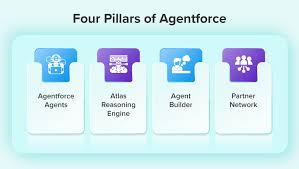
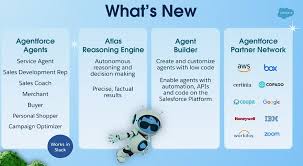
Agentforce was the highlight of the week in San Francisco during Salesforce’s annual Dreamforce conference—and for good reason! Agentforce Advances Copilot and Prompt Builder and that is truly exciting. Agentforce represents a groundbreaking solution that promises to transform how individuals and organizations interact with their CRM. However, as with any major product announcement, it raises many questions. This was evident during Dreamforce, where admins and developers, eager to dive into Agentforce, had numerous queries. Here’s an in-depth look at what Agentforce is, how it operates, and how organizations can leverage it to automate processes and drive value today. Agentforce Advances Copilot and Prompt Builder Many Dreamforce attendees who anticipated hearing more about Einstein Copilot were surprised by the introduction of Agents just before the event. However, understanding the distinctions between the legacy Einstein Copilot and the new Agentforce is crucial. Agentforce Advances Copilot and Prompt Builder. Agentforce Agents are essentially a rebranding of Copilot Agents but with an essential enhancement: they expand the functionality of Copilot to create autonomous agents capable of tasks such as summarizing or generating content and taking specific actions. Here are some key changes in terminology: Just like Einstein Copilot, Agents use user input—an “utterance”—entered into the Agentforce chat interface. The agent translates this utterance into a series of actions based on configurable instructions, and then executes the plan, providing a response. Understanding Agents: Topics A key difference between Einstein Copilot and Agentforce is the addition of “Topics.” Topics allow for greater flexibility and support a broader range of actions. They organize tasks by business function, helping Agents first determine the appropriate topic and then identify the necessary actions. This topic layer reduces confusion and ensures the correct action is taken. With this structure, Agentforce can support many more custom actions compared to Copilot’s 15-20, significantly expanding capabilities. Understanding Agents: Actions Actions in Agentforce function similarly to those in Einstein Copilot. These are the tasks an agent executes once it has identified the right plan. Out-of-the-box actions are available right away, providing a quick win for organizations looking to implement standard actions like opportunity summarization or sales emails. For more customized use cases, organizations can create bespoke actions using Apex, Flows, Prompts, or Service Catalog items (currently in beta). Understanding Agents: Prompts Whenever an LLM is used, prompts are necessary to provide the right input. Thoughtfully engineered prompts are essential for getting accurate, useful responses from LLMs. This is a key part of leveraging Agent Actions effectively, ensuring better results, reducing errors, and driving productive agent behavior. Prompt Builder plays a crucial role, allowing users to build, test, and refine prompts for Agent Actions, creating a seamless experience between generative AI and Salesforce workflows. How Generative AI and Agentforce Enhance CRM GenAI tools like Agentforce offer exciting enhancements to Salesforce organizations in several ways: However, these benefits are realized only when CRM users adopt and adapt to AI-assisted workflows. Organizations must prioritize change management and training, as most users will need to adjust to this new AI-powered way of working. If your company has already embraced AI, then you are halfway there. If AI hasn’t been introduced to the workforce you need to get started yesterday. Getting Started with Agentforce With all the buzz around Dreamforce, it’s no surprise that many organizations are eager to start using Agentforce. Fortunately, there are immediate opportunities to leverage these tools. The recommended approach is to begin with standard Agent actions, testing out-of-the-box features like opportunity summarization or creating close plans. From there, organizations can make incremental tweaks to customize actions for their specific needs. We have all come to expect that just as quickly as we include agentic ai into our processes and flows, Salesforce will add additional features and capabilities. As teams become more familiar with developing and deploying Agent actions, more complex use cases will become manageable, transforming the traditional point-and-click Salesforce experience into a more intelligent, agent-driven platform. Already I find myself asking, “is this an agent person or an ai-agent”? The day is coming, no doubt, when the question will be reversed. Tectonic’s AI Experts Can Help Interested in learning more about Agentforce or need guidance on getting started? Tectonic specializes in AI and analytics solutions within CRM, helping organizations unlock significant productivity gains through AI-based tools that optimize business processes. We are excited to enable you to enable Agentforce to Advance Copilot and Prompt Builder By Tectonic’s Solutions Architect, Shannan Hearne Like1 Related Posts Who is Salesforce? Who is Salesforce? Here is their story in their own words. From our inception, we’ve proudly embraced the identity of Read more Salesforce Marketing Cloud Transactional Emails Salesforce Marketing Cloud Transactional Emails are immediate, automated, non-promotional messages crucial to business operations and customer satisfaction, such as order Read more Salesforce Unites Einstein Analytics with Financial CRM Salesforce has unveiled a comprehensive analytics solution tailored for wealth managers, home office professionals, and retail bankers, merging its Financial Read more AI-Driven Propensity Scores AI plays a crucial role in propensity score estimation as it can discern underlying patterns between treatments and confounding variables Read more

Read More
Visualforce Pages in Salesforce

Visualforce Pages in Salesforce

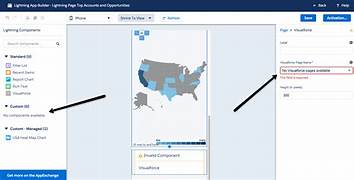
Visualforce Pages in Salesforce Visualforce Pages in Salesforce function as custom web pages that you can design to present data and functionality tailored to your organization’s needs. They offer a way to create and display information in a format that fits your specific requirements. Why Visualforce Pages Matter Visualforce Pages enable you to showcase data in unique ways, making them ideal for presenting information that doesn’t fit into the standard Salesforce interface. By customizing the layout and behavior of these pages, you can ensure the data and features are displayed in a way that best supports your organization’s goals. How Visualforce Pages Function Visualforce Pages are developed using a combination of HTML, Apex, and Visualforce components: Common Use Cases Visualforce Pages can be utilized for: Example of a Visualforce Page Here’s a basic example of a Visualforce Page: htmlCopy code<apex:page controller=”MyController”> <h1>Welcome to My Custom Page</h1> <apex:outputText value=”{!customMessage}” /> <apex:commandButton action=”{!doSomething}” value=”Click Me” /> </apex:page> Writing Apex CodeIn this example, the page displays a title, a custom message from the server using Apex, and a button that performs a server-side action when clicked. Visualforce Pages offer a robust method for enhancing and personalizing your Salesforce experience. They enable you to create user-friendly interfaces, display customized data, and integrate external services, providing tailored solutions that address your organization’s specific needs. Like Related Posts Who is Salesforce? Who is Salesforce? Here is their story in their own words. From our inception, we’ve proudly embraced the identity of Read more Salesforce Marketing Cloud Transactional Emails Salesforce Marketing Cloud Transactional Emails are immediate, automated, non-promotional messages crucial to business operations and customer satisfaction, such as order Read more Salesforce Unites Einstein Analytics with Financial CRM Salesforce has unveiled a comprehensive analytics solution tailored for wealth managers, home office professionals, and retail bankers, merging its Financial Read more AI-Driven Propensity Scores AI plays a crucial role in propensity score estimation as it can discern underlying patterns between treatments and confounding variables Read more

Read More
Strong AI Scalability

Strong AI Scalability

The rapid pace of digital transformation has made scalability essential for any business looking to remain competitive. The stakes are high—without the ability to scale, businesses risk falling behind as customer demands and market conditions shift. So, what does it take to build a scalable business that can grow without compromising performance or customer satisfaction? In this Tectonic insight, we’ll cover key steps to future-proof your operations, avoid common pitfalls, and ensure your business doesn’t just keep pace with the market, but leads it. Master Scalability with Scale Center Scalability doesn’t have to be overwhelming. Salesforce’s Scale Center, available on Trailhead, provides a comprehensive learning path to help you optimize your scalability strategy. Why Scalability Is a Must-Have Scalability is critical to long-term success. As your business grows, so will the demands on your applications, infrastructure, and resources. If your systems aren’t prepared, you risk performance issues, outages, lost revenue, and dissatisfied customers. Unexpected spikes in demand—from increased customer activity or internal changes like onboarding large numbers of employees—can push systems to their limits, leading to overloads or downtime. A strong scalability plan helps prevent these issues. Here are three best practices to help scale your operations smoothly and sustainably. 1. Prioritize Proactive Scale Testing Scale testing should be a key part of your application lifecycle. Many businesses wait until performance issues arise before addressing them, which can result in maintenance headaches, poor user experiences, and challenges in supporting growth. Proactive steps to take: 2. Use the Right Tools for Seamless Scalability Choosing the right technology is crucial when scaling your business. Equip your team with tools that support growth management, and follow these tips for success: By integrating the right tools and technologies, you’ll not only stay ahead of the curve but also build a culture ready to scale. 3. Focus on Sustainable Growth Strategies Scaling requires a long-term approach. From development to deployment, a strategy that emphasizes scalability from the outset can help you avoid costly fixes down the road. Key practices include: DevOps Done Right Building secure, scalable AI applications and agents requires bridging the gap between tools and skills. Focus on crafting a thoughtful DevOps strategy that supports scalability. Scalability: A Marathon, Not a Sprint Scaling effectively is an ongoing process. Customer needs and market conditions will continue to change, so your strategies should evolve as well. Scalability is about more than just handling increased demand—it’s about ensuring stability and performance across the board. Consider these steps to enhance your approach: Committing to Scalability Scalability isn’t a one-time achievement—it’s a continuous commitment to growing smarter and stronger across all areas of your business. By embedding best practices into your day-to-day operations, you’ll ensure that your systems meet demand and prepare your business for future breakthroughs. As you develop your scalability strategy, remember that customer experience and trust should always guide your decisions. Tackling scalability proactively ensures your business can thrive no matter how market conditions change. It’s more than just a bonus feature—it’s a critical element of a smoother user experience, reduced costs, and the flexibility to pivot when necessary. By embracing these strategies, you’ll not only avoid potential challenges but also build lasting trust with your customers. In a world where loyalty is earned through exceptional experiences, a strong scalability plan is your key to long-term success. Like Related Posts Who is Salesforce? Who is Salesforce? Here is their story in their own words. From our inception, we’ve proudly embraced the identity of Read more Salesforce Marketing Cloud Transactional Emails Salesforce Marketing Cloud Transactional Emails are immediate, automated, non-promotional messages crucial to business operations and customer satisfaction, such as order Read more Salesforce Unites Einstein Analytics with Financial CRM Salesforce has unveiled a comprehensive analytics solution tailored for wealth managers, home office professionals, and retail bankers, merging its Financial Read more AI-Driven Propensity Scores AI plays a crucial role in propensity score estimation as it can discern underlying patterns between treatments and confounding variables Read more

Read More
Change The Flow

Change The Flow

Salesforce has long been a leader in providing tools to automate business processes, with Workflow Rules and Process Builder as the go-to solutions for many organizations. However, as business demands grow more complex, Salesforce has introduced Flow—a more powerful and flexible automation tool that’s quickly becoming the standard. This insight will explore the key differences between Salesforce Flow, Process Builder, and Workflow Rules, and why Flow is considered the future of Salesforce automation. Workflow Rules: The Foundation of Salesforce Automation For years, Workflow Rules served as a reliable tool for automating basic tasks in Salesforce. Based on simple “if/then” logic, Workflow Rules automate actions such as sending email alerts, updating fields, and creating tasks. While effective for straightforward needs, Workflow Rules have significant limitations. They can’t create or update related records, and each rule can only trigger a single action—constraints that hinder more complex business processes. Process Builder: A Step Up in Complexity and Functionality Process Builder was introduced as a more advanced alternative to Workflow Rules, offering a visual interface that simplifies building automations. It allows for multiple actions to be triggered by a single event and supports more complex logic, including branching criteria. Process Builder also introduces a broader set of actions, such as creating records, posting to Chatter, and invoking Apex code. However, as businesses pushed Process Builder’s capabilities, its limitations in terms of performance and scalability became clear. Salesforce Flow: The Future of Automation Salesforce Flow combines the capabilities of both Workflow Rules and Process Builder while introducing powerful new features. Flows can automate nearly any process within Salesforce, from simple tasks like updating records to intricate workflows involving multiple objects and even external systems. Flow can be triggered by a variety of events, including record changes, scheduled times, and platform events, providing far more flexibility than its predecessors. One of Flow’s key strengths is its versatility. It can include screen elements for user interaction or run entirely in the background, making it suitable for a wide range of use cases. Whether automating internal processes or creating customer-facing applications, Flow’s adaptability shines. Salesforce continues to enhance Flow, closing the feature gaps that once existed between Flow and the older automation tools. This, coupled with a clear migration path, makes Flow the logical choice for the future. Why Salesforce Flow is the Way Forward Salesforce has already announced plans to retire Workflow Rules and Process Builder in favor of Flow, signaling a shift toward a more unified and scalable automation platform. Businesses still relying on the older tools should transition to Flow sooner rather than later. Not only will this ensure continued support and access to new features, but it will also allow organizations to leverage Salesforce’s most advanced automation tool. When comparing Salesforce Flow vs. Process Builder and Workflow Rules, it’s evident that Flow offers the most robust, flexible, and future-proof solution. Its ability to handle complex processes and its continuous enhancements make it the ideal choice for modern businesses. As Salesforce phases out Workflow Rules and Process Builder, migrating to Flow will equip your organization with the latest in automation capabilities. Ready to Make the Switch? Start exploring Salesforce Flow today and discover how it can transform your business processes for the better. Contact Tectonic for assistance. Like Related Posts Who is Salesforce? Who is Salesforce? Here is their story in their own words. From our inception, we’ve proudly embraced the identity of Read more Salesforce Marketing Cloud Transactional Emails Salesforce Marketing Cloud Transactional Emails are immediate, automated, non-promotional messages crucial to business operations and customer satisfaction, such as order Read more Salesforce Unites Einstein Analytics with Financial CRM Salesforce has unveiled a comprehensive analytics solution tailored for wealth managers, home office professionals, and retail bankers, merging its Financial Read more AI-Driven Propensity Scores AI plays a crucial role in propensity score estimation as it can discern underlying patterns between treatments and confounding variables Read more

Read More

When to use Flow

When and Why Should You Use a Flow in Salesforce? Flow is Salesforce’s premier tool for creating configurable automation and guided user experiences. If you need to build a process that doesn’t require the complexity of Apex code, Flow should be your go-to solution. It’s versatile, user-friendly, and equipped to handle a wide range of business automation needs. Legacy tools like Process Builder and Workflow Rules are being phased out, with support ending in December 2025. While you may choose to edit existing automations in these tools temporarily, migrating to Flow should be a top priority for future-proofing your Salesforce org. Capabilities of FlowFlows allow you to: When Should You Avoid Using a Flow?Although Flow is powerful, it’s not the right choice in every scenario. Here are situations where it may not be suitable: Creating a Flow in Salesforce Pro Tips for Flow Building Flow vs. Apex: Which to Choose?Flows are simpler, faster to deploy, and accessible to admins without coding expertise. Apex, on the other hand, is suited for complex use cases requiring advanced logic or integrations. Here’s when Apex should be used instead: Why Flows Are the FutureSalesforce has positioned Flow as the central automation tool by deprecating Workflow Rules and Process Builder. With every release, Flow’s capabilities expand, making it easier to replace tasks traditionally requiring Apex. For instance: Final ThoughtsSalesforce admins should prioritize building and migrating automation to Flow. It’s a scalable and admin-friendly tool that ensures your org stays up-to-date with Salesforce’s evolving ecosystem. Whether you’re automating basic processes or tackling complex workflows, Flow provides the flexibility to meet your needs. Like Related Posts Who is Salesforce? Who is Salesforce? Here is their story in their own words. From our inception, we’ve proudly embraced the identity of Read more Salesforce Marketing Cloud Transactional Emails Salesforce Marketing Cloud Transactional Emails are immediate, automated, non-promotional messages crucial to business operations and customer satisfaction, such as order Read more Salesforce Unites Einstein Analytics with Financial CRM Salesforce has unveiled a comprehensive analytics solution tailored for wealth managers, home office professionals, and retail bankers, merging its Financial Read more AI-Driven Propensity Scores AI plays a crucial role in propensity score estimation as it can discern underlying patterns between treatments and confounding variables Read more

Read More
Loan Boarding and Approval

Loan Boarding and Approval

Streamlining Loan Boarding and Approval Processes with Salesforce Technology The financial services industry is undergoing a rapid transformation, driven by the need for greater efficiency and improved customer experiences. One area where this shift is particularly evident is in the loan boarding and approval processes. Leveraging Salesforce technology, financial institutions can streamline these essential workflows, enhancing both speed and accuracy while delivering a superior borrower experience. Understanding Loan Boarding Loan boarding is the process of transitioning a loan from its origination phase into servicing. This involves several key steps, including data entry, document management, and compliance checks. Traditionally, this process has been manual, cumbersome, and prone to errors. However, Salesforce offers robust capabilities that allow organizations to automate and optimize these tasks, significantly reducing inefficiencies. Automating Data Entry Salesforce facilitates automated data entry through its customizable forms and integration capabilities. Tools like Salesforce Flow and Apex enable businesses to create workflows that automatically populate fields based on predefined criteria or data extracted from documents using Optical Character Recognition (OCR) technology. This automation reduces manual errors and accelerates the loan boarding process. Efficient Document Management Effective document management is crucial in loan boarding. Salesforce provides a centralized platform for secure storage and easy access to all necessary documents. Features like Salesforce Files enable organizations to manage documentation efficiently, allowing for easy retrieval, sharing, and version control. This streamlined document management ensures that all relevant information is readily available throughout the loan lifecycle. Streamlining Handoff and Approval Processes After a loan is boarded, it must go through a series of approvals before disbursement. The handoff between departments such as underwriting and risk assessment can cause delays if not properly managed. Salesforce’s collaborative tools facilitate seamless communication among stakeholders, ensuring a smooth transition through the approval process. Customizable Approval Workflows Salesforce allows for the creation of customizable approval workflows, enabling organizations to define specific criteria for each stage of loan approval. This flexibility ensures that loans are reviewed by the appropriate personnel based on their complexity or risk profile. Automated alerts notify relevant team members when their input is needed, minimizing bottlenecks and keeping the process moving efficiently. Enhanced Visibility with Real-Time Dashboards One of Salesforce’s standout features is its ability to generate real-time dashboards that provide insights into various stages of the loan process. Stakeholders can monitor key metrics, such as the average time for approvals or the number of loans pending at each stage, through intuitive visualizations. This transparency promotes quicker decision-making and fosters accountability within the team. Seamless Disbursement Process Once loans are approved, the disbursement phase is the next critical step. Salesforce’s integration capabilities with payment processing systems, such as NACHA/ACH solutions, allow organizations to automate fund transfers directly within the platform, streamlining the disbursement process. Automating Payment Processing Automated triggers for payments can be set up within Salesforce, reducing the need for manual intervention. This automation speeds up the disbursement process and minimizes the risk of errors associated with manual data entry during fund transfers, ensuring a smooth and reliable process. Comprehensive Portfolio Management Managing a large loan portfolio requires meticulous tracking of various elements, including amortization schedules, repayments, interest accruals, and fees. Salesforce excels in these areas, offering tools to manage all aspects of a loan portfolio effectively. Dynamic Amortization and Repayment Schedules Salesforce enables the creation of dynamic amortization schedules tailored to individual borrower agreements, easily accessible via custom borrower portals. These portals enhance borrower engagement by providing real-time information about repayment obligations and remaining balances, improving transparency and customer satisfaction. Fee Automation Automating fee calculations within Salesforce reduces administrative burdens and ensures accurate billing according to agreed-upon terms. This feature helps avoid discrepancies and delays, providing a seamless experience for both the lender and the borrower. Risk Management and Collections In today’s volatile economic environment, effective risk management is essential for financial institutions. Salesforce’s advanced analytics and performance rating tools allow organizations to proactively identify potential risks before they escalate, enabling more informed lending decisions. Performance and Risk Ratings By analyzing historical data, Salesforce enables lenders to assign risk ratings based on borrowers’ past behaviors and external market conditions. This data-driven approach supports more accurate and strategic lending decisions, helping to mitigate risk. Effective Collections Strategies For overdue accounts, Salesforce’s task management features automate reminders and follow-ups, ensuring timely communication and effective debt recovery. Maintaining open communication channels with borrowers during the collections process is crucial for preserving relationships and achieving successful outcomes. Conclusion: Embracing Digital Transformation By embracing digital transformation through Salesforce technology, financial institutions can significantly streamline their loan boarding and approval processes. This not only enhances operational efficiency but also positions them competitively in a tech-driven marketplace, delivering the high-quality service that today’s consumers demand. Salesforce’s powerful tools enable institutions to meet the unique needs of their borrowers effectively, ensuring both efficiency and excellence in service delivery. Like Related Posts Who is Salesforce? Who is Salesforce? Here is their story in their own words. From our inception, we’ve proudly embraced the identity of Read more Salesforce Marketing Cloud Transactional Emails Salesforce Marketing Cloud Transactional Emails are immediate, automated, non-promotional messages crucial to business operations and customer satisfaction, such as order Read more Salesforce Unites Einstein Analytics with Financial CRM Salesforce has unveiled a comprehensive analytics solution tailored for wealth managers, home office professionals, and retail bankers, merging its Financial Read more AI-Driven Propensity Scores AI plays a crucial role in propensity score estimation as it can discern underlying patterns between treatments and confounding variables Read more

Read More
Winter 25 Release Notes

Winter 25 Release Notes

The Winter ’25 release is available through the pre-release program. On August 30, 2024, Sandboxes will be upgraded, providing your organization with the Winter ’25 release experience. Set Up Your Pay Now Store Quickly and Easily Use the streamlined automated setup to get your Pay Now store up and running effortlessly. The guided process walks you through each step needed to configure your store. This feature is available in Salesforce Payments for Enterprise, Unlimited, and Developer editions. How to Set Up: Gain Insight into How User Permissions Are Granted Simplify user management with visibility into the profiles, permission sets, and permission set groups that grant permissions to a user. The User Access Summary now provides detailed information about a user’s assigned object, field, user, and custom permissions. Previously, identifying the source of a user’s permissions required multiple steps, but now you can access this information with just a few clicks. This change applies to Lightning Experience in all editions. How to Use: See How Object Access Is Granted in Object Manager Quickly view the permission sets, permission set groups, and profiles that grant access to an object, along with the level of access provided. The read-only Object Access Summary in Object Manager allows for quick checks during troubleshooting, reviews, or when deciding how to grant user access. This update is available in Lightning Experience across all editions. How to Access: Improve Performance for List Views on Custom and Standard Objects To enhance performance and meet the latest accessibility standards, list views for both custom and standard objects now render using Lightning Web Components (LWC) instead of Aura. LWC, Salesforce’s latest framework, delivers data faster and enables new features for list views. Previously, only custom object list views in sandboxes used LWC. This update applies to Lightning Experience in all editions. How to Use: Configure Record Highlights in Lightning App Builder Enhance your Lightning pages with the new Dynamic Highlights Panel, which lets you configure important fields directly within the Lightning App Builder. Previously, this was only possible through compact layouts in Setup. The Dynamic Highlights Panel can hold up to 12 fields and adjusts responsively to browser size. This feature is available in Group, Professional, Enterprise, Performance, Unlimited, and Developer editions. How to Implement: Make Record Fields Stand Out with Conditional Formatting Highlight key information on record pages using conditional formatting in Lightning App Builder. On Dynamic Forms-enabled pages, you can assign custom icons and colors to fields based on defined criteria, such as field values or other conditions on the page. This feature is available on a rolling basis starting in early September 2024 for Group, Professional, Enterprise, Performance, Unlimited, and Developer editions. How to Use: Save Time with New Messaging Components for Enhanced Bots (Generally Available) Empower customers and save service agents’ time with the new messaging components for enhanced bots. These include authentication, custom, form, and payment messaging components, which can handle more complex use cases on enhanced Apple Messages for Business channels. The form component is also available for Messaging for In-App and Web. These updates apply to Lightning Experience and Salesforce Classic in Enterprise, Performance, Unlimited, and Developer editions, with bot setup available only in Lightning Experience. How to Implement: Enhance Your LWR Site Experience by Curating Data Providers on a Page (Beta) Enhance LWR site pages by adding and configuring data providers in Experience Builder. This feature allows you to access data from different sources, such as Apex or Record data providers, directly within your site page and its components. This change is available in Professional, Enterprise, Unlimited, and Developer editions for LWR sites accessed through Lightning Experience. A community license is required to use this feature. How to Use: To configure data providers on an LWR Site page in Experience Builder: Enabling or Disabling Modernized Record Experience in Aura Sites You can now use upgraded record components based on Lightning web component technology to see stylistic changes in your Aura sites. These updates, previously limited to sandbox environments, are now available in production environments for the Create Record Form, Record Banner, and Record Detail components. This update is applicable to Aura sites accessed through Lightning Experience and Salesforce Classic in Enterprise, Performance, Unlimited, and Developer editions. When you enable the Use Lightning web components on your record pages in Aura sites setting, the Create Record Form, Record Banner, and Record Detail components display minor style changes. Some key updates include: Daily Summary of Service Appointments Requiring Immediate Attention Boost dispatcher productivity by using Einstein Copilot Field Service actions to get a daily summary of service appointments needing immediate attention, such as those with rule violations, overlaps, SLA risks, or emergencies. Each category in the summary is converted into a filter in the appointment list for quick resolution. Customize the summary to include additional categories. This feature is available in Lightning Experience in the Einstein 1 Field Service Edition with the Field Service Managed Package installed. To use this feature: Assigning Opportunity Splits to Territories Sales teams can now assign opportunity splits and opportunity product splits to territories, enabling them to report on how territories contribute to overall sales. Previously, splits could only be associated with the parent opportunity’s territory. Now, teams can also forecast based on split amounts across territories. This update applies to Lightning Experience in Enterprise, Performance, Unlimited, and Developer editions. To enable this feature: Strategic Planning with Account Plan Enhance your strategic planning with Account Plans by nurturing existing relationships and growing key accounts. Use Account Plans to research and analyze accounts, set objectives with actionable metrics, and monitor growth and development from a single repository within Salesforce. This feature applies to Lightning Experience in Enterprise, Performance, and Unlimited editions and in Einstein 1 Sales Edition. This feature will be rolled out to production environments after the Winter ’25 release and will be available to all customers by October 29, 2024. It is accessible in sandboxes only after its production release. To use Account Plans: Forecast Submissions Forecast submissions

Read More
gettectonic.com