Apex Archives - gettectonic.com - Page 8
Configuring Revenue Management

Configuring Revenue Management

Configuring Revenue Management for Automated Population of Recognition Templates and GLAs Revenue Management can be set up to automatically populate the recognition template and GLAs on your source records based on their revenue recognition treatment. How It Works Revenue Management assigns the correct recognition template to a source record by following these steps: Setting Up the Flow To use this functionality, you must build a Salesforce flow that triggers an Apex action. Follow these steps to create a flow for each source object: Below is an outline for creating a flow for the Order Product (OrderItem) source object: Creating the Flow for Order Product (OrderItem) The flow will trigger when you save or update an order product that meets the conditions for inclusion in recognition processes. Repeat for Other Source Objects Repeat the above procedure to create flows for each of the remaining source objects: Invoice Line, Credit Note Line, and Usage Summary (if used). Ready? By following these steps, you can efficiently configure Revenue Management to automate the population of recognition templates and GLAs, streamlining your revenue recognition processes. Like1 Related Posts Who is Salesforce? Who is Salesforce? Here is their story in their own words. From our inception, we’ve proudly embraced the identity of Read more Salesforce Marketing Cloud Transactional Emails Salesforce Marketing Cloud Transactional Emails are immediate, automated, non-promotional messages crucial to business operations and customer satisfaction, such as order Read more Salesforce Unites Einstein Analytics with Financial CRM Salesforce has unveiled a comprehensive analytics solution tailored for wealth managers, home office professionals, and retail bankers, merging its Financial Read more AI-Driven Propensity Scores AI plays a crucial role in propensity score estimation as it can discern underlying patterns between treatments and confounding variables Read more

Read More
Salesforce Webhooks

What Are Salesforce Webhooks?

Salesforce webhooks are a real-time communication method that allows Salesforce to send notifications to external applications when specific events occur: Webhooks are event-driven, meaning they are sent automatically when an event is triggered in the source system. They can be used to: Integrate data in real-time, Send data back into Salesforce, Facilitate data flowing into Salesforce, and Trigger actions and workflows in external systems. Webhooks can streamline business processes and reduce the need for manual intervention. They can be set up using Salesforce Sites or Experience Cloud.  To set up webhooks in Salesforce, you can: Content updated November 2024. Like Related Posts Who is Salesforce? Who is Salesforce? Here is their story in their own words. From our inception, we’ve proudly embraced the identity of Read more Salesforce Marketing Cloud Transactional Emails Salesforce Marketing Cloud Transactional Emails are immediate, automated, non-promotional messages crucial to business operations and customer satisfaction, such as order Read more Salesforce Unites Einstein Analytics with Financial CRM Salesforce has unveiled a comprehensive analytics solution tailored for wealth managers, home office professionals, and retail bankers, merging its Financial Read more AI-Driven Propensity Scores AI plays a crucial role in propensity score estimation as it can discern underlying patterns between treatments and confounding variables Read more

Read More
Salesforce Document Generation

Apex Salesforce

Apex is a strongly typed, object-oriented programming language that enables developers to execute flow and transaction control statements on Salesforce servers in conjunction with calls to the API. Using syntax that looks like Java and acts like database stored procedures, Apex helps developers add business logic to most system events, including button clicks, related record updates, and Visualforce pages. Apex Salesforce code can be initiated by Web service requests and from triggers on objects. As a language, Apex is: Integrated Apex provides built-in support for common Lightning Platform idioms, including: Easy to use Apex is based on familiar Java idioms, such as variable and expression syntax, block and conditional statement syntax, loop syntax, object and array notation. Where Apex introduces new elements, it uses syntax and semantics that are easy to understand and encourage efficient use of the Lightning Platform. Apex produces code that is both succinct and easy to write. Data focused Apex Salesforce is designed to thread together multiple query and DML statements into a single unit of work on the Salesforce server. Developers use database stored procedures to thread together multiple transaction statements on a database server in a similar way. Like other database stored procedures, Apex does not attempt to provide general support for rendering elements in the user interface. Rigorous Apex is a strongly typed language that uses direct references to schema objects such as object and field names. It fails quickly at compile time if any references are invalid. It stores all custom field, object, and class dependencies in metadata to ensure that they are not deleted while required by active Apex code. Hosted Apex is interpreted, executed, and controlled entirely by the Lightning Platform. Multi Tenant aware Like the rest of the Lightning Platform, Apex runs in a multitenant environment. So, the Apex runtime engine is designed to guard closely against runaway code, preventing it from monopolizing shared resources. Any code that violates limits fails with easy-to-understand error messages. Easy to test Apex provides built-in support for unit test creation and execution. It includes test results that indicate how much code is covered, and which parts of your code could be more efficient. Salesforce ensures that all custom Apex code works as expected by executing all unit tests prior to any platform upgrades. Versioned You can save your Apex code against different versions of the API. This enables you to maintain behavior. Apex is included in Salesforce Performance Edition, Unlimited Edition, Developer Edition, Enterprise Edition, and Database.com. Like Related Posts Who is Salesforce? Who is Salesforce? Here is their story in their own words. From our inception, we’ve proudly embraced the identity of Read more Salesforce Marketing Cloud Transactional Emails Salesforce Marketing Cloud Transactional Emails are immediate, automated, non-promotional messages crucial to business operations and customer satisfaction, such as order Read more Salesforce Unites Einstein Analytics with Financial CRM Salesforce has unveiled a comprehensive analytics solution tailored for wealth managers, home office professionals, and retail bankers, merging its Financial Read more AI-Driven Propensity Scores AI plays a crucial role in propensity score estimation as it can discern underlying patterns between treatments and confounding variables Read more

Read More
Sensitive Information De-identification

Sensitive Information De-identification

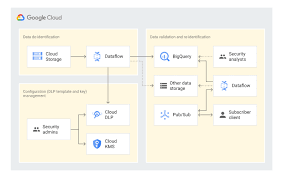
Using Google Cloud Data Loss Prevention with Salesforce for Sensitive Data Handling This insight discusses the transition from detecting and classifying sensitive data to preventing data loss using Google Cloud Data Loss Prevention (DLP). Sensitive Information De-identification for Salesforce is used as the data source to demonstrate how personal, health, credential, and financial information can be de-identified in unstructured data in near real-time. Overview of Google Cloud DLP Google Cloud DLP is a fully managed service designed to help discover, classify, and protect sensitive data. It easily transitions from detection to prevention by offering services that mask sensitive information and measure re-identification risk. Objective The goal was to demonstrate the ability to redact sensitive information in unstructured data at scale. Specifically, it aimed to determine whether sensitive data, such as credit card numbers, tax file numbers, and health care numbers, entered into Salesforce communications (Emails, Files, and Chatter) could be detected and redacted. Constraints Tested De-identifying Data with Google Cloud DLP API Instead of detailing the setup, this section focuses on the key areas of design. Google Design Decisions Supporting Disparate Data Sources with Multiple Integration Patterns and Redundant Design Salesforce Data Source De-identification targets include email addresses, Australian Medicare card numbers, GCP API keys, passwords, and credit card numbers. Credit card numbers are masked with asterisks, while other sensitive data is replaced with information types for readability (e.g., jane@secretemail.com becomes [redacted-email-address]). Sample Requests to Google De-identification Service JSON Structure to De-identify Text Using Google Cloud DLP API jsonCopy code{ // JSON structure } JSON Structure to De-identify Images Using Google Cloud DLP API jsonCopy code{ // JSON structure } Salesforce Design Decisions Redundancy and Batch Processing A scheduled batch job allows for recovery by polling unprocessed records. To handle large data volumes (e.g., 360,000 records over 5 days), the Salesforce BULK API is used to process queries and updates in large batch sizes, reducing the number of API calls. Sensitive Information De-identification Google Cloud Data Loss Prevention allows detecting and protecting assets with sensitive information, supporting a wide range of use cases across an enterprise. Proven Capabilities: Considerations and Lessons Learned Enhanced Email: Redacting tasks and EmailMessage records, handling read-only EmailMessage records by deleting and recreating them. Files: The architecture assumes files with sensitive data can be deleted and replaced with redacted versions. Audit Fields: Ensure setting CreatedDate and LastModifiedDate fields using original record dates. Field History Tracking: Avoid tracking fields intended for de-identification, tracking shadow fields instead. Image De-identification: Limited to JPEG, BMP, and PNG formats, with DOCX and PDF not yet supported. Like Related Posts Who is Salesforce? Who is Salesforce? Here is their story in their own words. From our inception, we’ve proudly embraced the identity of Read more Salesforce Marketing Cloud Transactional Emails Salesforce Marketing Cloud Transactional Emails are immediate, automated, non-promotional messages crucial to business operations and customer satisfaction, such as order Read more Salesforce Unites Einstein Analytics with Financial CRM Salesforce has unveiled a comprehensive analytics solution tailored for wealth managers, home office professionals, and retail bankers, merging its Financial Read more AI-Driven Propensity Scores AI plays a crucial role in propensity score estimation as it can discern underlying patterns between treatments and confounding variables Read more

Read More
Salesforce Document Generation

Generating Documents in Salesforce

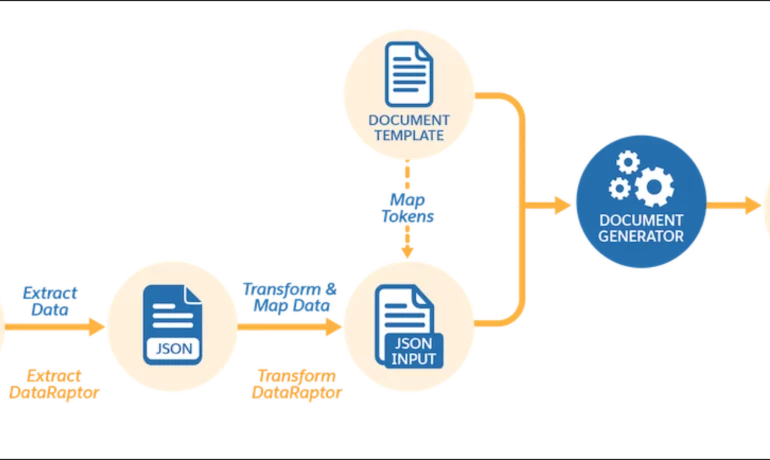
Salesforce document generation poses a challenge for businesses, given the intricacies of integration involved. Fortunately, a variety of tools are available for generating documents in Salesforce, and Tectonic is well-equipped to assist in their successful implementation. Salesforce Industries Document Generation empowers businesses to craft and manage accurate documents linked to standard Salesforce objects, encompassing contracts, opportunities, orders, quotes, and custom objects. For a more dynamic approach, Salesforce OmniStudio Document Generation facilitates the creation of documents using Microsoft Word and Microsoft PowerPoint templates. These templates can incorporate values from any JSON-based data within the text, including data sourced from various Salesforce objects. This versatile tool enables the generation of contracts, proposals, quotes, reports, non-disclosure agreements, service agreements, and more. Salesforce Industries Document Generation seamlessly integrates with Vlocity Insurance, Vlocity Health, communications, media, energy, utilities, government, and beyond. Vlocity Analytics, another valuable component, offers pre-built measurement tools that seamlessly integrate with Salesforce Reports, Dashboards, and Einstein. The Salesforce AppExchange boasts an extensive array of over 200 document generation tools. Your Salesforce partner can assist in selecting, installing, and implementing the most suitable options based on your business requirements. With Document Generation, you can generate contracts, proposals, quotes, reports, non-disclosure agreements, job offers, service agreements, and so on. You can generate documents using the specified sample client-side or server-side OmniScripts. You can also create your own OmniScripts by cloning and customizing the sample OmniScript to generate documents. Client-Side document generation is a synchronous process that results in a downloadable preview of the generated documents. You can generate documents from Microsoft Word (.docx), Microsoft PowerPoint (.pptx), and Web templates. These templates can include values from any JSON-based data in the text, including data from any Salesforce object. You can optionally convert the resulting documents to .pdf format. Server-Side document generation is available in both the OmniStudio Foundation and Salesforce Industries packages. Server-Side document generation is an asynchronous process that’s best for large and rendering-heavy documents and for document generation in batches. The Server-Side document generation service is secure and scalable and is hosted on Salesforce Hyperforce. The generated document is stored in your Salesforce org, and is attached to the object for which it’s generated. You can use Apex Classes, sample Integration Procedures, or a sample OmniScript to generate documents. Client-Side document generation supports Customer Community Plus, Customer Community, and Partner Community users to generate documents using client-side OmniScripts. Server-Side document generation supports Customer Community Plus, Customer Community, and Partner Community users to generate documents using the singleDocxServersideLwc server-side OmniScript. With the right licenses, Document Generation is available in the Salesforce Industries package. Metering measures resource utilization levels and throttling controls resource access and use based on defined rules. Metering measures the number of server-side documents that are generated by an org hourly and daily. The default hourly and daily limits for processing server-side document generation requests are 1,000 per org and 24,000 per org respectively. Throttling maintains consistency and resilience of the server-side document generation service by managing incoming server-side document generation requests from multiple orgs. Throttling can also prevent service degradation caused by high volume of requests at peak hours by blocking requests that exceed the default limits. The request details are saved in the Document Generation Processes entity. You can retrieve the blocked requests and later retry the server-side document generation. No matter what your specific document generation needs, Tectonic simplifies the process of getting your system up and running seamlessly, whether it’s through Salesforce Quickstarts or comprehensive implementation services. Content updated in 2February 2024, Shannan Hearne. Like1 Related Posts Who is Salesforce? Who is Salesforce? Here is their story in their own words. From our inception, we’ve proudly embraced the identity of Read more Salesforce Marketing Cloud Transactional Emails Salesforce Marketing Cloud Transactional Emails are immediate, automated, non-promotional messages crucial to business operations and customer satisfaction, such as order Read more Salesforce Unites Einstein Analytics with Financial CRM Salesforce has unveiled a comprehensive analytics solution tailored for wealth managers, home office professionals, and retail bankers, merging its Financial Read more AI-Driven Propensity Scores AI plays a crucial role in propensity score estimation as it can discern underlying patterns between treatments and confounding variables Read more

Read More
Salesforce Listview

Listview in Salesforce

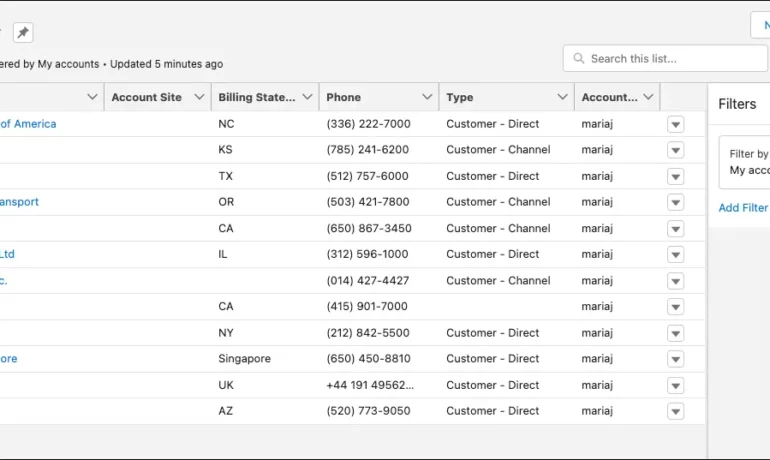
What is a listview in Salesforce? A list view is a filtered list of records where you can view records for one object at a time. For example, a list of Contacts, Accounts, or Opportunities. What are the benefits of list view in Salesforce? In a list view, you see only the data that you have access to. You can see records that you own, have read or write access to, or are shared with you. List views also include records owned by or shared with users in roles below you in the Salesforce hierarchy. What is the difference between report and Listview in Salesforce? While List Views are ideal for day-to-day tasks and offer quick access to relevant data, they cannot perform data analysis or generate summary reports. Reports, on the other hand, require an understanding of the data structure to create, and they’re only available to Salesforce users with the appropriate permissions enabled. Why use ListView? ListView builder is useful when you have a large number of items that can change dynamically, as it only builds the child records that are currently visible. It also allows you to easily scroll through the list of items. Column , on the other hand, is a layout widget that arranges its children vertically. What is the limitation of Listview in Salesforce? Due to SOQL limitations, list views are limited to first 2,000 records returned by the filter criteria. To confirm that the list view contains more than 2000 records you can create a report with the same criteria as list view to get the exact record count. Can you share a list view in Salesforce? Name the Public Group via the “Label” field. Select Users under the “Search” drop-down. Add the specific user(s) with whom you want to share the list view. Click Save. Content updated July 2025, Shannan Hearne Like Related Posts Who is Salesforce? Who is Salesforce? Here is their story in their own words. From our inception, we’ve proudly embraced the identity of Read more Salesforce Marketing Cloud Transactional Emails Salesforce Marketing Cloud Transactional Emails are immediate, automated, non-promotional messages crucial to business operations and customer satisfaction, such as order Read more Salesforce Unites Einstein Analytics with Financial CRM Salesforce has unveiled a comprehensive analytics solution tailored for wealth managers, home office professionals, and retail bankers, merging its Financial Read more AI-Driven Propensity Scores AI plays a crucial role in propensity score estimation as it can discern underlying patterns between treatments and confounding variables Read more
Read More
Salesforce

What is Salesforce?

Salesforce is cloud-based CRM software. It makes it easier for companies to find more prospects, close more deals, and connect with customers in a whole new, personalized way, so they can provide them with amazing service at scale. Salesforce, Inc. is an American cloud-based software company headquartered in San Francisco, California. It provides customer relationship management software and applications focused on sales, customer service, marketing automation, e-commerce, analytics, and application development. According to Wikipedia… Salesforce brings together all your data, from any source. Customer 360, the complete suite of products, unites your sales, service, marketing, commerce, and IT teams with a single, shared view of customer information. With artificial intelligence integrated across all products, SFDC helps everyone in your company work more productively and better deliver the personalized experiences customers love. To explore all Salesforce has to offer for your business, contact Tectonic today. Salesforce is cloud-based CRM software (What is CRM?). It makes it easier for companies to find more prospects, close more deals, and connect with customers in a whole new way, so they can provide them with amazing service at scale. Salesforce brings together all your data, from any source. Customer 360, our complete suite of products, unites your sales, service, marketing, commerce, and IT teams with a single, shared view of customer information. With artificial intelligence integrated across all products, SFDC helps everyone in your company work more productively and better deliver the personalized experiences customers love. Content updaed February 2025, Shannan Hearne Like Related Posts Who is Salesforce? Who is Salesforce? Here is their story in their own words. From our inception, we’ve proudly embraced the identity of Read more Salesforce Marketing Cloud Transactional Emails Salesforce Marketing Cloud Transactional Emails are immediate, automated, non-promotional messages crucial to business operations and customer satisfaction, such as order Read more Salesforce Unites Einstein Analytics with Financial CRM Salesforce has unveiled a comprehensive analytics solution tailored for wealth managers, home office professionals, and retail bankers, merging its Financial Read more AI-Driven Propensity Scores AI plays a crucial role in propensity score estimation as it can discern underlying patterns between treatments and confounding variables Read more
Read More
gettectonic.com