Landing Pages Archives - gettectonic.com - Page 3
Improving customer experiences with Marketing Cloud Personalization

Attention Maps vs. Heatmaps

Attention Maps vs. Heatmaps: How to Choose the Right Tool for UX Optimization Staring at a heatmap and unsure if you’re interpreting it correctly? Misreading data can lead to misguided changes—fixing what isn’t broken while missing critical issues. This guide cuts through the noise, helping you choose between AI-powered attention maps and traditional heatmaps so you can optimize designs with confidence. Attention Maps vs. Heatmaps: Key Differences Feature Attention Maps Traditional Heatmaps Data Source AI predictions (no real users needed) Real user interactions (clicks, scrolls, hovers) Best For Pre-launch design testing Post-launch behavior analysis Strengths Predicts visual focus, optimizes layouts before going live Tracks actual engagement, identifies usability issues Limitations Not 100% accurate—needs real-world validation Requires sufficient traffic for meaningful insights When to Use Attention Maps What They Do AI-generated attention maps predict where users will look first—highlighting high-impact zones (red/orange) and overlooked areas (blue/green). Best For: ✅ Pre-launch testing (landing pages, ads, UI designs)✅ Optimizing visual hierarchy (headlines, CTAs, key visuals)✅ A/B testing layouts before investing in traffic Top Attention Map Tools When to Use Traditional Heatmaps What They Show Heatmaps visualize real user behavior—click patterns, scroll depth, and hover activity—helping you spot engagement trends and friction points. Best For: ✅ Post-launch analysis (conversion funnels, drop-off points)✅ Identifying usability issues (ignored CTAs, confusing navigation)✅ Improving existing pages based on real interactions Top Heatmap Tools Real-World Use Cases 1. eCommerce (Use Heatmaps) 2. Landing Pages (Use Attention Maps First, Then Heatmaps) 3. SaaS Platforms (Use Heatmaps) 4. Content Sites (Use Heatmaps) Which Should You Use? Pro Tip: Think of attention maps as a movie trailer (predicting engagement) and heatmaps as box office results (showing what actually worked). Like Related Posts Who is Salesforce? Who is Salesforce? Here is their story in their own words. From our inception, we’ve proudly embraced the identity of Read more Salesforce Unites Einstein Analytics with Financial CRM Salesforce has unveiled a comprehensive analytics solution tailored for wealth managers, home office professionals, and retail bankers, merging its Financial Read more AI-Driven Propensity Scores AI plays a crucial role in propensity score estimation as it can discern underlying patterns between treatments and confounding variables Read more Tectonic’s Successful Salesforce Track Record Salesforce Technology Services Integrator – Tectonic has successfully delivered Salesforce in a variety of industries including Public Sector, Hospitality, Manufacturing, Read more

Read More
AI Drives Insights

AI Drives Insights

Innovations from Salesforce, HubSpot, and One AI are driving deeper insights and streamlining processes. Key Takeaways: AI is transforming the way businesses operate, and customer relationship management (CRM) is no exception. AI has been influencing the CRM space for years, but its impact is now reaching new heights. By harnessing AI algorithms, modern CRM systems offer predictive analytics and deeper insights, enabling brands to understand their customers on an unprecedented level. Advanced AI-enabled CRMs even incorporate sentiment analysis to gauge customer perceptions and provide automation tools to free marketers from mundane tasks. The global AI market, currently valued at 2.3 billion, continues to expand rapidly. From 2020 to 2022, annual corporate investments in AI startups increased by $5 billion, reflecting the growing demand for AI-driven innovations. As CRM vendors introduce more AI capabilities, it’s important to understand the unique approaches each one takes to differentiate themselves and deliver specific benefits. Salesforce and Einstein GPT: A New Era with OpenAI’s ChatGPT On March 7, 2023, Salesforce introduced Einstein GPT, a generative AI technology integrated into its CRM platform. Combining real-time data from Salesforce’s Data Cloud with OpenAI’s ChatGPT, Einstein GPT allows users to input natural-language prompts to streamline tasks and decision-making. Salesforce has long invested in AI. In 2017, it launched its Einstein AI as part of Service Cloud. By 2019, Salesforce had partnered with OpenAI to explore AI research and integrate advanced models into its ecosystem. The acquisition of Slack in 2020 further strengthened its AI capabilities by incorporating advanced messaging and communication tools into the CRM environment. Marc Benioff, CEO of Salesforce, highlighted the significance of AI’s growth: “The world is experiencing one of the most profound technological shifts with real-time technologies and generative AI. This comes at a pivotal moment as every company is focused on connecting with their customers in more intelligent, automated, and personalized ways.” Einstein GPT is set to transform customer engagement, with applications across Salesforce’s various platforms, including Tableau, MuleSoft, and Slack. HubSpot CRM: AI-Powered Content Assistant A day before Salesforce’s AI announcement, HubSpot revealed its own AI-powered features: the Content Assistant and ChatSpot.ai. These tools aim to enhance CRM users’ productivity while creating stronger connections with customers. HubSpot’s Content Assistant helps marketing and sales teams ideate, create, and share content through generative AI capabilities. It can suggest blog titles, create content outlines, and assist with crafting content for blogs, emails, landing pages, and websites. ChatSpot.ai, on the other hand, offers a natural-language chat experience to simplify CRM tasks for HubSpot users. HubSpot has also invested in AI for other functions, including conversation intelligence, data enrichment, predictive analytics, and content optimization, solidifying its position in the AI-driven CRM landscape. With AI advancements from companies like Salesforce, HubSpot, and One AI, the future of CRM is poised for enhanced efficiency, automation, and personalized customer interactions. Like Related Posts Who is Salesforce? Who is Salesforce? Here is their story in their own words. From our inception, we’ve proudly embraced the identity of Read more Salesforce Marketing Cloud Transactional Emails Salesforce Marketing Cloud Transactional Emails are immediate, automated, non-promotional messages crucial to business operations and customer satisfaction, such as order Read more Salesforce Unites Einstein Analytics with Financial CRM Salesforce has unveiled a comprehensive analytics solution tailored for wealth managers, home office professionals, and retail bankers, merging its Financial Read more AI-Driven Propensity Scores AI plays a crucial role in propensity score estimation as it can discern underlying patterns between treatments and confounding variables Read more
Read More
Pardot Forms Unleased

Pardot Forms Unleashed

Setting up and maintaining Pardot forms is generally straightforward using the point-and-click Pardot form builder. Pardot Forms Unleashed. You can select the fields you want prospects to complete, define completion actions upon form submission, and then integrate the form seamlessly onto your website or landing pages. However, there are some nuances, or “gotchas,” with Pardot forms that can complicate your campaigns, impact reporting accuracy, and affect data quality. Here are some lesser-known tips to navigate these challenges effectively: By understanding these nuances and best practices, you can effectively leverage Pardot forms to drive marketing initiatives while maintaining data integrity and campaign effectiveness. Pardot Forms Unleased. Like Related Posts Who is Salesforce? Who is Salesforce? Here is their story in their own words. From our inception, we’ve proudly embraced the identity of Read more Salesforce Marketing Cloud Transactional Emails Salesforce Marketing Cloud Transactional Emails are immediate, automated, non-promotional messages crucial to business operations and customer satisfaction, such as order Read more Salesforce Unites Einstein Analytics with Financial CRM Salesforce has unveiled a comprehensive analytics solution tailored for wealth managers, home office professionals, and retail bankers, merging its Financial Read more AI-Driven Propensity Scores AI plays a crucial role in propensity score estimation as it can discern underlying patterns between treatments and confounding variables Read more

Read More
Account Based Marketing

The Ultimate Guide to ABM Email Templates That Convert

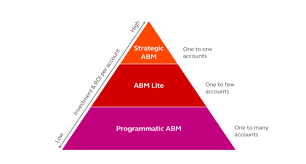
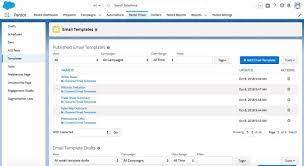
Crafting Hyper-Personalized ABM Emails That Get Responses Account-based marketing emails aren’t just messages—they’re strategic business conversations tailored to your most valuable accounts. These templates show you how to break through the noise with highly relevant, value-driven communication. Why ABM Emails Work Differently ✔ 87% higher response rates than generic emails✔ 3x more pipeline value from targeted accounts✔ 56% better conversion rates when properly personalized 1. Subject Lines That Demand Attention Personalized & Benefit-Driven Intriguing & Relevant Referencing Connections Pro Tip: Include the recipient’s name and company in 70% of subject lines for 22% higher open rates. 2. Email Body Structure That Converts The 4-Part ABM Email Framework 1. Personalized Hook (1 sentence)“Congrats on [Recent Achievement] – impressive growth in [Specific Metric]!” 2. Relevant Insight (2-3 sentences)“When we helped [Peer Company] with similar [Challenge], they achieved [Quantifiable Result] by [Unique Approach].” 3. Tailored Value Proposition“For [Account Name], this could mean [Specific Benefit 1] and [Specific Benefit 2] based on your [Unique Factor].” 4. Clear CTA with Social Proof*”When’s a good time for a 15-min chat? P.S. [Industry Leader] saw [Result] in [Timeframe].”* 3. Proven ABM Email Templates Template 1: The Executive Insight Email Subject: “[Industry Trend] impacting [Account Name]’s [Department]” Body:“Hi [First Name], Noticed [Account Name]’s focus on [Strategic Initiative] in your [Source]. With [Industry Trend] accelerating, many [Industry] leaders are seeing [Specific Impact]. We recently helped [Peer Company] navigate this by [Solution], achieving [Metric] in [Timeframe]. Would you have 20 minutes to discuss how this approach could support [Initiative]? Best,[Your Name][Your Position][Your Company]” Template 2: The Peer Comparison Email Subject: “How [Peer Company] achieved [Result] with [Solution]” Body:“Hi [First Name], [Peer Company] faced similar [Challenge] to what [Account Name] is managing around [Specific Issue]. Their solution? [Brief Case Study Summary]. *Three specific outcomes they gained: Would you be open to a quick call to explore if this approach could work for [Account Name]? [Your Name]” 4. Advanced ABM Email Strategies The Multi-Touch Sequence Interactive Elements That Boost Engagement 5. Measuring ABM Email Success Track these key metrics:✅ Open Rate (Target: 40-60%)✅ Response Rate (Target: 15-30%)✅ Meeting Booked Rate (Target: 5-15%)✅ Pipeline Influence (Measure account progression) Optimization Tip: A/B test every 5th email with different: Your ABM Email Checklist 🔹 Before Sending: 🔹 After Sending: “After implementing these ABM email strategies, we saw a 4x increase in meetings with target accounts and 35% faster deal velocity.”— Enterprise ABM Director Transform your ABM outreach from ignored to engaged with science-backed templates. Like Related Posts Who is Salesforce? Who is Salesforce? Here is their story in their own words. From our inception, we’ve proudly embraced the identity of Read more Salesforce Marketing Cloud Transactional Emails Salesforce Marketing Cloud Transactional Emails are immediate, automated, non-promotional messages crucial to business operations and customer satisfaction, such as order Read more Salesforce Unites Einstein Analytics with Financial CRM Salesforce has unveiled a comprehensive analytics solution tailored for wealth managers, home office professionals, and retail bankers, merging its Financial Read more AI-Driven Propensity Scores AI plays a crucial role in propensity score estimation as it can discern underlying patterns between treatments and confounding variables Read more

Read More
salesforce marketing cloud interaction studio

Ampscript

What is AMPscript used for in Salesforce? What is its purpose? AMPscript is a useful scripting language that you can use across emails, landing pages, SMS, and push notifications in Salesforce Marketing Cloud Builders. AMPscript is Marketing Cloud‘s proprietary scripting language for advanced dynamic content in emails, landing pages, SMS, and push messages. Why use Marketing Cloud AMPscript? AMPscript allows you to extend Marketing Cloud functionality beyond its out-of-the-box capabilities because you can develop code and custom solutions, tailored to your own specific needs and requirements. What are some functions you can perform with AMPscript? Types of Functions in Marketing Cloud AMPscript: What are advantages of AMPscript compared to Ssjs? For the web developer who are new to both languages, for them AMPscript has a shorter learning curve compared to SSJS. AMPscript should be preferred for simple inline personalization, which includes content like name, salutation and simple IF ELSE loops. Using AMPscript To use AMPscript, you insert it into the content body of your messages at the point where you want it to render. When you send a message that contains AMPscript, Marketing Cloud Engagement interprets the code and substitutes it with the output of the AMPscript function. 3 Way to Add There are three ways to add AMPscript code to your content: by using inline code, by adding code blocks, or by using tag-based scripting. The first two of these methods use special delimiters to denote the beginning and ending of the code that you want Marketing Cloud Engagement to interpret. In the third method, you delineate the AMPscript code with <script> tags. When you close an AMPscript block, use the same type of closing delimiter as you used to open the block. For example, if you open a block using tag-based scripting, you can’t close it by using the closing code block delimiter. Use the %%= and =%% delimiters to add AMPscript code inline with your content. Inline AMPscript is frequently used within HTML tags to dynamically populate the content of a message. In this basic example, a section of AMPscript is included inline within an HTML <p> tag. You can also include multi-line blocks of AMPscript code in your messages. Use the %%[ and ]%% delimiters to begin and end a code block, respectively. With a code block, you can define multiple variables and execute multiple functions. Code blocks use the syntax shown in this example. Tag-based syntax for AMPscript standardizes the syntax used to declare AMPscript blocks with the syntax of Server-Side JavaScript (SSJS). This syntax makes it easier for developers to switch between AMPscript and SSJS. Like1 Related Posts Who is Salesforce? Who is Salesforce? Here is their story in their own words. From our inception, we’ve proudly embraced the identity of Read more Salesforce Marketing Cloud Transactional Emails Salesforce Marketing Cloud Transactional Emails are immediate, automated, non-promotional messages crucial to business operations and customer satisfaction, such as order Read more Salesforce Unites Einstein Analytics with Financial CRM Salesforce has unveiled a comprehensive analytics solution tailored for wealth managers, home office professionals, and retail bankers, merging its Financial Read more AI-Driven Propensity Scores AI plays a crucial role in propensity score estimation as it can discern underlying patterns between treatments and confounding variables Read more

Read More
Smart Capture Forms as Marketing Cloud Journey Entry Source

Smart Capture Forms as Marketing Cloud Journey Entry Source

Transforming your marketing strategy into a seamless journey for your customers has never been easier, thanks to the integration of CloudPages’ Smart Capture forms with Journey Builder Entry Events. By leveraging this innovative feature, you can effortlessly guide your audience through personalized experiences that drive engagement and conversions. Smart Capture Forms as Marketing Cloud Journey Entry Source. Crafting these dynamic forms is a breeze, whether you prefer the classic or Content Builder editor, embedded within your landing pages or microsites. However, to take advantage of this functionality, it’s essential to ensure that you have both Journey Builder and CloudPages at your disposal. If you’re missing either piece of the puzzle, a quick chat with your Relationship Manager can swiftly rectify the situation. Now, let’s dig into the mechanics of how this synergy works. To initiate customers into a journey, the data captured by Smart Capture forms must be securely stored in a designated data extension. This data extension, aptly named the Event Source data extension, serves as the reservoir from which contacts are seamlessly injected into your Journey Builder journeys. Remember, for this mechanism to function seamlessly, your Event Source data extension must be configured as sendable. Creating a Smart Capture Form within CloudPages is a straightforward process: Navigate to CloudPages and effortlessly drag the Smart Capture gear onto the content area of your chosen landing page or microsite.Establishing a Data Extension tailored for Smart Capture as a Journey Builder event is paramount. This dedicated data extension serves as the conduit for seamlessly integrating Smart Capture forms with Journey Builder Entry Events. Here’s how to get started: Create a marketing cloud data extension explicitly designed to handle Smart Capture data within the context of Journey Builder.These conditions are required for creating a data extension to use in a Journey Builder entry event. Choose Create from New.Enter a name and select Is Sendable? if you plan to use emails with your Smart Capture form or Journey Builder journey.On the Data Retention Policy step, keep the default setting and click Next. Add any fields you would like to capture. When adding an Email Address attribute, change the Data Type to EmailAddress as email address because email address is the primary key. Set Send Relationship to the Email Address attribute so it relates to Subscribers on Subscriber Key. Smart Capture Forms as Marketing Cloud Journey Entry Source For those seeking further clarification or guidance on integrating Smart Capture forms with Journey Builder Entry Events, our comprehensive FAQs offer valuable insights: My Smart Capture form used as the trigger event for my journey won’t submit. What’s happening?Ensure that you configured the re-entry option and default channel address in the journey settings. I can’t get my journey to execute?If your journey includes an email send there are 2 important steps to complete before the journey can be executed. Within Email Studio, open up your email and be sure to complete both the Content Detective and Validate steps. Complete these steps before a journey can send that email. Explore our FAQs section dedicated to illuminating the intricacies of utilizing Smart Capture forms as Journey Builder Events within CloudPages. With this powerful integration at your fingertips, you can orchestrate personalized customer journeys that captivate your audience and drive tangible results. Embrace the potential of CloudPages‘ Smart Capture forms within Journey Builder to elevate your marketing endeavors to new heights of success. Like1 Related Posts Who is Salesforce? Who is Salesforce? Here is their story in their own words. From our inception, we’ve proudly embraced the identity of Read more Salesforce Marketing Cloud Transactional Emails Salesforce Marketing Cloud Transactional Emails are immediate, automated, non-promotional messages crucial to business operations and customer satisfaction, such as order Read more Salesforce Unites Einstein Analytics with Financial CRM Salesforce has unveiled a comprehensive analytics solution tailored for wealth managers, home office professionals, and retail bankers, merging its Financial Read more AI-Driven Propensity Scores AI plays a crucial role in propensity score estimation as it can discern underlying patterns between treatments and confounding variables Read more

Read More
gettectonic.com