RAG Archives - gettectonic.com - Page 101
Salesforce Integration

Salesforce Integrations for Sales and Marketing Teams

First Understand Salesforce Integrations Salesforce integrations involve establishing seamless connections between Salesforce and diverse third-party applications. These applications range from marketing automation tools and customer service software to accounting programs. The purpose is to facilitate a smooth exchange of data, ultimately enhancing Salesforce’s overall functionality. Salesforce integrations for sales and marketing teams brings all the applications needed for the relationship with prospects into one place. Salesforce’s Integration Ecosystem While Salesforce boasts a robust integration ecosystem, featuring over 3,000 integrations available on its AppExchange marketplace. Users can leverage various integration approaches: Salesforce Integrations for Sales and Marketing While there’s no complete universal list of essential Salesforce integrations for sales and marketing, several widely-used integrations cater to diverse needs: No-code Data Automation Integrations: Analytics and Reporting Integrations: Email Marketing Automation Integration: Data Storage Integration: Communications Apps Integrations: Project Management Tools Integration: Account Management Integration: CRM Tools Integration: Helpdesk Integrations: Feedback Tools Integration: These integrations facilitate efficient data handling, analytics, communication, project management, and more within sales and marketing teams. Integrations for Sales and Marketing Tools Salesforce seamlessly integrates with various tools relevant to Sales and Marketing teams, including but not limited to: Salesforce Integration with Teams and Workday The Salesforce AppExchange Salesforce’s Role in Sales and Marketing Salesforce Marketing Cloud Salesforce and ERP Integration Digital Marketing and Salesforce Salesforce’s Role in Marketing Automation Content updated November 2023. Like Related Posts Who is Salesforce? Who is Salesforce? Here is their story in their own words. From our inception, we’ve proudly embraced the identity of Read more Salesforce Marketing Cloud Transactional Emails Salesforce Marketing Cloud Transactional Emails are immediate, automated, non-promotional messages crucial to business operations and customer satisfaction, such as order Read more Salesforce Unites Einstein Analytics with Financial CRM Salesforce has unveiled a comprehensive analytics solution tailored for wealth managers, home office professionals, and retail bankers, merging its Financial Read more AI-Driven Propensity Scores AI plays a crucial role in propensity score estimation as it can discern underlying patterns between treatments and confounding variables Read more


Read More
Database Sharding

Database Sharding

Database Sharding: A Scalability Technique What is Sharding? Sharding is a database scaling technique that distributes data across multiple machines (or “shards”) to handle large datasets and high traffic loads that a single server may struggle to manage. The Problem: Single Database Limitations The Solution: Sharding Benefits of Sharding ✅ Horizontal Scaling – Add more servers instead of upgrading a single one (vertical scaling).✅ Improved Performance – Workload distribution reduces query response times.✅ Increased Storage Capacity – Supports much larger datasets than a single server.✅ Easier Data Management – Individual shards can be maintained, updated, and backed up independently.✅ Fault Tolerance – If one shard fails, the rest remain operational. How Sharding Works When to Use Sharding? Sharding vs. Partitioning Challenges of Sharding ⚠ Increased Complexity ⚠ Data Distribution Difficulties ⚠ Transactional & Query Challenges ⚠ Data Consistency Issues ⚠ Maintenance Overhead ⚠ Higher Costs Conclusion Sharding is a powerful solution for large-scale, high-traffic applications, but it introduces complexity and operational challenges. Success depends on: Before implementing sharding, evaluate whether its benefits outweigh the trade-offs for your use case. Like Related Posts Who is Salesforce? Who is Salesforce? Here is their story in their own words. From our inception, we’ve proudly embraced the identity of Read more Salesforce Unites Einstein Analytics with Financial CRM Salesforce has unveiled a comprehensive analytics solution tailored for wealth managers, home office professionals, and retail bankers, merging its Financial Read more AI-Driven Propensity Scores AI plays a crucial role in propensity score estimation as it can discern underlying patterns between treatments and confounding variables Read more Tectonic’s Successful Salesforce Track Record Salesforce Technology Services Integrator – Tectonic has successfully delivered Salesforce in a variety of industries including Public Sector, Hospitality, Manufacturing, Read more
Read More
Salesforce Sales Enablement

Salesforce Enablement Team Roles and Responsibilities

When implementing Salesforce Enablement to better equip teams with skills, content, and context it is important to set up the right users with the right permissions. Having a complete Sales Enablement team in place produces the most effective training programs. Accelerate business outcomes with enablement programs delivered to users through the Guidance Center in Salesforce. Create programs that are unique to your company, and assign programs to users who can complete exercises and measurable milestones in their flow of work.  Sales enablement is about people and technology, and strategically aligning them both behind a common goal: sales success. Sales enablement helps organizations streamline and shorten sales cycles by improving buyer interactions with relevant sales content that is tailored and personalized. Sales Enablement Platform A sales enablement platform provides sales teams with coaching, resources, and tools to help them effectively engage with customers and close deals. Identify who at your company can perform each role. In some cases, one person is ideal for all these responsibilities. Other companies require a team. Likewise, some of these roles aren’t required to use Enablement. But it can be nice to rely on these folks if they’re available. Roles and Responsibilities ROLE RESPONSIBILITIES REQUIRED TO USE ENABLEMENT? REQUIRED PERMISSIONS? Salesforce admin This person can access Setup and customize Salesforce for your company. To get your company started with Enablement, a Salesforce admin must give access to Enablement team members according to the required permissions listed on this page. Salesforce admins can also bring their Salesforce experience to help you define outcomes and milestones using Salesforce objects and fields. If you want to introduce new ways of tracking data in Salesforce to include those processes in a program, Salesforce admins can also help enable other features or customize settings. Yes For permissions required for Salesforce admins, search Salesforce Help for the specific task. Enablement admin A person who gets full access to create, edit, delete, publish, and unpublish Enablement programs in Salesforce. Enablement admins can also assign or unassign programs to Enablement users, view all Enablement analytics, customize the Enablement reports and dashboard, and create reports and dashboards using Enablement report types. Yes The Manage Enablement Essentials default permission set, which is included in the Enablement Admin permission set group. See Enablement Permission Set Groups, Permission Sets, and Permissions and Assign Permissions to Your Enablement Team. Content creator or manager This person adds your company’s training content to Salesforce. At some companies, this person is also the Enablement admin. Yes The Content Manager contributor role in the Enablement workspace of the Digital Experiences app. See Assign a Contributor Role in the Enablement Workspace. Enablement resources manager The person who manages resources related to Enablement other than training content that Enablement users directly consume as part of programs, such as these items. Surveys sent to peers and managers for gathering feedback on user performancePrompts and walkthroughs that guide users through Salesforce features and walkthroughs outside of programs No Manage Assessment Surveys and Manage In-App Guidance default permission sets, which are included in the Enablement Resources Manager permission set group. See Enablement Permission Set Groups, Permission Sets, and Permissions and Assign Permissions to Your Enablement Team. Business operations expert This person can help identify the business outcomes that your company wants to focus on and work with you to establish how certain job roles can contribute to your bottom line. No Your call. You can assign Enablement permissions to this person as needed. Enablement user The person at your company who takes the programs that you build and assign to them. Yes Use Enablement Programs default permission set, which is included in the Enablement User permission set group. Enablement admins, or users with the Manage Enablement Essentials default permission set, can also take programs that are assigned to them. See Enablement Permission Set Groups, Permission Sets, and Permissions and Assign Permissions to Your Enablement Team. Like Related Posts Who is Salesforce? Who is Salesforce? Here is their story in their own words. From our inception, we’ve proudly embraced the identity of Read more Salesforce Marketing Cloud Transactional Emails Salesforce Marketing Cloud Transactional Emails are immediate, automated, non-promotional messages crucial to business operations and customer satisfaction, such as order Read more Salesforce Unites Einstein Analytics with Financial CRM Salesforce has unveiled a comprehensive analytics solution tailored for wealth managers, home office professionals, and retail bankers, merging its Financial Read more AI-Driven Propensity Scores AI plays a crucial role in propensity score estimation as it can discern underlying patterns between treatments and confounding variables Read more

Read More
Salesforce and Healthcare

What is Healthcare Technology?

What is the role of healthcare technology? Healthtech companies play a crucial role in elevating patient care and outcome. Within the health and life sciences industry technology plays an important role. Leveraging innovative technologies and digital solutions, these companies contribute to the enhancement of diagnostic accuracy, treatment planning, and monitoring efficiency for healthcare providers. How is technology defined in healthcare? Healthtech encompasses a broad spectrum of technologies, including medical devices, information technology (IT) systems, algorithms, artificial intelligence (AI), cloud computing, and blockchain. The purpose is to provide support to healthcare organizations, facilitating improved services and patient care. CRM in healthcare not only stores patients’ contact information. It also gives a comprehensive overview of their medical history, appointments, and prescriptions. Using a healthcare CRM system, providers can customize their patient management plans so that each patient gets precisely the amount of care they need. How does HealthTech differ from MedTech? HealthTech is implemented through diverse technologies like wearables, applications, or databases. MedTech primarily involves medical equipment, prosthesis, and tools. Despite their distinct differences, both HealthTech and MedTech share a common goal of integrating technology into healthcare. What is healthcare management and technology? Health information management and healthtech professionals are engaged in comprehending healthcare dat. The intricacies of which require in-depth knowledge of the software and systems that govern its utilization. The convergence of these fields aims to enhance the quality of life for medical patients by integrating technology into healthcare practices. The global healthcare CRM market size was estimated at USD 14.3 billion in 2021 and is expected to reach USD 16.0 billion in 2022. The value is predicted to grow at a CAGR of 8.4% from 2022 to 2030. North America remained the largest market for medical CRM in 2021. Health Cloud is one of the Salesforce Industry Clouds: a solution tailored to meet the unique needs of specific industries. It combines the best of Salesforce’s CRM capabilities with advanced features tailored for healthcare providers, payers, medical device companies, and pharmaceutical manufacturers. What is a Hipaa compliant CRM? HIPAA regulations require this information be protected and kept confidential… A HIPAA-compliant CRM ensures that the information is handled securely and that the organization is in compliance with the law. Like1 Related Posts Who is Salesforce? Who is Salesforce? Here is their story in their own words. From our inception, we’ve proudly embraced the identity of Read more Salesforce Marketing Cloud Transactional Emails Salesforce Marketing Cloud Transactional Emails are immediate, automated, non-promotional messages crucial to business operations and customer satisfaction, such as order Read more Salesforce Unites Einstein Analytics with Financial CRM Salesforce has unveiled a comprehensive analytics solution tailored for wealth managers, home office professionals, and retail bankers, merging its Financial Read more AI-Driven Propensity Scores AI plays a crucial role in propensity score estimation as it can discern underlying patterns between treatments and confounding variables Read more

Read More
Salesforce and Healthcare

Healthcare CRM to Enable Consumers and Build Trust

To transform the healthcare industry and enhance the experiences of all stakeholders requires the right tools. Making a paramount focus on building trust through personalization is imperative. Patients no longer desire to be perceived merely as a number or a chart. They seek a personalized treatment approach. Using the right healthcare CRM to enable trust with consumers makes good sense. The Goal of a Healthcare CRM This goal can be accomplished by seamlessly integrating electronic health records (EHRs) and claims data, establishing a 360-degree view of each healthcare consumer. A unique view of each consumer. Leveraging the capabilities of application programming interfaces (APIs), organizations can access comprehensive consumer information in real-time. By facilitating effective collaboration, informed care decisions, and the prevention of care gaps. The incorporation of state-of-the-art healthcare customer relationship management (CRM) platforms, equipped with AI and advanced analytics, can yield actionable insights. Insights that enhance interactions with patients and members. For instance, Community Health Choice (CHC) in Texas has embraced Salesforce’s Health Cloud, fully integrating clinical and claims data to create a holistic view of each patient, enabling the delivery of comprehensive care. What is a CRM system in healthcare? A healthcare CRM is a customer relationship management system designed specifically for use in the healthcare industry. Salesforce Health Cloud is a top choice to enable trust. CRM in healthcare not only stores patients’ contact information, it also gives a comprehensive overview of their medical history, appointments, and prescriptions. With a healthcare CRM system, you can customize your patient management plans so that each patient gets precisely the amount of care they need. A Healthcare CRM to Build Trust Connected experiences contribute to strengthening trust, increasing retention, and ultimately fostering improved health outcomes and business results for healthcare organizations. Implementing these strategies allows healthcare organizations to enhance the overall quality of care, providing a more positive experience for patients, providers, and other stakeholders. Salesforce is the right healthcare CRM to enable trust with your patients and community. Like1 Related Posts Who is Salesforce? Who is Salesforce? Here is their story in their own words. From our inception, we’ve proudly embraced the identity of Read more Salesforce Marketing Cloud Transactional Emails Salesforce Marketing Cloud Transactional Emails are immediate, automated, non-promotional messages crucial to business operations and customer satisfaction, such as order Read more Salesforce Unites Einstein Analytics with Financial CRM Salesforce has unveiled a comprehensive analytics solution tailored for wealth managers, home office professionals, and retail bankers, merging its Financial Read more AI-Driven Propensity Scores AI plays a crucial role in propensity score estimation as it can discern underlying patterns between treatments and confounding variables Read more

Read More
Salesforce Slack

What is Slack?

Chances are a co-worker has at least once offered to “Slack” you something—whether it’s a file, a work order, or a phone number. The first time I heard this phrase, I was concerned about potential physical harm, only to learn that “Slack” refers to a messaging application for businesses and much more.  This insight takes a deep dive into Salesforce’s collaborative tool. Slack is a messaging app for businesses that connects people to the information they need.  Many companies utilize Slack from Salesforce as a centralized hub for various purposes. From project collaboration to casual “water cooler” conversations. This is especially vital for remote teams spread across different locations and time zones. At Tectonic, we’ve integrated Slack channels for accounts and Salesforce tools. For projects, events, webinars, and training, fostering seamless communication. Slack is becoming increasingly popular for its compatibility with Salesforce and numerous applications, across diverse workplaces. As opposed to text messaging or emails, Slack is an efficient messaging app making it easier to communicate and organize conversations. To understand Slack, it’s helpful to distinguish between its two primary communication forms. Channels and direct messages (DMs). Slack channels are tailored by users to bring the right people together. By facilitating the sharing of information, files, thoughts, and project details. In contrast, direct messages are private, one-off conversations ideal for topics outside specific channels. Conversations within the channels are transparent and accessible to everyone, except for private channels, marked with a lock symbol. Direct messages, on the other hand, are suited for smaller, individual conversations. Starting a new conversation in the platform is as simple as clicking the compose button and drafting a message. It can be for a specific channel or individual. Mentioning a team member using @team-members-name ensures that they see your message and are notified when it is posted. Emojis Slack’s wide variety of emoji reactions add a fun element, with commonly used emojis like eyes or check marks indicating engagement or task completion. Custom emojis can be created for personalized use or to trigger automated workflows within your Salesforce project.  The eyes emoji, for example, typically means the message reader is taking at a look at whatever was referenced in the post.   Slack customization is a key aspect of its effectiveness. Updating your profile, integrating with your calendar for availability status, and setting relevant notifications. Utilizing shortcuts, apps, and integrations can enhance collaboration efficiency. Tectonic conducts a comprehensive discovery of your organization’s processes to recommend tailored ways this tool can boost your overall efficiency. Sharing files is easy, with seamless integration with popular file storage tools like Dropbox and Google Drive. Slack’s scheduling feature allows you to compose messages and schedule delivery at more appropriate times, making it a valuable organizational time management tool. Users can set their in and out of office times. Thus silencing notifications outside working hours. Slack also has a mobile app so users can stay connected from anywhere. Chat-based Collaboration Comparisons This chat-based collaboration tool that emphasizes communication. Whereas Microsoft Teams is a comprehensive collaboration suite that offers chat, video conference, and integrated document management.  Teams is a part of the Microsoft ecosystem, while Slack is a standalone tool from Salesforce with robust third party integrations. The primary difference between Google Chat and Slack includes search and customization options and the amount of storage offered. Slack offers more customization options, Google Chat offers unlimited storage in Business and Enterprise plans. Slack differs from Skype in that it takes communication to the level of collaboration by bringing together teams, tools, and workflows in a single platform. The sweet spot for Slack seems to be in companies with 20-50 employees. Many businesses are moving away from email and into channels, Away from legacy suites and onto customizable platforms that can connect more easily.  In 2019 the platform broke the 12 million user daily activity level and continues to grow by about 37% every year. Cross-channel Integrations Slack offers thousands of cross-channel integrations with other apps, not just email and Salesforce. This collaborative tool was developed by Slack Technologies, owned by Salesforce. It offers freemium and paid subscription services, and offers text messaging, file and media sharing, voice and video calls, and group chat for team collaboration. Slack has the capacity to support an unlimited number of users per organization, channels per workspace, and over 100,000 users on a channel. All content in the channels is searchable. Thereby making it an easy repository for conversations which ultimately contain a lot of information users want to reference back to.  Slack also offers bookmarking of content, pinning of content and other assorted features for information organization. Default Slack settings encrypt data at rest and data in transit. Data is further protected with tools like Slack Enterprise Key Management, audit logs, and integrations with top data loss prevention providers. Slack received its official name in 2012 from Stewart Butterfield. He replaced the product codename of linefeed with the communication tool which he said was derived from Searchable Log of All Conversation and Knowledge. If you’re curious about how Slack can enhance your Salesforce experience, reach out to Tectonic for a free quote or demo today. Like Related Posts Who is Salesforce? Who is Salesforce? Here is their story in their own words. From our inception, we’ve proudly embraced the identity of Read more Salesforce Marketing Cloud Transactional Emails Salesforce Marketing Cloud Transactional Emails are immediate, automated, non-promotional messages crucial to business operations and customer satisfaction, such as order Read more Salesforce Unites Einstein Analytics with Financial CRM Salesforce has unveiled a comprehensive analytics solution tailored for wealth managers, home office professionals, and retail bankers, merging its Financial Read more AI-Driven Propensity Scores AI plays a crucial role in propensity score estimation as it can discern underlying patterns between treatments and confounding variables Read more
Read More
Understanding Salesforce Integration

Understanding Salesforce Integration

What is Salesforce Integration? Salesforce Integration is the process of connecting two or more systems to streamline workflows and enhance data consistency across platforms. Consider situations where vital information is stored in one system but also needed in another. By integrating these systems, you ensure seamless data flow, improve efficiency, and enable smooth business processes. Why is Integration Important? In today’s digital landscape, businesses must continuously enhance efficiency and customer experience to stay competitive. Operating in isolation is no longer an option. Effective system integration ensures faster, scalable, and more reliable operations. What is an API? An API (Application Programming Interface) enables different applications to communicate with each other. For instance, when you use a mobile app, it connects to the internet, retrieves data from a server, and displays it in a readable format. The right API ensures this process runs smoothly and efficiently. Different types of APIs will be discussed later in the Salesforce Integration Capabilities section. Types of Salesforce Integration Architectures Each integration architecture has advantages and drawbacks. Here are the three main types: 1. Point-to-Point Integration This is a one-to-one integration model where each system has a direct connection to another. For example, a sales application sends order details separately to a billing system, a shipping application, and a tracking system. However, this approach is costly to maintain and lacks scalability, as adding new integrations requires extensive modifications. 2. Hub-and-Spoke Integration With this model, a central hub facilitates communication between systems. Instead of creating multiple direct integrations, each system only connects to the hub. This setup simplifies management and scalability compared to point-to-point integration. 3. Enterprise Service Bus (ESB) Integration An evolution of the hub-and-spoke model, ESB uses an integration engine to connect various applications. ESB provides: Each system connects through an adapter, making it easy to scale integrations as business needs evolve. Salesforce Integration Capabilities Understanding APIs and integration capabilities is crucial. Here are key Salesforce integration tools: 1. REST API Best for web or mobile applications, REST API operates using: It uses JSON or XML and functions synchronously, meaning it waits for a response before proceeding. 2. SOAP API SOAP API is suited for back-end system integrations requiring structured payloads. It uses XML and supports asynchronous communication, meaning it can process requests without waiting for immediate responses. 3. Bulk API Designed for handling large data volumes, Bulk API efficiently processes up to 100 million records within a 24-hour period. It is asynchronous, making it ideal for initial data migrations and batch processing. 4. Streaming API Built on the publish/subscribe model, Streaming API supports near real-time data updates. It includes: This API is essential for event-driven architectures. 5. Outbound Messages This declarative option sends messages to external systems when triggered by workflow rules or approval processes. It is asynchronous but requires acknowledgment from the receiving system. 6. Web Service Callouts Salesforce can initiate outbound requests to external systems for data validation or process execution. These callouts require Apex coding and can be synchronous or asynchronous. 7. Salesforce Connect Salesforce Connect enables real-time data access from external systems without storing the data in Salesforce. This “data virtualization” reduces storage costs and ensures up-to-date information is available when needed. 8. Heroku Connect Heroku Connect synchronizes data between Salesforce and Postgres databases, making it ideal for high-volume applications where not all data needs to reside in Salesforce. Salesforce Integration Patterns Integration patterns define how systems interact. Consider: 1. Remote Call-In External systems retrieve, update, or delete Salesforce data (e.g., an order management system updating Salesforce records). 2. Request and Reply Salesforce calls an external system and waits for a response before proceeding (e.g., address validation services). 3. Fire and Forget Salesforce sends a request but does not wait for a response (e.g., outbound messages and platform events). 4. Batch Data Synchronization Data is periodically synchronized between Salesforce and external systems in bulk (e.g., nightly updates to a data warehouse). 5. UI Update Based on Data Changes Salesforce UI updates dynamically when backend data changes (e.g., real-time case status updates for support agents). 6. Data Virtualization Salesforce displays external data in real time without storing it, reducing storage costs and improving efficiency (e.g., Salesforce Connect). Conclusion Salesforce integration streamlines business processes, enhances efficiency, and improves data consistency. Understanding integration architectures, capabilities, and patterns helps businesses select the right approach for their needs. By leveraging Salesforce’s integration tools, organizations can achieve seamless connectivity across their technology ecosystem. Like Related Posts Who is Salesforce? Who is Salesforce? Here is their story in their own words. From our inception, we’ve proudly embraced the identity of Read more Salesforce Marketing Cloud Transactional Emails Salesforce Marketing Cloud Transactional Emails are immediate, automated, non-promotional messages crucial to business operations and customer satisfaction, such as order Read more Salesforce Unites Einstein Analytics with Financial CRM Salesforce has unveiled a comprehensive analytics solution tailored for wealth managers, home office professionals, and retail bankers, merging its Financial Read more AI-Driven Propensity Scores AI plays a crucial role in propensity score estimation as it can discern underlying patterns between treatments and confounding variables Read more

Read More
First-Party vs. Third-Party Cookies

First-Party vs. Third-Party Cookies

First-Party vs. Third-Party Cookies: Key Differences and Implications First-party and third-party cookies play distinct roles in the online experience, particularly in marketing and user engagement. While they share some similarities, their creation, functionality, and reputation differ significantly. What Are Cookies? Cookies are small data files stored on a user’s device to track activity and save information from a website visit. They enhance browsing by personalizing experiences—for example, saving login credentials, remembering preferences, or enabling targeted advertisements. When a user inputs their ZIP code to check the weather or adds items to a shopping cart, cookies store this information for future convenience. Cookies fall into two main categories: first-party and third-party. First-Party Cookies: The User-Friendly Helper First-party cookies are created by the website a user is actively visiting. They enhance the experience by tracking activities such as: These cookies are widely regarded as user-friendly because they focus on improving usability and personalization for the specific site being visited. Third-Party Cookies: The Advertising Workhorse Third-party cookies are set by domains other than the one a user is browsing. Often introduced via scripts or tags, these cookies are typically used for purposes such as: Unlike first-party cookies, third-party cookies have a reputation for being invasive. These persistent cookies remain on a device until deleted and can track users across multiple websites, enabling advertisers to deliver highly targeted campaigns. Do Second-Party Cookies Exist? Second-party cookies involve data-sharing partnerships between companies. For instance, an airline might share first-party data with a car rental service to promote offers to shared customers. While this collaboration facilitates personalized marketing, second-party cookies are more accurately described as shared first-party data rather than a distinct type of cookie. Key Differences Between First-Party and Third-Party Cookies Aspect First-Party Cookies Third-Party Cookies Created By The website a user is visiting External domains added via scripts or tags Purpose Improve user experience (e.g., preferences, login) Primarily used for advertising and tracking Reputation Positive due to usability benefits Often viewed negatively for privacy concerns The Future of Cookies: What’s Next? Growing privacy concerns and stricter regulations are driving changes in cookie usage. Many browsers, including Apple’s Safari and Mozilla’s Firefox, now block third-party cookies by default. Google Chrome has also committed to phasing out third-party cookies, with its Privacy Sandbox APIs offering more user control over tracking. As the reliance on third-party cookies wanes, advertisers and publishers are shifting toward alternative strategies, such as: Last Updated: July 2024 Like Related Posts Who is Salesforce? Who is Salesforce? Here is their story in their own words. From our inception, we’ve proudly embraced the identity of Read more Salesforce Marketing Cloud Transactional Emails Salesforce Marketing Cloud Transactional Emails are immediate, automated, non-promotional messages crucial to business operations and customer satisfaction, such as order Read more Salesforce Unites Einstein Analytics with Financial CRM Salesforce has unveiled a comprehensive analytics solution tailored for wealth managers, home office professionals, and retail bankers, merging its Financial Read more AI-Driven Propensity Scores AI plays a crucial role in propensity score estimation as it can discern underlying patterns between treatments and confounding variables Read more

Read More
Salesforce Service Cloud

Improved Agent Efficiency With Salesforce Service Cloud Customization

Are your service representatives finding the Lightning Service Console too cluttered? Salesforce Service Cloud customization to the rescue! Whether you’re planning to optimize your Service Cloud or seeking quick enhancements for your service team, there’s a plethora of features and tips available to boost the efficiency of your Service Cloud. If you haven’t implemented a console app for your customer service teams yet, you’re overlooking valuable time-saving functionalities. Console features differ slightly between Lightning and Classic. This guide focuses on the Service Cloud Lightning Console – for Classic feature details, refer to Salesforce Help or contact Tectonic. Split View with Salesforce Service Cloud Customization: Console Navigation: Workspace Tabs and Subtabs: Utility Bar Features: Like2 Related Posts Who is Salesforce? Who is Salesforce? Here is their story in their own words. From our inception, we’ve proudly embraced the identity of Read more Salesforce Marketing Cloud Transactional Emails Salesforce Marketing Cloud Transactional Emails are immediate, automated, non-promotional messages crucial to business operations and customer satisfaction, such as order Read more Salesforce Unites Einstein Analytics with Financial CRM Salesforce has unveiled a comprehensive analytics solution tailored for wealth managers, home office professionals, and retail bankers, merging its Financial Read more AI-Driven Propensity Scores AI plays a crucial role in propensity score estimation as it can discern underlying patterns between treatments and confounding variables Read more
Read More
Salesforce Integration

Salesforce Integrations Explained

Introducing Salesforce Integration – Fundamental Concepts Before diving deep into more the complex aspects, let’s explore the basics of Salesforce Integrations, encompassing three key areas: integration types, integration capabilities, and integration patterns. When we talk about integration, it means to create a connection between a specific Salesforce instance and another database, third party product, or system. The connection can be inbound, outbound, or bi-directional, and you may be connecting to another database, another Salesforce instance, or another cloud-based data source. What is Integration? Salesforce Integration involves bringing together two or more systems to streamline distinct processes, enabling the efficient management of information across various business processes that span multiple systems.  Salesforce Integration is a process of connecting two or more applications. This provides both a sharing of data between systems and end user improved efficiency. Enterprise systems use many applications, many or most of which are not designed to work with one another out of the box. How many integrations does Salesforce have? Salesforce has over 3,000 integrations available on its AppExchange marketplace alone. Apart from those, you can use: low-code and no-code integrations like Coupler.io or Zapier for data automation. Why is Integration Important with Salesforce? In our digital era, enhancing efficiency and customer experience is crucial for competitiveness and user adoption. Integration ensures that systems work seamlessly together by fostering a scalable and faster collaborative environment. How do you make Salesforce even better? Integrate it with the apps you already use. From productivity to marketing to collaboration and beyond, now you can connect your Salesforce to the other tools you need to run your business. MuleSoft is Salesforce’s integration and automation technology and offers connectivity solutions for all of your apps. What is an API? API, or Application Programming Interface, facilitates communication between two applications. It enables the smooth exchange of data, ensuring processes occur without interruptions. Different API types will be covered in the ‘Salesforce Integration Capabilities’ section. Types of Salesforce Integration Architectures Three integration architectures come with both their benefits and drawbacks: Salesforce Integration Capabilities Consider the following aspects for efficient Salesforce integration: Understanding integration involves recognizing its fundamental concepts, including types, architectures, and capabilities.  Like Related Posts Who is Salesforce? Who is Salesforce? Here is their story in their own words. From our inception, we’ve proudly embraced the identity of Read more Salesforce Marketing Cloud Transactional Emails Salesforce Marketing Cloud Transactional Emails are immediate, automated, non-promotional messages crucial to business operations and customer satisfaction, such as order Read more Salesforce Unites Einstein Analytics with Financial CRM Salesforce has unveiled a comprehensive analytics solution tailored for wealth managers, home office professionals, and retail bankers, merging its Financial Read more AI-Driven Propensity Scores AI plays a crucial role in propensity score estimation as it can discern underlying patterns between treatments and confounding variables Read more

Read More
Salesforce and Calendly

Calendly and Salesforce Integration

The Salesforce integration helps you close deals faster than the competition by scheduling high-value leads on the spot. Calendly Routing works with your marketing forms and Salesforce records to qualify, route, and schedule meetings. Integration with Calendly provides extra power to your CRM. Salesforce and Calendly can be integrated using Zapier, Boomi, or other integration tools. When scheduling meetings with new prospects when using Calendly, right inside Salesforce create a new lead, contact or opportunity.  Or update an existing Salesforce record. Your reps will love using the Calendly integration to get back more selling time, and management will love that Salesforce data is always accurate without having to chase down their reps for updates. Instantly schedule leads that come in via marketing forms based on real time Salesforce assignment status, filtering by deal stage, territory, or other fields in Salesforce as needed. To map Calendly data to fields in Salesforce objects What is the purpose of Calendly Scheduling Integration? Calendly is a virtual availability and booking app used to schedule meetings, appointments, and events for individuals and organizations. Calendly takes the work out of updating Salesforce so you can sell more. With this powerful integration you get to marry your Salesforce calendar and tasks with your actual availability providing easier scheduling for your prospects and customers. For teams on Calendly’s Enterprise plan, keep data more manageable in Salesforce by syncing Calendly data for specific groups only, like your Sales group. All other meeting and user information stays in Calendly so you don’t have to worry about non-revenue team data in the CRM. Schedule meetings for your team without leaving your CRM using Calendly, and view your upcoming and past meetings from your activities. Like Related Posts Who is Salesforce? Who is Salesforce? Here is their story in their own words. From our inception, we’ve proudly embraced the identity of Read more Salesforce Marketing Cloud Transactional Emails Salesforce Marketing Cloud Transactional Emails are immediate, automated, non-promotional messages crucial to business operations and customer satisfaction, such as order Read more Salesforce Unites Einstein Analytics with Financial CRM Salesforce has unveiled a comprehensive analytics solution tailored for wealth managers, home office professionals, and retail bankers, merging its Financial Read more AI-Driven Propensity Scores AI plays a crucial role in propensity score estimation as it can discern underlying patterns between treatments and confounding variables Read more

Read More
Einstein Opportunity Scoring Boosts Sales

Opportunities and List Views in Salesforce

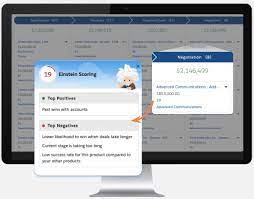
Understanding Opportunities and List Views in Salesforce What Is an Opportunity? An opportunity in Salesforce represents a deal in progress. These records track key details such as the associated account, stakeholders, and potential sales value. Opportunities help sales teams manage pipelines and track revenue potential efficiently. To view and manage your opportunities, Salesforce provides list views, which display a collection of opportunity records. Since list views are dynamic, any updates to an opportunity automatically reflect in real time. Additionally, you can filter, customize, and visualize list views to streamline your workflow. Filtering Opportunities in a List View By default, your list view may show Recently Viewed opportunities. To switch to a different view: To remove all filters, simply click Remove All, then Save. Filtering becomes especially powerful when managing a large number of records. Try adding a new opportunity using the New button and adjust filters to see how they refine the view. You can always add more filters to further customize your list. Creating a New List View Note: Only users with the View Roles and Role Hierarchy permission can select from your org’s role list when editing public list view visibility. Customizing Displayed Fields This allows you to focus on the most relevant opportunity details at a glance. Visualizing Opportunities with Kanban By default, Kanban groups opportunities by Stage (opportunity status). To customize this: To return to the standard table view, click the Display as icon and select Table. Maximize Your Use of List Views Salesforce’s opportunity list views offer powerful filtering, customization, and visualization capabilities to help sales teams stay organized and efficient. Keep exploring different list view settings to optimize your workflow and better manage your deals. Like Related Posts Who is Salesforce? Who is Salesforce? Here is their story in their own words. From our inception, we’ve proudly embraced the identity of Read more Salesforce Marketing Cloud Transactional Emails Salesforce Marketing Cloud Transactional Emails are immediate, automated, non-promotional messages crucial to business operations and customer satisfaction, such as order Read more Salesforce Unites Einstein Analytics with Financial CRM Salesforce has unveiled a comprehensive analytics solution tailored for wealth managers, home office professionals, and retail bankers, merging its Financial Read more AI-Driven Propensity Scores AI plays a crucial role in propensity score estimation as it can discern underlying patterns between treatments and confounding variables Read more
Read More
What Are The Value of Breadcrumbs

What Are The Value of Breadcrumbs

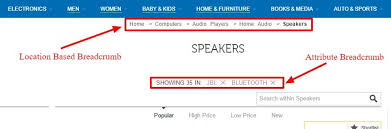
Breadcrumbs on a website provide a visual path for users to understand their location and navigate back to higher-level pages or the homepage, improving user experience and SEO. They act as a secondary navigation tool, especially helpful for sites with complex hierarchies or deep-level content.  Benefits of Breadcrumbs: Types of Breadcrumbs: Best Practices: Like Related Posts Who is Salesforce? Who is Salesforce? Here is their story in their own words. From our inception, we’ve proudly embraced the identity of Read more Salesforce Marketing Cloud Transactional Emails Salesforce Marketing Cloud Transactional Emails are immediate, automated, non-promotional messages crucial to business operations and customer satisfaction, such as order Read more Salesforce Unites Einstein Analytics with Financial CRM Salesforce has unveiled a comprehensive analytics solution tailored for wealth managers, home office professionals, and retail bankers, merging its Financial Read more AI-Driven Propensity Scores AI plays a crucial role in propensity score estimation as it can discern underlying patterns between treatments and confounding variables Read more
Read More
gettectonic.com