Salesforce Objects Archives - gettectonic.com - Page 3
field dependencies

Guide to Salesforce Field Dependencies

Salesforce provides robust tools to optimize processes, streamline workflows, and ensure data accuracy. In this guide, we’ll explore how to set up Salesforce field dependencies, implement validation rules, and use formula fields to enhance data quality and maintain data integrity across your organization. Understanding Field Dependency Field dependency in Salesforce allows you to filter and display relevant options in one picklist based on the user’s selection in another picklist. It links a controlling field and a dependent field, where the controlling field determines which values are shown in the dependent field. This helps maintain data integrity by preventing irrelevant selections, ensuring accurate and consistent data. Benefits of Field Dependencies Here’s why field dependencies are a valuable asset in Salesforce: Popular Use Cases for Field Dependencies How to Set Up Field Dependencies Best Practices for Managing Field Dependencies Conclusion Salesforce field dependencies are a powerful feature for ensuring clean data, enhancing workflows, and improving user experience. By enabling context-specific data entry, they reduce errors and save time, boosting productivity across your organization. If you need expert assistance with Salesforce configurations, Tectonic, a trusted Salesforce consultant, can help. With deep expertise in Salesforce solutions, Tectonic ensures your workflows are optimized and your Salesforce environment is perfectly aligned with your business needs. Reach out today to unlock the full potential of Salesforce for your organization. Content updated October 2024. Like Related Posts Who is Salesforce? Who is Salesforce? Here is their story in their own words. From our inception, we’ve proudly embraced the identity of Read more Salesforce Marketing Cloud Transactional Emails Salesforce Marketing Cloud Transactional Emails are immediate, automated, non-promotional messages crucial to business operations and customer satisfaction, such as order Read more Salesforce Unites Einstein Analytics with Financial CRM Salesforce has unveiled a comprehensive analytics solution tailored for wealth managers, home office professionals, and retail bankers, merging its Financial Read more AI-Driven Propensity Scores AI plays a crucial role in propensity score estimation as it can discern underlying patterns between treatments and confounding variables Read more


Read More
salesforce data model

Salesforce Data Model

The entity relationship diagrams (ERDs) featured in this insight elucidate significant connections among standard Salesforce objects, utilizing crow’s foot notation as part of Salesforce’s data modeling framework. The Salesforce Data Model shows the connection between fields, objects, and data. The Salesforce data model is essentially a composition of objects and fields. Data modeling involves structuring data using objects, fields, and relationships. In Salesforce, the database adopts a relational structure, storing data in tables referred to as Objects. These tables consist of columns representing types and rows denoting records, with entries named fields or data records. In Salesforce, objects play a pivotal role as they enable data storage, akin to tables in a database. Each object comprises multiple fields designed to house data effectively. Salesforce’s Data Model shows how each object relates to the others. The core architecture of Salesforce is characterized by a multi-tenant structure, where a common application serves multiple groups or clients. This architecture ensures the security and isolation of data for each client, even though they share the same server. Fields in the Salesforce data model are fundamental units of data storage, encompassing various types such as text, number, picklist, and date. These fields are utilized to store data specific to a particular object. For example, the Account object incorporates fields like Account Name, Account Number, and Phone. Like1 Related Posts Who is Salesforce? Who is Salesforce? Here is their story in their own words. From our inception, we’ve proudly embraced the identity of Read more Salesforce Marketing Cloud Transactional Emails Salesforce Marketing Cloud Transactional Emails are immediate, automated, non-promotional messages crucial to business operations and customer satisfaction, such as order Read more Salesforce Unites Einstein Analytics with Financial CRM Salesforce has unveiled a comprehensive analytics solution tailored for wealth managers, home office professionals, and retail bankers, merging its Financial Read more AI-Driven Propensity Scores AI plays a crucial role in propensity score estimation as it can discern underlying patterns between treatments and confounding variables Read more

Read More
Salesforce and Calendly

Calendly and Salesforce Integration

The Salesforce integration helps you close deals faster than the competition by scheduling high-value leads on the spot. Calendly Routing works with your marketing forms and Salesforce records to qualify, route, and schedule meetings. Integration with Calendly provides extra power to your CRM. Salesforce and Calendly can be integrated using Zapier, Boomi, or other integration tools. When scheduling meetings with new prospects when using Calendly, right inside Salesforce create a new lead, contact or opportunity.  Or update an existing Salesforce record. Your reps will love using the Calendly integration to get back more selling time, and management will love that Salesforce data is always accurate without having to chase down their reps for updates. Instantly schedule leads that come in via marketing forms based on real time Salesforce assignment status, filtering by deal stage, territory, or other fields in Salesforce as needed. To map Calendly data to fields in Salesforce objects What is the purpose of Calendly Scheduling Integration? Calendly is a virtual availability and booking app used to schedule meetings, appointments, and events for individuals and organizations. Calendly takes the work out of updating Salesforce so you can sell more. With this powerful integration you get to marry your Salesforce calendar and tasks with your actual availability providing easier scheduling for your prospects and customers. For teams on Calendly’s Enterprise plan, keep data more manageable in Salesforce by syncing Calendly data for specific groups only, like your Sales group. All other meeting and user information stays in Calendly so you don’t have to worry about non-revenue team data in the CRM. Schedule meetings for your team without leaving your CRM using Calendly, and view your upcoming and past meetings from your activities. Like Related Posts Who is Salesforce? Who is Salesforce? Here is their story in their own words. From our inception, we’ve proudly embraced the identity of Read more Salesforce Marketing Cloud Transactional Emails Salesforce Marketing Cloud Transactional Emails are immediate, automated, non-promotional messages crucial to business operations and customer satisfaction, such as order Read more Salesforce Unites Einstein Analytics with Financial CRM Salesforce has unveiled a comprehensive analytics solution tailored for wealth managers, home office professionals, and retail bankers, merging its Financial Read more AI-Driven Propensity Scores AI plays a crucial role in propensity score estimation as it can discern underlying patterns between treatments and confounding variables Read more

Read More
Salesforce and Wrike

Wrike Salesforce Integration

Seamless Wrike-Salesforce Integration for Real-Time Collaboration Easily integrate Wrike with Salesforce (SFDC) to sync data bidirectionally and in real time. With a single Unito flow, keep information aligned across platforms—no manual updates required. Why Integrate Wrike with Salesforce? Salesforce is a leading CRM solution used by teams worldwide, while Wrike streamlines project management. By integrating the two, sales and customer-facing teams can seamlessly collaborate with project teams, improving speed, transparency, and efficiency. Key Benefits: ✅ Work Within Salesforce – Salesforce users can manage Wrike tasks directly, eliminating the need to switch between platforms.✅ Real-Time Task Sync – Any changes in Wrike instantly update in Salesforce, ensuring consistency across both systems.✅ Improved Visibility & Accountability – Easily check task statuses in either platform, reducing the need for follow-ups.✅ Automated Project & Task Creation – Use templates or Wrike Integrate to generate tasks for Salesforce records automatically. How It Works: Customizable to Fit Your Needs With Wrike-Salesforce integration, teams can collaborate effortlessly, stay aligned, and keep projects moving forward—without ever leaving Salesforce. Get started in just a few clicks! Like Related Posts Who is Salesforce? Who is Salesforce? Here is their story in their own words. From our inception, we’ve proudly embraced the identity of Read more Salesforce Marketing Cloud Transactional Emails Salesforce Marketing Cloud Transactional Emails are immediate, automated, non-promotional messages crucial to business operations and customer satisfaction, such as order Read more Salesforce Unites Einstein Analytics with Financial CRM Salesforce has unveiled a comprehensive analytics solution tailored for wealth managers, home office professionals, and retail bankers, merging its Financial Read more AI-Driven Propensity Scores AI plays a crucial role in propensity score estimation as it can discern underlying patterns between treatments and confounding variables Read more
Read More
Visualize Your Task List With Salesforce and Wrike

Visualize Your Task List With Salesforce and Wrike

Streamlining Collaboration with Wrike and Salesforce Integration If your team uses Wrike and your sales team operates in Salesforce, seamless collaboration is now within reach without the hassle of switching between platforms or relying on excessive email communication. Visualize Your Task List With Salesforce and Wrike. Account administrators can integrate Wrike with Salesforce, a widely used CRM solution. This integration allows you to manage client projects directly within Salesforce, enhancing collaboration between sales and other customer-facing teams using Wrike. This setup facilitates faster, more transparent work processes. More information on Salesforce can be found here. How the Integration Works Once the integration is in place, you can monitor task status from within Salesforce. You can link any Salesforce object to a Wrike project or folder, ensuring that changes in Wrike are immediately reflected in Salesforce. This integration supports both Salesforce Classic and Salesforce Lightning. Key Benefits of Wrike-Salesforce Integration: Utilizing the Integration Every record page in Salesforce (where the integration is enabled) includes a Wrike widget. This widget lets you select or change the project or folder displayed, access tasks, and monitor their status. If a project or folder hasn’t been set up for a Salesforce record, you can create it directly from the widget using templates provided by the admin. The integration’s customization options allow you to select which Salesforce objects (such as Leads, Opportunities, Accounts, or Subscriptions) you want to link with Wrike. On enabled objects, record pages will feature the Wrike widget for easy access to related tasks. Setting Up the Wrike Widget To set up the Wrike widget on your Salesforce pages: Practical Applications Common Use Cases: Getting Started – Visualize Your Task List With Salesforce and Wrike Wrike’s Salesforce Integration is available to Wrike Enterprise accounts. If you are ready to implement this integration, contact Wrike’s Support team for the installation package. Please note that List view is not available for accounts created on or after June 9, 2023; we recommend using the Table view instead. This integration not only simplifies workflow management but also enhances collaboration and accountability across your teams, making it an invaluable tool for organizations using both Salesforce and Wrike. Like Related Posts Who is Salesforce? Who is Salesforce? Here is their story in their own words. From our inception, we’ve proudly embraced the identity of Read more Salesforce Marketing Cloud Transactional Emails Salesforce Marketing Cloud Transactional Emails are immediate, automated, non-promotional messages crucial to business operations and customer satisfaction, such as order Read more Salesforce Unites Einstein Analytics with Financial CRM Salesforce has unveiled a comprehensive analytics solution tailored for wealth managers, home office professionals, and retail bankers, merging its Financial Read more AI-Driven Propensity Scores AI plays a crucial role in propensity score estimation as it can discern underlying patterns between treatments and confounding variables Read more
Read More
Business Card Scanner App for Salesforce

Business Card Scanner App for Salesforce

Can I Scan a Business Card into Salesforce? Yes, you can scan a business card into Salesforce if your scanning system can create a CSV file or import data into Excel, which can then be saved as a .csv file. This resulting file can be uploaded to Salesforce. And there are several Business Card Scanner App for Salesforce solutions. Business Card Scanner App for Salesforce Does Salesforce Have a Business Card Scanner? Yes, Salesforce can utilize CamCard for Salesforce, a top OCR software that allows you to batch scan and digitize multiple business cards with unrivaled accuracy. Does CamCard Sync with Salesforce? Yes, CamCard perfectly integrates with customized Salesforce fields, making lead and contact management easier and more efficient on mobile. With a standard subscription, you can save unlimited cards to your Salesforce account. Is the CamCard App Free? CamCard offers many features, such as dating when you received a card, grouping cards received at one location, writing notes on each card, and searching by keywords, locations, or dates. The app is free, which is an added benefit. Is Scan to Salesforce Free? Yes, Scan to Salesforce allows you to instantly and accurately scan business cards and upload data to Salesforce for free. You can keep contacts in the iOS/Android app or sync them to your phone. How Do I Install Scan to Salesforce? Other Business Card Scanning Solutions: Using Outlook for Business Card Scanning: If you prefer more tools, consider those that import to Outlook and then use Salesforce’s Outlook integration tool to sync with Salesforce. This adds an extra step but offers more flexibility in choosing business card scanning software. Direct Integration with Salesforce: These options provide a variety of ways to seamlessly integrate business card data into Salesforce, ensuring efficient and accurate data management. Content updated March 2025. Like1 Related Posts Who is Salesforce? Who is Salesforce? Here is their story in their own words. From our inception, we’ve proudly embraced the identity of Read more Salesforce Marketing Cloud Transactional Emails Salesforce Marketing Cloud Transactional Emails are immediate, automated, non-promotional messages crucial to business operations and customer satisfaction, such as order Read more Salesforce Unites Einstein Analytics with Financial CRM Salesforce has unveiled a comprehensive analytics solution tailored for wealth managers, home office professionals, and retail bankers, merging its Financial Read more AI-Driven Propensity Scores AI plays a crucial role in propensity score estimation as it can discern underlying patterns between treatments and confounding variables Read more
Read More
Salesforce Standard Objects

Salesforce Standard Objects

Standard objects in Salesforce are crafted to support various business functions, including marketing, sales, services, and support. They play a pivotal role in managing workflows and efficiently handling comprehensive data. The following are examples of Salesforce standard objects: Account, Campaign. Contact, and Opportunity. Definition of Standard Objects: Salesforce Standard Objects Identifying and Searching for Standard Objects in Salesforce: To view all standard and custom objects available in your organization, click the plus icon (+). Record tabs provide access to specific object records, allowing users to view, edit, and create records from a list. Standard Objects Related to Accounts: Examples of standard objects related to accounts include accounts, contacts, opportunities, leads, products, campaigns, cases, users, contracts, reports, and dashboards. Custom objects, on the other hand, store unique information created by users. List of Main Standard Objects: Difference Between Standard Objects and Custom Objects: Standard objects, like accounts and contacts, come with Salesforce by default, while custom objects are created by users to store unique information. Identifying Standard and Custom Objects: Custom objects can have unique fields, relationships, and logic tailored to specific business needs. Standard objects are pre-built by Salesforce. Relationship Between Standard Objects: An example is the relationship between Account and Contacts, often a one-to-many lookup relationship where the Account ID is a field on a Contact, representing the association between the two. Editing Standard Objects: Users cannot rename certain standard objects designed for specific functions, but customization is available for custom objects and reports. Field Limit for Standard Objects: An organization cannot have more than 800 custom fields, with specific limits per object depending on the edition. Standard Object ID in Salesforce: Salesforce IDs usually have 15 or 18 characters, and the object ID refers to the first three characters from the Salesforce ID. For example, an Account object ID may appear as “001F000000gkM5s.” Person Account in Salesforce: Person Account is not a standalone object but shares features like page layouts, compact layouts, and record types with object-like functionalities, using Contact fields when viewing Account fields. Like2 Related Posts Who is Salesforce? Who is Salesforce? Here is their story in their own words. From our inception, we’ve proudly embraced the identity of Read more Salesforce Marketing Cloud Transactional Emails Salesforce Marketing Cloud Transactional Emails are immediate, automated, non-promotional messages crucial to business operations and customer satisfaction, such as order Read more Salesforce Unites Einstein Analytics with Financial CRM Salesforce has unveiled a comprehensive analytics solution tailored for wealth managers, home office professionals, and retail bankers, merging its Financial Read more AI-Driven Propensity Scores AI plays a crucial role in propensity score estimation as it can discern underlying patterns between treatments and confounding variables Read more

Read More
Salesforce analytics insurance

Cool Ways to Use Surveys With Salesforce

Leveraging survey forms is an effective way to gather real-life insights from individuals crucial to your organization. Salesforce facilitates survey integration either through Salesforce Surveys and Feedback Management (add-on license) or by seamlessly integrating web forms with Salesforce. Storing feedback in your CRM, linked to comprehensive contact information, is an obvious advantage. Salesforce surveys give you real-time feedback.  However, adopting an integrated web form approach offers additional benefits. Here are seven ideas to enhance your survey integration with Salesforce, ensuring valuable customer insights: Integrating survey forms with Salesforce is a strategic move to enhance customer experience and internal processes. Implementing these tips will not only improve the effectiveness of your Salesforce surveys but also align internal practices with best standards. Choose a tip that fits your needs and contributes to the success of your Salesforce surveys. Like Related Posts Who is Salesforce? Who is Salesforce? Here is their story in their own words. From our inception, we’ve proudly embraced the identity of Read more Salesforce Marketing Cloud Transactional Emails Salesforce Marketing Cloud Transactional Emails are immediate, automated, non-promotional messages crucial to business operations and customer satisfaction, such as order Read more Salesforce Unites Einstein Analytics with Financial CRM Salesforce has unveiled a comprehensive analytics solution tailored for wealth managers, home office professionals, and retail bankers, merging its Financial Read more AI-Driven Propensity Scores AI plays a crucial role in propensity score estimation as it can discern underlying patterns between treatments and confounding variables Read more
Read More
Salesforce Supports Babies and Their Families

Set Up Record Alerts

Set up the components required for Record Alerts, including OmniStudio FlexCard components and integration procedures, custom severity values, and alert categories. Like Related Posts Who is Salesforce? Who is Salesforce? Here is their story in their own words. From our inception, we’ve proudly embraced the identity of Read more Salesforce Marketing Cloud Transactional Emails Salesforce Marketing Cloud Transactional Emails are immediate, automated, non-promotional messages crucial to business operations and customer satisfaction, such as order Read more Salesforce Unites Einstein Analytics with Financial CRM Salesforce has unveiled a comprehensive analytics solution tailored for wealth managers, home office professionals, and retail bankers, merging its Financial Read more AI-Driven Propensity Scores AI plays a crucial role in propensity score estimation as it can discern underlying patterns between treatments and confounding variables Read more
Read More
Salesforce Document Generation

Generating Documents in Salesforce

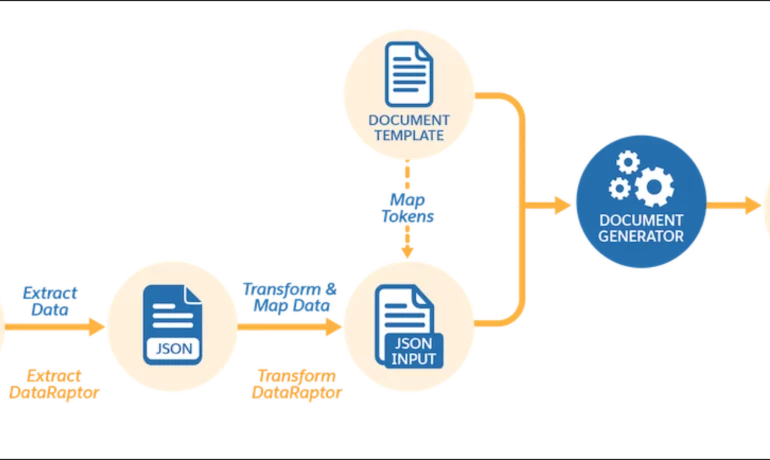
Salesforce document generation poses a challenge for businesses, given the intricacies of integration involved. Fortunately, a variety of tools are available for generating documents in Salesforce, and Tectonic is well-equipped to assist in their successful implementation. Salesforce Industries Document Generation empowers businesses to craft and manage accurate documents linked to standard Salesforce objects, encompassing contracts, opportunities, orders, quotes, and custom objects. For a more dynamic approach, Salesforce OmniStudio Document Generation facilitates the creation of documents using Microsoft Word and Microsoft PowerPoint templates. These templates can incorporate values from any JSON-based data within the text, including data sourced from various Salesforce objects. This versatile tool enables the generation of contracts, proposals, quotes, reports, non-disclosure agreements, service agreements, and more. Salesforce Industries Document Generation seamlessly integrates with Vlocity Insurance, Vlocity Health, communications, media, energy, utilities, government, and beyond. Vlocity Analytics, another valuable component, offers pre-built measurement tools that seamlessly integrate with Salesforce Reports, Dashboards, and Einstein. The Salesforce AppExchange boasts an extensive array of over 200 document generation tools. Your Salesforce partner can assist in selecting, installing, and implementing the most suitable options based on your business requirements. With Document Generation, you can generate contracts, proposals, quotes, reports, non-disclosure agreements, job offers, service agreements, and so on. You can generate documents using the specified sample client-side or server-side OmniScripts. You can also create your own OmniScripts by cloning and customizing the sample OmniScript to generate documents. Client-Side document generation is a synchronous process that results in a downloadable preview of the generated documents. You can generate documents from Microsoft Word (.docx), Microsoft PowerPoint (.pptx), and Web templates. These templates can include values from any JSON-based data in the text, including data from any Salesforce object. You can optionally convert the resulting documents to .pdf format. Server-Side document generation is available in both the OmniStudio Foundation and Salesforce Industries packages. Server-Side document generation is an asynchronous process that’s best for large and rendering-heavy documents and for document generation in batches. The Server-Side document generation service is secure and scalable and is hosted on Salesforce Hyperforce. The generated document is stored in your Salesforce org, and is attached to the object for which it’s generated. You can use Apex Classes, sample Integration Procedures, or a sample OmniScript to generate documents. Client-Side document generation supports Customer Community Plus, Customer Community, and Partner Community users to generate documents using client-side OmniScripts. Server-Side document generation supports Customer Community Plus, Customer Community, and Partner Community users to generate documents using the singleDocxServersideLwc server-side OmniScript. With the right licenses, Document Generation is available in the Salesforce Industries package. Metering measures resource utilization levels and throttling controls resource access and use based on defined rules. Metering measures the number of server-side documents that are generated by an org hourly and daily. The default hourly and daily limits for processing server-side document generation requests are 1,000 per org and 24,000 per org respectively. Throttling maintains consistency and resilience of the server-side document generation service by managing incoming server-side document generation requests from multiple orgs. Throttling can also prevent service degradation caused by high volume of requests at peak hours by blocking requests that exceed the default limits. The request details are saved in the Document Generation Processes entity. You can retrieve the blocked requests and later retry the server-side document generation. No matter what your specific document generation needs, Tectonic simplifies the process of getting your system up and running seamlessly, whether it’s through Salesforce Quickstarts or comprehensive implementation services. Content updated in 2February 2024, Shannan Hearne. Like1 Related Posts Who is Salesforce? Who is Salesforce? Here is their story in their own words. From our inception, we’ve proudly embraced the identity of Read more Salesforce Marketing Cloud Transactional Emails Salesforce Marketing Cloud Transactional Emails are immediate, automated, non-promotional messages crucial to business operations and customer satisfaction, such as order Read more Salesforce Unites Einstein Analytics with Financial CRM Salesforce has unveiled a comprehensive analytics solution tailored for wealth managers, home office professionals, and retail bankers, merging its Financial Read more AI-Driven Propensity Scores AI plays a crucial role in propensity score estimation as it can discern underlying patterns between treatments and confounding variables Read more

Read More
gettectonic.com