Google Analytics Archives - gettectonic.com - Page 3
Salesforce Experience Cloud

Nonprofit with Salesforce Experience Cloud

Transform Your Nonprofit with Salesforce Experience Cloud: A Digital Storefront for Engagement Think of Salesforce Experience Cloud as your Nonprofit’s digital storefront—always open, always inviting. This powerful Digital Experience Platform (DXP) enables you to create custom portals, communities, and hubs where donors, volunteers, and beneficiaries can seamlessly connect with your organization. Instead of juggling endless emails and spreadsheets, Experience Cloud centralizes interactions, making them self-service, intuitive, and engaging. With nonprofit-specific features, you can build customized, branded experiences without heavy development work. Here’s what makes Experience Cloud a game-changer: ✅ Drag-and-drop site builder for effortless customization✅ Prebuilt templates & Lightning components for quick deployment✅ Mobile Publisher for consistent branding across mobile apps✅ Built-in content management system (CMS)✅ Personalization tools like audience targeting & role-based access✅ Einstein AI-powered chatbots for instant responses✅ Gamification with badges & leaderboards✅ Google Analytics 4 integration for engagement insights✅ Advanced security with Lightning Locker & Clickjack protection …and much more. 🔍 Nonprofit Solutions You Can Build with Salesforce Experience Cloud 1️⃣ Program Applications & Intake Portals Managing program applications can be overwhelming without a structured system. Experience Cloud allows Nonprofits to create a self-service portal where applicants can submit forms, track status updates, and receive automated notifications—eliminating paper-based processes and endless email chains. With Dynamic Forms and Flow Builder, applications stay structured while automation accelerates approvals. Plus, since everything syncs to the Nonprofit Success Pack (NPSP), you’ll always have a real-time view of applicants and program impact. 2️⃣ Volunteer Portals Managing volunteers shouldn’t feel like a full-time job. With a Volunteer Portal, people can sign up, pick shifts, and track their hours—all without back-and-forth emails. Features like automated background checks and approval workflows ensure smooth operations. Meanwhile, Experience Cloud’s Chatter integration fosters engagement, helping you track who’s active, who’s disengaged, and who might need a little encouragement. 3️⃣ Community Partner Portals Nonprofits thrive on partnerships, and a Community Partner Portal keeps corporate sponsors, local businesses, and community groups connected. With this portal, partners can log in, access shared resources, submit funding applications, and track joint projects—all from one secure platform. Role-based access ensures that sensitive data stays protected while collaboration remains seamless. 4️⃣ Membership Portals If your nonprofit has a membership program, Experience Cloud helps you build a Member Portal where users can renew memberships, update information, and access exclusive content. Want to boost engagement? Introduce gamification with badges, leaderboards, and personalized event recommendations. Since everything is integrated with Salesforce CRM, you’ll gain real-time insights into member activity to keep engagement levels high. 5️⃣ Grant Management Portals Grant applications shouldn’t feel like a never-ending email thread. With Experience Cloud, you can create a Grant Management Portal where organizations apply for funding, track application progress, and submit reports—all in one place. Einstein AI can even prioritize applications based on predefined criteria, accelerating the review process. Grantors, in turn, can access real-time funding reports—enhancing transparency and trust. 6️⃣ E-Commerce & Donation Portals Looking to sell nonprofit merchandise or accept donations online? Experience Cloud seamlessly integrates with Salesforce Commerce Cloud, allowing you to build an e-commerce storefront for hassle-free transactions. Supporters can:💳 Make one-time or recurring donations🛍️ Purchase branded merchandise📜 Track donation history & receive personalized thank-you messages For secure transactions and easy donor tracking, you can integrate Stripe, PayPal, or other payment processors directly into your portal. 7️⃣ Voter Registration Portals If your nonprofit promotes civic engagement, Experience Cloud can power a Voter Registration Portal where users can check registration status, sign up to vote, and receive election reminders. With geolocation tools, voters can find polling places instantly, while Marketing Cloud integration allows you to send timely voter updates—ensuring higher participation in the democratic process. Implementing Salesforce Experience Cloud for Nonprofits Which Approach is Right for Your Nonprofit? Your ideal Experience Cloud implementation depends on your current CRM, budget, and long-term strategy. 1️⃣ Standalone Experience Cloud Implementation If your nonprofit already uses Salesforce CRM (but not NPSP), you can still implement Experience Cloud independently to create portals, volunteer hubs, and dashboards while maintaining your existing CRM as the system of record. Considerations:🔹 Custom Configuration – You’ll need to set up nonprofit-specific objects & automation.🔹 Permissions & Access – Well-structured security settings are crucial.🔹 CRM Integration – If using a non-Salesforce CRM, API integrations (e.g., MuleSoft, Zapier) will be required. This option is best for nonprofits that want external-facing engagement tools without fully shifting to the Salesforce Nonprofit ecosystem. 2️⃣ Experience Cloud + Nonprofit Cloud / NPSP For nonprofits already using Salesforce Nonprofit Cloud or NPSP, Experience Cloud becomes an extension of your engagement strategy. 🔹 Real-time donor, volunteer, and grant data sharing🔹 Prebuilt nonprofit features (fundraising, donor management, program tracking)🔹 Automation & AI-powered engagement 3️⃣ Experience Cloud + Third-Party Nonprofit CRMs Already using a third-party nonprofit CRM (like Raiser’s Edge NXT, Neon One, or DonorPerfect)? You can still leverage Experience Cloud, but strong integration is key. 🔹 Experience Cloud powers your donor, volunteer, or program portal🔹 API-based sync required for real-time data exchange🔹 Tools like MuleSoft or Zapier help bridge data gaps This approach is ideal for nonprofits wanting the flexibility of Experience Cloud without migrating their backend to Salesforce. Final Thought: Making Experience Cloud Work for Your Nonprofit No matter your approach, Salesforce Experience Cloud is a powerful tool to drive engagement and efficiency for nonprofits. However, successful implementation requires a well-thought-out strategy. Need expert guidance? A Salesforce implementation partner can help tailor Experience Cloud to fit your unique nonprofit needs, ensuring your digital storefront delivers maximum impact. Like Related Posts Who is Salesforce? Who is Salesforce? Here is their story in their own words. From our inception, we’ve proudly embraced the identity of Read more Salesforce Marketing Cloud Transactional Emails Salesforce Marketing Cloud Transactional Emails are immediate, automated, non-promotional messages crucial to business operations and customer satisfaction, such as order Read more Salesforce Unites Einstein Analytics with Financial CRM Salesforce has unveiled a comprehensive analytics solution tailored for wealth managers, home office professionals, and retail bankers, merging its Financial Read more AI-Driven Propensity Scores AI plays


Read More
Personalization and Third-Party Apps

Personalization and Third-Party Apps

Marketing Cloud Personalization: Integration Capabilities Marketing Cloud Personalization seamlessly integrates with various third-party solutions beyond Salesforce. These integrations span data management platforms, email service providers, third-party campaign detection tools, analytics products, content management systems, social media platforms, and tag managers. Personalization and Third-Party Apps. Data Management Platforms (DMP) Examples: Adobe Audience Manager, BlueKai, Neustar Functionality: Email Service Providers (ESP) Examples: Yes Lifecycle Marketing, Silverpop, Cheetah Mail, Adobe Campaign Functionality: Third-Party Campaign Detection Integration Type: UTM parameter mapping Functionality: Analytics Examples: Adobe Analytics, Google Analytics Functionality: Content Management Systems (CMS) Examples: Various CMS solutions Functionality: Social Integration Type: Generic segment sync Functionality: Tag Managers Integration Type: Custom implementation based on your needs Functionality: By leveraging these integration options, Marketing Cloud Personalization enables seamless data synchronization and enhanced targeting across multiple platforms and channels. Like Related Posts Who is Salesforce? Who is Salesforce? Here is their story in their own words. From our inception, we’ve proudly embraced the identity of Read more Salesforce Marketing Cloud Transactional Emails Salesforce Marketing Cloud Transactional Emails are immediate, automated, non-promotional messages crucial to business operations and customer satisfaction, such as order Read more Salesforce Unites Einstein Analytics with Financial CRM Salesforce has unveiled a comprehensive analytics solution tailored for wealth managers, home office professionals, and retail bankers, merging its Financial Read more AI-Driven Propensity Scores AI plays a crucial role in propensity score estimation as it can discern underlying patterns between treatments and confounding variables Read more
Read More
10 Essential Email Marketing KPIs to Measure Success

10 Essential Email Marketing KPIs to Measure Success

Is Your Email Strategy Working? These Metrics Tell the Truth Email marketing isn’t a “set it and forget it” channel—it’s a data-driven science. With evolving privacy rules (like Apple’s Mail Privacy Protection) and shifting consumer behaviors, tracking the right KPIs is crucial to optimizing engagement, conversions, and ROI. Here are the 10 most critical email marketing KPIs to measure performance—and how to use them to refine your strategy. 1. Delivery Rate What it measures: Percentage of emails that actually reach inboxes.Formula: (Emails Sent – Bounces) / Emails SentWhy it matters: If your emails aren’t being delivered, nothing else matters. Low delivery rates? Check for spam filters, authentication issues (SPF/DKIM/DMARC), or poor list hygiene. 2. Click-Through Rate (CTR) What it measures: Percentage of recipients who clicked a link in your email.Formula: Unique Clicks / Delivered EmailsWhy it matters: Indicates content relevance and CTA effectiveness. A high CTR means your message resonates; a low CTR suggests weak offers or poor email design. 3. Clicks by Link What it measures: Which links get the most engagement.Why it matters: Not all clicks are equal. If subscribers only click your unsubscribe link or a secondary CTA (instead of your main offer), you need to restructure your email flow. 4. Event Lag (Time-to-Click) What it measures: How quickly recipients engage after receiving your email.Why it matters: Fast clicks = urgent, compelling content. Slow clicks = your email got buried or lacked urgency. Use this to refine subject lines, send times, and preheaders. 5. Bounce Rate (By Type) What it measures: Percentage of emails rejected by the recipient’s server.Types: 6. Unsubscribe & Complaint Rates What they measure: 7. Web Traffic & Conversions What it measures: How many email clicks lead to desired actions (purchases, sign-ups, downloads).Pro tip: Use UTM parameters to track email-driven conversions in Google Analytics.Why it matters: The ultimate measure of ROI. If clicks don’t convert, your landing page or offer may be the issue. 8. Campaign vs. Email Performance What it measures: How individual emails perform within broader campaigns.Why it matters: Some emails (e.g., welcome series) may outperform others (promotional blasts). Compare CTR, conversions, and unsubscribe rates to identify winning templates. 9. List Growth Rate What it measures: How fast your subscriber list is expanding.Formula: (New Subscribers – Unsubscribes) / Total List SizeWhy it matters: Stagnant lists = missed opportunities. Boost growth with lead magnets, opt-in incentives, and cross-channel promotions. 10. Most & Least Engaged Subscribers What it measures: Who opens/clicks regularly vs. who ignores your emails.Why it matters: Key Takeaway: Test, Analyze, Optimize Email success isn’t static—it’s a cycle of testing, measuring, and refining. Start with these 10 KPIs, but always:✅ A/B test subject lines, CTAs, and send times✅ Segment your lists for hyper-relevant messaging✅ Clean your lists regularly to maintain deliverability “Your email metrics are a mirror—they show exactly what’s working (and what’s not). Stop guessing. Start measuring.” Need help tracking these KPIs? Contact Tectonic for marketing measurement assistance. #EmailMarketing #DigitalMarketing #KPIs #MarketingStrategy #ROI Like Related Posts Who is Salesforce? Who is Salesforce? Here is their story in their own words. From our inception, we’ve proudly embraced the identity of Read more Salesforce Marketing Cloud Transactional Emails Salesforce Marketing Cloud Transactional Emails are immediate, automated, non-promotional messages crucial to business operations and customer satisfaction, such as order Read more Salesforce Unites Einstein Analytics with Financial CRM Salesforce has unveiled a comprehensive analytics solution tailored for wealth managers, home office professionals, and retail bankers, merging its Financial Read more AI-Driven Propensity Scores AI plays a crucial role in propensity score estimation as it can discern underlying patterns between treatments and confounding variables Read more

Read More
Marketing Cloud Intelligence For Data Integration

Marketing Cloud Intelligence For Data Integration

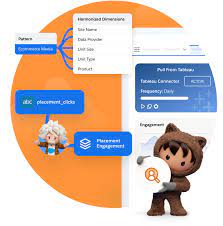
What exactly is Salesforce Datorama, now referred to as Marketing Cloud Intelligence? It is a versatile, cloud-based marketing data platform offering a suite of solutions aimed at enhancing data integration, reporting, analysis, and optimization. Marketing Cloud Intelligence For Data Integration. However, the question arises: Does Marketing Cloud Intelligence truly deliver the cloud-based Marketing Intelligence as Salesforce touts? Let’s dive into what this platform offers and dissect its capabilities without the fluff. Understanding the Platform: Salesforce’s Marketing Cloud Intelligence, formerly known as Datorama, serves as an analytics tool meticulously designed to integrate and visualize various forms of marketing performance data. It strikes a balance, catering to both analytically inclined marketers and seasoned analysts seeking to bridge data with conventional BI tools like Tableau. Flexible SaaS with Tailored Customization: Despite its Software-as-a-Service (SaaS) nature, Datorama surprises with its flexibility. It can function autonomously, handling data storage, modeling, ETL, and visualization, or seamlessly integrate with other platforms like Azure Databricks or Looker. While it accommodates numerous data use cases, its primary focus remains on Performance Marketing. Marketing Cloud Intelligence often gets misclassified as a traditional Business Intelligence or Analytics platform, but it truly excels in data management. For those contemplating its adoption, familiarity with its functionalities through resources like “Getting to Know Marketing Cloud Intelligence” or video walkthroughs is encouraged. Transition to Marketing Cloud Intelligence: The rebranding from Datorama to Marketing Cloud Intelligence was proposed in early 2022, gaining momentum recently. Despite the name change, the platform’s features and capabilities remain intact. Origins and Evolution: Originating from an Israeli-based technology firm in 2012, Datorama swiftly gained traction under the stewardship of its founders Ran Sarig, Efi Cohen, and Katrin Ribant. In 2018, Salesforce acquired Datorama, integrating it into the Marketing Cloud suite alongside Account, Engagement, Personalization, and Data Cloud platforms. However, as of February 2, 2023, the original founders and core engineering teams have moved on, possibly signaling a shift in the platform’s trajectory. Functionalities and Capabilities: Marketing Cloud Intelligence boasts robust data onboarding and connectivity features, with a rich assortment of connectors and retrieval mechanisms supporting popular data management platforms like SAP Hana, AWS, Oracle, Vertica, and SQL Server. It excels in ingesting and managing aggregated marketing performance data, with the capacity to handle event-level data as well. Pricing and Competitors: While its pricing model revolves around data row consumption and user seats, the platform may become cost-prohibitive at higher volumes. However, recent enhancements like Data Lake offer expanded row count flexibility without escalating costs. Its primary competitors include Domo, Adverity, NinjaCat, Improvado, Looker, PowerBI, and Google Data Studio. Use Cases and Industries: Marketing Cloud Intelligence serves marketers and advertisers across various industries, including communications, media, technology, healthcare, finance, manufacturing, automotive, retail, and publishing. Its versatility lies in supporting six specific marketing data use cases, ranging from building a single source of data to producing informative dashboards. Continuous Evolution: With frequent product releases, Marketing Cloud Intelligence remains dynamic, adapting to evolving market needs and technological advancements. Its commitment to enhancing analytics, visualization, connectivity, and marketplace apps ensures its relevance in the ever-changing landscape of marketing data management. Future Outlook: As Salesforce navigates the competitive analytics space, the future of Marketing Cloud Intelligence remains intriguing. While challenges like pricing pressures persist, the platform’s integration within the Marketing Cloud ecosystem and ongoing enhancements hint at a promising trajectory. Whether it evolves into a fully integrated analytics solution or retains its standalone utility, only time will tell. But one thing is certain: Salesforce’s promotion of Marketing Cloud Intelligence will continue to shape its evolution and market positioning moving forward. Like1 Related Posts Who is Salesforce? Who is Salesforce? Here is their story in their own words. From our inception, we’ve proudly embraced the identity of Read more Salesforce Marketing Cloud Transactional Emails Salesforce Marketing Cloud Transactional Emails are immediate, automated, non-promotional messages crucial to business operations and customer satisfaction, such as order Read more Salesforce Unites Einstein Analytics with Financial CRM Salesforce has unveiled a comprehensive analytics solution tailored for wealth managers, home office professionals, and retail bankers, merging its Financial Read more AI-Driven Propensity Scores AI plays a crucial role in propensity score estimation as it can discern underlying patterns between treatments and confounding variables Read more

Read More
Salesforce Success Story

Case Study: Salesforce Innovation for Hospitality

Major hospitality management firm, moves to the cloud and adopts Google Cloud and Salesforce to improve operational insights and decision-making. Tectonic assisted them to move to the cloud and obtatin quicker, actionable insights with business intelligence. Salesforce Innovation for Hospitality.

Read More

Attribution with Google Tag Manager and Custom Code

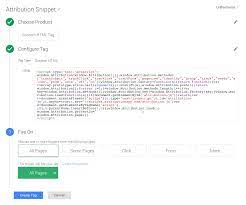
Utilizing Google Tag Manager with Custom Code If you’re already using Google Tag Manager (GTM) on your website, you can leverage it to store UTM parameters in a browser cookie. This stored data can then be extracted and populated into hidden form fields, which are sent to Salesforce upon form submission. Attribution with Google Tag Manager and Custom Code. Here’s a step-by-step guide to the process: Attribution with Google Tag Manager and Custom Code Pros: Cons: Limitations: Implementing Attribution Snippets with GTM Across All Pages To implement attribution snippets using GTM, follow these steps: Adding Attributes in Google Tag Manager: Adding a Custom HTML Tag in GTM: Adding Code to GTM: Optimizing GTM Performance Differentiating GTM and Google Analytics Testing GTM Code Employ a Tag Debugger: Attribution with Google Tag Manager and Custom Code Changes Is your business ready for the changes coming to Google’s data measurement infrastructure? You probably rely on Google Analytics as a marvelous tool to understand your customers and better target their needs across both your web and mobile app platforms. But with changes on the way from Google, particularly with some legacy mobile app tracking and measurement platforms, the stability of your analytics might be at risk if you’re not prepared. What’s changing? The current version of Google Tag Manager (version 4, or “Legacy”) for mobile apps will no longer be supported by Google as of March 2020. But, limitations on the functionality of GTM version 4 have already begun. Due to these limitations and hard dates for deprecation, everyone will need to upgrade to Google Tag Manager version 5. This requires the implementation of new GTM and Firebase Software Development Kits and a switch from the current GTM in-app, data layer approach to the new Firebase, event-based, data collection process. When will service be affected? Here are the key dates and milestones shared by Google, subject to change (though unlikely): Will analytics measurement be affected? Yes, for your mobile applications in particular. For your business to maintain uninterrupted Google Analytics tracking, you must make changes in the app source code. You’ll have to migrate the current data layer code in-app to Firebase-syntax data collection code, install a new Firebase SDK (if not already in place), create new GTM v5 containers, and test the new set-up for reliability to avoid any interruptions. InfoTrust can provide you with assistance to make this process as painless as possible. Please note, if you are already using Firebase Analytics and/or the newer version of Google Tag Manager for mobile apps, v5 (Firebase powered events and data collection), there is nothing to worry about and you are already in the safe zone. These dates are only meant to deprecate the measurement tracking for **Google Tag Manager v4 Legacy Containers** in mobile apps. This DOES NOT mean you have to move to Firebase Analytics and it DOES NOT mean GA for mobile apps is going away. Simply the means of collecting data in the app, if using GTM, is going through an upgraded version. You will need to update your source code to use the new GTM v5 SDK and Firebase event code, as described later but feel free to continue using GA as normal (if deployed in the new GTM v5 Firebase-powered containers). Benefits of Switching It’s not all bad news. Though the migration to GTM v5 will take some work, there are some major advantages. Most importantly, switching ensures uninterupted information flow to Google Analytics, so you never lose touch with your customers. Also, this isn’t just a cosmetic change; the switch to version 5 comes with more tags, new GTM capabilities, and new Firebase analytics UI capabilities. Why InfoTrust? If you’re still using version 4 of Google Tag Manager, this could be a complex project that requires input from many different parts of your business from IT to software development to analytics to marketing. Migrating platforms may be a little annoying, but it’s much less annoying than losing access to the key analytics tools or data you rely on to understand your customers and make strategic business decisions. Switching prevents headaches later and unlocks useful new features now. InfoTrust can help your organization come up with a solid migration plan, help work with your engineers to fully test and configure all the reporting + data measurement, and partner with your team to make the most out of the data collection and mobile application data you will continue to capture. If you have any questions about any aspect of this process, don’t think twice about reaching out. We’d love to help. InfoTrust is here to make sure you’re data confident. Like1 Related Posts Who is Salesforce? Who is Salesforce? Here is their story in their own words. From our inception, we’ve proudly embraced the identity of Read more Salesforce Marketing Cloud Transactional Emails Salesforce Marketing Cloud Transactional Emails are immediate, automated, non-promotional messages crucial to business operations and customer satisfaction, such as order Read more Salesforce Unites Einstein Analytics with Financial CRM Salesforce has unveiled a comprehensive analytics solution tailored for wealth managers, home office professionals, and retail bankers, merging its Financial Read more AI-Driven Propensity Scores AI plays a crucial role in propensity score estimation as it can discern underlying patterns between treatments and confounding variables Read more
Read More
Google Data Studio and Salesforce

Google Data Studio and Salesforce

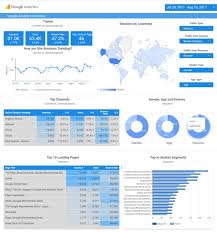
Does Google Data Studio integrate with Salesforce? Yes, Google Data Studio seamlessly integrates with Salesforce, enabling you to consolidate sales and marketing data for insightful analysis. Through powerful visualizations, you can discern which channels drive the most leads and revenue, empowering you to refine your marketing strategies effectively. At Xappex, they don’t just develop software; they revolutionize your Salesforce data interaction experience. Trusted by thousands of enterprises globally, their cutting-edge admin tools effortlessly fuse Salesforce with Excel, Google Data Studio and Google Sheets, ensuring efficient and intuitive data management. Empower your team with Xappex and embark on a journey where time-saving meets robust Salesforce data management. Available since December 2019, the Google Data Studio connector facilitates the utilization of Salesforce databases as data sources for your reports and dashboards. Whether leveraging existing reports, extracting data from specific objects, or crafting custom SOQL queries for precise data extraction, this connector provides flexibility and efficiency in data visualization. Additionally, the connector is accessible via windsor.ai, offering further convenience and accessibility. Integrating Salesforce with Looker Studio presents numerous advantages by amalgamating CRM data with advanced analytics and visualization capabilities. Streamline your sales processes, gain deeper insights into customer data, and leverage predictive modeling to forecast future sales trends based on historical Salesforce data. Moreover, Google Data Studio allows seamless report sharing within your organization or with external parties, facilitating collaboration on business strategies and progress tracking, particularly for larger teams. Regarding the transition from Google Data Studio to Looker Studio, while the brand name has changed, the capabilities, interface, and functionality remain unchanged. Looker Studio continues to offer robust data visualization tools and analytics capabilities, ensuring continuity in data-driven decision-making processes. Content updated October 2023. Like Related Posts Agiloft Salesforce Integration Optimize organizational efficiency, performance, and value by automating contracts with Agiloft Contract Lifecycle Management Software. Regain control and streamline processes Read more Demandbase Salesforce Integration The integration of Demandbase with Salesforce creates a seamless connection between Demandbase One and your Salesforce CRM, establishing a bidirectional Read more Box and Salesforce Integration What is Box and Salesforce integration? Together, Box and Salesforce integration bring you seamless solutions that make it easy for Read more Salesforce Integrations How do you make Salesforce even better? Integrate it with all the third party apps you already use. From productivity Read more

Read More
Marketing Cloud Lead Scoring

Marketing Cloud Lead Scoring

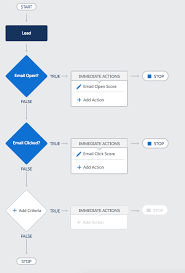
The acquisition of Exacttarget, now known as Salesforce Marketing Cloud, in 2012 caused a stir in the industry. It wasn’t due to Salesforce’s reputation for acquiring top martech products and teams, but rather because Salesforce had predominantly focused on B2B2B, while Exacttarget was firmly established in the B2C realm. Nonetheless, the acquisition also brought in Pardot, one of the leading marketing automation platforms for B2B marketing at that time. So, why did Salesforce make this move? They recognized that B2C-style marketing was on the verge of becoming the norm in B2B environments. This approach emphasizes storytelling and creating experiences over simple transactions. Salesforce Marketing Cloud enriches email journeys with SMS, advertising, social engagement, and more. Today, it ranks among the top three choices for enterprises, counting clients like Adidas and American Express among its roster. However, like any product, Marketing Cloud has its acknowledged limitations, especially when competing with Marketo, Eloqua, or Hubspot in fiercely contested deals. One significant challenge for B2B marketers is Marketing Cloud’s lead scoring and website tracking functionalities—critical tools for achieving superior sales and marketing alignment and executing client-driven, behavioral marketing campaigns. Lead scoring is a tactic used in marketing and sales to prioritize potential customers (leads) based on their likelihood to convert into paying customers. The aim is to focus the sales team’s efforts on leads most likely to convert, thereby enhancing the efficiency of the sales process and maximizing revenue. Lead scoring involves assigning a numerical value or score to each lead based on various factors and behaviors indicating their level of interest and engagement with your products or services. These factors include demographics, behavioral data, engagement metrics, lead source, intent, scoring models, explicit data, and negative signals. Once leads are scored, they can be categorized into different segments or tiers, such as “Hot,” “Warm,” and “Cold,” or Marketing Qualified or Sales Qualified, allowing sales teams to prioritize their efforts accordingly. Lead scoring facilitates more effective collaboration between marketing and sales teams, leading to improved conversion rates and overall revenue generation. The significance of lead scoring cannot be overstated. According to Marketing Sherpa, 61% of B2B marketers send any lead directly to sales without a lead qualification strategy, while sales reps ignore 70% of all leads from marketing, leading to significant inefficiencies and considered a top-three time-waster for sales teams. To address this issue and achieve sales and marketing alignment, businesses can take several steps, including defining their Ideal Customer Profile (ICP or Persona), tailoring communication and content to attract the right leads, collecting necessary data to qualify leads effectively, and identifying which leads match their profile and are ready to be handed over to the sales team. Analyze the steps in your customer jouneys by ICP or Persona and assign a score to the possible disposition of each step. While a bit stressful this is a great exercise in measuring historical data to see what really moves the needle in your sales cycles. While some steps are within a company’s control, others require technological support. One key tool for this is lead activity tracking, which collects data on lead engagement. Additionally, a lead scoring mechanism is needed to quantify lead interest and fit objectively. Unfortunately, Salesforce Marketing Cloud doesn’t offer satisfactory native functionality for activity tracking and lead scoring. However, there are several options to successfully track lead scoring within Salesforce, such as SalesWings, Marketing Cloud Connect and Process Automation, Marketing Cloud Journey Builder, and Marketing Cloud Personalization Builder and Predictive Intelligence, among others. Each option offers unique features and advantages, enabling businesses to tailor their lead scoring strategies to their specific needs and objectives. While Salesforce Marketing Cloud may lack native lead scoring capabilities, there are powerful ways to drive sales and marketing interactions effectively. The key is to base decisions on core marketing automation features and keep the goal of lead scoring in mind to align sales and marketing teams and personalize the customer experience based on intent. When a visitor goes to your website with the tracking code installed, a cookie is dropped with a unique ID and session ID. The cookie adds an ID to all Collect calls. The cookie tracks the user until it’s removed or cleared. The Collect Tracking Code pixel identifies itself as an invisible image, and it doesn’t affect the user experience of website visitors who use a screen reader. Configurations vary by product and use case. Collect Tracking Code monitors the variables and events that you select at the contact level. Considerations Salesforce Marketing Cloud may lack native lead scoring capabilities, there are powerful ways to drive sales and marketing interactions effectively. Base your decision on core marketing automation features and keep the goal of lead scoring in mind to align your sales and marketing teams and personalize the customer experience based on intent. All solution product descriptions are provided by their respective owners. Content updated May 2024. Like1 Related Posts Who is Salesforce? Who is Salesforce? Here is their story in their own words. From our inception, we’ve proudly embraced the identity of Read more Salesforce Marketing Cloud Transactional Emails Salesforce Marketing Cloud Transactional Emails are immediate, automated, non-promotional messages crucial to business operations and customer satisfaction, such as order Read more Salesforce Unites Einstein Analytics with Financial CRM Salesforce has unveiled a comprehensive analytics solution tailored for wealth managers, home office professionals, and retail bankers, merging its Financial Read more AI-Driven Propensity Scores AI plays a crucial role in propensity score estimation as it can discern underlying patterns between treatments and confounding variables Read more
Read More
crm analytics

Understand Customer Service Analytics

Customer Service Analytics: Types, Use Cases & Key Benefits Customer service analytics transforms raw customer data into actionable insights—helping businesses improve support, boost retention, and drive revenue. With today’s complex customer journeys, analytics tools are essential for tracking interactions, predicting trends, and optimizing experiences. What Is Customer Service Analytics? Customer service analytics involves collecting and analyzing data from every touchpoint—support tickets, purchases, surveys, social media, and more. Companies use this data to: By leveraging analytics, businesses move from reactive problem-solving to proactive customer success strategies. 4 Key Types of Customer Service Analytics 1. Customer Experience (CX) Analytics What it does: Tracks key support metrics to assess performance and identify trends.Key metrics: Why it matters: 2. Customer Journey Analytics What it does: Maps the full customer lifecycle—from first contact to repeat purchases.Key data sources: Why it matters: 3. Customer Retention Analytics What it does: Measures loyalty and identifies churn risks.Key metrics: Why it matters: 4. Customer Engagement Analytics What it does: Tracks interactions across all channels (email, chat, social media).Key insights: Why it matters: Top 7 Customer Service Metrics to Track Metric What It Measures Why It Matters CSAT Customer satisfaction Gauges service quality First Response Time Speed of initial reply Impacts customer perception Time to Resolution Issue resolution speed Reduces frustration Customer Effort Score Ease of getting help Lower effort = higher loyalty Churn Rate Lost customers Identifies retention issues Lifetime Value (CLV) Customer profitability Guides long-term strategy Loyal Customer Rate Repeat buyers Measures brand advocacy How Analytics Improves Customer Service “Analytics turns raw data into stories—revealing relationships and driving smarter decisions.” – Susan Lahey Choosing the Right Analytics Software The best tools integrate data from all customer touchpoints, offering: Key takeaway: Don’t fear the data—embrace it. With the right analytics strategy, businesses can enhance CX, reduce churn, and boost revenue. Like Related Posts Who is Salesforce? Who is Salesforce? Here is their story in their own words. From our inception, we’ve proudly embraced the identity of Read more Salesforce Marketing Cloud Transactional Emails Salesforce Marketing Cloud Transactional Emails are immediate, automated, non-promotional messages crucial to business operations and customer satisfaction, such as order Read more Salesforce Unites Einstein Analytics with Financial CRM Salesforce has unveiled a comprehensive analytics solution tailored for wealth managers, home office professionals, and retail bankers, merging its Financial Read more AI-Driven Propensity Scores AI plays a crucial role in propensity score estimation as it can discern underlying patterns between treatments and confounding variables Read more
Read More
analytics 360 and journey builder

Google Analytics 360 and Salesforce Marketing Cloud

Customers seek to engage with brands that understand and value them, offering personalized interactions. Google Analytics 360 and Marketing Cloud provide a full understanding of your customers. 67 percent express a willingness to pay more for an enhanced brand experience. However, 51 percent of consumers feel that brands are currently falling short in delivering this desired level of customer experience. Various challenges contribute to this, including disconnected data, outdated systems, disparate channels, and siloed departments. The solution to overcoming these obstacles lies in integration. Integration of Google Analytics 360 and Marketing Cloud is the fix! While the answer seems straightforward, the task of untangling data from multiple fragmented systems to create a unified and actionable view of the consumer is more complex. Salesforce and Google recognize this challenge and have joined forces to facilitate the seamless integration of cross-channel insights for marketers within the Salesforce Marketing Cloud and Google Marketing Platform. Empowering Marketers This integration offers several capabilities, empowering marketers to be more productive, analyze rich data in one place and create personalized messages. The ability to make informed marketing decisions is key for many. Key features include simplified setup, cross-channel analytics, content performance analysis, website optimization, marketing attribution, and audience activation. The simplified setup allows users to view Analytics 360 reports in one Marketing Cloud dashboard. The cross-channel analytics feature provides a comprehensive understanding of customer engagement metrics, integrating data from various sources, including web and advertising. Content performance analysis goes beyond open and click rates, offering insights into customer behavior after interacting with marketing content. Website optimization leverages Marketing Cloud engagement data to enhance web optimization tests and personalize the site experience based on a broader, cross-channel view of the consumer. Marketing attribution enriches attribution reports with Marketing Cloud engagement data for a more complete view of the channels and tactics leading to optimal results. Integration of Google Analytics 360 and Marketing Cloud Provides Simplification The integration also simplifies the process of providing additional marketing and channel engagement data to Google Marketing Platform for measurement and activation through auto-tagging of journeys. Additionally, for the first time, marketers can create audiences in Analytics 360 based on users’ web and app browsing behavior and directly share and activate them through additional Marketing Cloud channels like email, SMS, or push notifications. This coordination ensures a consistent and personalized customer journey across various channels. Like1 Related Posts Who is Salesforce? Who is Salesforce? Here is their story in their own words. From our inception, we’ve proudly embraced the identity of Read more Salesforce Marketing Cloud Transactional Emails Salesforce Marketing Cloud Transactional Emails are immediate, automated, non-promotional messages crucial to business operations and customer satisfaction, such as order Read more Salesforce Unites Einstein Analytics with Financial CRM Salesforce has unveiled a comprehensive analytics solution tailored for wealth managers, home office professionals, and retail bankers, merging its Financial Read more AI-Driven Propensity Scores AI plays a crucial role in propensity score estimation as it can discern underlying patterns between treatments and confounding variables Read more

Read More
clock

Salesforce Integrations for Sales and Marketing Teams

What do Salesforce integrations entail? Salesforce Integrations for Sales and Marketing Teams. Salesforce integrations involve establishing connections between Salesforce and various third-party applications, ranging from marketing automation tools and customer service software to accounting programs. This seamless exchange of data between platforms serves to enhance Salesforce’s overall functionality. How extensive is Salesforce’s integration ecosystem? Salesforce boasts a robust integration ecosystem, with over 3,000 integrations available on its AppExchange marketplace. Beyond these, users can leverage: Salesforce Integrations for Sales and Marketing Teams While there isn’t a one-size-fits-all list of essential Salesforce integrations for sales and marketing, we’ve curated a selection of widely-used integrations across various categories: These integrations cater to diverse needs within sales and marketing, facilitating efficient data handling, analytics, communication, project management, and more. Like1 Related Posts Who is Salesforce? Who is Salesforce? Here is their story in their own words. From our inception, we’ve proudly embraced the identity of Read more Salesforce Marketing Cloud Transactional Emails Salesforce Marketing Cloud Transactional Emails are immediate, automated, non-promotional messages crucial to business operations and customer satisfaction, such as order Read more Salesforce Unites Einstein Analytics with Financial CRM Salesforce has unveiled a comprehensive analytics solution tailored for wealth managers, home office professionals, and retail bankers, merging its Financial Read more AI-Driven Propensity Scores AI plays a crucial role in propensity score estimation as it can discern underlying patterns between treatments and confounding variables Read more

Read More
gettectonic.com