
Salesforce Development Services Archives - gettectonic.com - Page 8
Salesforce

Approval Process Salesforce

Approval processes take automation one step further, letting you specify a sequence of steps that are required to approve a record. An approval process automates how records are approved in Salesforce. An approval process specifies each step of approval, including from whom to request approval and what to do at each point of the process. Users can’t see which approval process is triggered when they click Submit for Approval. Familiarize users on the criteria for each approval process and what each approval process does. If the record doesn’t meet the entry criteria or if they’re not an allowed submitter for any approval processes, Salesforce displays an error. Terminology Approval Actions An approval action occurs when all required approvers approve a step. Approval Process An approval process automates how records are approved in Salesforce. An approval process specifies each step of approval, including from whom to request approval and what to do at each point of the process. Approval Request An approval request is an email, Salesforce app notification, Lightning Experience notification, or Chatter post. The approval request notifies the recipients that a record was submitted for them to approve. Approval Steps Approval steps define the chain of approval for a particular approval process. Each step determines: The first step specifies what to do if a record doesn’t advance to that step. Later steps specify what happens if an approver rejects the request. Assigned Approver The assigned approver is the user responsible for responding to an approval request. Delegated Approver A delegated approver is someone appointed by an assigned approver as an alternate for approval requests. Email Approval Response Email approval response lets users respond to approval requests by replying to an email notification. Initial Submission Actions An initial submission action occurs when a user first submits a record for approval. By default, the record is locked. Final Approval Actions Final approval actions occur when all required approvals are obtained. Final Rejection Actions A final rejection action occurs when an approver rejects the request and it moves to the final rejection state. Outbound Message An outbound message sends information to a designated endpoint, like an external service. You can configure outbound messages from Setup. Configure the external endpoint and use SOAP API to create a listener for the messages. Process Instance A process instance represents one instance of an approval process. A new process instance is created each time a record is submitted for approval. Process Instance Node A process instance node represents an instance of an approval step. The system creates a process instance node each time a record enters a step in an approval process. The system doesn’t create a process instance node when the record doesn’t meet the step criteria, or the approval process instance is completed without entering the step. Recall Actions A recall action occurs when a submitted approval request is recalled. By default, the record is unlocked. Record Locking Record locking prevents users from editing a record, regardless of field-level security or sharing settings. By default, Salesforce locks records that are pending approval. Only admins can edit locked records. Like2 Related Posts Who is Salesforce? Who is Salesforce? Here is their story in their own words. From our inception, we’ve proudly embraced the identity of Read more Salesforce Marketing Cloud Transactional Emails Salesforce Marketing Cloud Transactional Emails are immediate, automated, non-promotional messages crucial to business operations and customer satisfaction, such as order Read more Salesforce Unites Einstein Analytics with Financial CRM Salesforce has unveiled a comprehensive analytics solution tailored for wealth managers, home office professionals, and retail bankers, merging its Financial Read more AI-Driven Propensity Scores AI plays a crucial role in propensity score estimation as it can discern underlying patterns between treatments and confounding variables Read more

Read More
Cloud Managed Services

Page Layout in Salesforce

Page layouts in Salesforce are essential for controlling the arrangement and organization of various elements on object record pages in Salesforce. These elements include buttons, fields, s-controls, Visualforce, custom links, and related lists. Page layouts play a crucial role in determining the visibility, read-only status, and required fields, allowing customization of record pages tailored to user preferences. Required Editions: Page layouts can incorporate s-controls and Visualforce pages, adjusting their size and deciding whether to display labels and scroll bars. Salesforce provides two tools for editing page layouts: the original page layout editor and an enhanced page layout editor. The enhanced editor, enabled by default, offers additional functionality and a user-friendly interface compared to the original editor. Within a page layout, users can access a mini page layout, defining hover details when mousing over a field in the Agent console or Recent Items section in Salesforce Classic. Salesforce automatically generates a default page layout for custom objects, and if unused, Lightning Platform API can still interact with the object or build a custom user interface. Create Page Layouts: Utilize the enhanced page layout editor to tailor record page layouts to meet user needs effectively. Enhanced Page Layout Editor: This tool, enabled by default, enhances the customization of page layouts in Salesforce, the Self-Service Portal, and the Salesforce Customer Portal. It combines the functionality of the original editor with additional features and an improved interface. Assign Page Layouts to Profiles or Record Types: Define which page layouts users see by assigning them based on profiles or record types. Profiles determine the page layout for a user, while the combination of profile and record type determines the displayed layout for a specific object. Edit Multi-Line Layouts for Opportunity Products: Customize columns for displaying or editing items in the Products related list on an opportunity detail page. Configure Fields on Multi-Line Layouts for Opportunity Products: Ensure fields are visible on the Opportunity Product page layout before adding them to the multi-line layout, achieved through the Product related list on an Opportunity object page layout. Customize Related Lists: Tailor buttons, columns, order, and record sort order of related lists on record detail pages in Salesforce and the Salesforce Customer Portal. Customize Standard and Custom Buttons on Page Layouts: When customizing page layouts, control the display and order of both standard and custom buttons. How Page Layout Elements Display in Lightning Experience: Customizations made in Salesforce Classic affect object record pages in Lightning Experience. However, the page elements display differently, with some elements not supported in Lightning Experience. Page Layout Tips: Keep page layouts organized and user-friendly. How Page Layouts Work in the Salesforce Mobile App: Use the enhanced page layout editor to customize object record detail pages, configure actions, and determine field and related list visibility in the Salesforce mobile app. Manage Mobile Cards in the Enhanced Page Layout Editor: Enhance the Mobile Cards section of your page layout with expanded lookups, components, and Visualforce pages to display them as mobile cards in the Salesforce mobile app. Feed-Based Layouts in Salesforce Classic: Feed-based page layouts simplify record work by offering separate views for the record’s feed and its details, including related lists. Salesforce Classic Home Tab Page Layouts: Customize the Home tab in Salesforce Classic by including components like sidebar links, a company logo, a dashboard snapshot, or custom components. Different home page layouts can be assigned to users based on their profiles. Customize Page Layouts with the Original Page Layout Editor: Use the original page layout editor for customizing page layouts in Salesforce, the Self-Service Portal, and the Salesforce Customer Portal. Like1 Related Posts Who is Salesforce? Who is Salesforce? Here is their story in their own words. From our inception, we’ve proudly embraced the identity of Read more Salesforce Marketing Cloud Transactional Emails Salesforce Marketing Cloud Transactional Emails are immediate, automated, non-promotional messages crucial to business operations and customer satisfaction, such as order Read more Salesforce Unites Einstein Analytics with Financial CRM Salesforce has unveiled a comprehensive analytics solution tailored for wealth managers, home office professionals, and retail bankers, merging its Financial Read more AI-Driven Propensity Scores AI plays a crucial role in propensity score estimation as it can discern underlying patterns between treatments and confounding variables Read more
Read More
Business Card Scanner App for Salesforce

Business Card Scanner App for Salesforce

Can I Scan a Business Card into Salesforce? Yes, you can scan a business card into Salesforce if your scanning system can create a CSV file or import data into Excel, which can then be saved as a .csv file. This resulting file can be uploaded to Salesforce. And there are several Business Card Scanner App for Salesforce solutions. Business Card Scanner App for Salesforce Does Salesforce Have a Business Card Scanner? Yes, Salesforce can utilize CamCard for Salesforce, a top OCR software that allows you to batch scan and digitize multiple business cards with unrivaled accuracy. Does CamCard Sync with Salesforce? Yes, CamCard perfectly integrates with customized Salesforce fields, making lead and contact management easier and more efficient on mobile. With a standard subscription, you can save unlimited cards to your Salesforce account. Is the CamCard App Free? CamCard offers many features, such as dating when you received a card, grouping cards received at one location, writing notes on each card, and searching by keywords, locations, or dates. The app is free, which is an added benefit. Is Scan to Salesforce Free? Yes, Scan to Salesforce allows you to instantly and accurately scan business cards and upload data to Salesforce for free. You can keep contacts in the iOS/Android app or sync them to your phone. How Do I Install Scan to Salesforce? Other Business Card Scanning Solutions: Using Outlook for Business Card Scanning: If you prefer more tools, consider those that import to Outlook and then use Salesforce’s Outlook integration tool to sync with Salesforce. This adds an extra step but offers more flexibility in choosing business card scanning software. Direct Integration with Salesforce: These options provide a variety of ways to seamlessly integrate business card data into Salesforce, ensuring efficient and accurate data management. Content updated March 2025. Like1 Related Posts Who is Salesforce? Who is Salesforce? Here is their story in their own words. From our inception, we’ve proudly embraced the identity of Read more Salesforce Marketing Cloud Transactional Emails Salesforce Marketing Cloud Transactional Emails are immediate, automated, non-promotional messages crucial to business operations and customer satisfaction, such as order Read more Salesforce Unites Einstein Analytics with Financial CRM Salesforce has unveiled a comprehensive analytics solution tailored for wealth managers, home office professionals, and retail bankers, merging its Financial Read more AI-Driven Propensity Scores AI plays a crucial role in propensity score estimation as it can discern underlying patterns between treatments and confounding variables Read more

Read More
Salesforce

Salesforce Platform Explained

The Salesforce Platform, formerly known as Force.com, serves as the foundational framework that spans the Sales and Service Clouds, offering robust capabilities for tailoring standard Salesforce products. Within this platform, you have the flexibility to construct custom data tables using custom objects, initiate automation through Flow, and design personalized user interfaces utilizing the Lightning App Builder. Salesforce is a CRM platform and also a centralized platform for managing customer accounts, sales leads, activities, customer support cases, and more. Users can access Salesforce through a web browser, mobile app, or desktop application. Salesforce provides users comprehensive tools to manage customer data, automate processes, analyze data and insights, and create personalized customer experiences. Salesforce also offers a variety of solutions for customer service, marketing automation, commerce, app development, and more. For those seeking a wholly unique experience, the option to acquire Salesforce Platform licenses, considerably more economical than, for instance, Sales Cloud licenses, allows you to develop entirely customized applications on the Salesforce platform. What is Salesforce used for? Salesforce is used for streamlining sales, service, and marketing activities via industry-specific products. With seamless software integration. It offers solutions for various needs such as Sales Cloud, Service Cloud, Marketing Cloud, Community Cloud, Field Services, CPQ and Billing etc. Is the Salesforce platform just CRM? Salesforce has completely changed the idea of traditional CRM. It merged all the features of a traditional CRM with a bunch of new unique tools and capabilities. Thus offering its users MUCH more than ever before. Top Salesforce customers in the USA are U.S. Bank, Amazon Web Services, American Express, Walmart, and T-Mobile. Overall, more than 59% of Salesforce clients come from the USA, as for the end of 2022. Salesforce Platform Pricing – click here. The Salesforce Platform is now Einstein 1. The bold new future of enterprise AI requires a new type of platform. One that can handle terabytes of disconnected data, have the freedom to choose your AI models, and connect directly into the flow of work, all while maintaining customer trust. The Einstein 1 Platform unifies your data, AI, CRM, development, and security into a single, comprehensive platform. It empowers IT, admins, and developers with an extensible AI platform, facilitating fast development of generative apps and automation. Accelerate development and maximize your developers and admins time across workflows, app customization and configurations. Keep your data safe and sound by securing your Salesforce org with Salesforce’s portfolio of security and privacy products. Activate all your customer data across Salesforce applications at every touch point using relevant insights and contextual data in the flow of work. Content updated December 2023. Like1 Related Posts Who is Salesforce? Who is Salesforce? Here is their story in their own words. From our inception, we’ve proudly embraced the identity of Read more Salesforce Marketing Cloud Transactional Emails Salesforce Marketing Cloud Transactional Emails are immediate, automated, non-promotional messages crucial to business operations and customer satisfaction, such as order Read more Salesforce Unites Einstein Analytics with Financial CRM Salesforce has unveiled a comprehensive analytics solution tailored for wealth managers, home office professionals, and retail bankers, merging its Financial Read more AI-Driven Propensity Scores AI plays a crucial role in propensity score estimation as it can discern underlying patterns between treatments and confounding variables Read more
Read More
Cloud First

A Salesforce Architect’s Thoughts on User Experience

The intersection of Salesforce User Experience (UX) Design and Architecture in the Salesforce ecosystem is making traction. As User Experience Designer and Strategy Designer certifications were launched by Salesforce, architects are increasingly venturing into UX to create comprehensive and well thought out solutions. This collaboration, emphasizing the importance of user experience, has the potential to increase project success through efficient, scalable, and sustainable designs, particularly for Certified Technical Architects (CTAs). User Interaction and Adoption are important considerations for architects, requiring a focus on understanding user interactions to guide effective decisions. The method of creating a user story, showing what the user needs to accomplish, assists the designers in creating solutions that are user friendly By mapping the user journey and data flow through process and journey mapping, architects gain insights into necessary objects, relationships, and high-touchpoint objects influencing Large Data Volumes (LDV). Understanding user expectations informs architects about necessary record ownership changes, conversions, security, and data visibility requirements. Salesforce UX Certifications The recent emphasis on UX design in Salesforce, marked by certifications like Strategy Designer and User Experience Designer, has prompted useful discussions within the Salesforce architect community. Personal experience completing these certifications underscores the importance of architects embracing UX design, especially on the path to becoming a Certified Technical Architect. The incorporation of journey mapping into solution design, as discovered through creating process and journey maps from CTA scenarios, has proven invaluable. The synergy between architects and UX designers manifests as they collaborate to seamlessly integrate visual and technical elements. Thus resulting in cohesive, user-friendly solutions. Despite distinct areas of expertise, both roles converge on considering user needs, business requirements, and personas, fostering pivotal collaboration that ensures functional and aesthetically pleasing systems. A user-centric approach is crucial for architects in solving problems and ensuring holistic solutions. Process mapping facilitates identifying record ownership changes, conversions, security, and data visibility requirements. Higher Probability of Success is achieved by considering the users’ interactions. Building solutions that prioritize simplicity, reducing project complexity and enhancing user understanding. Performance, Scalability, and Usage must be factored into architectural considerations. Architects need to understand system usage, scalability needs, and performance to create efficient systems capable of handling increased usage. Additionally, architects should prioritize efficiency by identifying large data volume objects and designing for scalability. Return on Investment (ROI) through Sustainability is a key factor for project success. Architects should consider both adoption and sustainable design, ensuring long-term value. ROI-driven decisions should permeate the design process. Minimizing potential rework and supporting evolving technology and business requirements. Salesforce UX in Design Process Incorporating user experience design early in the design process enhances project success by avoiding costly redesigns and ensuring the final product meets user needs. Architects must prioritize sustainability. Then they can create designs that maximize ROI and provide long-term value to the organization. User experience design is integral for architects. While providing a framework for understanding user interactions and optimizing the Salesforce solutions the arcitects design and build. Embracing UX design and collaborating effectively, architects can create systems that are not only functional and efficient but also intuitive and enjoyable to use. When designing custom Salesforce solutions, the architect should always consider the end user. At Tectonic, our entire team of Salesforce consultants focus on delivering an application that meets everyone’s expectations. Contact us today. Like1 Related Posts Who is Salesforce? Who is Salesforce? Here is their story in their own words. From our inception, we’ve proudly embraced the identity of Read more Salesforce Marketing Cloud Transactional Emails Salesforce Marketing Cloud Transactional Emails are immediate, automated, non-promotional messages crucial to business operations and customer satisfaction, such as order Read more Salesforce Unites Einstein Analytics with Financial CRM Salesforce has unveiled a comprehensive analytics solution tailored for wealth managers, home office professionals, and retail bankers, merging its Financial Read more AI-Driven Propensity Scores AI plays a crucial role in propensity score estimation as it can discern underlying patterns between treatments and confounding variables Read more
Read More
Summary Formulas and Row Level Formulas

Summary Formulas and Row Level Formulas

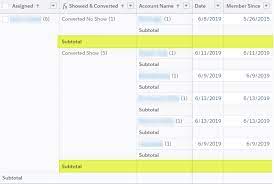
Salesforce report formulas serve various purposes, from grouping records to performing calculations and comparing data. In the Salesforce Report Builder, you’ll encounter two distinct types of formulas: Summary Formulas and Row-Level Formulas. Although they may sound similar, they serve different functions. Summary Formulas operate across multiple records, displaying their results at the bottom of a column. Conversely, Row-Level Formulas pertain to a single record and display their results directly on the corresponding row. Let’s dip into examples of both Row-Level and Summary Formulas to understand their applications in Salesforce reports. Example 1: Total Opportunity Amount Suppose your boss requests a report showing the total Opportunity Amount broken down by Country. In this scenario, you wouldn’t require a Summary Formula field. Instead, simply select the Opportunity Amount field and check the SUM checkbox. If you include a grouping based on Country, the report will automatically generate a summary line. Example 2: Average Monthly Case Volume for a Specific Product Now, imagine the support team asks for a report indicating the monthly average of Cases for a specific Product over the past year. Here, you’d utilize a Summary Formula. Ensure the Product field is set as a ‘Group By Row’ field, then select Summary Formula from the Columns drop-down. Create the formula by dividing the Record Count by 12 (the number of months in a year), and assign a column name, such as “Monthly Avg Cases.” Example 3: Checking Field Value Matches For another scenario, let’s say you’re tasked with verifying that at the Case level, the Billing State matches the Shipping State of the associated Account. With Row-Level formulas, you can accomplish this without creating a new field. Add a Row-Level Formula from the Columns drop-down, then create an IF statement comparing the Billing State to the Shipping State, resulting in either 0 (not matching) or 1 (matching). It’s valuable to note some considerations regarding Row-Level formulas, such as the limitation of one Row-Level formula per report and a maximum of five referenced fields. Additionally, Row-Level formulas cannot be used for cross-filters or buckets. Refer to Salesforce documentation for more details on restrictions. In conclusion, understanding the distinction between Row-Level and Summary Formulas empowers you to leverage the appropriate formula type effectively in Salesforce reports, optimizing your data analysis and decision-making processes. Like Related Posts Who is Salesforce? Who is Salesforce? Here is their story in their own words. From our inception, we’ve proudly embraced the identity of Read more Salesforce Marketing Cloud Transactional Emails Salesforce Marketing Cloud Transactional Emails are immediate, automated, non-promotional messages crucial to business operations and customer satisfaction, such as order Read more Salesforce Unites Einstein Analytics with Financial CRM Salesforce has unveiled a comprehensive analytics solution tailored for wealth managers, home office professionals, and retail bankers, merging its Financial Read more AI-Driven Propensity Scores AI plays a crucial role in propensity score estimation as it can discern underlying patterns between treatments and confounding variables Read more

Read More
salesforce integrations

Salesforce Integrations

How do you make Salesforce even better? Integrate it with all the third party apps you already use. From productivity to marketing to collaboration and beyond, now you can connect your Salesforce to the other tools you need to run your business. MuleSoft is Salesforce’s integration and automation technology and offers connectivity solutions for all of your apps. Learn more about Salesforce integrations. Streamline your team’s workflow and increase productivity by syncing G Suite by Google Cloud with Salesforce. Increase team collaboration and efficiency with the Slack and Salesforce integration. Increase sales while generating accurate financial data by integrating Quickbooks and Salesforce. Make it easier to manage email lists and contact records by connecting directly MailChimp to Salesforce. Target and engage the right buyers and save valuable time with the LinkedIn and Salesforce integration. Connect DocuSign to Salesforce and send, sign and track agreements and approvals on any device. Integrate Jira and Salesforce and make it easier to monitor the progress of your projects. Use the HelloSign integration to simplify the process for preparing and tracking e-signature documents. Build customer apps lightning fast, with the Salesforce and CodeScience integration. Connect ActiveCampaign and Salesforce to accelerate business growth with automated one to one experiences that connect across all channels and through the entire customer lifecycle. Sync documents to keep files updated and organized, with the Dropbox and Salesforce integration. This is just the beginning of the ways that integrating Salesforce with your other systems can increase employee productivity, automate data transfer, reduce human error, and make everyone happier. If you have questions about integrating your systems with Salesforce, contact Tectonic today. Like1 Related Posts Who is Salesforce? Who is Salesforce? Here is their story in their own words. From our inception, we’ve proudly embraced the identity of Read more Salesforce Marketing Cloud Transactional Emails Salesforce Marketing Cloud Transactional Emails are immediate, automated, non-promotional messages crucial to business operations and customer satisfaction, such as order Read more Salesforce Unites Einstein Analytics with Financial CRM Salesforce has unveiled a comprehensive analytics solution tailored for wealth managers, home office professionals, and retail bankers, merging its Financial Read more AI-Driven Propensity Scores AI plays a crucial role in propensity score estimation as it can discern underlying patterns between treatments and confounding variables Read more

Read More
Tectonic-Ensuring Salesforce Customer Satisfaction

Tectonic’s Successful Salesforce Track Record

Salesforce Technology Services Integrator – Tectonic has successfully delivered Salesforce in a variety of industries including Public Sector, Hospitality, Manufacturing, and Health Life Sciences.  Read on about Tectonic’s successful Salesforce track record. Our primary focus is assisting clients with their Salesforce needs to solve business challenges. We work at the intersection of CRM, Marketing, Big Data, and Analytics. Public Sector Experience/Focus Proven Delivery – Tectonic delivers Salesforce Implementation, Integration and Managed Services, utilizing a modified Waterfall / Agile Delivery Method, leveraging US and International Delivery Center (IDC) resources, and delivering with strong, experienced Project Management Health and Life Sciences Focus We’ve helped healthcare providers navigate the challenges of moving data, including PHI and PII, into the cloud, providing physician facing services and improving operations. Salesforce provides comprehensive solutions tailored for the healthcare industry, addressing the specific needs of both payers (insurance providers) and providers (healthcare organizations). These solutions are designed to enhance patient engagement, improve operational efficiency, and drive better health outcomes. Financial Services Focus Transforming financial service delivery, optimizing operations, and cultivating community well-being and trust are at the core of Salesforce Financial Services Solutions. By automating every banking customer experience and uniting teams through Salesforce’s intelligence and a shared view of real-time customer data, a comprehensive banking solution is created, fostering customer satisfaction and loyalty. Travel and Hospitality Focus Salesforce provides tailored solutions for the hospitality and travel industry, helping businesses in this sector deliver exceptional customer experiences, streamline operations, and drive growth. These solutions leverage the power of the Salesforce Customer 360 platform to centralize data, enhance communication, and provide a personalized experience for guests. Manufacturing, Distribution, and Energy Focus We’ve helped small and large manufacturers optimize their sales operations and drive efficiencies in their contact center. Salesforce offers a suite of solutions tailored for manufacturing and distribution industries to enhance processes, improve collaboration, and drive overall efficiency. These solutions are designed to streamline operations. Designed improve customer relationships and provide valuable insights. Nonprofit Focus We’ve helped nonprofits and NGO’s optimize their operations and drive efficiencies in their fundraising and mission efforts. Salesforce offers a suite of solutions to nurture relationships and scale impact. Solutions with AI-driven, personalized services. Salesforce allows you to take control of your data on a single integrated platform. Nonprofit Cloud brings a nonprofit CRM, fundraising, programs, marketing engagement, and outcomes together in a single product. Strategic Relationship with Salesforce – Salesforce Ventures invested in Tectonic in Q3 2015.  We maintain strong working relationships with Salesforce License Sales, Professional Services and Alliances. Tectonic’s successful Salesforce track record stems from our great relationship with Salesforce and grows through each customer interaction. Like1 Related Posts Who is Salesforce? Who is Salesforce? Here is their story in their own words. From our inception, we’ve proudly embraced the identity of Read more Salesforce Marketing Cloud Transactional Emails Salesforce Marketing Cloud Transactional Emails are immediate, automated, non-promotional messages crucial to business operations and customer satisfaction, such as order Read more Salesforce Unites Einstein Analytics with Financial CRM Salesforce has unveiled a comprehensive analytics solution tailored for wealth managers, home office professionals, and retail bankers, merging its Financial Read more AI-Driven Propensity Scores AI plays a crucial role in propensity score estimation as it can discern underlying patterns between treatments and confounding variables Read more

Read More
gettectonic.com