Salesforce Public Sector Solutions Archives - gettectonic.com - Page 4
Salesforce Logo

Spring ’24 Release Enhancements for Public Sector, Education, and Nonprofit

Enhancements for Public Sector, Education and Nonprofit Spring ’24. Change of Circumstance Guided Flow Public Sector Ensure that benefit eligibility remains accurate even when circumstances change. Use guided flows to simplify the process for constituents to report a “change in circumstance” and for caseworkers to re-check eligibility and adjust disbursement amounts. Caseworker Productivity Dashboard Public Sector Analyze caseload trends, boost productivity, and see results. Out-of-the-box data insights empower agencies to understand caseload trends, prioritize and distribute caseloads based on key factors, and visualize their impact. Recruitment and Admissions Enhancements Education Increase application completions by simplifying application processes. Empower parents and agents to start and view applications, support applications to multiple programs, and keep applicants on track with checklists that are reusable across programs. Mentorship Support Education Help students build deeper relationships. Connect students with mentors like alumni, faculty, or peers, and support them with a comprehensive portal experience. Fundraising Enhancements Nonprofit Attribute revenue from recurring donation upgrade campaigns and understand ROI to make data-driven spend decisions. There is also a new object for payment information and a business process API that makes it easier to build integrations. Program Management Enhancements Nonprofit Save time and improve data quality with Automated Outcome Results. Experience Cloud Integration makes it possible to share your outcome strategy externally, and Care Plan Integration links individual care plans to outcomes. Grantseeker Collaboration Public Sector and Nonprofit Enable teams to collaborate when they’re seeking grant funding. Applicants can securely share applications, for faster information gathering and application completion. And applicant owners can control who can view and edit. Private Funding Opportunities Nonprofit Avoid unsolicited applications. Target projects closely aligned with funding priorities and manage the volume of applications you receive. Stay tuned to the Tectonic Insights for more great news from Salesforce and the Spring ’24 Release. Enhancements for Public Sector, Education, and Nonprofit. Like Related Posts Who is Salesforce? Who is Salesforce? Here is their story in their own words. From our inception, we’ve proudly embraced the identity of Read more Salesforce Marketing Cloud Transactional Emails Salesforce Marketing Cloud Transactional Emails are immediate, automated, non-promotional messages crucial to business operations and customer satisfaction, such as order Read more Salesforce Unites Einstein Analytics with Financial CRM Salesforce has unveiled a comprehensive analytics solution tailored for wealth managers, home office professionals, and retail bankers, merging its Financial Read more AI-Driven Propensity Scores AI plays a crucial role in propensity score estimation as it can discern underlying patterns between treatments and confounding variables Read more

Read More
Care Plans in Public Sector Solutions

Care Plans in Public Sector Solutions

Customized Care Plans for Public Sector Solutions and Constituent Support Creating customized care plans for public sector solutions is essential to supporting constituents and promoting their self-sufficiency. Many individuals struggle to find the help they need during health, housing, personal safety, and other crises, which government agencies can address. Public Sector Solutions offers care plans that enable caseworkers to assist constituents in crisis and resolve community issues effectively. How Care Plans Work Care plans are designed with specific goals to help constituents achieve milestones or outcomes, along with benefits to aid in reaching these goals. For example: Common Issues Addressed by Care Plans Caseworkers can use care plans to assist constituents facing various challenges, such as: Initiating Care Plans Often, a need for a care plan is identified when a third party contacts a government agency. For instance, a concerned neighbor reports an elderly person driving erratically. In such cases, Public Sector Solutions allows for the creation of care plans linked to these reports, stored as public complaint records. Creating and Using Care Plan Templates As a Public Sector Solutions administrator or a case manager with assigned permissions, you can create care plan templates tailored to different assistance scenarios. Here’s how the process works: Care plan templates should include specific goals and benefits for various scenarios, ensuring that each plan is tailored to the unique needs of the constituent. Documentation Focus This documentation explains how to set up and use care plan templates with cases created from public complaints. It details the steps from intake to assessment, ensuring that care plans are effectively implemented to support constituents in need. By utilizing these structured care plans, caseworkers can provide targeted assistance, helping constituents navigate crises and work towards self-sufficiency. Like Related Posts Who is Salesforce? Who is Salesforce? Here is their story in their own words. From our inception, we’ve proudly embraced the identity of Read more Salesforce Marketing Cloud Transactional Emails Salesforce Marketing Cloud Transactional Emails are immediate, automated, non-promotional messages crucial to business operations and customer satisfaction, such as order Read more Salesforce Unites Einstein Analytics with Financial CRM Salesforce has unveiled a comprehensive analytics solution tailored for wealth managers, home office professionals, and retail bankers, merging its Financial Read more AI-Driven Propensity Scores AI plays a crucial role in propensity score estimation as it can discern underlying patterns between treatments and confounding variables Read more

Read More
outcome management public sector solutions

Use Outcome Management to Create and Measure Your Public Sector Solutions Impact Strategy

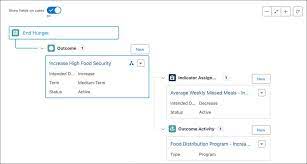
How do you Use Outcome Management to Create and Measure Your Public Sector Solutions Impact Strategy? Recenter your focus on constituents in the public sector by embracing Outcome Management. Assess whether your constituent programs attain their intended outcomes and make informed decisions based on data-driven insights. Leverage Outcome Management alongside Public Sector Solutions to formulate a strategy for instigating change. Collect data, monitor progress, and assess program effectiveness using actionable data. For instance, scrutinize the number of homeless individuals finding shelter through a housing grant, adjusting program parameters for enhanced outcomes. Monitor the academic advancement of children in publicly funded early childhood learning and development programs. Outcome Management allows you to track the success of your programs, ensuring they align with planned deliveries. Outcome Management serves as an impact measurement tool that consolidates an organization’s outcome strategy, defining, measuring, and evaluating it in a unified platform. What is outcome-based planning? Outcome-based planning represents an adaptive and customer-centric project management approach, emphasizing the attainment of desired results over traditional roadmaps’ limitations, such as inflexibility and output-centricity. Incorporate indicator results to gauge progress against time-bound targets and baseline values. Utilize results to store aggregated values from assessments, program enrollments, benefit disbursements, and other data sources. What is the meaning of outcome management? Outcome management is a client-centric service delivery approach, prioritizing the results clients aim to achieve over merely focusing on available services. It encourages collaboration, allowing agencies to leverage expertise both within and outside the organization. What does outcome management deal with? Outcome Management strategically ensures initiatives align with departmental and governmental outcomes, aiming to achieve the intended results. “In these days in an experience-driven world, customer success is really key to making that customer experience as seamless as possible and developing trusted relationships and customer intimacy. The market is slowly coming to realize that.” Neeracha Taychakhoonnavudh, EVP of Global Customer Success at Salesforce What is an outcome-focused approach? Outcome-focused care tailors medical interventions and support services to achieve desired outcomes, such as promoting independence, improving quality of life, and enhancing overall well-being. Outcome Management Public Sector Solutions Revolutionize Impact Outcome Management revolutionizes impact measurement, providing a comprehensive platform to define, measure, and evaluate organizational outcome strategies. Set time-bound targets and baseline values, consistently measure indicators across outcomes or programs, and organize outcomes into groups reflecting organizational strategy. Outcome Management Public Sector Solutions Track and steer desired change with Outcomes, connecting them to efforts like programs or benefits. Utilize Impact Strategies and Impact Strategy Assignments to group Outcomes, presenting your entire strategy cohesively. Indicators define how outcomes are measured, building a library for consistent impact measurement across various aspects of your work. Use time-bound indicator performance periods to track progress from the starting point to your intended goal. If using outcome management to better create and measure your public sector solutions, contact Tectonic today. By Tectonic’s Salesforce Marketing Consultant, Shannan Hearne Like1 Related Posts Who is Salesforce? Who is Salesforce? Here is their story in their own words. From our inception, we’ve proudly embraced the identity of Read more Salesforce Marketing Cloud Transactional Emails Salesforce Marketing Cloud Transactional Emails are immediate, automated, non-promotional messages crucial to business operations and customer satisfaction, such as order Read more Salesforce Unites Einstein Analytics with Financial CRM Salesforce has unveiled a comprehensive analytics solution tailored for wealth managers, home office professionals, and retail bankers, merging its Financial Read more AI-Driven Propensity Scores AI plays a crucial role in propensity score estimation as it can discern underlying patterns between treatments and confounding variables Read more

Read More
Salesforce Success Story

Case Study: Large State Travel-Nonprofit and Hospitality/Travel-Salesforce Service/Experience Clouds

Transform into a Modern Data Driven Organization: case study nonprofit hospitality salesforce Largest Non-Profit Travel / Trade Organization moves to the cloud and adopts Salesforce and Google Cloud Platform to improve Operations and Marketing Industry: Government – Travel / Hospitality Service Cloud Experience Cloud case study nonprofit hospitality salesforce The largest nonprofit travel and Trade organization, is self-tasked with developing and maintaining marketing programs to further develop tourism in this large State. PROBLEM SOLUTION RESULTS Like2 Related Posts Who is Salesforce? Who is Salesforce? Here is their story in their own words. From our inception, we’ve proudly embraced the identity of Read more Salesforce Marketing Cloud Transactional Emails Salesforce Marketing Cloud Transactional Emails are immediate, automated, non-promotional messages crucial to business operations and customer satisfaction, such as order Read more Salesforce Unites Einstein Analytics with Financial CRM Salesforce has unveiled a comprehensive analytics solution tailored for wealth managers, home office professionals, and retail bankers, merging its Financial Read more AI-Driven Propensity Scores AI plays a crucial role in propensity score estimation as it can discern underlying patterns between treatments and confounding variables Read more

Read More
Industry Cloud

Salesforce Industry Cloud Explained

What are Salesforce industry clouds? Salesforce Industry Cloud aims to fast-track the digital transformation within different industries by providing tailored solutions that can enhance customer experiences, streamline operations, and improve overall business efficiency. Industry cloud platforms use innovative technologies and approaches, such as packaged business capabilities, industry-aware data fabrics and composable tooling to go beyond traditional cloud and create added value. Over the past few years, Salesforce has dedicated efforts to develop industry-specific solutions, exemplified by offerings such as Financial Services Cloud, Health Cloud, and the Public Sector Cloud.  These customized Salesforce solutions are created with industry experts to assist modernizing your business, saving you time, lowering costs, and focusing on your customers. Salesforce Industry Cloud Explained These specialized solutions take the foundational elements of Salesforce’s core CRM and tailor them to the unique needs of specific industries. In Health Cloud, the emphasis shifts from traditional Accounts and Contacts to focus on Families and Patients. Similarly, Financial Services Cloud redirects attention from standard Opportunities and Products to concentrate on Financial Holdings and Assets. To further enhance its Industries portfolio, Salesforce expanded with the acquisition of Vlocity in 2020. This acquisition broadened the spectrum of industry-specific clouds, extending into areas such as communications, media, and insurance. Whatever size your business, Salesforce has specialized solutions to support the capabilities your business needs to thrive and grow. Current Salesforce Industry Cloud solutions exist for: Automotive Communications Consumer Goods Higher Education Energy and Utilities Financial Services Government and Public Sector Healthcare and Life Sciences Manufacturing Media Nonprofit Professional Services Retail Technology Travel, Transportation, and Hospitality What are the benefits of industry clouds? Industry Clouds are specific offerings that are pre-built and packaged up for organizations to adopt. By implementing these solutions, you could reap a whole host of benefits, including a higher ROI, increased job demand, and better customer experience – all of which are essential in the current climate. Like2 Related Posts Who is Salesforce? Who is Salesforce? Here is their story in their own words. From our inception, we’ve proudly embraced the identity of Read more Salesforce Marketing Cloud Transactional Emails Salesforce Marketing Cloud Transactional Emails are immediate, automated, non-promotional messages crucial to business operations and customer satisfaction, such as order Read more Salesforce Unites Einstein Analytics with Financial CRM Salesforce has unveiled a comprehensive analytics solution tailored for wealth managers, home office professionals, and retail bankers, merging its Financial Read more AI-Driven Propensity Scores AI plays a crucial role in propensity score estimation as it can discern underlying patterns between treatments and confounding variables Read more

Read More
Salesforce Success Story

Case Study: Largest Native American Tribe in the US-Citizen Engagement for Tribes-Salesforce Public Sector Solutions (PSS)/Health Cloud/Experience Cloud/Marketing Cloud and Mulesoft

Citizen Engagement for Tribes Salesforce Tribal Government MuleSoft Experience Cloud Health Cloud Public Sector Solutions (PSS) Health Cloud Experience Cloud Tribal Nation Solutions MuleSoft Marketing Cloud salesforce tribal government mulesoft Industry: Tribes – Government & Healthcare PROBLEM: SOLUTION: Implementation of Salesforce Public Sector Solutions (PSS), Health Cloud, Experience Cloud, Marketing Cloud & MuleSoft: RESULTS: Like1 Related Posts Who is Salesforce? Who is Salesforce? Here is their story in their own words. From our inception, we’ve proudly embraced the identity of Read more Salesforce Marketing Cloud Transactional Emails Salesforce Marketing Cloud Transactional Emails are immediate, automated, non-promotional messages crucial to business operations and customer satisfaction, such as order Read more Tectonic’s Successful Salesforce Track Record Salesforce Technology Services Integrator – Tectonic has successfully delivered Salesforce in a variety of industries including Public Sector, Hospitality, Manufacturing, Read more Perfect Drip Campaign In an ideal world, you effortlessly conquer the lead generation challenges with one creative arm tied behind your back, craft Read more

Read More
Account Planning With Salesforce

CRM Analytics Limits

When using CRM Analytics, keep these limits in mind. API Call Limits These limits apply to all supported editions. API Call Limit Maximum concurrent CRM Analytics API calls per org 100 Maximum CRM Analytics API calls per user per hour 10,000 Dataset Row Storage Allocations per License In Salesforce org, your total row storage limit for all registered datasets combined depends on your license combination. Each license allocates a different number of rows. Baseline Row Allocation Allocated Rows CRM Analytics Plus 10 billion CRM Analytics Growth 100 million Sales Analytics 25 million Service Analytics 25 million Event Monitoring Analytics 50 million B2B Marketing Analytics 25 million CRM Analytics for Financial Services Cloud 25 million CRM Analytics for Health Cloud 25 million Extra Data Rows license 100 million Your total row storage limit is a combination of your active licenses. For example: Because the CRM Analytics Plus license includes the Sales Analytics and Service Analytics licenses, your total row allocation remains 10 billion. Similarly, the CRM Analytics Growth license includes the Sales Analytics and the Service Analytics licenses, so your total row allocation remains 100 million. However, if you obtain another Sales Analytics or Services Analytics license, your row limit increases by 25 million for each added license. Dataset Row Limits Each dataset supports up to 2 billion rows. If your Salesforce org has less than 2 billion allocated rows, each dataset supports up to your org’s allocated rows. Dataset Field Limits Value Limit Maximum number of fields in a dataset 5,000 (including up to 1,000 date fields) Maximum number of decimal places for each value in a numeric field in a dataset (overflow limit) 17 decimal placesWhen a value exceeds the maximum number of decimal places, it overflows. Both 100,000,000,000,000,000 and 10,000,000,000,000,000.0 overflow because they use more than 17 decimal places. A number also overflows if it’s greater (or less) than the maximum (or minimum) supported value. 36,028,797,018,963,968 overflows because its value is greater than 36,028,797,018,963,967. -36,028,797,018,963,968 overflows because it’s less than -36,028,797,018,963,967.When a number overflows, the resulting behavior in CRM Analytics is unpredictable. Sometimes CRM Analytics throws an error. Sometimes it replaces a numeric value with a null value. And sometimes mathematical calculations, such as sums or averages, return incorrect results. Occasionally, CRM Analytics handles numbers up to 19 digits without overflowing because they are within the maximum value for a 64-bit signed integer (263 – 1). But numbers of these lengths aren’t guaranteed to process.As a best practice, stick with numbers that are 17 decimal places or fewer. If numbers that would overflow are necessary, setting lower precision and scale on the dataset containing the large numbers sometimes prevents overflow. If your org hasn’t enabled the handling of numeric values, the maximum number of decimal places for each value in a numeric field in a dataset is 16. All orgs created after Spring ’17 have Null Measure Handling enabled. Maximum value for each numeric field in a dataset, including decimal places 36,028,797,018,963,967For example, if three decimal places are used, the maximum value is 36,028,797,018,963.967 Minimum value for each numeric field in a dataset, including decimal places -36,028,797,018,963,968For example, if five decimal places are used, the minimum value is -36,028,797,018,9.63968 Maximum number of characters in a field 32,000 Data Sync Limits If you extract more than 100 objects in your dataflows, contact Salesforce Customer Support before you enable data sync. Value Limit Maximum number of concurrent data sync runs 3 Maximum number of objects that can be enabled for data sync, including local and remote objects 100 Maximum amount of time each data sync job can run for local objects 24 hours Maximum amount of time each data sync job can run for remote objects 12 hours Data sync limits for each job:Marketo Connector (Beta)NetSuite ConnectorZendesk Connector Up to 100,000 rows or 500 MB per object, whichever limit is reached first Data sync limits for each job:Amazon Athena ConnectorAWS RDS Oracle ConnectorDatabricks ConnectorGoogle Analytics ConnectorGoogle Analytics Core Reporting V4 ConnectorOracle Eloqua ConnectorSAP HANA Cloud ConnectorSAP HANA Connector Up to 10 million rows or 5 GB per object, whichever limit is reached first Data sync limits for each job*:AWS RDS Aurora MySQL ConnectorAWS RDS Aurora PostgresSQL ConnectorAWS RDS MariaDB ConnectorAWS RDS MySQL ConnectorAWS RDS PostgreSQL ConnectorAWS RDS SQL Server ConnectorGoogle Cloud Spanner ConnectorMicrosoft Azure Synapse Analytics ConnectorMicrosoft Dynamics CRM ConnectorSalesforce External ConnectorSalesforce Contacts Connector for Marketing Cloud EngagementSalesforce OAuth 2.0 Connector for Marketing Cloud Engagement Up to 20 million rows or 10 GB per object, whichever limit is reached first Data sync limits for each job*:Amazon Redshift ConnectorAmazon S3 ConnectorCustomer 360 Global Profile Data Connector (Beta)Google BigQuery for Legacy SQL ConnectorGoogle BigQuery Standard SQL ConnectorHeroku Postgres ConnectorMicrosoft Azure SQL Database ConnectorSnowflake Input Connector Up to 100 million rows or 50 GB per object, whichever limit is reached first *When using these connectors, Salesforce Government Cloud org data is protected in transit with advanced encryption and can sync up to 10 million rows or 5 GB for each connected object, whichever limit is reached first. Note When using a Salesforce local input connection, CRM Analytics bulk API usage doesn’t count towards Salesforce bulk API limits. Use of the external Salesforce connection and output connection impacts your limits. The dataflow submits a separate bulk API call to extract data from each Salesforce object. The dataflow uses a batch size of 100,000–250,000, depending on whether the dataflow or the bulk API chunks the data. As a result, to extract 1 million rows from an object, the dataflow creates 4–10 batches. Recipe and Dataflow Limits Important In Winter ‘24, recipe runs over 2 minutes are counted against the limit. Previously, the recipe run counts weren’t correct. For more information, see Known Issue – Recipe runs are not counting towards the daily maximum run limit. Value Limit Maximum amount of time each recipe or dataflow can run 48 hours Maximum number of recipes 1,000 Maximum number of dataflows definitions (with data sync enabled) 100 Maximum number of dataflow and recipe runs in a rolling

Read More
Salesforce Nonprofit Cloud

Easily Refer Constituents to Providers by Using a Guided Flow

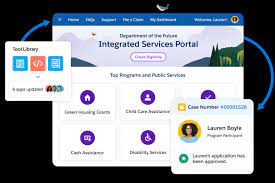
Facilitate constituent referrals to service providers effortlessly by utilizing a guided flow. This streamlined process enables the inclusion of comprehensive information about individuals or households, providers, and other essential details. Enhance the effectiveness of service delivery by sharing the referral record and additional information directly with the service provider. Your caseworkers can easily refer constituents to providers using guided flow. Implementation of this feature is relevant in Lightning Experience within Enterprise, Performance, Unlimited, and Developer editions where Public Sector Solutions are enabled. Provider Referral The provider referral guided flow optimizes how caseworkers communicate pertinent information to service providers, encompassing details such as required services, necessary documentation, and other crucial information for efficient service delivery. Government agencies often become aware of constituents in need when they apply for benefits or when concerns are reported or referred to the agency. Caseworkers play a vital role in understanding constituent issues, identifying suitable benefits and services to enhance well-being, and referring constituents to other agencies or providers as necessary. Caseworkers carry out various tasks when referring constituents to providers, including reviewing benefit applications, assigning benefits to eligible constituents, and searching for certified providers to deliver the required benefits. If certified providers are not available, caseworkers may refer constituents to another agency or provider offering the necessary services. Refer constituents to providers using guided flow The provider referral guided flow assists caseworkers in efficiently sharing pertinent information with providers during the referral process. This flow facilitates tasks such as including constituent and provider information from records, entering referral details, describing required services, attaching relevant documents, and sharing additional information through service-specific PDF templates for customization by the provider or agency. Upon completion of the flow, a referral is created, and documents, along with filled PDF templates, are attached and shared with selected providers or agencies. Providers and agencies then utilize the shared information to determine their capacity to serve referred constituents. The Provider Referral flow is presented as an OmniScript guided flow, allowing customization of the OmniScript and associated OmniStudio components to align with specific programs and processes. Additionally, create fillable PDF templates to share tailored information with providers for the services delivered to constituents. By Tectonic’s Salesforce Marketing Consultant, Shannan Hearne Like1 Related Posts Tectonic’s Successful Salesforce Track Record Salesforce Technology Services Integrator – Tectonic has successfully delivered Salesforce in a variety of industries including Public Sector, Hospitality, Manufacturing, Read more Asset Management Salesforce Can Salesforce do asset management? You can manage assets in Consumer Goods (desktop) and in the Consumer Goods offline mobile Read more Generating Documents in Salesforce Salesforce document generation poses a challenge for businesses, given the intricacies of integration involved. Fortunately, a variety of tools are Read more Salesforce Scheduler Salesforce Scheduler provides the objects required for appointment scheduling and an app that makes it easy to set up Scheduler. Read more

Read More
Customer Experience

Engage Your Community with Experience Cloud

Community engagement operates as a mutual exchange of ideas and information, and Salesforce facilitates communication with your constituents while providing an avenue for reciprocal connections. This involves sharing feedback, participating in community events, and expanding networks through Salesforce Experience Cloud. Engage Your Community with Experience Cloud. Engage Your Community with Experience Cloud Community engagement is relevant to public sector, government, tribal, nonprofit, and commerce scenarios and functions across multiple Salesforce solutions. Salesforce Community Cloud for Engagement: Salesforce Community is a portal designed for groups with shared goals, offering an efficient way for members to connect with the community’s team or leaders. Experience Cloud, Salesforce’s digital experience platform, rapidly builds websites, portals, and mobile apps to engage customers and digitize business processes. Community Cloud speeds to market features that enable individuals to interact with brands, companies, and service providers across the digital landscape. Experience Cloud as Your Content Management System: To succeed in digital transformation, businesses need to swiftly bring experiences to market, create personalized customer interactions, and ensure consistent touch points across multichannel journeys. Experience Cloud’s mission is designed to meet these requirements, helping organizations streamline systems, align teams, accelerate digital adoption, and process a quarter’s worth of data in one go. Fostering Community with Salesforce: Community managers can facilitate ongoing conversations, host virtual meet-ups, and solicit feedback to build trust. Encouraging dialogue and implementing feedback strengthens community bonds, demonstrating the value placed on members’ input. Creating Connected Experiences with Salesforce: Salesforce enables the development of multiple connected experiences, from customer support sites to B2B distributor portals. These sites, built on Experience Cloud, include self-service tools that reduce the workload on service agents and sales representatives. Metrics and Reporting: Setting goals and metrics is crucial for community success. Metrics can include content consumption, community engagement, and value creation. Monitoring metrics like file downloads, likes, shares, and comments provides insights into content usage. Tracking membership growth, user participation, and programmatic impact gauges community engagement. Evaluating the impact on goals, such as increased volunteer participation, measures the value created by the community. Salesforce provides a comprehensive set of tools for advancement teams to build informative, navigable, and engaging communities, fostering quick and meaningful engagement with constituents. Like Related Posts Tectonic’s Successful Salesforce Track Record Salesforce Technology Services Integrator – Tectonic has successfully delivered Salesforce in a variety of industries including Public Sector, Hospitality, Manufacturing, Read more Asset Management Salesforce Can Salesforce do asset management? You can manage assets in Consumer Goods (desktop) and in the Consumer Goods offline mobile Read more Salesforce Scheduler Salesforce Scheduler provides the objects required for appointment scheduling and an app that makes it easy to set up Scheduler. Read more Salesforce Health Cloud Information Since its inception in 2016, Salesforce Health Cloud has evolved significantly, adapting to the intricacies of the sensitive and dynamic Read more

Read More
salesforce einstein analytics and hospitality

Trust in AI Data

As companies rapidly embrace Artificial Intelligence and realize its benefits, trust must be their top priority. And to instill trust in AI, they must first instill trust in the data that powers it. Think about data as a well-balanced diet for AI — you’re healthiest when you avoid junk food and consume all the proper nutrients. Simply put, organizations can only harness the full power of AI when it is fueled by accurate, comprehensive data.  The Future is Here AI is no longer a futuristic concept; it has become a reality in our living rooms, cars, and frequently, in our pockets. As this technology continues to play an ever-expanding role in our daily lives, a crucial question arises: To what extent can, and should, we place our trust in these AI systems? Trust in AI data comes more naturally for some than others. As the prevalence of AI increases, so does the concern about ensuring that it aligns with human values. A frequently cited example illustrating this challenge involves the moral decision an autonomous car may face when confronted with a collision scenario. Consider a situation where a driver must swerve to avoid being hit and seriously injured by an oncoming bus. However, the dilemma arises as the car faces the prospect of hitting a baby if it swerves left or an elderly person if it swerves right—posing a complex ethical question for the autonomous car. Arvind Krishna, Senior Vice President of Hybrid Cloud and Director of IBM Research, emphasizes the importance of careful programming in AI systems to prevent biases introduced by programmers from influencing outcomes. Recognizing the complexity of such issues, he discusses the need to develop frameworks for addressing these ethical challenges, a task IBM is tackling through its participation in the Partnership on AI alongside other technology organizations. Trust in AI data vs bias: Instances of machines demonstrating bias have already garnered attention, eroding trust in AI systems. AI technicians are actively working to identify and mitigate the origins of bias, acknowledging that machines can become biased due to inadequate representation in their training data. Guru Banavar, IBM Chief Science Officer for Cognitive Computing, notes that unintentional bias may arise from a lack of care in selecting the right training dataset, while intentional bias can result from a malicious attacker manipulating the dataset. James Hendler, Director of the Institute for Data Exploration and Applications at Rensselaer Polytechnic Institute, reminds us that while AI can be a force for social good, it also holds the potential for diverse social impacts, where actions deemed good by one may be perceived as harmful by another. Hence, an awareness of these complexities is essential in navigating the ethical landscape of AI applications. Artificial Intelligence (AI) is revolutionizing work processes and service delivery, empowering organizations to harness its formidable capabilities for data-driven predictions, product and service optimization, innovation augmentation, increased productivity, and cost reduction. While the benefits of AI adoption are immense, it also introduces risks and challenges, prompting concerns about the current level of trustworthiness in AI applications. Public Trust in AI data Unlocking the full potential and return on investment from AI necessitates a sustained commitment to building and upholding public trust. For widespread adoption, people must have confidence that AI development and utilization adhere to responsible and trustworthy practices. In a pioneering initiative, KPMG Australia, in collaboration with the University of Queensland, conducted a world-first in-depth exploration of trust and global attitudes toward AI across 17 countries. The resulting report, “Trust in Artificial Intelligence: A Global Study 2023,” delivers comprehensive insights into the factors influencing trust, the perceived risks and benefits of AI utilization, community expectations regarding AI governance, and the entities considered trustworthy in AI development, usage, and regulation. This report, titled “Trust in Artificial Intelligence: 2023 Global Study on the Shifting Public Perceptions of AI,” presents key findings from the global study and offers individual country snapshots, serving as a valuable resource for those leading, creating, or governing AI systems. Importantly, it outlines four critical pathways for policymakers, standards setters, governments, businesses, and non-governmental organizations (NGOs) to navigate the challenges associated with trust in the development and deployment of AI. Like Related Posts AI-Driven Propensity Scores AI plays a crucial role in propensity score estimation as it can discern underlying patterns between treatments and confounding variables Read more Tectonic’s Successful Salesforce Track Record Salesforce Technology Services Integrator – Tectonic has successfully delivered Salesforce in a variety of industries including Public Sector, Hospitality, Manufacturing, Read more Asset Management Salesforce Can Salesforce do asset management? You can manage assets in Consumer Goods (desktop) and in the Consumer Goods offline mobile Read more What is Salesforce? Salesforce is cloud-based CRM software. It makes it easier for companies to find more prospects, close more deals, and connect Read more

Read More
Caseworker Productivity Dashboard

Caseworker Productivity Dashboard in Salesforce

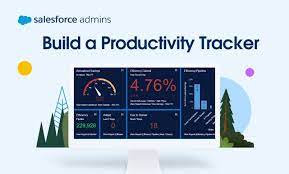
Gain Insights into Caseworker Efficiency and Community Impact Leverage Caseworker Productivity analytics to effectively manage workloads and make data-driven staffing decisions based on caseloads and case patterns. Provide supervisors with valuable insights into caseload distribution, caseworker performance, and case processing times to enhance overall caseworker productivity and efficiency. Visualize the community impact of your team by showcasing the number of beneficiaries assisted and the total benefits disbursed. Where: This enhancement is applicable to Lightning Experience in Enterprise, Performance, Unlimited, and Developer editions with enabled Public Sector Solutions. Case Management Reports and Dashboards Utilize reporting functionalities to extract meaningful data regarding Clients and Programs. You can duplicate reports, filter them to include the Clients and Programs under your management, and subsequently add them to personalized dashboards for efficient progress tracking. Case Management comprises three report folders: Case Management Reports, Program Management Embedded Reports, and Program Management Reports (Unpackaged). Access to reports can be controlled through folder sharing to manage permissions effectively. Caseworker Productivity Dashboard The Case Management Reports folder includes reports such as: The Program Management Embedded Reports folder encompasses reports like: The Program Management Reports (Unpackaged) folder incorporates reports like: Access Case Management Reports To access Case Management reports: View Dashboards Two dashboard folders under Case Management include the Contacts Who May Require Followup and Intake Summary dashboards. In the Program Management Dashboards folder, you’ll find the Sample Program Management and Program Management Home Page dashboards. The Contacts Who May Require Followup dashboard incorporates reports such as: The Intake Summary dashboard encompasses reports like: The Sample Program Management dashboard includes reports like: The Program Management Home Page dashboard incorporates reports such as: To view Case Management dashboards: When you install the caseworker productivity analytics app via Guided Setup, the auto-install process seamlessly adds the Workload Management Analytics dashboard to the Public Sector: Benefit Management app. To make the Case Analytics dashboard accessible to users, embed it in the case record page after the auto-install process completes. Caseworker Productivity Dashboard has Intake Summary Dashboards. Like1 Related Posts Tectonic’s Successful Salesforce Track Record Salesforce Technology Services Integrator – Tectonic has successfully delivered Salesforce in a variety of industries including Public Sector, Hospitality, Manufacturing, Read more Asset Management Salesforce Can Salesforce do asset management? You can manage assets in Consumer Goods (desktop) and in the Consumer Goods offline mobile Read more Lookup Relationship in Salesforce What is Lookup relationship in Salesforce? Salesforce’s lookup relationships is a significant capability that allows users to connect two objects Read more Generating Documents in Salesforce Salesforce document generation poses a challenge for businesses, given the intricacies of integration involved. Fortunately, a variety of tools are Read more

Read More
Improving Public Sector Employee Experience

Improving the Public Sector Employee Experience with Salesforce

Confronted with the ever-evolving challenges of a dynamic workforce, the public sector, much like its private counterparts, grapples with transformations brought about by the pandemic, remote work, health issues, retirements, and cyber threats.  Improving Public Sector Employee Experience with Salesforce helps. Improving Employee Experience with Salesforce to Prevent the Great Resignation and Quiet Quitting As the “new normal” emerges, organizations anticipate persistent issues related to employee engagement and retention, including the growing phenomenon known as the “Great Resignation.” This surge in resignations presents a potential crisis, intensifying the competition for talent amid a rise in open positions and governmental constraints. And now we have employees who are “Quiet Quitting.”  Quiet quitting refers to doing the minimum requirements of one’s job and putting in no more time, effort, or enthusiasm than absolutely necessary. The Solution? The key to attracting and retaining top talent involves reimagining staffing functions and prioritizing the overall Employee Experience. Like private enterprises, successful recruitment often hinges on employee referrals and positive ratings. Digital enablement and modernization play a critical role in meeting employee expectations shaped by consumer experiences. Public servants frequently encounter challenges in accessing information, navigating siloed communication, and dealing with paper-based processes, emphasizing the need for efficient, digitally-enabled systems. With the expansion of remote work, well-designed systems become crucial in determining employee engagement and fostering connected experiences that enhance loyalty, morale, and retention. Even small changes can significantly enhance the employee experience, from recruitment to the end of service. Aligning dispersed teams and fostering collaboration in a remote work environment requires a digital headquarters that connects teams, tools, customers, and partners. Improving Public Sector Employee Experience Providing a welcoming and efficient onboarding process for new hires and facilitating knowledge sharing through digital platforms contribute to a positive employee experience. Digital technology, resembling a searchable knowledge base, empowers employees to find answers quickly. A customer-centric employee experience, utilizing technology like Employee Concierge, ensures immediate access to essential information, promoting efficiency in a modern digital age. Features such as global search and automated workflows, supported by tools like Salesforce Bots, enhance accessibility and streamline support processes. Robotic Process Automation (RPA) can reduce repetitive tasks, allowing staff to focus on more complex problem-solving. Transforming paper processes into dynamic, digital experiences enhances accessibility and efficiency. Utilizing data for diversity, equity, and inclusion (DE&I) initiatives is crucial. Integrating modern platforms for data analysis provides insights into workforce demographics and HR processes. People Analytics strategies, including the use of tools like Tableau for visualization, aid in identifying diversity gaps and developing effective solutions. Overall, a strategic focus on the Employee Experience and leveraging modern technologies can help public sector organizations effectively navigate workforce challenges. From Experience Cloud for engagement to a Service Cloud Knowledge Base for ease of information, Salesforce has many tools to help improve the public sector employee experience. Contact Tectonic today to explore Public Sector, Government, and Tribal solutions. Like1 Related Posts Tectonic’s Successful Salesforce Track Record Salesforce Technology Services Integrator – Tectonic has successfully delivered Salesforce in a variety of industries including Public Sector, Hospitality, Manufacturing, Read more Asset Management Salesforce Can Salesforce do asset management? You can manage assets in Consumer Goods (desktop) and in the Consumer Goods offline mobile Read more Lookup Relationship in Salesforce What is Lookup relationship in Salesforce? Salesforce’s lookup relationships is a significant capability that allows users to connect two objects Read more Step By Step Guide to a Salesforce Quickstart Salesforce Implementation with a Tectonic Quickstart: Step-by-Step Salesforce Quickstart Guide. Step 1: Define Your Business Requirements Identify specific business processes Read more

Read More
Salesforce Success Story

Case Study: Service Cloud Experience Cloud Federal Nonprofit Talent Acquisition

Military congressionally chartered, federally supported non-profit corporation that sustains and equips the armed forces. Client employs nearly 170,000 professionals to support and sustain the global mission of the armed forces. Service Cloud Experience Cloud Federal Nonprofit Talent Acquisition. Industry: Federal – Military Process Gaps: Client’s lack of a digital processes for talent acquisition hindered their ability to find and develop top-tier employees. The repository was incomplete, inaccurate, disconnected from other departments within the business ecosystem with no checks & balances in place – resulting into inefficient talent acquisition lifecycle that could not be tracked. Implemented : Technologies integrated : Our solution? Tectonic assisted with the successful implementation of Salesforce Sales Cloud, Experience Cloud, API Integrations and Advanced SF Security. Key activities included: Results: With Salesforce Public Sector Solutions, you can improve the provision of public services, expedite processes, and promote community trust and well-being. These solutions, which are specifically designed for government enterprises, use state-of-the-art technology to streamline workflows, guarantee compliance, and expedite operations. Discover the revolutionary potential of Salesforce in the areas of emergency program Salesforce offers digital transformation technology for government and public sector industries. If you are considering a Salesforce recruiting solution, contact Tectonic today. Like2 Related Posts Who is Salesforce? Who is Salesforce? Here is their story in their own words. From our inception, we’ve proudly embraced the identity of Read more Salesforce Marketing Cloud Transactional Emails Salesforce Marketing Cloud Transactional Emails are immediate, automated, non-promotional messages crucial to business operations and customer satisfaction, such as order Read more Salesforce Unites Einstein Analytics with Financial CRM Salesforce has unveiled a comprehensive analytics solution tailored for wealth managers, home office professionals, and retail bankers, merging its Financial Read more AI-Driven Propensity Scores AI plays a crucial role in propensity score estimation as it can discern underlying patterns between treatments and confounding variables Read more

Read More
Salesforce Field Service

Understanding Salesforce Field Service

Salesforce Field Service is an expansive addition to Salesforce Service Cloud, offering a 360 degree perspective on workforce management, especially in scenarios where services extend beyond the office or work site into the field. This typically involves mobile employees such as service technicians, alongside service agents, dispatchers, and service managers. Let’s dive into the nuances of Salesforce Field Service, addressing key aspects like its definition, user roles, reporting, scheduling, optimization, and more. Salesforce Field Service is also a popular tool in public sector solutioning. Understanding Salesforce Field Service will help to decide if it is right for your service teams. Understanding Salesforce Field Service: Salesforce Field Service, formerly known as Field Service Lightning (FSL), is an extension of Service Cloud designed to provide a comprehensive workforce management view. It seamlessly manages services delivered in the field, such as a electrical installer arriving to fulfill a customer’s order. Field Service Lightning evolves with each Salesforce release, continually enhancing functionality. Salesforce Field Service enhances customer engagement with real-time personalization, optimization of field teams with a scheduling engine, and access to offline data. Components of Salesforce Field Service: Field Service comprises various components, including Service Appointments, Salesforce Service Cloud integration, Territory and Scheduling functionalities, the Field Service Dispatcher Console, and the Field Service Mobile App for Android and iOS with offline capabilities. A detailed data model diagram illustrates the relationship between Service Cloud and Field Service. Users of Salesforce Field Service: Salesforce Field Service is particularly valuable for organizations with mobile field technicians supporting customers. It excels in scenarios with intricate service delivery involving multiple individuals like dispatchers, field technicians, service agents, and service managers. Each user persona interacts with Salesforce Field Service in distinct ways, utilizing tools like the Dispatcher Console or Field Service Mobile App tailored to their roles. Use Cases for Salesforce Field Service: Field Service proves beneficial in diverse service scenarios, including repairs, maintenance, sales visits, and healthcare care visits. It facilitates efficient coordination among dispatchers, field technicians, service agents, and service managers, streamlining processes and enhancing customer satisfaction. Key Terms in Salesforce Field Service: Understanding key terms such as Work Orders, Service Appointments, Contracts, Entitlements, Work Types, Service Territories, Operating Hours, Resources, and Scheduling Policies is essential. These terms collectively form the foundation of Salesforce Field Service’s robust data model and optimized usability. Scheduling and Optimization: Scheduling in Salesforce Field Service is managed through the Dispatcher Console, empowering dispatchers to make informed decisions. Various methods, from manual to fully automated, enable the creation of service appointments, optimizing resource allocation and ensuring efficient service delivery. Forecasting and Planning: Use real-time data to quickly assess the impact of global or in-day optimization on travel time and resource utilization. Refine scheduling policies, get an instant view of optimization results, and KPI changes. Asset Service Management: Move from reactive to proactive service with real-time asset tracking. Monitor service outcomes and create preventive maintenance plans based on asset use, condition, age, and specific criteria. Service Territory Design: Service Territories, categorized as Primary, Secondary, and Relocation Territories, define where teams can perform work. Well-defined territories are crucial for efficient dispatcher satisfaction, requiring thoughtful initial design and ongoing maintenance. Field Service Mobile App: The Salesforce Field Service Mobile app is essential for on-the-move workforces, offering technicians essential information to optimize job execution. Offline capabilities ensure uninterrupted work, and the Visual Remote Assistant feature enables two-way video and audio communication between agents, technicians, and customers. Slack for Field Service: Empower your mobile workforce with seamless connectivity and timely assistance whenever it is needed. Mobilize for service appoints and tap into the expertise of colleagues throughout the organization with the user-friendly Slack interface. Reporting in Salesforce Field Service: Monitoring service efficiency and success involves leveraging Salesforce reports, list views, and other platform analytics. Work Order List Views and Field Service Report Types provide insights into service call-outs and overall performance. Enabling Field Service Lightning: Setting up Salesforce Field Service involves installing it as a Managed Package, assigning licenses to users, and configuring standard objects like Products, Assets, Service Contracts, and Entitlements. Creating records for Service Territories, Service Resources, and Operating Hours establishes the framework for the service model. Field Service Deployments: Deployments in Salesforce Field Service can be time-consuming due to its reliance on object data. Considerations for complex relational data movement between environments and potential risks, such as resistance to automation, require careful attention. Tectonic, as a Salesforce Consulting Partner, can assist your company in deploying Salesforce Field Service. Salesforce Field Service projects, while intricate, can be highly valuable when executed correctly providing a large ROI. Adequate planning, phased implementations, and a long-term perspective contribute to the success of organizations leveraging the capabilities of Salesforce Field Service. If you are looking for a more robust solution, consider Field Service Plus combining dispatch and technician functionality along with Service Cloud and Sales Cloud. Tectonic looks forward to helping your field service team utilize this Salesforce tool. Tectonic is please to announce Salesforce Service Cloud Implementation Solutions. Like2 Related Posts Who is Salesforce? Who is Salesforce? Here is their story in their own words. From our inception, we’ve proudly embraced the identity of Read more Salesforce Marketing Cloud Transactional Emails Salesforce Marketing Cloud Transactional Emails are immediate, automated, non-promotional messages crucial to business operations and customer satisfaction, such as order Read more Salesforce Unites Einstein Analytics with Financial CRM Salesforce has unveiled a comprehensive analytics solution tailored for wealth managers, home office professionals, and retail bankers, merging its Financial Read more AI-Driven Propensity Scores AI plays a crucial role in propensity score estimation as it can discern underlying patterns between treatments and confounding variables Read more

Read More
gettectonic.com