Data Archives - gettectonic.com - Page 89
Salesforce Quickstart

Salesforce Quickstarts Explained

What is a Salesforce Quickstart? Salesforce Quickstarts are great for individual departments or small sales & customer service teams who want to get the most out of their Salesforce investment from day one. Tectonic refers to these as Salesforce Implementation Solutions. Small to medium-sized businesses who are looking for quick deployment and want to get started with Salesforce as soon as possible benefit greatly from Salesforce quickstarts. Quickstart packages have also been called Salesforce Jumpstarts, a program to help businesses quickly and efficiently implement Salesforce. In either case, these programs are an all-in-one solution including everything from initial setup and configuration to training and support. What is a Salesforce Quickstart Package from Tectonic? A Salesforce Quickstart Package is a streamlined implementation process designed for companies seeking swift implementation of Salesforce. This limited engagement focuses on crucial planning, decision-making, standard and custom configurations, and essential user and admin training. It is tailored for small to medium-sized businesses aiming for a prompt Salesforce deployment, covering sales, marketing, service, and more. A QuickStart Implementation is the fastest way to get your organization using Salesforce. It is a limited engagement that provides immediate benefits and a foundation for future digital transformation. Key Benefits What you’ll receive .Partner Assistance in Implementing Salesforce with Quickstart A Salesforce consulting partner, like Tectonic, can assist in assessing needs, configuring Quickstart packages, providing training and support, adopting best practices, and optimizing the Salesforce environment. Tectonic offers ready-to-launch Quickstart packages and Accelerators, ensuring faster system fulfillment, cost reduction, secure scaling, and enhanced customer experience. How do I use trailhead to learn Salesforce after a quickstart? In Trailhead, learning topics are broken down into modules and each module contains units. At the end of a unit, you’ll complete a quiz or hands-on challenge that will earn you points. Once you’ve completed all the units in a module, you’ll get a badge that is displayed on your profile.  Salesforce Trailhead is your first, free choice for Salesforce training.  Trailhead is a fantastic learning platform for new Trailblazers coming into the Salesforce ecosystem and existing Salesforce professionals who want to improve their skills and knowledge. Tectonic is please to announce Salesforce Service Cloud Implementation Solutions. Content updated April 2024. Like1 Related Posts Who is Salesforce? Who is Salesforce? Here is their story in their own words. From our inception, we’ve proudly embraced the identity of Read more Salesforce Marketing Cloud Transactional Emails Salesforce Marketing Cloud Transactional Emails are immediate, automated, non-promotional messages crucial to business operations and customer satisfaction, such as order Read more Salesforce Unites Einstein Analytics with Financial CRM Salesforce has unveiled a comprehensive analytics solution tailored for wealth managers, home office professionals, and retail bankers, merging its Financial Read more AI-Driven Propensity Scores AI plays a crucial role in propensity score estimation as it can discern underlying patterns between treatments and confounding variables Read more

Read More
Salesforce Health Cloud

Salesforce Health Cloud Information

Since its inception in 2016, Salesforce Health Cloud has evolved significantly, adapting to the intricacies of the sensitive and dynamic health industry. The latest addition to its offerings, Customer 360 for Health, represents a strategic move towards more empathetic care, bolstering patient trust and fostering team collaboration.

Read More
Salesforce Scheduler

Salesforce Scheduler

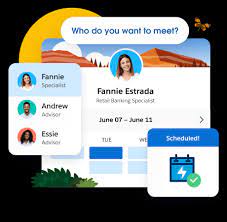
Salesforce Scheduler provides the objects required for appointment scheduling and an app that makes it easy to set up Scheduler. It provides preconfigured, customizable flows and rules that provide appointment booking experience. It also provides business APIs to create appointment booking experiences.

Read More
salesforce integrations

Salesforce Integrations

How do you make Salesforce even better? Integrate it with all the third party apps you already use. From productivity to marketing to collaboration and beyond, now you can connect your Salesforce to the other tools you need to run your business. MuleSoft is Salesforce’s integration and automation technology and offers connectivity solutions for all of your apps. Learn more about Salesforce integrations. Streamline your team’s workflow and increase productivity by syncing G Suite by Google Cloud with Salesforce. Increase team collaboration and efficiency with the Slack and Salesforce integration. Increase sales while generating accurate financial data by integrating Quickbooks and Salesforce. Make it easier to manage email lists and contact records by connecting directly MailChimp to Salesforce. Target and engage the right buyers and save valuable time with the LinkedIn and Salesforce integration. Connect DocuSign to Salesforce and send, sign and track agreements and approvals on any device. Integrate Jira and Salesforce and make it easier to monitor the progress of your projects. Use the HelloSign integration to simplify the process for preparing and tracking e-signature documents. Build customer apps lightning fast, with the Salesforce and CodeScience integration. Connect ActiveCampaign and Salesforce to accelerate business growth with automated one to one experiences that connect across all channels and through the entire customer lifecycle. Sync documents to keep files updated and organized, with the Dropbox and Salesforce integration. This is just the beginning of the ways that integrating Salesforce with your other systems can increase employee productivity, automate data transfer, reduce human error, and make everyone happier. If you have questions about integrating your systems with Salesforce, contact Tectonic today. Like1 Related Posts Who is Salesforce? Who is Salesforce? Here is their story in their own words. From our inception, we’ve proudly embraced the identity of Read more Salesforce Marketing Cloud Transactional Emails Salesforce Marketing Cloud Transactional Emails are immediate, automated, non-promotional messages crucial to business operations and customer satisfaction, such as order Read more Salesforce Unites Einstein Analytics with Financial CRM Salesforce has unveiled a comprehensive analytics solution tailored for wealth managers, home office professionals, and retail bankers, merging its Financial Read more AI-Driven Propensity Scores AI plays a crucial role in propensity score estimation as it can discern underlying patterns between treatments and confounding variables Read more

Read More
Salesforce Heroku

Heroku Explained

scale modern apps. Their platform is characterized by its elegance, flexibility, and user-friendly nature, providing developers with the simplest path to bring their apps to market.

Read More

Box and Salesforce Integration

What is Box and Salesforce integration? Together, Box and Salesforce integration bring you seamless solutions that make it easy for teams to securely collaborate on the most critical content in Box, without leaving Salesforce. It easily connects with other Apps to share and store the data. Box allows users to create, edit, update, and share files/folders with Salesforce. It has a highly secured authentication process and a customizable user permission to access the files/folders. Your teams and customers expect amazing digital experiences, no matter what tools they use — which means you must deliver a consistent content experience across every app. Together, Box and Salesforce bring you seamlessly integrated solutions. The result? Better customer engagements, faster resolution on support cases, and seamless signatures so organizations can quickly go from quote to cash. Content is at the core of business today — and a driving force for your sales teams. Our integration empowers sales reps to collaborate on content directly in Salesforce, while your organization’s documents are centralized in Box to streamline processes, engage customers, and accelerate sales cycles. With Box for Salesforce, account teams can easily and securely access and share relevant files from any device, no matter if they’re at home, in the office, or out in the field. Box – Secure File Sharing — From file creation and sharing, to e-signing and retention — one secure place for it all.  Like Related Posts Who is Salesforce? Who is Salesforce? Here is their story in their own words. From our inception, we’ve proudly embraced the identity of Read more Salesforce Marketing Cloud Transactional Emails Salesforce Marketing Cloud Transactional Emails are immediate, automated, non-promotional messages crucial to business operations and customer satisfaction, such as order Read more Salesforce Unites Einstein Analytics with Financial CRM Salesforce has unveiled a comprehensive analytics solution tailored for wealth managers, home office professionals, and retail bankers, merging its Financial Read more AI-Driven Propensity Scores AI plays a crucial role in propensity score estimation as it can discern underlying patterns between treatments and confounding variables Read more

Read More
Salesforce Contact Key

What is the Contact Key in Salesforce?

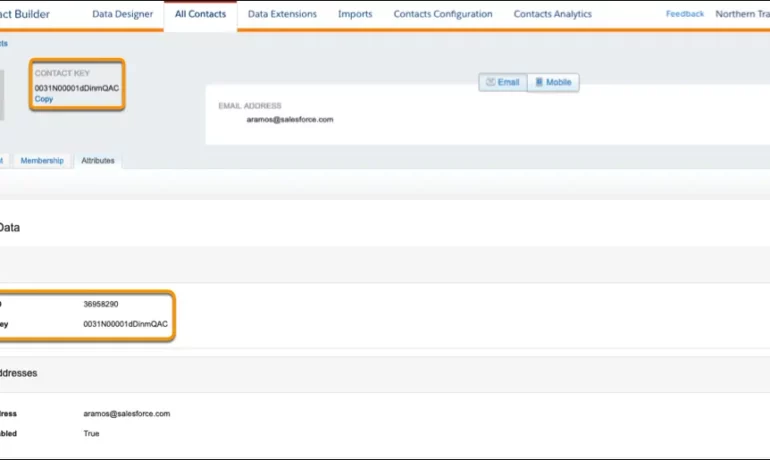
The contact key in Salesforce, also known as a subscriber key, is a unique identifier for a contact in Marketing Cloud MobilePush. Use this value to associate cross-channel addresses and subscriptions for a single contact. You can use the same key for a contact across multiple channels, such as email, SMS, and push messaging. What are contact keys? An immutable object that stores information about a single contact, such as the contact’s first name, phone numbers, and addresses. What is a Salesforce Subscriber key? A subscriber key is a text field that contains a value that uniquely identifies a subscriber in your Marketing Cloud account. A subscriber key is limited to 254 English characters. Avoid using email addresses as subscriber keys. What is the difference between subscriber key and contact key? This key is used to identify a single person across multiple channels inside of Marketing Cloud. In Email Studio, that key is called the “Subscriber Key”. In other channels, such as Mobile Connect or Mobile Push, that value is called “Contact Key”. What is the difference between contacts and subscribers? A subscriber in SFMC primarily represents an individual’s email communication preferences and is associated with email campaigns, while a contact represents a broader customer profile that includes information beyond email, allowing you to engage with customers across various channels. What is the difference between contact ID and contact key? The Contact Key gives you this ability and consistence. Existence of the contact key gives you the consistence of sending messages thru multiple channels and identify your contacts. Email and Text Message channels in our case. Contact ID is a unique number for your contacts in Salesforce Marketing Cloud. What is a subscriber key in Marketing Cloud? A subscriber is a person who has opted to receive communications from your organization. You can track information about subscribers using profile and preference attributes. Use the subscriber key to identify your subscribers in Marketing Cloud. Create lists or data extensions to store your subscribers. What is the difference between contact and subscriber in Marketing Cloud? Key Differences: Purpose: Contacts store customer data and facilitate segmentation and personalization efforts. Subscribers represent individuals who have subscribed to receive communications from your organization. Primary key is  a column or set of columns that uniquely identifies the record in the table. When a primary key is defined using multiple columns, the data from each column is used to determine whether a record/row is unique. Like Related Posts Who is Salesforce? Who is Salesforce? Here is their story in their own words. From our inception, we’ve proudly embraced the identity of Read more Salesforce Marketing Cloud Transactional Emails Salesforce Marketing Cloud Transactional Emails are immediate, automated, non-promotional messages crucial to business operations and customer satisfaction, such as order Read more Salesforce Unites Einstein Analytics with Financial CRM Salesforce has unveiled a comprehensive analytics solution tailored for wealth managers, home office professionals, and retail bankers, merging its Financial Read more AI-Driven Propensity Scores AI plays a crucial role in propensity score estimation as it can discern underlying patterns between treatments and confounding variables Read more

Read More
Salesforce analytics insurance

Cool Ways to Use Surveys With Salesforce

Leveraging survey forms is an effective way to gather real-life insights from individuals crucial to your organization. Salesforce facilitates survey integration either through Salesforce Surveys and Feedback Management (add-on license) or by seamlessly integrating web forms with Salesforce. Storing feedback in your CRM, linked to comprehensive contact information, is an obvious advantage. Salesforce surveys give you real-time feedback.  However, adopting an integrated web form approach offers additional benefits. Here are seven ideas to enhance your survey integration with Salesforce, ensuring valuable customer insights: Integrating survey forms with Salesforce is a strategic move to enhance customer experience and internal processes. Implementing these tips will not only improve the effectiveness of your Salesforce surveys but also align internal practices with best standards. Choose a tip that fits your needs and contributes to the success of your Salesforce surveys. Like Related Posts Who is Salesforce? Who is Salesforce? Here is their story in their own words. From our inception, we’ve proudly embraced the identity of Read more Salesforce Marketing Cloud Transactional Emails Salesforce Marketing Cloud Transactional Emails are immediate, automated, non-promotional messages crucial to business operations and customer satisfaction, such as order Read more Salesforce Unites Einstein Analytics with Financial CRM Salesforce has unveiled a comprehensive analytics solution tailored for wealth managers, home office professionals, and retail bankers, merging its Financial Read more AI-Driven Propensity Scores AI plays a crucial role in propensity score estimation as it can discern underlying patterns between treatments and confounding variables Read more

Read More
gettectonic.com