Integrations Archives - gettectonic.com - Page 14
What is GovSlack

What is GovSlack?

GovSlack: Streamlined, Secure Collaboration for Government GovSlack brings together your team, tools, and partners into one secure platform, specifically designed to meet government regulations for processing and storing sensitive data. By integrating GovSlack, organizations can eliminate internal and external communication silos while empowering employees with the flexibility to excel in their roles. What is GovSlack?GovSlack is a tailored version of Slack that allows agencies, contractors, citizens, and partners to collaborate in a centralized, secure workspace. It complies with the strictest security and operational standards required by public sector clients. Is Slack FedRAMP approved?Yes, Slack holds FedRAMP Moderate authorization to meet public sector compliance needs. GovSlack goes further, earning FedRAMP JAB High authorization and is actively pursuing DoD CC SRG IL4 compliance to cater to defense sector clients. Does the federal government use Slack?Security is crucial for public sector agencies and their partners. Federal agencies trust Slack as their secure digital HQ, helping teams from the U.S. Department of Veterans Affairs to the GSA’s 18F office enhance collaboration while meeting stringent data privacy requirements. GovSlack Key FeaturesGovSlack, launched in July 2022 after extensive testing and feedback from government clients, offers several features to ensure secure and compliant collaboration: GovSlack integrates seamlessly with other government-specific tools such as Salesforce Government Cloud Plus, creating a powerful CRM and collaboration ecosystem to accelerate agency goals and improve constituent services. Case Study: Army Software Factory (SWF)The Army SWF, using agile methods to upskill soldiers and develop cutting-edge digital solutions, required a flexible and secure collaboration platform. By adopting GovSlack, they fostered improved collaboration without compromising compliance with stringent DoD policies. Partner IntegrationsLeading companies such as Lockheed Martin and Box are leveraging GovSlack to streamline collaboration while maintaining compliance with federal regulations. For example, Lockheed Martin is using GovSlack to manage projects with government partners while ensuring sensitive data remains protected. ThoughtsGovSlack is built for secure, government-specific collaboration, providing agencies and their partners with the flexibility to work more effectively while meeting compliance needs. By integrating with key tools and offering enhanced security features, GovSlack supports the digital transformation efforts of public sector organizations across the globe. Like Related Posts Who is Salesforce? Who is Salesforce? Here is their story in their own words. From our inception, we’ve proudly embraced the identity of Read more Salesforce Marketing Cloud Transactional Emails Salesforce Marketing Cloud Transactional Emails are immediate, automated, non-promotional messages crucial to business operations and customer satisfaction, such as order Read more Salesforce Unites Einstein Analytics with Financial CRM Salesforce has unveiled a comprehensive analytics solution tailored for wealth managers, home office professionals, and retail bankers, merging its Financial Read more AI-Driven Propensity Scores AI plays a crucial role in propensity score estimation as it can discern underlying patterns between treatments and confounding variables Read more


Read More
Salesforce Einstein Copilot

What’s Included in Einstein Copilot Studio?

Christmas came early this year with Salesforce’s announcement of Einstein Copilot Studio. Einstein Copilot Studio will encompass the following features: By Tectonic’s Salesforce Marketing Consultant, Shannan Hearne Like1 Related Posts Who is Salesforce? Who is Salesforce? Here is their story in their own words. From our inception, we’ve proudly embraced the identity of Read more Salesforce Marketing Cloud Transactional Emails Salesforce Marketing Cloud Transactional Emails are immediate, automated, non-promotional messages crucial to business operations and customer satisfaction, such as order Read more Salesforce Unites Einstein Analytics with Financial CRM Salesforce has unveiled a comprehensive analytics solution tailored for wealth managers, home office professionals, and retail bankers, merging its Financial Read more AI-Driven Propensity Scores AI plays a crucial role in propensity score estimation as it can discern underlying patterns between treatments and confounding variables Read more

Read More
Salesforce Sales Enablement

Sales Enablement from Salesforce

Sales enablement from Salesforce encompasses the utilization of content, coaching, training, and technology. By bringing it all together to facilitate the onboarding of sales representatives, enhance their skills, and optimize their selling capabilities.  The responsibility is on sales leaders to establish impactful enablement strategies that directly contribute to revenue goals and to demonstrate their effectiveness. In a business world where sales is increasingly complex, sales enablement proves indispensable in assisting sellers in overcoming key challenges inherent in their roles, such as the need to be subject matter experts, adapting to virtual selling in a hybrid environment, and navigating economic uncertainties. For effective sales enablement, companies must initiate the process by pinpointing a specific and measurable revenue goal, subsequently crafting custom training programs that propel sales reps towards achievement. The journey involves meticulous monitoring of progress as sellers modify their behavior, necessitating adaptability and continuous learning to streamline their path toward efficient growth. This demands the selection of a well-defined enablement goal, articulating the requisite behavioral changes, molding the desired behavior through targeted training initiatives, and vigilantly monitoring advancements. Ultimately, sales enablement must adopt a personalized approach, focusing on empowering sellers with the skills and tools essential for transforming them into adept closers. Before you get started with Sales Enablement from Salesforce, make sure that you understand the responsibilities required to build Enablement programs in Salesforce. Identify colleagues who can take on the responsibilities of managing, assigning, and analyzing Enablement programs. Doing so also helps your Salesforce admin assign permissions so that the appropriate team members can access necessary features. Discover more about Salesforce’s sales enablement tools by reaching out to Tectonic. Contact us today. Like1 Related Posts Who is Salesforce? Who is Salesforce? Here is their story in their own words. From our inception, we’ve proudly embraced the identity of Read more Salesforce Marketing Cloud Transactional Emails Salesforce Marketing Cloud Transactional Emails are immediate, automated, non-promotional messages crucial to business operations and customer satisfaction, such as order Read more Salesforce Unites Einstein Analytics with Financial CRM Salesforce has unveiled a comprehensive analytics solution tailored for wealth managers, home office professionals, and retail bankers, merging its Financial Read more AI-Driven Propensity Scores AI plays a crucial role in propensity score estimation as it can discern underlying patterns between treatments and confounding variables Read more

Read More
Salesforce

Salesforce Integrations for Sales Users

Salesforce integration offers compatibility with a wide array of business tools, and this insight article from Tectonic zeroes in on the most advantageous integrations tailored for your sales teams. Salesforce Integrations for Sales Users encompass various areas from contract management tools to lead enrichment and marketing automation platforms, the focus is on enhancing the efficiency of your sales operations. Understanding Salesforce Integrations A Salesforce integration is a mechanism linking the CRM with one or more business tools, facilitating seamless data transfer and automation of repetitive administrative tasks. With over 2,500 integrations, Salesforce is one of the most connected and flexible CRMs on the market. Let’s dive into the top Salesforce integrations for sales teams in 2024. Best Salesforce Integrations for Sales Teams 1. Slack – Streamlined Internal Communication Owned by Salesforce, Slack integration ensures smooth communication by facilitating easy sharing and querying of records between the two platforms. This integration promotes real-time updates, fostering improved collaboration, quicker decision-making, and enhanced productivity. Slack and Salesforce integrations are easy to set up and Tectonic can help. User Reviews: 2. Salesloft – Elevating Sales Engagement Salesloft complements Salesforce by focusing on customer engagement. This integration allows the import of contacts from Salesforce into Salesloft, enabling seamless communication with prospects. Recorded communication details are then synchronized back into Salesforce, offering visibility into deal progression and prospect engagement. User Reviews: 3. Chili Piper – Simplified Scheduling Chili Piper’s integration with Salesforce streamlines appointment scheduling by enabling one-click meeting scheduling within Salesforce. Every booked meeting is automatically logged and tracked as an event in Salesforce, contributing to improved data accuracy and efficient scheduling. All interactions with leads are added to engagement activity in their Salesforce record. User Reviews: 4. Juro – Accelerating Contract Management Juro’s all-in-one contract management platform integrates seamlessly with Salesforce, enabling sales reps to generate sales agreements effortlessly. The integration facilitates real-time syncing of data between the two platforms, allowing for swift contract drafting, negotiation, and management. Key Benefit: 5. LinkedIn Sales Solutions – Incorporate LinkedIn profiles to Salesforce records LinkedIn Sales Solutions embeds LinkedIn profiles with the CRM providing timely insights on buyers and companies. Data Validation flags out-of-date contacts. Key Benefit: 6. Lead Capture in Sales Cloud – Collect leads from Facebook and Google directly into Sales Cloud This application enables marketers to collect lead data from two primary external platform ad forms and share them with sales teams. Key Benefit: Salesforce Integrations for Sales Users These Salesforce integrations are tailored to augment the capabilities of sales teams, ranging from internal communication to contract management, ultimately fostering efficiency and productivity. If you are looking at tools to integrate with Salesforce for your teams, contact Tectonic for Salesforce implementation assistance. Like1 Related Posts Who is Salesforce? Who is Salesforce? Here is their story in their own words. From our inception, we’ve proudly embraced the identity of Read more Salesforce Marketing Cloud Transactional Emails Salesforce Marketing Cloud Transactional Emails are immediate, automated, non-promotional messages crucial to business operations and customer satisfaction, such as order Read more Salesforce Unites Einstein Analytics with Financial CRM Salesforce has unveiled a comprehensive analytics solution tailored for wealth managers, home office professionals, and retail bankers, merging its Financial Read more AI-Driven Propensity Scores AI plays a crucial role in propensity score estimation as it can discern underlying patterns between treatments and confounding variables Read more
Read More
multi-channel campaigns

Multi-Channel Campaigns

Leveraging Salesforce for Multi-Channel Campaign Management with Tectonic In today’s dynamic marketing landscape, businesses need to connect with their audience across multiple channels—email, social media, web, and beyond. Managing these campaigns effectively can feel like juggling too many balls at once, especially when aiming to maintain consistent messaging, track performance, and maximize ROI. That’s where Salesforce, paired with expertise from Tectonic, makes all the difference. Salesforce simplifies multi-channel campaign management, helping businesses stay organized, boost engagement, and achieve measurable results. Let’s dive into how this powerful platform, supported by Tectonic’s expertise, takes campaign management to the next level. The Challenge Marketing teams often face obstacles like: The Solution: Streamlined Multi-Channel Campaign Management Salesforce, with Tectonic as your trusted partner, transforms the complexity of multi-channel campaigns into a streamlined and effective process. By integrating channels, automating workflows, and delivering real-time insights, businesses can engage their audience and achieve exceptional results. 1. Centralized Campaign Planning Salesforce Marketing Cloud provides a centralized platform for planning and managing campaigns across channels—email, SMS, social media, and paid ads—all from one dashboard. This unified view ensures messaging and branding stay consistent while fostering seamless collaboration across teams. Tectonic enhances this process by ensuring your Salesforce environment is optimized for your specific needs. 2. Personalized Messaging at Scale Salesforce’s AI-powered tools, such as Einstein AI, analyze customer data to craft personalized content for every audience segment. These tools allow businesses to create tailored emails, ads, and social media posts that resonate with specific groups. With Tectonic’s guidance, you can implement personalization strategies that drive engagement and conversions to new heights. 3. Real-Time Performance Tracking Salesforce consolidates campaign performance data into a single platform, providing real-time metrics like open rates, click-through rates, social engagement, and conversions. Customizable dashboards allow your team to monitor results at a glance, enabling quick adjustments for maximum impact. Tectonic can help design these dashboards for clarity and actionable insights. 4. Automation for Efficiency Managing multi-channel campaigns involves countless tasks, but Salesforce automates processes such as scheduling, triggering emails, and personalizing messaging based on user behavior. By streamlining these repetitive tasks, your team can focus on creativity and strategy. Tectonic’s expertise ensures these automations are tailored to fit your business workflows perfectly. 5. Seamless Integration Across Channels Salesforce integrates with platforms like Google Ads, Facebook, LinkedIn, and Instagram, consolidating data into one ecosystem. This eliminates the need for manual data collection, saving time and improving accuracy. Tectonic ensures these integrations are set up seamlessly, so you can focus on running impactful campaigns. Strategies for Success with Salesforce Why Tectonic + Salesforce? Tectonic combines deep Salesforce expertise with a keen understanding of marketing challenges to help you fully unlock the platform’s potential. Together, Salesforce and Tectonic empower businesses to achieve more efficient, impactful, and ROI-driven campaigns. Ready to revolutionize your multi-channel marketing strategy? Let Tectonic guide you to Salesforce success. Content updated December 2024. Like Related Posts Who is Salesforce? Who is Salesforce? Here is their story in their own words. From our inception, we’ve proudly embraced the identity of Read more Salesforce Marketing Cloud Transactional Emails Salesforce Marketing Cloud Transactional Emails are immediate, automated, non-promotional messages crucial to business operations and customer satisfaction, such as order Read more Salesforce Unites Einstein Analytics with Financial CRM Salesforce has unveiled a comprehensive analytics solution tailored for wealth managers, home office professionals, and retail bankers, merging its Financial Read more AI-Driven Propensity Scores AI plays a crucial role in propensity score estimation as it can discern underlying patterns between treatments and confounding variables Read more

Read More
Benefits of Salesforce Experience Cloud

Benefits of Salesforce Experience Cloud

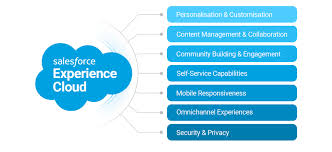
Salesforce Experience Cloud: Transforming Digital Customer Engagement To understand the Benefits of Salesforce Experience Cloud we must understand what a customer or partner portal is intended to do. Salesforce Experience Cloud, previously known as Community Cloud, is a powerful digital experience platform (DXP) designed to help organizations create and deliver exceptional, customer-centric experiences across multiple channels. This platform goes beyond community management, offering tools for building and managing websites, portals, mobile apps, and integrating social media. Benefits of Salesforce Experience Cloud explored. Built on Salesforce Customer 360, Experience Cloud gives businesses a comprehensive view of their customers by connecting data from various sources. With these insights, businesses can create personalized experiences tailored to each customer’s preferences and needs. Organizations can use Experience Cloud to design portals, websites, and communities, providing seamless access to relevant information, collaboration tools, and resources. The platform’s flexibility allows businesses to enhance customer satisfaction, improve partner collaboration, and boost employee productivity. Key Benefits of Salesforce Experience Cloud Salesforce Experience Cloud offers numerous benefits that help businesses deliver seamless experiences across the customer journey. Here are some of its key advantages: 1. Seamless Integration Experience Cloud integrates effortlessly with other Salesforce products like Sales Cloud and Service Cloud, providing a unified platform for comprehensive customer management. 2. Scalability and Customization The platform is highly scalable, allowing businesses to expand their communities as they grow. With extensive customization options, businesses can tailor the platform to meet their specific needs and branding requirements. 3. Security and Trust Salesforce is known for its robust security features, ensuring customer data is protected at all times. Businesses can confidently manage sensitive customer information within Experience Cloud. 4. Extensive AppExchange Ecosystem Salesforce’s AppExchange marketplace provides access to a wide range of pre-built integrations and apps that enhance the functionality of Experience Cloud, allowing businesses to customize and extend their platform capabilities. Real-World Uses of Salesforce Experience Cloud Salesforce Experience Cloud is used by businesses across various industries to improve customer engagement, enhance collaboration, and boost productivity. Some key use cases include: 1. Partner Portals Experience Cloud enables businesses to create dedicated partner portals where partners can collaborate with internal teams, access resources, and share leads. This accelerates partner engagement and streamlines business processes. 2. Self-Service Portals Businesses can offer 24/7 self-service portals, allowing customers to access product information, troubleshoot common issues, and track their interactions. These portals help reduce the workload on support teams and enhance customer satisfaction. 3. Customer Communities Experience Cloud allows businesses to create customer communities where users can find personalized content, engage with other users, and access self-service resources. This promotes collaboration and reduces the strain on customer support teams. 4. Employee Communities Internal employee communities serve as hubs for company-wide communication, training, and collaboration. Employees can access resources, share knowledge, and seek support, ultimately boosting engagement and productivity. 5. Branded Mobile Apps Businesses can use Experience Cloud to develop branded mobile apps that give customers, partners, and employees convenient access to services, resources, and information on the go. 6. Social Media Integration Experience Cloud integrates with popular social media platforms, allowing businesses to engage with customers directly, share content, and respond to inquiries. Top Features of Salesforce Experience Cloud Salesforce Experience Cloud is packed with features that enhance customer engagement, streamline operations, and improve overall efficiency: Companies Using Salesforce Experience Cloud Nike and PUMA leverage Experience Cloud for personalization. Nike’s loyalty program and Puma’s mobile shopping experience are enhanced by the platform’s built-in mobile UX design and technical architecture, resulting in better customer engagement and increased sales. Bank of America and Wells Fargo use Experience Cloud to offer customer support through self-service portals and community forums, improving customer satisfaction and gathering valuable feedback. IBM uses the platform to create collaborative communities for employees and customers alike. With integrated tools like Salesforce Einstein and IBM Watson, the company has enhanced internal collaboration and customer service. Hulu uses Salesforce to power its Help Center, where customers can find answers, engage with other viewers, and leave feedback that shapes Hulu’s content. OpenTable relies on Experience Cloud for its Diner Help portal, a one-stop shop for dining-related queries, enhancing the user experience and operational efficiency. Choosing the Right Salesforce Experience Cloud Partner for Implementation When implementing Salesforce Experience Cloud, choosing the right partner is crucial to ensure success. Look for a partner with: With the right partner, like Tectonic, businesses can fully grasp the power of Salesforce Experience Cloud to deliver exceptional digital experiences that foster customer loyalty, drive business growth, and improve operational efficiency. Content updated October 2024. Like Related Posts Who is Salesforce? Who is Salesforce? Here is their story in their own words. From our inception, we’ve proudly embraced the identity of Read more Salesforce Marketing Cloud Transactional Emails Salesforce Marketing Cloud Transactional Emails are immediate, automated, non-promotional messages crucial to business operations and customer satisfaction, such as order Read more Salesforce Unites Einstein Analytics with Financial CRM Salesforce has unveiled a comprehensive analytics solution tailored for wealth managers, home office professionals, and retail bankers, merging its Financial Read more AI-Driven Propensity Scores AI plays a crucial role in propensity score estimation as it can discern underlying patterns between treatments and confounding variables Read more
Read More
Slack and Salesforce

Flow Core Actions for Slack: Send Slack Message

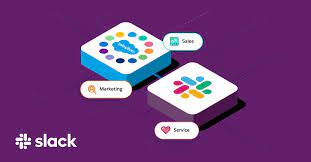
Effortlessly send messages to Slack channels, direct messages, or the Messages tab of a Slack app using the Send Slack Message Flow Core Action. Required Editions Prerequisite: Ensure Salesforce for Slack integrations are enabled before using this action. Steps to Send a Slack Message in Flow 1. Add an Action to the Flow Set Connection Values for Slack Input Parameter Description Slack App Required. Specify the Slack app to execute the action. Only Slack apps installed in your org are available. The input value corresponds to the Slack app ID. Slack Workspace Required. Identify the Slack workspace where the app is installed. You can select a value or resource. The input value corresponds to the Slack workspace ID. Execute Action As Specify the entity executing the action: Set Slack Message Details Input Parameter Description Slack Conversation ID Required. The ID of the Slack channel, direct message, or user to send the message. Store Output Values Output Parameter Description Slack Message Timestamp The timestamp of the sent message. Use this for starting threads or as a resource in subsequent actions. Usage Notes By configuring the Send Slack Message Flow Core Action, you can streamline communication workflows and enhance collaboration directly from Salesforce to Slack. Like Related Posts Who is Salesforce? Who is Salesforce? Here is their story in their own words. From our inception, we’ve proudly embraced the identity of Read more Salesforce Marketing Cloud Transactional Emails Salesforce Marketing Cloud Transactional Emails are immediate, automated, non-promotional messages crucial to business operations and customer satisfaction, such as order Read more Salesforce Unites Einstein Analytics with Financial CRM Salesforce has unveiled a comprehensive analytics solution tailored for wealth managers, home office professionals, and retail bankers, merging its Financial Read more AI-Driven Propensity Scores AI plays a crucial role in propensity score estimation as it can discern underlying patterns between treatments and confounding variables Read more
Read More
Generative AI Regulations

Salesforce, Data Science, and Generative AI

Is Salesforce utilized in the field of data science? Salesforce data science and Generative AI Data Science-as-a-Service (DSaaS) democratizes access to machine learning through the Salesforce Data Management Platform, enabling widespread adoption of data science capabilities. Utilizing Salesforce for Data Science Empowerment: The integration of Salesforce into data science represents a transformative endeavor aimed at democratizing machine learning through Data Science-as-a-Service (DSaaS). By leveraging the Salesforce Data Management Platform, the objective is to empower individuals across various domains with the potential of data science. Democratization of Data Science: DSaaS introduces a versatile workbench that capitalizes on machine learning to refine segmentation, enhance activation strategies, and uncover deeper insights. Through robust analytics tools, users can gain profound insights into individual customer behaviors. Supported by a formidable 20-petabyte analytics environment and a real-time big data infrastructure, data-driven analytics are taken to unprecedented levels. Harnessing Modeling Resources: Data owners enjoy the flexibility to harness their data, algorithms, and models either within the Salesforce Data Management Platform or within their independent environments. Spearheading this initiative is the Salesforce Unified Intelligence Platform (UIP) team, constructing a centralized data intelligence platform aimed at enriching business insights, enhancing user experience, improving product quality, and optimizing operational efficiency, all while upholding the core value of trust embedded in the Salesforce platform. Salesforce Data Science and Generative AI Emphasizing Security and Design: Security stands as a cornerstone of the Salesforce platform, with the UIP’s evolution tracing back to a transition from a colossal Hadoop cluster to UIP in public clouds. The architectural journey prioritized data classification early on, engaging in meticulous reviews with legal and security experts to classify data intended for storage within UIP. Adopting the “zero-trust infrastructure” principle, the architecture is fortified against both internal and external threats, ensuring robust defense mechanisms against potential data breaches. Unlocking Data Science Potential through DSaaS: DSaaS serves as a catalyst in democratizing machine learning through the Salesforce Data Management Platform, spotlighting the pivotal role of data science in fostering generative AI and cultivating trustworthy AI. Data scientists play a critical role in ensuring data quality and organization to steer clear of issues such as biased or irrelevant outcomes. Navigating Data Science Challenges: Despite the transformative potential of data science, businesses encounter various challenges including managing diverse data sources, scarcity of skilled professionals, data privacy and security concerns, data cleansing complexities, and effectively communicating findings to non-technical stakeholders. Proposed Solutions: Addressing these challenges involves leveraging data integration tools, investing in the upskilling and reskilling of data professionals, implementing robust data privacy measures, employing data governance tools for data cleansing, and honing communication skills for reporting findings to non-technical stakeholders. The success of generative AI hinges on well-organized data, and data science is pivotal in achieving this. Whether utilizing AI tools built with the expertise of data scientists or building a data science team, businesses can navigate the evolving landscape of AI and data science with confidence. Content updated March 2024. Like1 Related Posts Who is Salesforce? Who is Salesforce? Here is their story in their own words. From our inception, we’ve proudly embraced the identity of Read more Salesforce Marketing Cloud Transactional Emails Salesforce Marketing Cloud Transactional Emails are immediate, automated, non-promotional messages crucial to business operations and customer satisfaction, such as order Read more Salesforce Unites Einstein Analytics with Financial CRM Salesforce has unveiled a comprehensive analytics solution tailored for wealth managers, home office professionals, and retail bankers, merging its Financial Read more AI-Driven Propensity Scores AI plays a crucial role in propensity score estimation as it can discern underlying patterns between treatments and confounding variables Read more

Read More
salesforce bulk api

What is Salesforce Bulk API

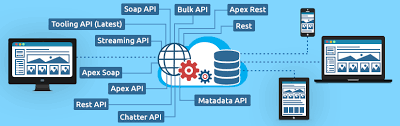
Salesforce Bulk API is a REST-based API designed for processing large volumes of data efficiently, allowing for asynchronous operations like inserting, updating, upserting, and deleting records in bulk. It’s optimized for handling large datasets and is often used with tools like Data Loader to import and export data in Salesforce.  More Details: Key Features and Benefits: How it Works: Bulk API vs. Batch API: While both handle large data volumes, Bulk API is generally used for asynchronous operations, while Batch API is more suitable for synchronous operations where you need to handle errors during the import. Bulk API processes records in batches asynchronously, allowing you to kick off the import and deal with errors later, while Batch API might be more suitable if you need to handle errors immediately during the import process.  Like Related Posts Who is Salesforce? Who is Salesforce? Here is their story in their own words. From our inception, we’ve proudly embraced the identity of Read more Salesforce Marketing Cloud Transactional Emails Salesforce Marketing Cloud Transactional Emails are immediate, automated, non-promotional messages crucial to business operations and customer satisfaction, such as order Read more Salesforce Unites Einstein Analytics with Financial CRM Salesforce has unveiled a comprehensive analytics solution tailored for wealth managers, home office professionals, and retail bankers, merging its Financial Read more AI-Driven Propensity Scores AI plays a crucial role in propensity score estimation as it can discern underlying patterns between treatments and confounding variables Read more
Read More
Accounting Software That Integrates With Salesforce

Accounting Software Integration With Salesforce

Integrating accounting software with Salesforce streamlines financial processes and improves data visibility across departments. This integration allows for a more efficient flow of information, reducing manual data entry and potential errors, ultimately leading to better decision-making and a healthier bottom line.  Benefits and popular options: Benefits of Salesforce Accounting Integration: Popular Accounting Software Integrated with Salesforce: How it Works: Salesforce integrations with accounting software typically involve: By integrating accounting software with Salesforce, businesses can create a more efficient and streamlined workflow, leading to better financial management and improved business outcomes.  Like Related Posts Who is Salesforce? Who is Salesforce? Here is their story in their own words. From our inception, we’ve proudly embraced the identity of Read more Salesforce Marketing Cloud Transactional Emails Salesforce Marketing Cloud Transactional Emails are immediate, automated, non-promotional messages crucial to business operations and customer satisfaction, such as order Read more Salesforce Unites Einstein Analytics with Financial CRM Salesforce has unveiled a comprehensive analytics solution tailored for wealth managers, home office professionals, and retail bankers, merging its Financial Read more AI-Driven Propensity Scores AI plays a crucial role in propensity score estimation as it can discern underlying patterns between treatments and confounding variables Read more

Read More
Migrating from Zoho to Salesforce

Migrating from Zoho to Salesforce

Migrating from Zoho to Salesforce is a major undertaking that can significantly enhance a business’s CRM processes as it scales. To ensure a smooth transition, careful planning, data preparation, and execution are essential for accurate and efficient data transfer. In this guide, we’ll outline a step-by-step approach to migrating from Zoho to Salesforce, covering everything from pre-migration planning to post-migration follow-up. Step 1: Pre-Migration Planning 1. Evaluate Your Business RequirementsBegin by assessing your current and future CRM needs. Identify critical functionalities in Zoho that you depend on and determine which Salesforce features will either replace or enhance them. Consider: This evaluation ensures that Salesforce is configured to align with your business processes during the migration. 2. Assign a Project TeamForming a dedicated project team is crucial for a successful migration. Include stakeholders from various departments, designate a project manager to oversee the migration, and enlist CRM specialists familiar with both Zoho and Salesforce. You might also consider hiring a certified Salesforce consultant or partner to assist with technical aspects. 3. Backup Your DataBefore starting the migration, back up your data from Zoho. Export all relevant information, including: This backup ensures you have a complete copy in case any issues arise during the migration. Step 2: Preparing Salesforce for Migration 1. Customize Salesforce to Fit Your NeedsNow is the time to tailor Salesforce to reflect your existing business processes. Review the custom fields, objects, workflows, and automations in Zoho, replicating or enhancing them in Salesforce. Salesforce’s high customization level allows you to optimize your CRM for your team’s specific needs. 2. Set Up IntegrationsIf you’ve been using third-party tools integrated with Zoho, establish the corresponding integrations in Salesforce. The Salesforce AppExchange offers a range of integrations, from email marketing platforms to accounting systems. Ensure the necessary tools are connected before migrating your data. Step 3: Data Migration 1. Map Data FieldsTo facilitate accurate data transfer between Zoho and Salesforce, map your Zoho data fields to their Salesforce counterparts. For instance, “Account Name” in Zoho should correspond to “Account” in Salesforce. Create equivalent custom fields in Salesforce if they exist in Zoho. 2. Cleanse Your DataData cleansing is vital to ensure only relevant, accurate, and up-to-date information is migrated. Remove duplicates, outdated contacts, and incorrect data from Zoho. This step streamlines the migration process and enhances the quality of your Salesforce database. 3. Choose a Migration ToolSelect an appropriate tool for migrating data between CRMs, such as: Depending on your data’s complexity, choose a tool that provides additional support, such as mapping or automation features. 4. Perform a Test MigrationConduct a test migration using a subset of your data before proceeding with the full migration. This allows you to verify that everything transfers correctly and identify any issues with data formatting, relationships between objects, or custom fields. Adjust your mapping and migration processes based on the test results. Step 4: Full Data Migration Once you’re satisfied with the test migration results, proceed with the complete data migration from Zoho to Salesforce. This process may take time, depending on your data‘s size and complexity, so plan for downtime or staggered migrations to minimize disruptions to your team’s workflow. Step 5: Post-Migration Setup and Testing 1. Validate Your DataAfter the full migration, verify that all data has been transferred accurately. Check for discrepancies between Zoho and Salesforce records, ensuring that relationships (e.g., contacts linked to accounts) remain intact. 2. Recreate Automation and WorkflowsRe-establish any automations, workflows, or triggers that were functioning in Zoho within Salesforce. Utilize Salesforce’s automation tools, like Process Builder or Flow, to replicate these processes. Adjust them as necessary to leverage Salesforce’s advanced capabilities. 3. Train Your TeamSuccessful migration extends beyond data transfer; it’s crucial to ensure your team is equipped to use Salesforce effectively. Conduct training sessions focused on new features and workflows, providing documentation or cheat sheets to facilitate adjustment. 4. Monitor System PerformancePost-migration, monitor your Salesforce instance for any performance issues or data inconsistencies. Make necessary adjustments and ensure that integrations are functioning as expected. Step 6: Post-Migration Follow-Up 1. Run Parallel OperationsConsider operating both systems in parallel for a brief period to confirm Salesforce is fully functional before phasing out Zoho. This allows your team to continue using Zoho if critical issues arise in Salesforce during the transition. 2. Optimize Your Salesforce InstanceOver time, identify opportunities to further customize and optimize Salesforce to meet your evolving needs. Regularly review workflows, automations, and reporting to fully utilize Salesforce’s advanced features. Who Should You Work With A successful migration from Zoho to Salesforce involves key stakeholders from various departments to ensure the new CRM setup aligns with company processes. Typical Migration Timelines The duration of a Zoho to Salesforce migration typically depends on your data’s complexity and the required customizations. For smaller businesses with straightforward CRM setups, the process may take 4 to 6 weeks, encompassing planning, data mapping, testing, and training. However, larger organizations with extensive custom fields, workflows, and third-party integrations may require 3 to 6 months. Allow ample time for thorough testing and validation to ensure data accuracy and system functionality before going live. User training and post-migration follow-up are also critical for a smooth transition. Conclusion Migrating from Zoho to Salesforce is a growth step in enhancing your company’s CRM capabilities and positioning it for future growth. By meticulously planning your migration, cleansing your data, and configuring Salesforce to meet your business requirements, you can facilitate a smooth transition and leverage Salesforce’s powerful features from day one. With the right preparation and support, your business will be well-equipped to scale, streamline operations, and achieve long-term success using Salesforce. If you need assistance with your migration, don’t hesitate to contact Tectonic for a quote. Content updated September 2024. Like Related Posts Who is Salesforce? Who is Salesforce? Here is their story in their own words. From our inception, we’ve proudly embraced the identity of Read more Salesforce Marketing Cloud Transactional Emails Salesforce Marketing Cloud Transactional Emails are immediate, automated, non-promotional messages crucial to business operations

Read More
Slack and AI

Just When You Thought We Were GPT’d Out, Here Comes Slack and Generative AI

Since its public introduction in 2014, Slack has transformed from its original concept, a searchable log of all conversation and knowledge, into a comprehensive productivity platform that has reshaped how work and co-working is conducted. Get ready! Here comes Slack and Generative AI! In a recent release, Salesforce Slack unveiled a next-generation platform. A platform designed to facilitate seamless automation and integration for users of all technical levels, regardless of coding proficiency. This platform simplifies the utilization of data within Slack, offering enhanced automation and intelligence, allowing for the creation of no-code workflows, custom integrations, and the incorporation of generative AI. Steve Wood, Slack’s SVP of Product and Platform, highlights the significance of placing automation and generative AI tools directly into users’ hands as a pivotal step in Slack’s journey to redefine not only how people work but also how machines and humans interact in the future. Wood delves into the unique features of the new Slack platform, emphasizing its modular architecture grounded in building blocks like functions, triggers, and workflows. These components are remixable, reusable, and seamlessly integrate with the data flow within Slack. The platform enables developers to create tailored solutions, such as integrating with Salesforce, fostering more efficient collaboration, and automating workflows across various business functions. The introduction of generative AI, like Slack GPT, further enhances the platform’s capabilities.  Slack GPT can use Einstein GPT to gain actionable data from Salesforce Customer 360 and Data Cloud.  Wood underscores the potential of this combination to revolutionize work interactions by simplifying automation into reusable building blocks, accessible to both humans and machines. He emphasizes the transformative power of pairing data with AI and automation, anticipating a significant shift in how technology is leveraged in the workplace. Slack and GPT Wood also explains the recent Slack GPT news, detailing its native integration into the Slack user experience. Slack GPT brings generative AI directly into the platform, allowing users to summarize conversations, catch up on missed messages, and edit content effortlessly. The integration of Einstein GPT into Slack expands the conversational interface to Customer 360, providing real-time customer insights directly in Slack. This can be used to automatically generate case summaries based on data from Service Cloud AND Slack. As AI evolves over time, Wood shares his excitement about observing how people utilize Slack GPT in real-world scenarios. The focus remains on empowering platform users through native generative AI and leveraging data and behaviors to enhance the product continuously. Historical Content Wood emphasizes the historical context stored within Slack, highlighting the collective past as a valuable resource for future decision-making. Integrating AI technologies into this rich dataset within Slack presents a substantial opportunity for improving workflows and tools. Regarding the integration of Slack with Salesforce Customer 360, Wood stresses the importance of having relevant information easily accessible in one place. Slack serves as the hub where work occurs, and by incorporating generative AI, the platform aims to enhance transparency, alignment, and effectiveness in decision-making. Drawing in and analyzing the data from Slack as well as the other Salesforce platforms provides vital customer information. In reflection on the rapid adoption of this technology, Wood acknowledges the unique challenges presented by the unknown behavior of generative AI. Stability, accuracy, and safety are top concerns, with ethical and responsible development practices crucial for building trust. The future, as Wood sees it, hinges on maintaining a commitment to ethical development, ensuring customers feel confident in trusting the transformative capabilities of generative AI in the workplace and the Slack platform. Like1 Related Posts Who is Salesforce? Who is Salesforce? Here is their story in their own words. From our inception, we’ve proudly embraced the identity of Read more Salesforce Marketing Cloud Transactional Emails Salesforce Marketing Cloud Transactional Emails are immediate, automated, non-promotional messages crucial to business operations and customer satisfaction, such as order Read more Salesforce Unites Einstein Analytics with Financial CRM Salesforce has unveiled a comprehensive analytics solution tailored for wealth managers, home office professionals, and retail bankers, merging its Financial Read more AI-Driven Propensity Scores AI plays a crucial role in propensity score estimation as it can discern underlying patterns between treatments and confounding variables Read more

Read More
gettectonic.com