
Own Archives - gettectonic.com - Page 53
Salesforce Document Generation

Generating Documents in Salesforce

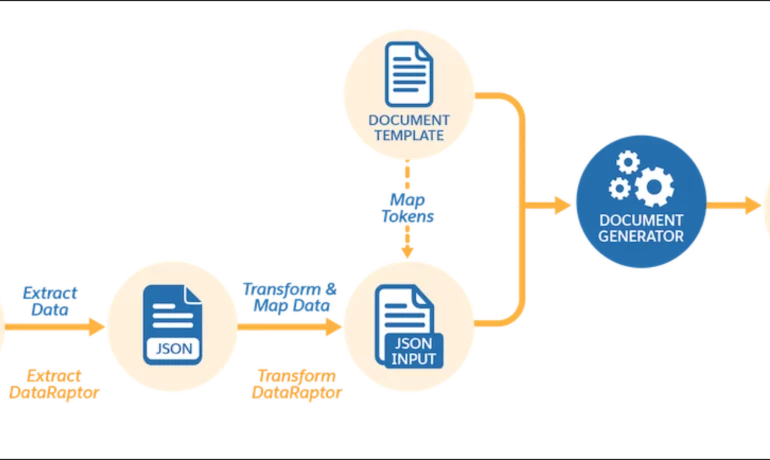
Salesforce document generation poses a challenge for businesses, given the intricacies of integration involved. Fortunately, a variety of tools are available for generating documents in Salesforce, and Tectonic is well-equipped to assist in their successful implementation. Salesforce Industries Document Generation empowers businesses to craft and manage accurate documents linked to standard Salesforce objects, encompassing contracts, opportunities, orders, quotes, and custom objects. For a more dynamic approach, Salesforce OmniStudio Document Generation facilitates the creation of documents using Microsoft Word and Microsoft PowerPoint templates. These templates can incorporate values from any JSON-based data within the text, including data sourced from various Salesforce objects. This versatile tool enables the generation of contracts, proposals, quotes, reports, non-disclosure agreements, service agreements, and more. Salesforce Industries Document Generation seamlessly integrates with Vlocity Insurance, Vlocity Health, communications, media, energy, utilities, government, and beyond. Vlocity Analytics, another valuable component, offers pre-built measurement tools that seamlessly integrate with Salesforce Reports, Dashboards, and Einstein. The Salesforce AppExchange boasts an extensive array of over 200 document generation tools. Your Salesforce partner can assist in selecting, installing, and implementing the most suitable options based on your business requirements. With Document Generation, you can generate contracts, proposals, quotes, reports, non-disclosure agreements, job offers, service agreements, and so on. You can generate documents using the specified sample client-side or server-side OmniScripts. You can also create your own OmniScripts by cloning and customizing the sample OmniScript to generate documents. Client-Side document generation is a synchronous process that results in a downloadable preview of the generated documents. You can generate documents from Microsoft Word (.docx), Microsoft PowerPoint (.pptx), and Web templates. These templates can include values from any JSON-based data in the text, including data from any Salesforce object. You can optionally convert the resulting documents to .pdf format. Server-Side document generation is available in both the OmniStudio Foundation and Salesforce Industries packages. Server-Side document generation is an asynchronous process that’s best for large and rendering-heavy documents and for document generation in batches. The Server-Side document generation service is secure and scalable and is hosted on Salesforce Hyperforce. The generated document is stored in your Salesforce org, and is attached to the object for which it’s generated. You can use Apex Classes, sample Integration Procedures, or a sample OmniScript to generate documents. Client-Side document generation supports Customer Community Plus, Customer Community, and Partner Community users to generate documents using client-side OmniScripts. Server-Side document generation supports Customer Community Plus, Customer Community, and Partner Community users to generate documents using the singleDocxServersideLwc server-side OmniScript. With the right licenses, Document Generation is available in the Salesforce Industries package. Metering measures resource utilization levels and throttling controls resource access and use based on defined rules. Metering measures the number of server-side documents that are generated by an org hourly and daily. The default hourly and daily limits for processing server-side document generation requests are 1,000 per org and 24,000 per org respectively. Throttling maintains consistency and resilience of the server-side document generation service by managing incoming server-side document generation requests from multiple orgs. Throttling can also prevent service degradation caused by high volume of requests at peak hours by blocking requests that exceed the default limits. The request details are saved in the Document Generation Processes entity. You can retrieve the blocked requests and later retry the server-side document generation. No matter what your specific document generation needs, Tectonic simplifies the process of getting your system up and running seamlessly, whether it’s through Salesforce Quickstarts or comprehensive implementation services. Content updated in 2February 2024, Shannan Hearne. Like1 Related Posts Who is Salesforce? Who is Salesforce? Here is their story in their own words. From our inception, we’ve proudly embraced the identity of Read more Salesforce Marketing Cloud Transactional Emails Salesforce Marketing Cloud Transactional Emails are immediate, automated, non-promotional messages crucial to business operations and customer satisfaction, such as order Read more Salesforce Unites Einstein Analytics with Financial CRM Salesforce has unveiled a comprehensive analytics solution tailored for wealth managers, home office professionals, and retail bankers, merging its Financial Read more AI-Driven Propensity Scores AI plays a crucial role in propensity score estimation as it can discern underlying patterns between treatments and confounding variables Read more


Read More
Salesforce Quickstart

Step By Step Guide to a Salesforce Quickstart

Salesforce Implementation with a Tectonic Quickstart: Step-by-Step Salesforce Quickstart Guide. Step 1: Define Your Business Requirements Step 2: Choose the Appropriate Salesforce Products Step 3: Choose the Right Salesforce Quickstart Package Step 4: Prepare Your Data Step 5: Customize Your Quickstart Package Step 6: Train Your Users Step 7: Monitor and Optimize Your Processes Benefits of Salesforce Implementation with QuickStart Package Is it time for your business to get up and running on Salesforce? Contact Tectonic about our Salesforce Quickstart solutions today. Salesforce quickstarts are also known as Salesforce Implementation Solutions. Content updated December 2024. Like1 Related Posts Who is Salesforce? Who is Salesforce? Here is their story in their own words. From our inception, we’ve proudly embraced the identity of Read more Salesforce Marketing Cloud Transactional Emails Salesforce Marketing Cloud Transactional Emails are immediate, automated, non-promotional messages crucial to business operations and customer satisfaction, such as order Read more Salesforce Unites Einstein Analytics with Financial CRM Salesforce has unveiled a comprehensive analytics solution tailored for wealth managers, home office professionals, and retail bankers, merging its Financial Read more AI-Driven Propensity Scores AI plays a crucial role in propensity score estimation as it can discern underlying patterns between treatments and confounding variables Read more
Read More
The Evolution of Industrial Revolutions

The Evolution of Industrial Revolutions

History of First Four Industrial Revolutions Throughout history, humanity has always relied on technology. Although the technology of each era looked different from today’s, it was groundbreaking for its time. People consistently used available technology to simplify their lives while striving to enhance and advance it. This ongoing pursuit of innovation laid the groundwork for the industrial revolutions. Today, we are in the midst of the fourth industrial revolution, also known as Industry 4.0, marked by the rise of tech and web design companies. The Evolution of Industrial Revolutions. Here’s an overview of the three previous industrial revolutions that have led us to this point: The First Industrial Revolution (1765) The first industrial revolution followed the proto-industrialization period, starting in the late 18th century and extending into the early 19th century. This era was characterized by mechanization, which transformed industries and shifted the economic backbone from agriculture to industry. The massive extraction of coal and the invention of the steam engine introduced a new type of energy, accelerating manufacturing and economic growth through the expansion of railroads. This led to the enlarging of cities where factories and industry took place. The Second Industrial Revolution (1870) Nearly a century after the first, the second industrial revolution began in the late 19th century, marked by significant technological advancements. New sources of energy—electricity, gas, and oil—emerged, leading to the development of the internal combustion engine. This period also saw the rise of steel demand, chemical synthesis, and new communication methods like the telegraph and telephone. The invention of the automobile and airplane at the turn of the 20th century solidified the second industrial revolution’s profound impact on modern society. This led to the growing mobility of humanity. The Third Industrial Revolution (1969) In the latter half of the 20th century, the third industrial revolution introduced nuclear energy as a new power source. This revolution brought forth the rise of electronics, telecommunications, and computers, paving the way for space exploration, advanced research, and biotechnology. In the industrial sector, the advent of Programmable Logic Controllers (PLCs) and robots led to an era of high-level automation, revolutionizing manufacturing processes. This, in turn, led to a time of greater lesiure and freedom. Industry 4.0 Many consider Industry 4.0 to be the fourth industrial revolution, unfolding right before our eyes. Beginning at the dawn of the third millennium with the widespread use of the Internet, Industry 4.0 represents a shift from physical to virtual innovations. It encompasses developments in virtual reality, augmented reality, and other digital technologies that reshape our interaction with the physical world. The four industrial revolutions have fundamentally shaped global economies. Numerous programs and projects are being implemented worldwide to help people harness the benefits of the fourth revolution in their daily lives. From digital flipbooks to augmented reality gaming, the future is bright. For instance, the EU-funded RESTART project aims to transform vocational education and training (VET) systems to meet the digital skill demands of modern industries, ensuring that the workforce is equipped to thrive in this new technological landscape. What’s next? Look out as we are already into the Fifth Industrial Revolution. Like Related Posts Who is Salesforce? Who is Salesforce? Here is their story in their own words. From our inception, we’ve proudly embraced the identity of Read more Salesforce Marketing Cloud Transactional Emails Salesforce Marketing Cloud Transactional Emails are immediate, automated, non-promotional messages crucial to business operations and customer satisfaction, such as order Read more Salesforce Unites Einstein Analytics with Financial CRM Salesforce has unveiled a comprehensive analytics solution tailored for wealth managers, home office professionals, and retail bankers, merging its Financial Read more AI-Driven Propensity Scores AI plays a crucial role in propensity score estimation as it can discern underlying patterns between treatments and confounding variables Read more

Read More
Salesforce Listview

Listview in Salesforce

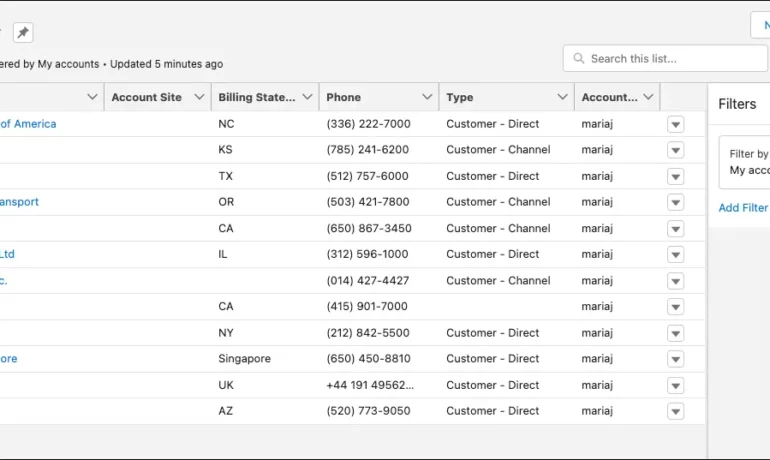
What is a listview in Salesforce? A list view is a filtered list of records where you can view records for one object at a time. For example, a list of Contacts, Accounts, or Opportunities. What are the benefits of list view in Salesforce? In a list view, you see only the data that you have access to. You can see records that you own, have read or write access to, or are shared with you. List views also include records owned by or shared with users in roles below you in the Salesforce hierarchy. What is the difference between report and Listview in Salesforce? While List Views are ideal for day-to-day tasks and offer quick access to relevant data, they cannot perform data analysis or generate summary reports. Reports, on the other hand, require an understanding of the data structure to create, and they’re only available to Salesforce users with the appropriate permissions enabled. Why use ListView? ListView builder is useful when you have a large number of items that can change dynamically, as it only builds the child records that are currently visible. It also allows you to easily scroll through the list of items. Column , on the other hand, is a layout widget that arranges its children vertically. What is the limitation of Listview in Salesforce? Due to SOQL limitations, list views are limited to first 2,000 records returned by the filter criteria. To confirm that the list view contains more than 2000 records you can create a report with the same criteria as list view to get the exact record count. Can you share a list view in Salesforce? Name the Public Group via the “Label” field. Select Users under the “Search” drop-down. Add the specific user(s) with whom you want to share the list view. Click Save. Content updated July 2025, Shannan Hearne Like Related Posts Who is Salesforce? Who is Salesforce? Here is their story in their own words. From our inception, we’ve proudly embraced the identity of Read more Salesforce Marketing Cloud Transactional Emails Salesforce Marketing Cloud Transactional Emails are immediate, automated, non-promotional messages crucial to business operations and customer satisfaction, such as order Read more Salesforce Unites Einstein Analytics with Financial CRM Salesforce has unveiled a comprehensive analytics solution tailored for wealth managers, home office professionals, and retail bankers, merging its Financial Read more AI-Driven Propensity Scores AI plays a crucial role in propensity score estimation as it can discern underlying patterns between treatments and confounding variables Read more

Read More
salesforce asset management

Asset Management Salesforce

Can Salesforce do asset management? You can manage assets in Consumer Goods (desktop) and in the Consumer Goods offline mobile app in Salesforce. Let’s understand the process in detail. Create Asset Templates and Asset Types: Before you create assets, ensure that admins have created asset templates and asset types. Assets are items, such as refrigerators or freezers, that you place at a customer location (retail store) to increase your sales. Assets are also items you use in your business such as vehicles or computers. As an asset’s owner, you’re responsible for the maintenance, repair, or any other services required for the asset. Managing assets efficiently can help reduce customer complaints and, in turn, increase your brand value. By actively tracking your assets’ conditions, you can budget better, reduce losses, and ensure employee safety. What is the use of asset object in Salesforce? So, Assets are used quite frequently by sales, customer service in your back office. Assets are a standard object. It comes out-of-the-box with Salesforce. And being a standard object we can add custom fields, validation rules, record types, multiple page layouts. How do I create an asset for a product in Salesforce? Create an Asset What is the asset state period in Salesforce? An asset state period represents a time span when an asset has the same quantity, amount, and monthly recurring revenue (MRR). An asset has as many asset state periods as there are changes to it (asset actions) during its lifecycle. The dashboard and related pages show the current asset state period. What is the difference between subscription and asset in Salesforce? Use subscriptions to keep records of subscription products you’ve quoted or sold. Use assets to keep records of stand-alone products you’ve quoted or sold. You can use these records later to manage amendments and renewals to your opportunities and orders. How do I enable assets in Salesforce? Enable Asset Scheduling in Salesforce Scheduler How do I create an asset in Salesforce CPQ? Salesforce CPQ creates assets when you click Contracted on an opportunity or order. The asset creation process varies based on your account’s renewal model and the value of the asset conversion field on the product you’re contracting. How do you renew assets in Salesforce CPQ? Select the assets you want to renew, and then click Renew. Salesforce CPQ creates a renewal quote, associates it with a renewal opportunity, and opens the quote line editor. Edit the quantities of the assets from your original quote as needed. You can also add new products. What is an asset state? Asset State denotes the different states of assets in the organization such as assets in Use, In Store, Expired and so on. Apart from the default asset states, you can create custom ones. You can also enable or disable ownership and scan for custom asset states you create. Note that Salesforce also has a Digital Asset Management (DAM) capability. Where is asset library in Salesforce? To view asset files in Files home, select Libraries and then select Asset Library . To view and edit asset files in Setup, enter Asset Files in the Quick Find box, then select Asset Files. For more information on Salesforce Asset Management, contact Tectonic today. Like1 Related Posts Who is Salesforce? Who is Salesforce? Here is their story in their own words. From our inception, we’ve proudly embraced the identity of Read more Salesforce Marketing Cloud Transactional Emails Salesforce Marketing Cloud Transactional Emails are immediate, automated, non-promotional messages crucial to business operations and customer satisfaction, such as order Read more Salesforce Unites Einstein Analytics with Financial CRM Salesforce has unveiled a comprehensive analytics solution tailored for wealth managers, home office professionals, and retail bankers, merging its Financial Read more AI-Driven Propensity Scores AI plays a crucial role in propensity score estimation as it can discern underlying patterns between treatments and confounding variables Read more

Read More
AI-driven propensity scores

AI-Driven Propensity Scores

AI plays a crucial role in propensity score estimation as it can discern underlying patterns between treatments and confounding variables through machine learning, without explicit programming. This insight has gone through numerous updates as the information and use of AI-driven propensity scores evolved. In many cases, writers give a brief overview of the what of a tool. Today, we are going way beyond “what the sausage tastes like” to “how the sausage is made” Tectonic hopes you will enjoy learning how propensity models and AI driven propensity scores improve your data. Propensity Model in Artificial Intelligence: Propensity modeling generates a propensity score, representing the probability that a visitor, lead, or customer will take a specific action. For instance, a propensity model, using data science or machine learning, can help predict the likelihood of a lead converting to a customer. AI-driven propensity scores take an existing data model and improve its predictions, speed, and analysis with AI. Propensity Score in CRM: In CRM, a propensity score is the model’s probabilistic estimate of a customer performing a specific action. Grouping customers by score ranges allows for effective comparison and analysis within each bucket. Enhancing Propensity Modeling with AI: Traditional statistical propensity models might lack accuracy, but integrating machine learning technologies, as demonstrated by Alphonso, can significantly optimize ad spend and increase prediction accuracy from 8% to 80%. That’s a whopping 72% improvement. Propensity Modeling Overview: Propensity modeling involves predictive models analyzing past behaviors to forecast the future actions of a target audience. It identifies the likelihood of specific actions, aiding in personalized marketing. Role of Machine Learning in Propensity Models: Propensity models rely on machine learning algorithms, acting as binary classifiers predicting whether a certain event or behavior will occur. Logistic regression and Classification and Regression Tree Analysis are common methods for calculating propensity scores. Characteristics of Effective Propensity Models: For robust predictions, propensity models should be dynamic, scalable, and adaptive. Dynamic models adapt to trends, scalable for diverse predictions, and adaptive with regular data updates. Propensity Modeling Applications: Propensity models find applications in predicting customer behavior, such as purchasing, converting, churning, or engaging. Real-time predictions, data analysis, and AI integration contribute to successful implementations. AI-driven propensity scores are extremely useful in that they can be coupled with many other models to give additional insights to your data. Types of Propensity Score Models: Various models include propensity to purchase/convert, customer lifetime value (CLV), propensity to churn, and propensity to engage. Combining models can enhance the effectiveness of marketing campaigns. When to Use Propensity Scores: Propensity scores are beneficial when random assignment of treatments is impractical. They help estimate treatment effects in observational studies, providing an alternative to traditional model-building methods. Limitations of Propensity Score Methods: While propensity scores help achieve exchangeability between exposed and unexposed groups, they do not claim to eliminate confounding due to unmeasured covariates. Findings from observational studies must be interpreted cautiously due to potential residual confounding. Content updated October 2021. Content updated February 2025. Like3 Related Posts Who is Salesforce? Who is Salesforce? Here is their story in their own words. From our inception, we’ve proudly embraced the identity of Read more Salesforce Marketing Cloud Transactional Emails Salesforce Marketing Cloud Transactional Emails are immediate, automated, non-promotional messages crucial to business operations and customer satisfaction, such as order Read more Salesforce Unites Einstein Analytics with Financial CRM Salesforce has unveiled a comprehensive analytics solution tailored for wealth managers, home office professionals, and retail bankers, merging its Financial Read more Tectonic’s Successful Salesforce Track Record Salesforce Technology Services Integrator – Tectonic has successfully delivered Salesforce in a variety of industries including Public Sector, Hospitality, Manufacturing, Read more

Read More
Financial Services Sector

Salesforce Unites Einstein Analytics with Financial CRM

Salesforce has unveiled a comprehensive analytics solution tailored for wealth managers, home office professionals, and retail bankers, merging its Financial Services Cloud with Einstein Analytics. This amalgamation, known as Einstein Analytics for Financial Services, harnesses Salesforce’s robust query engine and interpretation layers, fueled by the enterprise data analytics prowess acquired through BeyondCore in 2016. Salesforce Unites Einstein Analytics with Financial CRM This integrated platform – Salesforce Unites Einstein Analytics with Financial CRM – offers two prebuilt analytical models, meticulously designed to gauge client churn (identifying clients at risk of leaving) and the potential for clients to bring additional assets to a firm. These models, while prepackaged, can be tailored to specific needs, providing insights into future scenarios within the firm. Advisors can leverage these models to assess client characteristics against firm-wide benchmarks and receive actionable suggestions to enhance client retention. Home office professionals and data scientists have the option to delve into the underlying mathematical frameworks of these models, allowing for customization if required. While the tool offers enterprise-level benchmarking, firms can incorporate their own industry-specific data to run the models, ensuring tailored insights. This initiative builds upon previous endeavors integrating machine learning into Financial Services Cloud, which aimed to identify crucial life events and offer actionable recommendations. The decision to develop a more holistic solution stemmed from observing customer behavior and the growing trend of custom dashboard creation. By streamlining and prepackaging these insights, Salesforce aims to accelerate adoption and empower users to focus on their core tasks. Although customization remains a key feature, the platform aims to simplify adoption by providing templated solutions. However, the efficacy of insights depends on the quality of the ingested data, emphasizing the importance of data aggregation and normalization. Future updates are expected to introduce additional machine learning models focused on reducing heldaway assets and increasing assets under management. Developed in collaboration with diverse stakeholders, ranging from enterprise financial advisors to firms of varying sizes, the service is priced at $150 per user per month. It’s not a standalone product and requires integration with Financial Services Cloud or Einstein Analytics Plus. Like2 Related Posts Who is Salesforce? Who is Salesforce? Here is their story in their own words. From our inception, we’ve proudly embraced the identity of Read more Salesforce Marketing Cloud Transactional Emails Salesforce Marketing Cloud Transactional Emails are immediate, automated, non-promotional messages crucial to business operations and customer satisfaction, such as order Read more AI-Driven Propensity Scores AI plays a crucial role in propensity score estimation as it can discern underlying patterns between treatments and confounding variables Read more Tectonic’s Successful Salesforce Track Record Salesforce Technology Services Integrator – Tectonic has successfully delivered Salesforce in a variety of industries including Public Sector, Hospitality, Manufacturing, Read more
Read More
Salesforce

Who is Salesforce?

Who is Salesforce? Here is their story in their own words. From our inception, we’ve proudly embraced the identity of a customer-centric company. Since the very day we opened our doors, customer focus has been the guiding force behind every decision we make. It’s the catalyst for our growth and the driving factor behind our customers’ success. Our commitment involves developing technologies, fostering partnerships, and building communities that enable companies to establish profound connections with their customers, transforming every business into a customer-centric entity. While the world evolves, our unwavering commitment to customer focus remains constant. New technologies, social trends, and immediate priorities may emerge, but the essence of the customer—discerning, demanding, and eager to be impressed—endures. Our mission is to assist you in meeting your customers where they are, fostering unwavering loyalty to your company through thick and thin. Our role is to construct bridges between companies and customers, recognizing that meaningful connections are the linchpin of business success. We are dedicated to delivering on this mission. Empowering every department to prioritize customers is our goal, facilitated by Customer 360—the world’s leading CRM. We provide a platform where every team member can access a unified source of truth, enhancing collaboration with integrated capabilities that facilitate crucial conversations and decisions where they matter most. With Tableau, we empower companies to unearth profound insights and take data-driven actions to better serve their customers. Every product in our portfolio plays a pivotal role in establishing connections that drive success, with the potential to channel that success into positive change. HISTORY In 1999, Salesforce founders launched a revolutionary customer relationship management (CRM) system from a small San Francisco apartment. Their groundbreaking approach involved hosting all software and critical customer data on the internet, pioneering the “software as a service” (SaaS) model that quickly spread across the tech industry. Cultivating Trust Early adopters took a leap of faith in embracing our cloud-based model, and trust became a cornerstone. Over the decades, our product has evolved, becoming an essential service for some of the world’s most significant businesses, governments, and organizations. Trust and relationships have become invaluable commodities. Core Values Our core values drive our actions and unite us as a company: This content was updated in 2023. Like Related Posts Salesforce Marketing Cloud Transactional Emails Salesforce Marketing Cloud Transactional Emails are immediate, automated, non-promotional messages crucial to business operations and customer satisfaction, such as order Read more Salesforce Unites Einstein Analytics with Financial CRM Salesforce has unveiled a comprehensive analytics solution tailored for wealth managers, home office professionals, and retail bankers, merging its Financial Read more AI-Driven Propensity Scores AI plays a crucial role in propensity score estimation as it can discern underlying patterns between treatments and confounding variables Read more Tectonic’s Successful Salesforce Track Record Salesforce Technology Services Integrator – Tectonic has successfully delivered Salesforce in a variety of industries including Public Sector, Hospitality, Manufacturing, Read more

Read More
gettectonic.com