Salesforce Marketing Cloud Archives - gettectonic.com - Page 15
Smart Capture Forms as Marketing Cloud Journey Entry Source

Smart Capture Forms as Marketing Cloud Journey Entry Source

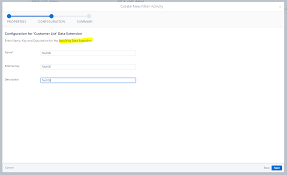
Transforming your marketing strategy into a seamless journey for your customers has never been easier, thanks to the integration of CloudPages’ Smart Capture forms with Journey Builder Entry Events. By leveraging this innovative feature, you can effortlessly guide your audience through personalized experiences that drive engagement and conversions. Smart Capture Forms as Marketing Cloud Journey Entry Source. Crafting these dynamic forms is a breeze, whether you prefer the classic or Content Builder editor, embedded within your landing pages or microsites. However, to take advantage of this functionality, it’s essential to ensure that you have both Journey Builder and CloudPages at your disposal. If you’re missing either piece of the puzzle, a quick chat with your Relationship Manager can swiftly rectify the situation. Now, let’s dig into the mechanics of how this synergy works. To initiate customers into a journey, the data captured by Smart Capture forms must be securely stored in a designated data extension. This data extension, aptly named the Event Source data extension, serves as the reservoir from which contacts are seamlessly injected into your Journey Builder journeys. Remember, for this mechanism to function seamlessly, your Event Source data extension must be configured as sendable. Creating a Smart Capture Form within CloudPages is a straightforward process: Navigate to CloudPages and effortlessly drag the Smart Capture gear onto the content area of your chosen landing page or microsite.Establishing a Data Extension tailored for Smart Capture as a Journey Builder event is paramount. This dedicated data extension serves as the conduit for seamlessly integrating Smart Capture forms with Journey Builder Entry Events. Here’s how to get started: Create a marketing cloud data extension explicitly designed to handle Smart Capture data within the context of Journey Builder.These conditions are required for creating a data extension to use in a Journey Builder entry event. Choose Create from New.Enter a name and select Is Sendable? if you plan to use emails with your Smart Capture form or Journey Builder journey.On the Data Retention Policy step, keep the default setting and click Next. Add any fields you would like to capture. When adding an Email Address attribute, change the Data Type to EmailAddress as email address because email address is the primary key. Set Send Relationship to the Email Address attribute so it relates to Subscribers on Subscriber Key. Smart Capture Forms as Marketing Cloud Journey Entry Source For those seeking further clarification or guidance on integrating Smart Capture forms with Journey Builder Entry Events, our comprehensive FAQs offer valuable insights: My Smart Capture form used as the trigger event for my journey won’t submit. What’s happening?Ensure that you configured the re-entry option and default channel address in the journey settings. I can’t get my journey to execute?If your journey includes an email send there are 2 important steps to complete before the journey can be executed. Within Email Studio, open up your email and be sure to complete both the Content Detective and Validate steps. Complete these steps before a journey can send that email. Explore our FAQs section dedicated to illuminating the intricacies of utilizing Smart Capture forms as Journey Builder Events within CloudPages. With this powerful integration at your fingertips, you can orchestrate personalized customer journeys that captivate your audience and drive tangible results. Embrace the potential of CloudPages‘ Smart Capture forms within Journey Builder to elevate your marketing endeavors to new heights of success. Like1 Related Posts Who is Salesforce? Who is Salesforce? Here is their story in their own words. From our inception, we’ve proudly embraced the identity of Read more Salesforce Marketing Cloud Transactional Emails Salesforce Marketing Cloud Transactional Emails are immediate, automated, non-promotional messages crucial to business operations and customer satisfaction, such as order Read more Salesforce Unites Einstein Analytics with Financial CRM Salesforce has unveiled a comprehensive analytics solution tailored for wealth managers, home office professionals, and retail bankers, merging its Financial Read more AI-Driven Propensity Scores AI plays a crucial role in propensity score estimation as it can discern underlying patterns between treatments and confounding variables Read more

Read More
Tips for Awesome SFMC Email Templates

Tips for Awesome SFMC Email Templates

Tips for Awesome SFMC Email Templates. Email design doesn’t have to be hard-unlock the potential of Salesforce Marketing Cloud (SFMC) with these 5 tips for crafting exceptional email templates on the Salesforce Marketing Cloud platform: Implement these strategies to unlock Salesforce Marketing Cloud’s potential and create captivating, personalized email campaigns that connect with your audience and deliver meaningful results. Content updated February 2022. Like Related Posts Who is Salesforce? Who is Salesforce? Here is their story in their own words. From our inception, we’ve proudly embraced the identity of Read more Salesforce Marketing Cloud Transactional Emails Salesforce Marketing Cloud Transactional Emails are immediate, automated, non-promotional messages crucial to business operations and customer satisfaction, such as order Read more Salesforce Unites Einstein Analytics with Financial CRM Salesforce has unveiled a comprehensive analytics solution tailored for wealth managers, home office professionals, and retail bankers, merging its Financial Read more AI-Driven Propensity Scores AI plays a crucial role in propensity score estimation as it can discern underlying patterns between treatments and confounding variables Read more
Read More
Marketing Cloud Filters

Marketing Cloud Filters

When crafting a filter, you establish conditions that the system assesses for each subscriber or data extension row to determine qualification for the segment. For each condition, you can choose the profile attribute, field column, or measure to evaluate, specify the operator for comparing values, and define the value for comparison.

Read More
Salesforce Mobilepush

Salesforce Mobilepush

Salesforce MobilePush is included in Corporate and Enterprise editions. Salesforce Marketing Cloud’s MobilePush feature powers the creation and delivery of notifications to encourage app usage. To effectively target your notifications, leverage user data from various channels. Push notifications, resembling SMS text messages and mobile alerts, are exclusive to users who have installed your app. Each mobile platform – iOS, Android, Fire OS, Windows, and BlackBerry – has its own services supporting push functionality. To send a push notification in Salesforce Marketing Cloud (SFMC), utilize the Outbound Message template in MobilePush. You can send push messages to mobile devices based on demographic attributes, including rich media content like images or videos. Push notifications operate as brief messages sent directly from app publishers to users’ mobile devices. Users don’t need to actively use the app or their phones to receive these notifications. They serve as a prompt and efficient means for brands to convey important information. In Salesforce, you can employ push notifications to notify sales managers of changes in opportunities or alert service agents to cases requiring immediate attention. These notifications can be configured for any object based on criteria set up in Salesforce Flow automation. The key distinction between a push notification and an app notification lies in their impact on users. A push notification brings users to the application, initiating engagement, while an in-app notification guides users within the app. The working principle is that push notifications can be received at any time, while in-app notifications are effective only when the application is open. Like1 Related Posts Who is Salesforce? Who is Salesforce? Here is their story in their own words. From our inception, we’ve proudly embraced the identity of Read more Salesforce Marketing Cloud Transactional Emails Salesforce Marketing Cloud Transactional Emails are immediate, automated, non-promotional messages crucial to business operations and customer satisfaction, such as order Read more Salesforce Unites Einstein Analytics with Financial CRM Salesforce has unveiled a comprehensive analytics solution tailored for wealth managers, home office professionals, and retail bankers, merging its Financial Read more AI-Driven Propensity Scores AI plays a crucial role in propensity score estimation as it can discern underlying patterns between treatments and confounding variables Read more
Read More
Marketing Cloud Cloudpages

Salesforce Marketing Cloud Cloudpages

Utilize the CloudPages builder in Marketing Cloud Engagement to effortlessly publish targeted marketing content across multiple channels. CloudPages, a feature within Salesforce Marketing Cloud, offers drag-and-drop tools and pre-built templates for creating and publishing landing pages, preference center pages, and more. Salesforce Marketing Cloud empowers efficient marketing processes and streamlined customer relationship management. It enables the creation of customer profiles and tracking of interactions across various channels, including email, social media, and web interactions. CloudPages facilitates the automatic saving of Smart Capture block data, addition of default content versions to multiple destinations, and the design and preview of content in the audience’s format. For customer experience, CloudPages ensures a seamless process where prospects view and convert on pages using capture forms, with their data instantly updated in relevant Data Extensions. They are efficiently added to Journey Builder flows and receive tailored marketing communications promptly. Organize information for specific destinations, such as landing pages or microsites, with a Cloud Pages collection. Landing pages, created with Cloud Pages, can include custom forms with Ampscript and can be embedded in emails and websites. CloudPages smart capture forms can be used as a Journey Builder Entry Event. The difference between landing pages and CloudPages lies in CloudPages being an application within Marketing Cloud that can publish to various destinations, including Landing Pages. Marketing Cloud Engagement, with the inclusion of Cloud Pages, aids in conversions by providing a drag-and-drop interface for easy creation of landing pages, eliminating the need for complex coding. To create a landing page in Marketing Cloud, navigate to Web Studio > Cloud Pages, create a new collection, and within it, click ‘Create’ and select ‘Landing Page.’ Building CloudPages is user-friendly, featuring a drag-and-drop interface with templated layouts, content blocks, and dynamic content options. It allows easy insertion of text, images, buttons, forms, and more. Salesforce Marketing Cloud differs from Pardot, with Pardot being closely integrated with sales on the Salesforce core platform, while Marketing Cloud operates as a separate application. Landing pages are still crucial, as research indicates that businesses with more landing pages tend to experience higher conversion rates. The term “landing page” refers to a campaign-specific page with a single call to action and no website navigation. Insider tips for using Cloud Pages include making content relevant with Dynamic Content blocks, avoiding information overload, ensuring mobile-friendliness, and experimenting with different page versions for optimal performance. Content updated September 2023. Like2 Related Posts Who is Salesforce? Who is Salesforce? Here is their story in their own words. From our inception, we’ve proudly embraced the identity of Read more Salesforce Marketing Cloud Transactional Emails Salesforce Marketing Cloud Transactional Emails are immediate, automated, non-promotional messages crucial to business operations and customer satisfaction, such as order Read more Salesforce Unites Einstein Analytics with Financial CRM Salesforce has unveiled a comprehensive analytics solution tailored for wealth managers, home office professionals, and retail bankers, merging its Financial Read more AI-Driven Propensity Scores AI plays a crucial role in propensity score estimation as it can discern underlying patterns between treatments and confounding variables Read more
Read More
Salesforce Marketing Cloud

Marketing Cloud Connector

Marketing Cloud Connect is an API integration that connects Marketing Cloud with other Salesforce systems, such as Sales Cloud and Service Cloud. The Salesforce Marketing Cloud Connector brings connectivity between the Salesforce cloud platforms. What are the prerequisites for Marketing Cloud connector? Marketing Cloud Connect requires a relationship between a single Marketing Cloud account and one or more Salesforce orgs. Your Marketing Cloud account must be provisioned and enabled for use with Marketing cloud Connect before connection. Subscriber Key is required for Marketing Cloud Connect. You can’t have multiple Sales or Service Cloud orgs connecting to one Marketing Cloud account. But you can have multiple business units connected to multiple different Sales or Service Cloud orgs. How does MC Connect work? Marketing Cloud Connect combines the digital marketing capabilities of Marketing Cloud with the data management, segmentation, and campaign management tools in Salesforce. Create powerful customer relationships with more data-driven, personalized conversations and the ability to automate the customer journey. What do users need for most Marketing Cloud connect functionality? To use most Marketing Cloud Connect functionality, users need a license for the Marketing Cloud and a license for Sales or Service Cloud. Understanding the user types and permissions associated with Marketing Cloud Connect is essential to configuration and they are referenced throughout the Salesforce documentation. What is the contact key in Marketing Cloud connect? The contact key is a unique subscriber defined by a customer-provided Contact Key. Each time a subscriber is added to Marketing Cloud, it must have a Contact Key defined. This key is used to identify a single person across multiple channels inside of Marketing Cloud. So if John Smith has two email addresses, one mobile number, and two physical addresses, the contact key unifies the data into a single record. Like Related Posts Salesforce Marketing Cloud Transactional Emails Salesforce Marketing Cloud Transactional Emails are immediate, automated, non-promotional messages crucial to business operations and customer satisfaction, such as order Read more Perfect Drip Campaign In an ideal world, you effortlessly conquer the lead generation challenges with one creative arm tied behind your back, craft Read more Salesforce Content Builder Salesforce Content Builder empowers you to craft compelling emails and landing page templates, complete with reusable and interactive content blocks. Read more Demandbase Salesforce Integration The integration of Demandbase with Salesforce creates a seamless connection between Demandbase One and your Salesforce CRM, establishing a bidirectional Read more

Read More
Salesforce Marketing Cloud Journey Builder

Entry Sources in Salesforce Journey Builder

Journey Builder in Salesforce Marketing Cloud serves as a tool enabling digital marketers to craft personalized customer journeys by triggering specific actions based on individual customer behavior. Entry sources in Salesforce Journey Builder send customers on a customized journey. The entry source within Journey Builder signifies the starting point of a customer’s journey, determining how customers enter it. This entry source can be a sendable data extension, a Journey Builder Audience, or an entry event. It’s important to recognize that once a journey is activated, it utilizes a snapshot of the entry source data extension. Any modifications made to the data extension (or the recipients in it) after activation will not be recognized by the ongoing journey. To incorporate new fields or changes to the entry source data extension, creating a new version of the journey is necessary. An entry event, the trigger prompting one or more contacts to enter a journey, is recorded in a data source monitored by Journey Builder at a schedule set by the user. Entry events can be specific to a particular journey or reused across multiple journeys. Journey Builder configuration allows the initiation of a journey based on any event configured in the Marketing Cloud instance. Editing or reviewing the entry source configuration is possible before activating a journey; however, active entry sources cannot be edited. To make changes, a new version of the journey needs to be created. Remember if you create a new version of an existing journey, recipients already in the journey will continue through the previous version by default. When opting for a sendable data extension as an entry source, it is best to include fields essential for personalization or dynamic content. It’s also recommended to use a single entry source data extension created through a query if the journey’s data is stored in multiple extensions. Pre-filtering the audience data extension can expedite processing. Using synchronized data extensions to populate an entry source data extension in journeys involving Sales Cloud or Service Cloud data alongside Marketing Cloud data is considered a best practice. Tectonic, as your Salesforce implementation partner, ensures a tailored Salesforce solution aligning with your business needs and models through our comprehensive discovery process. Like Related Posts Who is Salesforce? Who is Salesforce? Here is their story in their own words. From our inception, we’ve proudly embraced the identity of Read more Salesforce Marketing Cloud Transactional Emails Salesforce Marketing Cloud Transactional Emails are immediate, automated, non-promotional messages crucial to business operations and customer satisfaction, such as order Read more Salesforce Unites Einstein Analytics with Financial CRM Salesforce has unveiled a comprehensive analytics solution tailored for wealth managers, home office professionals, and retail bankers, merging its Financial Read more AI-Driven Propensity Scores AI plays a crucial role in propensity score estimation as it can discern underlying patterns between treatments and confounding variables Read more
Read More

Salesforce Marketing Cloud Brand Builder

Enhance Your Marketing Cloud Presence with BrandBuilder-Salesforce Marketing Cloud Brand Builder BrandBuilder in Marketing Cloud empowers you to personalize your account’s color scheme to align with your company’s logo colors. This enhancement ensures a unified brand experience for both users and subscribers across various platforms, including: To start using BrandBuilder: Creating a new brand in your account is now simpler with BrandBuilder, thanks to recent changes in the Setup menu. Salesforce Marketing Cloud Brand Builder. Here’s how: With BrandBuilder, maintaining brand consistency and enhancing the visual appeal of your Marketing Cloud account has never been easier. Like1 Related Posts Who is Salesforce? Who is Salesforce? Here is their story in their own words. From our inception, we’ve proudly embraced the identity of Read more Salesforce Marketing Cloud Transactional Emails Salesforce Marketing Cloud Transactional Emails are immediate, automated, non-promotional messages crucial to business operations and customer satisfaction, such as order Read more Salesforce Unites Einstein Analytics with Financial CRM Salesforce has unveiled a comprehensive analytics solution tailored for wealth managers, home office professionals, and retail bankers, merging its Financial Read more AI-Driven Propensity Scores AI plays a crucial role in propensity score estimation as it can discern underlying patterns between treatments and confounding variables Read more

Read More
Salesforce Contact Key

What is the Contact Key in Salesforce?

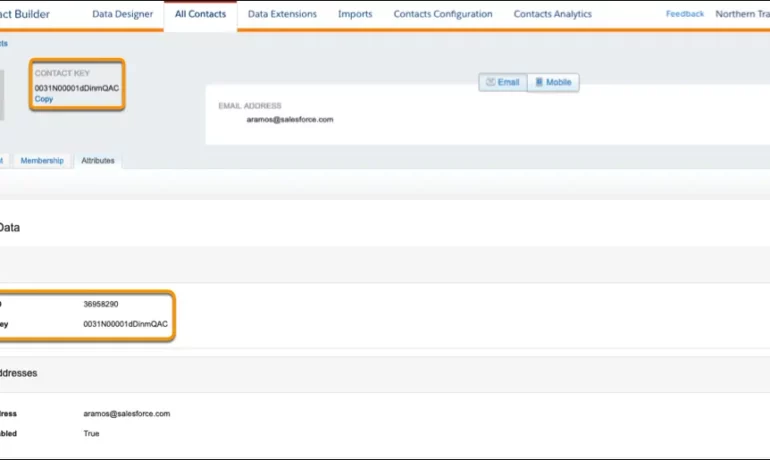
The contact key in Salesforce, also known as a subscriber key, is a unique identifier for a contact in Marketing Cloud MobilePush. Use this value to associate cross-channel addresses and subscriptions for a single contact. You can use the same key for a contact across multiple channels, such as email, SMS, and push messaging. What are contact keys? An immutable object that stores information about a single contact, such as the contact’s first name, phone numbers, and addresses. What is a Salesforce Subscriber key? A subscriber key is a text field that contains a value that uniquely identifies a subscriber in your Marketing Cloud account. A subscriber key is limited to 254 English characters. Avoid using email addresses as subscriber keys. What is the difference between subscriber key and contact key? This key is used to identify a single person across multiple channels inside of Marketing Cloud. In Email Studio, that key is called the “Subscriber Key”. In other channels, such as Mobile Connect or Mobile Push, that value is called “Contact Key”. What is the difference between contacts and subscribers? A subscriber in SFMC primarily represents an individual’s email communication preferences and is associated with email campaigns, while a contact represents a broader customer profile that includes information beyond email, allowing you to engage with customers across various channels. What is the difference between contact ID and contact key? The Contact Key gives you this ability and consistence. Existence of the contact key gives you the consistence of sending messages thru multiple channels and identify your contacts. Email and Text Message channels in our case. Contact ID is a unique number for your contacts in Salesforce Marketing Cloud. What is a subscriber key in Marketing Cloud? A subscriber is a person who has opted to receive communications from your organization. You can track information about subscribers using profile and preference attributes. Use the subscriber key to identify your subscribers in Marketing Cloud. Create lists or data extensions to store your subscribers. What is the difference between contact and subscriber in Marketing Cloud? Key Differences: Purpose: Contacts store customer data and facilitate segmentation and personalization efforts. Subscribers represent individuals who have subscribed to receive communications from your organization. Primary key is  a column or set of columns that uniquely identifies the record in the table. When a primary key is defined using multiple columns, the data from each column is used to determine whether a record/row is unique. Like Related Posts Who is Salesforce? Who is Salesforce? Here is their story in their own words. From our inception, we’ve proudly embraced the identity of Read more Salesforce Marketing Cloud Transactional Emails Salesforce Marketing Cloud Transactional Emails are immediate, automated, non-promotional messages crucial to business operations and customer satisfaction, such as order Read more Salesforce Unites Einstein Analytics with Financial CRM Salesforce has unveiled a comprehensive analytics solution tailored for wealth managers, home office professionals, and retail bankers, merging its Financial Read more AI-Driven Propensity Scores AI plays a crucial role in propensity score estimation as it can discern underlying patterns between treatments and confounding variables Read more
Read More
gettectonic.com