
Testing Archives - gettectonic.com - Page 15
Salesforce Flow Builder

Salesforce Flow Builder

Salesforce Flow Builder: Key Limitations & Workarounds (2024 Guide) While Salesforce Flow Builder is a powerful automation tool, it comes with important technical constraints that every admin and developer should understand. Here’s a concise breakdown of the most critical limitations and practical solutions: Core Limitations of Flow Builder 1. Execution Limits 2. Query & Data Operation Constraints 3. Performance Boundaries 4. Structural Constraints 5. Execution Order Challenges Additional Considerations Pro Tips for Optimization “The best flows are simple flows. When you hit these limits, it’s often a sign to reevaluate your architecture.” – Salesforce Architect’s Handbook Understanding these boundaries will help you design more efficient automations while knowing when to transition to code-based solutions. Like Related Posts Who is Salesforce? Who is Salesforce? Here is their story in their own words. From our inception, we’ve proudly embraced the identity of Read more Salesforce Marketing Cloud Transactional Emails Salesforce Marketing Cloud Transactional Emails are immediate, automated, non-promotional messages crucial to business operations and customer satisfaction, such as order Read more Salesforce Unites Einstein Analytics with Financial CRM Salesforce has unveiled a comprehensive analytics solution tailored for wealth managers, home office professionals, and retail bankers, merging its Financial Read more AI-Driven Propensity Scores AI plays a crucial role in propensity score estimation as it can discern underlying patterns between treatments and confounding variables Read more

Read More
End of Support for Workflow Rules and Process Builder

End of Support for Workflow Rules and Process Builder

Every month Salesforce announces retirement and sundowning of products and features. For long-time Salesforce power users, this one feels like the end of an era. Salesforce has announced the end of support for Workflow Rules and Process Builder in 2025. Scheduled Paths are a replacement for Scheduled Actions in Process Builder and Time-Based Workflow Rules. And they even have some new and improved features like support for minutes! Flows can now call other sub-flows, a much-longed-for replacement for Process Builder’s ability to call Flows. End of Support for Workflow Rules and Process Builder Salesforce will no longer be supporting Workflow Rules and Process Builder on December 31, 2025, and we recommend that you migrate your automation to Flow Builder by that time. Have you taken advantage of all the powerful features of Flow? Not yet? Have no fear, and go with the Flow! We’ve curated a comprehensive guide of resources to take you from zero to hero on your journey with us to migrate your organization from Workflow Rules and/or Process Builder onto the newer and more powerful engine of Flow! Why move to Flow? What’s happening with Workflow Rules and Process Builder? Salesforce is starting the process of moving away from Workflow Rules and Process Builder, and transitioning to the more feature-rich functionality of Flow. You’re also probably wondering why Salesforce is retiring Workflow Rules and Process Builder. Salesforce wants to focus development on a modern, extensible, low-code automation solution in Flow Builder, which led to retire the previous features. What does this change mean for me?  If you have active Workflow Rules or Process Builder processes running after 2025, they will no longer receive customer support or bug fixes. What action can I take? We recommend implementing a plan to migrate any active rules or processes to Flow Builder before the deadline. Depending on the complexity of your org, this migration may take a significant amount of time and testing, so we recommend starting now. To assist in the migration process, we have a Migrate to Flow tool and extensive support resources available. What happens if I don’t take action? After December 31, 2025, Workflow Rules and Process Builder may continue to function and execute existing automation, but customer support will not be available, and bugs will not be fixed. How do I identify affected users? You can identify whether you have active workflow rules by going to Setup | Process Automation | Workflow Rules and sorting the Active column for checkmarks. You can identify whether you have active Process Builder processes by going to Setup | Process Automation | Process Builder and sorting the Status column for Active. If you have more questions, open a case with support via Salesforce Help. To view all current and past retirements, see Salesforce Product & Feature Retirements. What does the transition to Flows entail? The transition is set to take place in multiple phases. The first phase began with the Winter ’22 release, wherein the ability to create net-new Workflow Rules was turned off. In Summer ‘23 release the ability to create net-new processes in Process Builder will be disabled. In the last phase, Workflow Rules and Process Builder will go away entirely, and any platform automation will be leveraging Flow. This phased approach will allow administrators ample time to transition to Flow with as minimal effort as possible. What changed in the Winter ’22 release? As of Winter ’22, we’ve blocked the creation of Workflow Rules. You can still activate, deactivate, and edit any existing Workflow Rules. To test and create Workflow Rules for use in managed packages, developer orgs still allow you to create Workflow Rules. Process Builder has remained unaffected during this period. For new automation, use Flow. Link to Release Notes What changed in the Summer ’23 release? Starting in Summer ’23, Salesforce began blocking the creation of Process Builder Processes. Much like workflow rules above, you can still activate, deactivate, and edit any existing Processes. For new automation, use Flow. How can existing Workflow Rules & Processes be transitioned to Flow? A tool called “Migrate to Flow” allows you to covert existing Workflow Rules & Processes to Flow in an org, at the click of a button. More information about this tool can be found here. There are a few considerations to keep in mind as we roll out this tool. If your organization relies heavily on existing Workflow Rules or Process Builder, please consider starting the migration process today using the Migrate to Flow tool, rather than when the deadline approaches. This will also allow you to test the migrated Flows in small batches to ensure your organization’s needs are adequately met. How can I get started in Flow? For those with limited exposure to Flows, tinkering in a trailhead playground, demo org, or other non-production org is a great way to explore the capabilities of Flows. Once ready, admins can try creating any new automation needed in their organization in Flows rather than in Process Builder. Trailhead – The best place to start! Build Flows with Flow BuilderRecord-Triggered FlowsAutomate Your Business Processes with Salesforce Flow Automation Home Page – Watch videos, read blog posts, or explore other Trailhead offerings related to Flows. Trailhead Community Topics – Join the discussion!#Flow#Automation What about feature parity between Workflows/Processes and Flows? During the last few releases, many of the biggest parity gaps between Workflow Rules/Process Builder and Flow have been addressed already, including: Additionally, more and more gaps are being addressed with each new release. What about Approval Processes, Email Alerts, and other functionality operating on the workflow engine? There are no plans to retire any of these auxiliary features; however, each of them can be leveraged through flow (or Flow Orchestrator, in the case of approval processes), without the need to use processes or workflow rules at all. Flow Trailhead – Click Here Like1 Related Posts Who is Salesforce? Who is Salesforce? Here is their story in their own words. From our inception, we’ve proudly embraced the identity of Read

Read More
Custom Copilot Actions

Custom Copilot Actions

How to Create a Custom Copilot Action Custom Copilot Actions allow you to extend Copilot’s functionality within Salesforce, enabling users to perform tasks specific to your business needs. By utilizing invocable Apex classes, autolaunched flows, and prompt templates, you can build custom actions tailored to your organization’s requirements. Extend your unified copilot with custom actions. Before You Begin: Steps to Create a Custom Copilot Action: Testing and Deployment: Understanding Einstein Copilot Einstein Copilot is Salesforce’s AI assistant designed to enhance productivity and user experience across various applications and departments. Admins can configure and deploy Copilots to empower users with AI capabilities, streamlining workflows and increasing efficiency. Out-of-the-Box Actions: In the Spring ’24 release, Einstein Copilot offers several out-of-the-box actions, including: Customization and Future Development: Admins can create custom actions to tailor Copilot’s capabilities to their organization’s specific requirements. Custom actions enable tasks such as updating records and integrating with external systems, enhancing productivity and efficiency. When you create a custom action, you build it on top of platform functionality you want to make available in Einstein Copilot, such as invocable Apex classes, autolaunched flows, or prompt templates. Adding custom actions lets you customize your copilot and get more mileage out of your current Salesforce platform capabilities. Access to a custom copilot action depends on the type of Salesforce action it references. For example, if a custom action was built using a flow, the custom action adheres to the permissions, field-level security, and sharing settings configured in the flow. Use Cases and Considerations: Typical Use Cases: Considerations: Building Custom Copilot Actions: Power of Custom Actions: Custom actions extend Copilot’s capabilities, offering a wide range of use cases and functionalities. Actions can be built using flows, prompts, or Apex, providing flexibility and customization options. Descriptive Instructions: Accurate descriptions of actions, inputs, and outputs are essential for Copilot’s understanding and execution. Clear instructions provide context and improve response accuracy. Best Practices: Einstein Copilot, coupled with custom actions, empowers organizations to optimize workflows and drive efficiency. By following best practices and leveraging the full potential of Copilot, Salesforce admins can enhance user experiences and unlock new levels of productivity. Explore these features within your organization to realize the benefits of Salesforce Einstein Copilot Custom Actions. Assign an action to your copilot from the Copilot Actions page, the record page for an action, or the Copilot Action Library tab of the actions panel in the Copilot Builder. Your copilot must be deactivated. To test your action and preview how the output appears in a copilot conversation, open the copilot in the Copilot Builder and start a preview conversation. Enter utterances that you expect to trigger your action, and then make adjustments to the copilot action instructions based on your results. What powers Einstein Copilot custom actions? By facilitating the flow of work through smart, AI-driven actions, Einstein Copilot enhances efficiency and decision-making. Here’s how organizations can harness its power through the design of custom actions, ensuring their operations are as streamlined and effective as possible. Like1 Related Posts Who is Salesforce? Who is Salesforce? Here is their story in their own words. From our inception, we’ve proudly embraced the identity of Read more Salesforce Marketing Cloud Transactional Emails Salesforce Marketing Cloud Transactional Emails are immediate, automated, non-promotional messages crucial to business operations and customer satisfaction, such as order Read more Salesforce Unites Einstein Analytics with Financial CRM Salesforce has unveiled a comprehensive analytics solution tailored for wealth managers, home office professionals, and retail bankers, merging its Financial Read more AI-Driven Propensity Scores AI plays a crucial role in propensity score estimation as it can discern underlying patterns between treatments and confounding variables Read more

Read More
Learning AI

AI Success is a Team Sport

The contemporary workplace is currently experiencing a profound transformation. The Future of Jobs Report from the World Economic Forum predicts that AI will replace approximately 85 million jobs by 2025, while concurrently generating around 97 million AI-related jobs. AI Success is a Team Sport and will require hiring and training people. This significant shift necessitates a reevaluation of work dynamics, introducing new roles that involve collaboration between “humans, machines, and algorithms.” Amidst this transformative period, AI provides opportunities for organizations to reimagine existing roles, offer upskilling opportunities, and design innovative positions to meet evolving needs. For leaders in the data domain, the crucial task is to assess which jobs could benefit from AI. This requires a thorough understanding of organizational tasks, skills, and strategic goals, complemented by a scalable change management process to accommodate the growth of AI initiatives. To pinpoint relevant jobs, the following steps can be taken: Despite 67% of global business leaders considering the use of generative AI, an equal number of IT leaders acknowledge a skills gap among their employees. “I think most business leaders have a good sense of what the key jobs are inside their organizations. Of those key jobs, what are the good candidates for AI? I think it’s important for any executive—data or not—to understand what they are and plan accordingly.” SOLOMON KAHN DATA LEADERSHIP COLLABORATIVE  The implementation of AI necessitates a specialized team, encompassing roles from project managers to domain experts. The composition of the team depends on the project’s complexity, scope, budget, and overall strategic objectives. But to be sure, AI Success is a Team Sport. Key roles for AI initiatives include: AI acts as a disruptor to traditional business practices, and this disruption is viewed positively. The bonuses far outweigh the challenges. The new generation of user-friendly AI technologies, such as generative AI, has moved beyond the hype cycle, offering applications that generate personalized offers and automated chatbots capable of solving complex customer support issues. In this era powered by AI, data leaders play a pivotal role in driving transformative change. Like1 Related Posts Who is Salesforce? Who is Salesforce? Here is their story in their own words. From our inception, we’ve proudly embraced the identity of Read more Salesforce Marketing Cloud Transactional Emails Salesforce Marketing Cloud Transactional Emails are immediate, automated, non-promotional messages crucial to business operations and customer satisfaction, such as order Read more Salesforce Unites Einstein Analytics with Financial CRM Salesforce has unveiled a comprehensive analytics solution tailored for wealth managers, home office professionals, and retail bankers, merging its Financial Read more AI-Driven Propensity Scores AI plays a crucial role in propensity score estimation as it can discern underlying patterns between treatments and confounding variables Read more

Read More
Workflow Rules & Process Builder End of Support

Workflow Rules And Process Builder End of Support

Publish Date: Mar 5, 2024 Description Salesforce will no longer be supporting Workflow Rules and Process Builder on December 31, 2025, and we recommend that you migrate your automation to Flow Builder by that time. Workflow Rules & Process Builder End of Support You’re also probably wondering why we’re retiring Workflow Rules and Process Builder. Salesforce wants to focus development on a modern, extensible, low-code automation solution in Flow Builder, which led us to retire the previous features. What does this change mean for me? If you have active Workflow Rules or Process Builder processes running after 2025, they will no longer receive customer support or bug fixes. What action can I take? We recommend implementing a plan to migrate any active rules or processes to Flow Builder before the deadline. Depending on the complexity of your org, this migration may take a significant amount of time and testing, so we recommend starting now. To assist in the migration process, we have a Migrate to Flow tool and extensive support resources available. What happens if I don’t take action? After December 31, 2025, Workflow Rules and Process Builder may continue to function and execute existing automation, but customer support will not be available, and bugs will not be fixed. How do I identify affected users? You can identify whether you have active workflow rules by going to Setup | Process Automation | Workflow Rules and sorting the Active column for checkmarks. You can identify whether you have active Process Builder processes by going to Setup | Process Automation | Process Builder and sorting the Status column for Active. If you have more questions, open a case with support via Salesforce Help. To view all current and past retirements, see Salesforce Product & Feature Retirements. To read about the Salesforce approach to retirements, read our Product & Feature Retirement Philosophy. Like Related Posts Who is Salesforce? Who is Salesforce? Here is their story in their own words. From our inception, we’ve proudly embraced the identity of Read more Salesforce Marketing Cloud Transactional Emails Salesforce Marketing Cloud Transactional Emails are immediate, automated, non-promotional messages crucial to business operations and customer satisfaction, such as order Read more Salesforce Unites Einstein Analytics with Financial CRM Salesforce has unveiled a comprehensive analytics solution tailored for wealth managers, home office professionals, and retail bankers, merging its Financial Read more AI-Driven Propensity Scores AI plays a crucial role in propensity score estimation as it can discern underlying patterns between treatments and confounding variables Read more

Read More
demand generation web use cases for personalization

Demand Generation Web Use Cases for Personalization

Utilize effective personalization techniques adopted by businesses in online campaigns to stimulate demand generation. The term “demand generation” has somewhat faded from the marketing lexicon due to the emphasis on analytics, AI, and metrics for lead conversion. However, where does personalization fit into the broader scope of demand generation? Demand generation web use cases for personalization. Personalization plays a pivotal role in various aspects of demand generation: In lead nurturing, personalization is equally vital: Moreover, personalization is instrumental in lead acquisition efforts by delivering relevant experiences to all of your prospects. To effectively implement personalization, real-time insights into individual behaviors and interactions are essential. A comprehensive personalization solution should unify data from various channels and systems, enabling seamless cross-channel personalization. This includes “stitching” together anonymous and known user profiles, integrating data with complementary systems like CRMs and marketing platforms, and facilitating real-time omni-channel personalization. The key to successful personalization lies in understanding and addressing each individual’s unique needs and preferences. By adopting a customer-centric approach and setting clear objectives aligned with business goals, organizations can leverage personalization to enhance customer experiences, boost conversion rates, and drive measurable business growth. To execute a successful personalization strategy, organizations must: By following these steps and continuously optimizing personalization efforts, organizations can build stronger customer relationships, drive business growth, and maximize marketing ROI. Website personalization serves as the starting point for many companies embarking on their personalization journey. This entails ensuring that returning visitors encounter pages tailored to their previous experiences or recent purchases. It can also involve presenting new customers with product recommendations based on their current browsing session. The return on this initial investment can be substantial, with many companies witnessing a significant increase in conversion rates, sometimes by as much as 50% or more. For instance, a site converting 2% of visitors might see that figure rise to 3%, a dream scenario for digital marketers. Moreover, this boost in conversion rates can have far-reaching effects across marketing programs, leading to a reduction in overall customer acquisition costs. Tectonic now offers Personalization Implementation Solutions. The next stage in personalization maturity involves integrating a customer’s web and email experiences. This seamless connection between two major channels for customer engagement brings organizations closer to achieving an omni-channel personalization experience. Timely and relevant follow-up messages after a customer’s website visit or purchase can deepen relationships and enhance lifetime value without significant additional marketing expenditure. Finally, the ultimate goal is to extend personalization across all channels, ensuring consistent and tailored experiences wherever customers interact with your brand. However, achieving this can be challenging due to fragmented customer data across multiple channels, teams, and systems. An effective personalization solution should consolidate and synthesize this cross-channel information by maintaining unified customer profiles and enabling real-time omni-channel personalization. Testing is a crucial aspect of successful personalization efforts, allowing organizations to optimize campaigns and maximize engagement, conversions, and revenue. A robust personalization solution should facilitate A/B testing, measuring lift over control, evaluating impacts against specific goals, and filtering results by segment. Effective website personalization lays the foundation for broader personalization efforts across channels. By seamlessly integrating web and email experiences and extending personalization to all touchpoints, organizations can deliver tailored experiences that drive engagement, loyalty, and ultimately, business growth. By Tectonic’s Salesforce Marketing Platform Architect Shannan Hearne Like1 Related Posts Who is Salesforce? Who is Salesforce? Here is their story in their own words. From our inception, we’ve proudly embraced the identity of Read more Salesforce Marketing Cloud Transactional Emails Salesforce Marketing Cloud Transactional Emails are immediate, automated, non-promotional messages crucial to business operations and customer satisfaction, such as order Read more Salesforce Unites Einstein Analytics with Financial CRM Salesforce has unveiled a comprehensive analytics solution tailored for wealth managers, home office professionals, and retail bankers, merging its Financial Read more AI-Driven Propensity Scores AI plays a crucial role in propensity score estimation as it can discern underlying patterns between treatments and confounding variables Read more

Read More
Personalization With Customized AI-Driven Journeys

Personalization With Customized AI-Driven Journeys

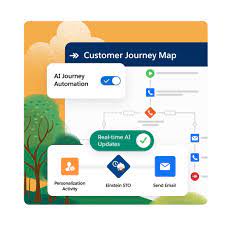
AI-Enabled Triggers for Guiding Customer Journeys – Personalization With Customized AI-Driven Journeys Initiate timely and relevant customer experiences that seamlessly lead individuals through their purchasing journey. Employ AI-powered decision-making to identify the most suitable next steps for customers, offering personalized suggestions based on real-time behavior, historical data, and business-specific datasets such as pricing and inventory. Deliver predefined experiences, such as browsing or cart abandonment journeys, while utilizing real-time interactions to determine the optimal content, channel, or offer for each customer. Efficiently extract insights by harnessing behavioral data and advanced analytics to visualize cross-channel customer journeys for both individuals and segments, identifying and resolving key friction points. Elevate customer acquisition, loyalty, and lifetime value by crafting personalized, omni-channel journeys that align with both customer desires and business objectives. Enable trigger-based customer journeys that facilitate immediate responses to customer actions, whether in the physical realm, such as entering a store and connecting to Wi-Fi, or in the virtual space, like visiting a shopping website. The Role of AI in Elevating the Customer Journey AI significantly contributes to heightened customer satisfaction, ultimately leading to improved retention. Address customer pain points in their preferred language and provide solutions tailored to their needs based on purchasing history and previous interactions with customer service. AI’s Influence Across Customer Journey Stages At each stage of the customer journey, AI transforms experiences by delivering personalized interactions from awareness to post-purchase. This transformation is made possible through automation, predictive analytics, and intelligent virtual agents. Transformative Impact of Generative AI on Customer Journeys Generative AI, exemplified by advanced language models like GPT-4, has the potential to revolutionize customer journeys. These models automate communication and content creation, dynamically adjusting tone and style to match customer preferences. For instance, Grammarly’s tone detector adapts communication based on the recipient’s profile and interaction history. Continuous Iteration and AI in Customer Journey Mapping In the era of digitization, AI-driven personalization surpasses traditional customer journey mapping based on a few personas. Organizations must harness AI and machine learning to create personalized journeys that enhance user experiences. The iterative improvement process involves collecting comprehensive data, utilizing AI for analysis and insights, implementing changes, and evaluating results through key performance indicators. Netflix: An AI Success Story Netflix serves as a prime example of AI success, continuously analyzing user behavior and preferences to refine content recommendation algorithms. This approach enhances personalization, leading to increased customer engagement and satisfaction. Integrating Generative AI into Existing Systems To fully capitalize on generative AI, integration into existing systems and processes is crucial. This may entail developing APIs to connect AI tools with customer relationship management (CRM) systems and content management systems. Testing and Continuous Enhancement Implementing AI-driven personalization necessitates a robust testing and evaluation process. Clearly defined key performance indicators and analytics capabilities are essential for measuring effectiveness and making continuous improvements. Like2 Related Posts Who is Salesforce? Who is Salesforce? Here is their story in their own words. From our inception, we’ve proudly embraced the identity of Read more Salesforce Marketing Cloud Transactional Emails Salesforce Marketing Cloud Transactional Emails are immediate, automated, non-promotional messages crucial to business operations and customer satisfaction, such as order Read more Salesforce Unites Einstein Analytics with Financial CRM Salesforce has unveiled a comprehensive analytics solution tailored for wealth managers, home office professionals, and retail bankers, merging its Financial Read more AI-Driven Propensity Scores AI plays a crucial role in propensity score estimation as it can discern underlying patterns between treatments and confounding variables Read more

Read More

Salesforce Data Cloud Explained

Salesforce Data Cloud: The Essential Guide Unlocking the Power of Unified Customer Data Salesforce Data Cloud revolutionizes how businesses connect and activate customer data by unifying information from multiple sources—including demographic, behavioral, and transactional data (e.g., mobile app engagement, eCommerce purchases, and support cases). But before diving in, it’s crucial to understand what Data Cloud is (and isn’t) to maximize its potential. Here are 10 key facts to guide your implementation. 1. Data Cloud (Free) vs. Paid Editions 💡 Key Insight: Start with the free tier to explore, then upgrade as needs grow. 2. Availability & Regional Restrictions 3. Unified Profiles: The “Golden Record” A unified profile is not a merged record—it’s a dynamic, real-time view combining: Unlike Salesforce duplicate rules, source records remain intact—Data Cloud simply creates a single customer view. ⚠️ Note: Unified profiles consume credits based on processing complexity. 4. Data Cloud ≠ A Data Lake 5. Key Data Modeling Concepts Before ingesting data, understand: 📌 Pro Tip: If you’ve used Marketing Cloud Data Extensions, you already know this! 6. No Activations in Free Tier Activations (sending segments to external platforms) require paid editions: Without activations, your segments remain stuck in Data Cloud. 7. Activations vs. Data Actions Feature Use Case Targets Activations Send segments to external platforms Marketing Cloud, Ads, Salesforce Apps Data Actions Trigger real-time insights Platform Events, Webhooks, MC 8. Have Clear Use Cases Before enabling Data Cloud, define what problem you’re solving:✅ Personalized Marketing (e.g., dynamic ad audiences)✅ AI-Driven Sales Insights (e.g., lead scoring)✅ Unified Service History (e.g., 360° customer view) 🚀 Example: A retailer uses Data Cloud to track online + in-store purchases, enabling hyper-targeted email campaigns. 9. The Learning Curve is Worth It 10. Start Small, Scale Smart Final Thoughts Salesforce Data Cloud is a game-changer for businesses drowning in siloed data. By unifying customer insights and enabling real-time activation, it powers smarter marketing, sales, and service—but only if implemented strategically. Ready to begin?✔ Leverage the free tier for testing.✔ Plan use cases before scaling.✔ Invest in training to maximize value. The future of CRM is connected data—will your business be ready? Content updated March 2025. Like Related Posts Who is Salesforce? Who is Salesforce? Here is their story in their own words. From our inception, we’ve proudly embraced the identity of Read more Salesforce Marketing Cloud Transactional Emails Salesforce Marketing Cloud Transactional Emails are immediate, automated, non-promotional messages crucial to business operations and customer satisfaction, such as order Read more Salesforce Unites Einstein Analytics with Financial CRM Salesforce has unveiled a comprehensive analytics solution tailored for wealth managers, home office professionals, and retail bankers, merging its Financial Read more AI-Driven Propensity Scores AI plays a crucial role in propensity score estimation as it can discern underlying patterns between treatments and confounding variables Read more

Read More
What is GovSlack

What is GovSlack?

GovSlack: Streamlined, Secure Collaboration for Government GovSlack brings together your team, tools, and partners into one secure platform, specifically designed to meet government regulations for processing and storing sensitive data. By integrating GovSlack, organizations can eliminate internal and external communication silos while empowering employees with the flexibility to excel in their roles. What is GovSlack?GovSlack is a tailored version of Slack that allows agencies, contractors, citizens, and partners to collaborate in a centralized, secure workspace. It complies with the strictest security and operational standards required by public sector clients. Is Slack FedRAMP approved?Yes, Slack holds FedRAMP Moderate authorization to meet public sector compliance needs. GovSlack goes further, earning FedRAMP JAB High authorization and is actively pursuing DoD CC SRG IL4 compliance to cater to defense sector clients. Does the federal government use Slack?Security is crucial for public sector agencies and their partners. Federal agencies trust Slack as their secure digital HQ, helping teams from the U.S. Department of Veterans Affairs to the GSA’s 18F office enhance collaboration while meeting stringent data privacy requirements. GovSlack Key FeaturesGovSlack, launched in July 2022 after extensive testing and feedback from government clients, offers several features to ensure secure and compliant collaboration: GovSlack integrates seamlessly with other government-specific tools such as Salesforce Government Cloud Plus, creating a powerful CRM and collaboration ecosystem to accelerate agency goals and improve constituent services. Case Study: Army Software Factory (SWF)The Army SWF, using agile methods to upskill soldiers and develop cutting-edge digital solutions, required a flexible and secure collaboration platform. By adopting GovSlack, they fostered improved collaboration without compromising compliance with stringent DoD policies. Partner IntegrationsLeading companies such as Lockheed Martin and Box are leveraging GovSlack to streamline collaboration while maintaining compliance with federal regulations. For example, Lockheed Martin is using GovSlack to manage projects with government partners while ensuring sensitive data remains protected. ThoughtsGovSlack is built for secure, government-specific collaboration, providing agencies and their partners with the flexibility to work more effectively while meeting compliance needs. By integrating with key tools and offering enhanced security features, GovSlack supports the digital transformation efforts of public sector organizations across the globe. Like Related Posts Who is Salesforce? Who is Salesforce? Here is their story in their own words. From our inception, we’ve proudly embraced the identity of Read more Salesforce Marketing Cloud Transactional Emails Salesforce Marketing Cloud Transactional Emails are immediate, automated, non-promotional messages crucial to business operations and customer satisfaction, such as order Read more Salesforce Unites Einstein Analytics with Financial CRM Salesforce has unveiled a comprehensive analytics solution tailored for wealth managers, home office professionals, and retail bankers, merging its Financial Read more AI-Driven Propensity Scores AI plays a crucial role in propensity score estimation as it can discern underlying patterns between treatments and confounding variables Read more

Read More
Salesforce prompt builder

Create Test and Refine Prompt Templates With Prompt Builder

Salesforce has introduced Prompt Builder, a revolutionary tool powered by generative AI, designed to enhance business tasks by seamlessly integrating prompts into workflows. This article delves into the core AI concepts underlying Prompt Builder, offering insights into creating, managing, testing, and refining prompt templates for optimal performance. Before digging into the intricacies of this new innovation, let’s first explore what generative AI means for administrators. Create Test and Refine Prompt Templates With Prompt Builder. Understanding Key Terms: Key Features of Prompt Builder: Utilizing Prompt Templates: Testing and Refining Prompt Templates: Deploying Prompts: Designing Effective Prompt Templates: Embracing Generative AI with Prompt Builder: As Prompt Builder prepares for its general availability in Spring ’24, businesses can anticipate a paradigm shift in how they harness AI to propel their operations forward. Whether seasoned Salesforce Admins or newcomers to AI integration, Prompt Builder offers a gateway to unlocking the myriad possibilities of generative AI within Salesforce. Create Test and Refine Prompt Templates With Prompt Builder. Like1 Related Posts Who is Salesforce? Who is Salesforce? Here is their story in their own words. From our inception, we’ve proudly embraced the identity of Read more Salesforce Marketing Cloud Transactional Emails Salesforce Marketing Cloud Transactional Emails are immediate, automated, non-promotional messages crucial to business operations and customer satisfaction, such as order Read more Salesforce Unites Einstein Analytics with Financial CRM Salesforce has unveiled a comprehensive analytics solution tailored for wealth managers, home office professionals, and retail bankers, merging its Financial Read more AI-Driven Propensity Scores AI plays a crucial role in propensity score estimation as it can discern underlying patterns between treatments and confounding variables Read more

Read More
AI Capability Maturity Model

AI Capability Maturity Model

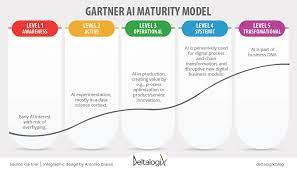
The AI Capability Maturity Model (AI CMM), devised by the Artificial Intelligence Center of Excellence within the GSA IT Modernization Centers of Excellence (CoE), functions as a standardized framework for federal agencies to evaluate their organizational and operational maturity levels. It is equally useful for private organizations in aligning them with predefined objectives. Instead of imposing normative capability assessments, the AI CMM concentrates on illuminating significant milestones indicative of maturity levels along the AI journey. The AI Capability Maturity Model focuses primarily on the development of AI capabilities within an organization. It evaluates an organization’s maturity across four main areas: data, algorithms, technology, and people. Serving as a valuable tool, the AI CMM assists organizations in shaping their unique AI roadmap and investment strategy. The outcomes derived from AI CMM analysis empower decision-makers to identify investment areas that address immediate goals for rapid AI adoption while aligning with broader enterprise objectives in the long run. Maturity vs capability models A maturity model tends to measure activities, such as whether a certain tool or process has been implemented. In contrast, capability models are outcome-based, which means you need to use measurements of key outcomes to confirm that changes result in improvements. AI development rooted in sound software practices underpins much of the content discussed in this and other chapters. Though not explicitly delving into agile development methodology, Dev(Sec)Ops, or cloud and infrastructure strategies, these elements are fundamental to the successful development of AI solutions. The AI CMM elaborates on how a robust IT infrastructure leads to the most successful development of an organization’s AI practice. What are the maturity levels of AI? What are the maturity levels of Artificial Intelligence? Or it can be measured this way. AI Maturity Model Why is AI maturity important? The AI Maturity Assessment is a process designed to help organizations evaluate their current AI capabilities, identify gaps and areas for improvement, and develop a roadmap to build a more effective AI program. Organizational Maturity Areas Organizational maturity areas represent the capacity to embed AI capabilities across the organization. Two approaches, top-down and user-centric, offer distinct perspectives on organizational maturity. Top-Down, Organizational View Bottom-Up, User-centric View Operational Maturity Areas Operational maturity areas represent organizational functions impacting the implementation of AI capabilities. Each area is treated as a discrete capability for maturity evaluation, yet they generally depend on one another. PeopleOps CloudOps DevOps SecOps DataOps MLOps AIOps AI Capability Maturity Model This comprehensive overview of organizational and operational maturity areas underlines the multifaceted nature of AI implementation and the critical role played by diverse elements in ensuring success across different layers of an organization. How AI is transforming the world? AI-powered technologies such as natural language processing, image and audio recognition, and computer vision have revolutionized the way we interact with and consume media. With AI, we are able to process and analyze vast amounts of data quickly, making it easier to find and access the information we need. Like1 Related Posts Who is Salesforce? Who is Salesforce? Here is their story in their own words. From our inception, we’ve proudly embraced the identity of Read more Salesforce Marketing Cloud Transactional Emails Salesforce Marketing Cloud Transactional Emails are immediate, automated, non-promotional messages crucial to business operations and customer satisfaction, such as order Read more Salesforce Unites Einstein Analytics with Financial CRM Salesforce has unveiled a comprehensive analytics solution tailored for wealth managers, home office professionals, and retail bankers, merging its Financial Read more AI-Driven Propensity Scores AI plays a crucial role in propensity score estimation as it can discern underlying patterns between treatments and confounding variables Read more

Read More
gettectonic.com