Marketing Automation Archives - gettectonic.com - Page 4
Agentic AI is Here

Agentic AI is Here

Embracing the Era of Agentic AI: Redefining Autonomous Systems A new paradigm in artificial intelligence, known as “Agentic Artificial Intelligence,” is poised to revolutionize the capabilities of the known autonomous universe. This cutting-edge technology represents a significant leap forward in AI-driven decision-making and action, promising transformative impacts across various industries including healthcare, manufacturing, IT, finance, marketing, and HR. Agents are the way to go! There is no two ways about this. Looking into the progression of the Large Language Model based applications since last year, its not hard to see that the Agentic Process (agents as reusable, specific and dedicated single unit of work) — would be the way to build Gen AI applications. What is Agentic AI? Agentic Artificial Intelligence marks a departure from traditional AI models that primarily focus on passive observation and analysis. Unlike its predecessors, which often require human intervention to execute tasks, Agentic AI systems possess the autonomy to initiate actions independently based on their assessments. This allows them to navigate much more complex environments and undertake tasks with a level of initiative and adaptability previously unseen. At least outside of sci-fy movies. Real-World Applications of Agentic Artificial Intelligence Healthcare In healthcare, Agentic AI systems are transforming patient care. These systems autonomously monitor vital signs, administer medication, and assist in surgical procedures with unparalleled precision. By augmenting healthcare professionals’ capabilities, these AI-driven agents enhance patient outcomes and streamline care processes. Augmenting is the key word, here. Manufacturing and Logistics In manufacturing and logistics, Agentic AI optimizes operations and boosts efficiency. Intelligent agents handle predictive maintenance of machinery, autonomous inventory management, and robotic assembly. Leveraging advanced algorithms and sensor technologies, these systems anticipate issues, coordinate complex workflows, and adapt to real-time production demands, driving a shift towards fully autonomous production environments. Customer Service Within enterprises, AI agents are revolutionizing business operations across various departments. In customer service, AI-powered chatbots with Agentic Artificial Intelligence capabilities engage with customers in natural language, providing personalized assistance and resolving queries efficiently. This enhances customer satisfaction and allows human agents to focus on more complex tasks. Marketing and Sales Agentic Artificial Intelligence empowers marketing and sales teams to analyze vast datasets, identify trends, and personalize campaigns with unprecedented precision. By understanding customer behavior and preferences at a granular level, AI agents optimize advertising strategies, maximize conversion rates, and drive revenue growth. Finance and Accounting In finance and accounting, Agentic AI streamlines processes like invoice processing, fraud detection, and risk management. These AI-driven agents analyze financial data in real time, flag anomalies, and provide insights that enable faster, more informed decision-making, thereby improving operational efficiency. Ethical Considerations of Agentic Artificial Intelligence The rise of Agentic AI also brings significant ethical and societal challenges. Concerns about data privacy, algorithmic bias, and job displacement necessitate robust regulation and ethical frameworks to ensure responsible and equitable deployment of AI technologies. Navigating the Future with Agentic AI The advent of Agentic AI ushers in a new era of autonomy and innovation in artificial intelligence. As these intelligent agents permeate various facets of our lives and enterprises, they present both challenges and opportunities. To navigate this new world, we must approach it with foresight, responsibility, and a commitment to harnessing technology for the betterment of humanity. Like1 Related Posts Who is Salesforce? Who is Salesforce? Here is their story in their own words. From our inception, we’ve proudly embraced the identity of Read more Salesforce Marketing Cloud Transactional Emails Salesforce Marketing Cloud Transactional Emails are immediate, automated, non-promotional messages crucial to business operations and customer satisfaction, such as order Read more Salesforce Unites Einstein Analytics with Financial CRM Salesforce has unveiled a comprehensive analytics solution tailored for wealth managers, home office professionals, and retail bankers, merging its Financial Read more AI-Driven Propensity Scores AI plays a crucial role in propensity score estimation as it can discern underlying patterns between treatments and confounding variables Read more

Read More

Salesforce Marketing Cloud Gamechanger

Why Choose Salesforce Marketing Cloud for Your Business? Before diving into the features, let’s explore what makes Salesforce Marketing Cloud (SFMC) a game-changer for businesses. At its core, SFMC streamlines marketing automation, handling tasks like email outreach and audience segmentation with ease. This efficiency allows you to focus on strategy instead of repetitive tasks. As marketing shifts toward personalization, understanding your customers is more important than ever. SFMC helps businesses analyze customer behaviors, purchasing patterns, and engagement trends, making it easier to deliver highly targeted campaigns. Now, let’s dive into the top five features that set Salesforce Marketing Cloud apart. 1. Journey Builder – Create Personalized Customer Journeys Every customer follows a unique path, and Journey Builder lets you design tailored experiences across multiple channels. It helps map out customer interactions, ensuring they receive the right message at the right time. For example, if you run an e-commerce store, Journey Builder can automatically trigger: Marketing Value: ✔ Enhances personalization, leading to higher engagement.✔ Automates follow-ups so no opportunity is missed. Use Case: A customer browses sneakers on your website but doesn’t purchase. With Journey Builder, you can set up an automated sequence: 2. Email Studio – Simplify Your Email Marketing Email remains one of the most effective marketing channels. With Email Studio, you can craft high-impact email campaigns using a drag-and-drop interface—no coding required. From newsletters to transactional emails, SFMC ensures your message reaches the right audience. You can also A/B test subject lines and layouts to optimize performance. Marketing Value: ✔ Personalized emails generate 6x more transactions than generic ones.✔ Built-in analytics help refine email strategies. Use Case: Instead of blasting the same email to all customers, SFMC lets you segment audiences: This targeted approach drives better results and improves ROI. 3. Audience Studio – Harness the Power of Data Keeping track of customer data across platforms can be overwhelming. Audience Studio centralizes data from multiple sources—your website, social media, and emails—into a unified customer profile. It then segments customers based on behaviors and preferences, making it easier to deliver hyper-targeted campaigns. Marketing Value: ✔ Better audience insights lead to more effective marketing.✔ Integrates data from different platforms into one dashboard. Use Case: Launching a new product? Audience Studio – now known as Data Cloud – can identify your most interested customers based on their browsing history and past purchases. This ensures your ad spend is focused on high-intent buyers instead of a general, broad, uninterested audience. 4. Mobile Studio – Reach Customers on Their Phones With over 50% of emails opened on mobile, a strong mobile strategy is crucial. Mobile Studio enables businesses to connect with customers via SMS, push notifications, and in-app messaging. Even better, messages can be personalized based on user behavior, ensuring relevance. Marketing Value: ✔ Engage customers on their most-used device.✔ Mobile marketing sees higher open and conversion rates than email. Use Case: With most users glued to their phones, Mobile Studio ensures your brand stays top of mind. 5. Analytics Builder – Measure Your Success Running campaigns is one thing, but knowing what’s working is what truly drives growth. Analytics Builder tracks campaign performance in real time, providing insights on open rates, clicks, and conversions. Its user-friendly dashboards allow businesses to quickly identify top-performing campaigns and optimize underperforming ones. Marketing Value: ✔ Data-driven decisions outperform guesswork.✔ Helps fine-tune campaigns for maximum ROI. Use Case: If email engagement is low, Analytics Builder may reveal that your CTA is too subtle. By refining the email design, click-through rates can improve almost instantly. Unlock the Full Potential of Salesforce Marketing Cloud Salesforce Marketing Cloud offers a powerful, data-driven marketing suite that elevates customer engagement and drives conversions. It is as important in B2B marketing as it is to B2C and creates amazing customer experiences. By leveraging tools like Journey Builder, Email Studio, and Audience Studio (now known as Salesforce Data Cloud), businesses can create personalized, automated campaigns that resonate with their customers. Want to maximize engagement and ROI? Salesforce Marketing Cloud is a gamechanger. Start exploring Salesforce Marketing Cloud today—because the future of marketing is all about smarter, more connected and data-driven experiences. Content updated February 2025. Like1 Related Posts Who is Salesforce? Who is Salesforce? Here is their story in their own words. From our inception, we’ve proudly embraced the identity of Read more Salesforce Marketing Cloud Transactional Emails Salesforce Marketing Cloud Transactional Emails are immediate, automated, non-promotional messages crucial to business operations and customer satisfaction, such as order Read more Salesforce Unites Einstein Analytics with Financial CRM Salesforce has unveiled a comprehensive analytics solution tailored for wealth managers, home office professionals, and retail bankers, merging its Financial Read more AI-Driven Propensity Scores AI plays a crucial role in propensity score estimation as it can discern underlying patterns between treatments and confounding variables Read more

Read More
Sales Prospecting Tools

Sales Prospecting Tools

The Complete Guide to Sales Prospecting Tools Sales prospecting tools: Two men examining a touchscreen displaying dashboards and charts. With the right tools, you can spend more time building relationships that convert prospects into loyal customers. Learn how technology can help you identify and engage the right prospects more efficiently. Selling has become more challenging, with 69% of sales professionals agreeing that their jobs are harder now. That’s why sales prospecting tools are crucial—they streamline the process, making it faster and more accurate. When equipped with the right tools, you can focus more on nurturing customer relationships, turning prospects into long-term clients. In this guide, we’ll explore what sales prospecting tools are, key features to look for, and the biggest benefits they provide. What Are Sales Prospecting Tools? Sales prospecting tools are software solutions designed to help sales teams identify, engage, and convert potential customers. These tools enhance the sales prospecting process, enabling sales reps to quickly and effectively reach new buyers. They often integrate with existing platforms, such as Customer Relationship Management (CRM) software and email marketing systems, to optimize outreach and engagement. Typically, prospecting tools focus on outbound marketing, helping sales reps connect with potential customers who may not yet be familiar with the company or product. Types of Sales Prospecting Tools Selecting the right sales prospecting tool depends on your current prospecting methods and future goals. Below are the most common categories of prospecting tools: Lead Generation Tools Lead generation tools help sales teams identify prospects who are ready to purchase. These tools streamline workflows, enhance productivity, and flag potential buyers based on their online activity. For example, they might alert a rep when a prospect searches for solutions related to your product or service. Some lead generation tools also enable mass outreach, such as power dialers that allow sales reps to call multiple prospects simultaneously. Choosing the right lead generation tool depends on how your target customers prefer to engage. For instance, if you have better results from social media interactions than phone calls, a power dialer may not be the best fit. Evaluate your analytics and future goals to determine which tool will maximize your success. CRM Software CRM software manages all customer and prospect interactions across sales, service, marketing, and more. Acting as a single source of truth, CRM platforms centralize all sales activity in one location, allowing leaders to assign prospects and track progress more effectively. With AI-powered features, CRM tools can guide reps on the next best steps and personalize workflows, improving conversion rates. CRMs also provide critical insights for targeting prospects more likely to convert. Social Media Prospecting Tools Social media has become a powerful channel for sales prospecting. Specialized tools scrape social platforms for data to help sales reps identify prospects ready for outreach. For instance, they can track user activity related to the business problem your product solves and notify reps when users engage with relevant content. The integration of AI in social media prospecting tools has further boosted their effectiveness. As AI continues to evolve, expect more sophisticated features in this space. Why Are Sales Prospecting Tools Important? In today’s competitive market, your prospects are also being contacted by your competitors—most of whom are using advanced sales prospecting tools. If you’re not using similar tools, you risk falling behind. Sales prospecting tools help level the playing field by streamlining research and outreach, allowing reps to connect with the right prospects at the right time. However, these tools must be used strategically. Simply contacting more people won’t guarantee more sales. Personalization and targeting remain key. Using the insights provided by these tools, sales reps can tailor their messages and approaches, making each outreach effort more effective. Benefits of Using Sales Prospecting Tools When fully integrated into your sales processes, prospecting tools can deliver substantial benefits, including: Key Features to Look for in Sales Prospecting Tools To ensure your sales prospecting tool adds value to your business, consider the following features: Compliance Keeping up with constantly changing rules around prospecting—especially across different channels—can be daunting. A good prospecting tool automates compliance, ensuring your emails, calls, and social media outreach meet best practices and regulations. Ease of Use Your prospecting tool should simplify your workflow, not complicate it. Look for intuitive interfaces and tools that can automate repetitive tasks, such as dialing multiple numbers or sending emails in bulk. AI-Powered Analytics Tools with AI capabilities can generate valuable insights, such as identifying the best time to call a prospect or suggesting which channel is most likely to yield a response. System Integration Your prospecting tool should seamlessly integrate with existing systems, such as CRMs and marketing automation platforms, to ensure data flows smoothly and insights are actionable across your entire workflow. Customizable and Scalable Your sales process is unique to your business. Opt for customizable and scalable tools that can adapt as your needs change, ensuring you get maximum ROI from your investment. Make Prospecting Work for Your Business Without the right tools, your team is at a disadvantage compared to competitors using advanced sales prospecting technologies. Finding a tool with the right features and customizing it for your specific needs—such as pricing structures and campaign strategies—can empower your team to prospect more efficiently, yielding better results in less time. Content updated October 2024. Like Related Posts Who is Salesforce? Who is Salesforce? Here is their story in their own words. From our inception, we’ve proudly embraced the identity of Read more Salesforce Marketing Cloud Transactional Emails Salesforce Marketing Cloud Transactional Emails are immediate, automated, non-promotional messages crucial to business operations and customer satisfaction, such as order Read more Salesforce Unites Einstein Analytics with Financial CRM Salesforce has unveiled a comprehensive analytics solution tailored for wealth managers, home office professionals, and retail bankers, merging its Financial Read more AI-Driven Propensity Scores AI plays a crucial role in propensity score estimation as it can discern underlying patterns between treatments and confounding variables Read more
Read More
Why Use Marketing Cloud Mobile Connect

Mobile Marketing Strategy

In today’s multitasking digital landscape, customers are constantly engaged in various activities like texting, searching with Google, browsing social media, and ordering lunch, all on the same screen. Their usage requires you to develop a Mobile Marketing Strategy. To effectively reach these customers, mobile marketing must seamlessly integrate into their current mobile experience. This requires a unified platform that aligns with their digital habits. According to the Insider Intelligence 2023 Research, email remains the most preferred communication method among customers, with a whopping 93% preference rate. However, customer preferences vary significantly across different channels, presenting a challenge for marketers who need to choose the right channels for each context. To deliver the best customer experience, marketers need to bring together multiple channels by adhering to changing data sources and evolving customer expectations. As data sources for targeting shift towards digital identities and declared preferences, marketers must adapt their strategies accordingly. Here are guiding principles for an effective mobile marketing strategy: Understanding Mobile Channels: Push Notifications: SMS Messaging: Chat Apps: Key Takeaways: Like Related Posts Who is Salesforce? Who is Salesforce? Here is their story in their own words. From our inception, we’ve proudly embraced the identity of Read more Salesforce Marketing Cloud Transactional Emails Salesforce Marketing Cloud Transactional Emails are immediate, automated, non-promotional messages crucial to business operations and customer satisfaction, such as order Read more Salesforce Unites Einstein Analytics with Financial CRM Salesforce has unveiled a comprehensive analytics solution tailored for wealth managers, home office professionals, and retail bankers, merging its Financial Read more AI-Driven Propensity Scores AI plays a crucial role in propensity score estimation as it can discern underlying patterns between treatments and confounding variables Read more

Read More
Salesforce role hierarchy

If Not Informatica, Then Who?

What Lies Ahead for Salesforce’s Acquisition Strategy? If Not Informatica Then Who? The Breakdown: The proposed Salesforce-Informatica acquisition, which promised significant advancements in data integration, quality control, and customer insights, ultimately fell through due to disagreements over the deal’s terms. Impact on Salesforce’s Strategy: The acquisition was positioned as a strategic move for Salesforce, building on its largest acquisition of Slack in 2020, aimed at fortifying its data ecosystem and bolstering its position in data analytics and management through enhanced AI capabilities and data management solutions. Future Acquisition Prospects: With the Informatica deal off the table, attention turns to potential targets like HubSpot. This shift underscores Salesforce’s commitment to maintaining a competitive edge in CRM and marketing automation amidst increasing competition and past acquisitions such as ExactTarget and Pardot. The Details: The anticipated mega-deal, which could have significantly expanded Salesforce’s data capabilities and represented one of its largest acquisitions to date, dissolved due to an inability to reach consensus on deal terms, as reported by multiple sources. Informatica, valued at over billion, specializes in data management software, while Salesforce, the world’s leading CRM software company valued at 1.71 billion, has historically expanded its customer data capabilities through strategic acquisitions. Notably, Salesforce completed its largest acquisition with the $27.7 billion purchase of Slack Technologies in 2020. If Not Informatica, Then Who Boosting Salesforce’s Data Ecosystem: The proposed acquisition of Informatica, first reported by the Wall Street Journal on April 12, aimed to elevate Salesforce’s data capabilities, particularly in areas like data integration, quality control, and customer insights. This strategic move reflected a broader trend in the software industry towards mergers and acquisitions to strengthen capabilities in data analytics and management. By integrating Informatica into Salesforce’s data ecosystem, the company was poised to enhance its AI systems and leverage the Mulesoft infrastructure for improved data cataloging, as well as sophisticated solutions like master data management and data governance. Implications for Marketing and Customer Experience (CX) Professionals: The potential acquisition could have accelerated innovation in customer experience management, empowering CMOs and CX professionals with robust data tools for faster, more informed decision-making. This could have translated into enhanced customer interactions, driving revenue growth and enhancing Salesforce’s competitive position in the market. Like Related Posts Who is Salesforce? Who is Salesforce? Here is their story in their own words. From our inception, we’ve proudly embraced the identity of Read more Salesforce Marketing Cloud Transactional Emails Salesforce Marketing Cloud Transactional Emails are immediate, automated, non-promotional messages crucial to business operations and customer satisfaction, such as order Read more Salesforce Unites Einstein Analytics with Financial CRM Salesforce has unveiled a comprehensive analytics solution tailored for wealth managers, home office professionals, and retail bankers, merging its Financial Read more AI-Driven Propensity Scores AI plays a crucial role in propensity score estimation as it can discern underlying patterns between treatments and confounding variables Read more
Read More
Summer 24 Release Updates

Summer 24 Release Flow Enhancements

Summer ’24 is approaching fast! Discover the latest enhancements in Flow Builder, such as the Automation App, Action Button (beta), and more. Dive into Be Release Ready for additional resources to help you prepare for Summer ’24. Curious to see these features in action? Join Salesforce product manager Sam Reynard and me as we showcase some of these capabilities live on the May 30 episode of “Automate This!” Summer 24 Release Flow Enhancements Screen Flows Summer ’24 introduces significant advancements in screen flow functionality, including the general availability (GA) of the Repeater component and the new Action Button, enabling dynamic and responsive screens. Create Multiple Records with Repeaters (GA) One of the most anticipated screen flow features is now generally available! With Repeaters, you can effortlessly create multiple records on a single screen. For instance, use a Repeater component to gather information about beneficiaries on an insurance policy. Users can add as many beneficiaries as needed during the flow execution. The Repeater component now supports most standard GA screen components as child components. Additionally, Repeaters offer features like conditional field visibility, input validation, and help text, providing enhanced flexibility and usability. Amplify Reactive Screens with Action Buttons (beta) Integrate an Action Button component into your screen to execute an autolaunched flow, fetching and making data available for other screen components. This empowers you to create truly dynamic single-page applications. The Action Button enables various use cases, such as generating data tables based on selected parent records, retrieving external data for user selection, creating dependent picklist fields, or summarizing record selections. Set Conditional Disabled and Read-Only States Conditionally disable or set components to read-only mode to protect users from interacting with specific fields based on business logic. This feature enhances form usability and ensures data integrity by preventing unwanted modifications. Address Component Improvements Enhancements to the Address component include Google Address Lookup, reactive options for field requirements and disabling, and proper support for State and Country picklists. Reactivity Improvements Reactive components like Collection Choice Sets and Display Text now offer enhanced capabilities, improving the responsiveness and usability of screen flows. Flow Builder Enhancements Transform Element (GA) Seamlessly map and optimize data with the Transform element, replacing loops and optimizing flow performance significantly. Update Existing Records with Matching Criteria When creating records, specify matching criteria to update existing records instead of creating duplicates, improving data quality. Is Blank and Is Empty Operators Easily check for Null or Empty values with the new Is Blank and Is Empty operators, simplifying logic and improving flow readability. Flow Management Automation App Manage flows efficiently through a dedicated Lightning app, offering advanced filtering, searching, and list view creation capabilities. Actions Enhancements include default values and placeholder text for Invocable Actions, and the new Lock/Unlock Record action. Improved User Experience Actions and Subflow configuration now reside in a side panel, featuring UX improvements like displaying full Apex class names. Schedule-Triggered Flows Debug scheduled flows with specific records, enhancing debugging capabilities and flexibility. Flow Orchestration Pause, resume, and recover failed orchestration runs, and create orchestration run dashboards for better visibility and management. The Summer ’24 release brings a wealth of new features to Flow Builder, empowering admins and developers to create powerful, responsive, and dynamic experiences for users. Stay tuned for more insights on these enhancements in upcoming blog posts and webinars! Like Related Posts Who is Salesforce? Who is Salesforce? Here is their story in their own words. From our inception, we’ve proudly embraced the identity of Read more Salesforce Marketing Cloud Transactional Emails Salesforce Marketing Cloud Transactional Emails are immediate, automated, non-promotional messages crucial to business operations and customer satisfaction, such as order Read more Salesforce Unites Einstein Analytics with Financial CRM Salesforce has unveiled a comprehensive analytics solution tailored for wealth managers, home office professionals, and retail bankers, merging its Financial Read more AI-Driven Propensity Scores AI plays a crucial role in propensity score estimation as it can discern underlying patterns between treatments and confounding variables Read more
Read More
Approvers and Approver Groups in Salesforce

Approvers and Approver Groups in Salesforce

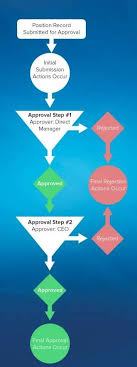
Approvers and Approver Groups in Salesforce. An approver in Salesforce CPQ Advanced Approvals is a user who receives approval request emails and can either approve or reject the request. An approver record can represent an individual user or a group of users. Utilizing approver groups (like Salesforce queues) is beneficial when you need to route approvals to all members of a specific team. REQUIRED Salesforce CPQ EDITIONSAvailable in: Salesforce CPQ Summer ‘16 and later with Advanced Approvals 3.1 and later For instance, you can create an approver group that includes all managers in the accounting department. This group can then be associated with an approval rule triggered by a quote with a net total of $750,000 or more. Consequently, each accounting manager will receive an email notification regarding the request. Assign Approvers Dynamically Based on Criteria You can specify an approver dynamically based on a formula or specific criteria. For instance, you might want the approver to be the regional manager associated with a sales rep’s opportunity. If the regional manager changes, the approval will automatically reference the new manager. To set up a dynamic approver: Add a custom formula field to your quote or opportunity that references the ID of the approver’s user record.Include this formula field in your approval rule setup.Delegate Approvers Delegated approvers are designated users who receive approval requests on behalf of another user for a predefined period, typically during the original approver’s absence. To delegate approvers: Specify the user to whom you want to delegate in the “Delegated Approver” field.Set the start and end dates for the delegation period.Ensure that delegated approvers have the necessary permissions and access to the approval objects page layout, including the ability to approve or reject requests. Approver Fields Depending on page layouts and field-level security settings, not all approver fields may be visible or editable. Delegated Approver: This field designates the user receiving approval requests instead of the primary approver for a limited time. Delegation End: Specifies the date after which delegated approvers no longer receive requests.Delegation Start: Specifies the date from which delegated approvers start receiving requests.Group ID: If the approver represents a group, this field references the Group record’s ID.Unanimous: Indicates that approval from all group members is required for the request to be considered approved.User: If the approver is an individual user, this field references the User record. Approval Rules Approval rules dictate which users or groups receive approval requests and the email templates used for notifications upon approval or rejection. When a sales rep submits a record for approval, Salesforce CPQ evaluates all active approval rules associated with that record’s object. If the approval conditions are met, the corresponding rule triggers, and Salesforce CPQ sends an approval request email to the designated approver(s) as defined in the rule. Each approval rule can optionally include lookups to request templates, approval templates, and rejection templates, allowing for customized email notifications based on specific conditions. Interested in creating automated approvals or approver groups in your Salesforce org? Contact Tectonic today. Like1 Related Posts Who is Salesforce? Who is Salesforce? Here is their story in their own words. From our inception, we’ve proudly embraced the identity of Read more Salesforce Marketing Cloud Transactional Emails Salesforce Marketing Cloud Transactional Emails are immediate, automated, non-promotional messages crucial to business operations and customer satisfaction, such as order Read more Salesforce Unites Einstein Analytics with Financial CRM Salesforce has unveiled a comprehensive analytics solution tailored for wealth managers, home office professionals, and retail bankers, merging its Financial Read more AI-Driven Propensity Scores AI plays a crucial role in propensity score estimation as it can discern underlying patterns between treatments and confounding variables Read more
Read More
gettectonic.com