Compliance Archives - gettectonic.com - Page 25
salesforce chatter app

Chatter Feed Tracking in Public Sector Solutions

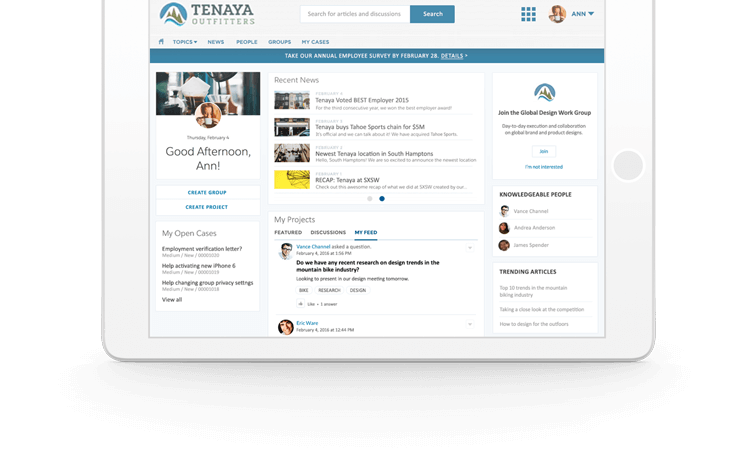
Understanding Chatter Feed Tracking Chatter Feed Tracking in public sector solutions is a robust feature designed to detect changes to specific record fields and broadcast them as updates in the What I Follow feed. Users following a record witness these updates in their What I Follow view, with the exception of updates made by users themselves, which are visible in their profile feeds. Benefits of Chatter Feed Tracking Activation Enabling Chatter Feed Tracking introduces powerful collaboration and information-sharing capabilities. Users gain the ability to follow updates to objects (records), enhancing their engagement with accounts, opportunities, and cases. This feature facilitates seamless collaboration and document sharing directly on the objects. Chatter Feed Tracking in Public Sector Solutions Activate Chatter Feed Tracking to foster collaboration and keep users and constituents informed about applications, pending tasks, and workflow processes. This feature enables users to follow record updates in a dedicated feed on the record page. For instance, enabling feed tracking on objects such as Business License Application, Individual Application, and Regulatory Code Violation allows application reviewers to effortlessly monitor updates to license and permit applications, as well as violations discovered during inspections. Constituents can utilize the Chatter feed on public portals to seek additional information from reviewers or compliance officers. Enabling Chatter Feed Tracking – Public Sector Solutions Required Editions and User Permissions Available in: Enterprise, Performance, Unlimited, and Developer Editions with Public Sector Solutions User Permissions Needed To view the feed tracking Setup page: Customizing Feed Tracking for Objects Customize feed tracking for specific objects by following these steps: Chatter Feed vs. Chatter Publisher Chatter Feeds in Lightning Experience offer more formatting options and attachment capabilities compared to Chatter Publisher. The Chatter publisher provides enhanced controls for styling and content addition, including features like inline images, hyperlinks, links to records, and code snippets. Chatter Feed Tracking in Public Sector Solutions Capabilities Key features of Chatter include: Like Related Posts Who is Salesforce? Who is Salesforce? Here is their story in their own words. From our inception, we’ve proudly embraced the identity of Read more Salesforce Marketing Cloud Transactional Emails Salesforce Marketing Cloud Transactional Emails are immediate, automated, non-promotional messages crucial to business operations and customer satisfaction, such as order Read more Salesforce Unites Einstein Analytics with Financial CRM Salesforce has unveiled a comprehensive analytics solution tailored for wealth managers, home office professionals, and retail bankers, merging its Financial Read more AI-Driven Propensity Scores AI plays a crucial role in propensity score estimation as it can discern underlying patterns between treatments and confounding variables Read more

Read More
Marketing Cloud Admins

Generating PDFs of Marketing Cloud Emails

Rendering Emails as PDFs in Salesforce Marketing Cloud Converting Salesforce Marketing Cloud Engagement emails into PDFs can be a required step for documentation, compliance, and archiving. While Salesforce provides various solutions for PDF rendering, not all are fully compatible with Salesforce Marketing Cloud (SFMC). This insight explores different methods to convert emails into PDFs and automate the process wherever possible. Manual PDF Rendering For users who need a straightforward approach, saving an email as a PDF manually is an option: Using Chrome Extensions Several Chrome extensions can facilitate PDF conversion, including: Using Sejda for PDF Conversion Sejda is a free online tool that preserves links and other embedded elements while converting emails to PDFs. It can be an excellent solution for one-off conversions where maintaining interactivity is important. Email Archiving in Salesforce Salesforce offers an Email Archiving Add-On that can store emails for compliance and retrieval. However, this solution is more focused on archiving than rendering emails into PDFs. Automating PDF Rendering in SFMC For those looking to automate PDF generation, a structured approach using AWS services and SFMC data extensions is possible. Steps to Automate PDF Rendering Alternative AppExchange Solutions For those looking for pre-built solutions, Salesforce AppExchange offers various options, such as Sercante, which specializes in PDF generation and marketing automation integrations. Conclusion Converting emails to PDFs in SFMC can be done manually, with browser extensions, or through automated solutions using AWS services. The right choice depends on your needs, whether it’s one-time conversion, compliance archiving, or a fully automated workflow. Content updated February 2025. Like Related Posts Who is Salesforce? Who is Salesforce? Here is their story in their own words. From our inception, we’ve proudly embraced the identity of Read more Salesforce Marketing Cloud Transactional Emails Salesforce Marketing Cloud Transactional Emails are immediate, automated, non-promotional messages crucial to business operations and customer satisfaction, such as order Read more Salesforce Unites Einstein Analytics with Financial CRM Salesforce has unveiled a comprehensive analytics solution tailored for wealth managers, home office professionals, and retail bankers, merging its Financial Read more AI-Driven Propensity Scores AI plays a crucial role in propensity score estimation as it can discern underlying patterns between treatments and confounding variables Read more
Read More
Key Benefits of Dynamic Dashboards

Key Benefits of Dynamic Dashboards

What Is a Salesforce Dynamic Dashboard? A Dynamic Dashboard customizes data visibility based on a user’s role or access level. Unlike standard dashboards, which present static data predefined by the creator, dynamic dashboards automatically adjust their content according to the logged-in user. For example, in a sales team, individual representatives see their performance against quotas, while a manager gets a comprehensive view of the entire team’s progress—all within a single dashboard. Why Use a Dynamic Dashboard? Dynamic dashboards offer unparalleled flexibility, personalization, and efficiency, making them an indispensable Salesforce feature. Their advantages include: Key Features of Dynamic Dashboards: Standard vs. Dynamic Dashboards Feature Standard Dashboard Dynamic Dashboard Data View Fixed for all users Adjusts based on user role Customization Limited Flexible, role-based Security General access Role-based access control Maintenance Requires multiple versions Single adaptable dashboard Example Use Cases: Key Benefits of Salesforce Dynamic Dashboards Personalized Data Visualization Tailor dashboards to display role-specific metrics, ensuring users focus on the most relevant insights. Enhanced Role-Based Access Restricts data access to authorized personnel, improving security and compliance. Increased Efficiency Reduces dashboard duplication, saving administrative time and effort. Real-Time Insights Automatically refreshes data, keeping teams informed with the latest metrics. Simplified Collaboration Facilitates team alignment by ensuring stakeholders have access to relevant data. Salesforce Dynamic Dashboard Limits & Restrictions How to Create a Dynamic Dashboard in Salesforce Step 1: Navigate to Dashboards Step 2: Define Dashboard Properties Step 3: Add Components Step 4: Set the Running User Step 5: Save and Test Step 6: Optimize Layout Mastering Dynamic Dashboards: 5 Steps for Optimization Advanced Features & Tips Dynamic Dashboards in Lightning Experience Cross-Filtering Across Components Key Takeaways By implementing dynamic dashboards effectively, businesses can streamline reporting, empower teams with actionable data, and drive strategic growth. Like Related Posts Who is Salesforce? Who is Salesforce? Here is their story in their own words. From our inception, we’ve proudly embraced the identity of Read more Salesforce Marketing Cloud Transactional Emails Salesforce Marketing Cloud Transactional Emails are immediate, automated, non-promotional messages crucial to business operations and customer satisfaction, such as order Read more Salesforce Unites Einstein Analytics with Financial CRM Salesforce has unveiled a comprehensive analytics solution tailored for wealth managers, home office professionals, and retail bankers, merging its Financial Read more AI-Driven Propensity Scores AI plays a crucial role in propensity score estimation as it can discern underlying patterns between treatments and confounding variables Read more

Read More

Maximizing Business Efficiency with Salesforce Managed Services

The Importance of Salesforce Optimization In today’s super fast-paced business world, companies rely on Salesforce to streamline operations and reduce costs. As a leading customer relationship management (CRM) platform, Salesforce enables organizations to enhance workflows, improve efficiency, and drive better results. To maximize the value of your Salesforce platform, optimization is essential. This involves fine tuning the system to ensure ease of use, eliminating inefficiencies, and enhancing overall performance. However, managing Salesforce effectively requires significant time and resources—this is where Salesforce Managed Services come in. This Tectonic insight explores how Managed Services can elevate your Salesforce experience, driving improved business performance and maximizing return on investment. What is Salesforce Optimization? Salesforce optimization focuses on refining the platform to better align with your business needs. It involves continuous improvements in system configuration, workflows, and integrations to ensure peak performance. Given that business requirements evolve over time, optimization is an ongoing process rather than a one-time task. Through Managed Services, businesses can fine-tune settings, enhance workflows, and ensure seamless system integrations, leading to increased productivity and efficiency. How to Optimize Salesforce for Maximum Efficiency Optimizing Salesforce involves refining data management, automation, user experience, and security. Key areas of focus include: 1. Data Model Optimization 2. Indexing and Query Optimization 3. Managing Governor Limits 4. Data Loading and Migration 5. UI and Lightning Experience Optimization 6. Reporting and Dashboard Optimization 7. Security and Access Control 8. Performance Monitoring and Analysis Challenges in Salesforce Optimization Optimizing Salesforce can be complex, and failing to manage it properly can hinder performance. Common challenges include: Why Continuous Salesforce Optimization is Essential Ongoing optimization ensures that businesses maximize their Salesforce investment, enabling: Understanding Salesforce Managed Services Salesforce Managed Services offer a proactive approach to CRM optimization. Instead of managing Salesforce in-house, businesses can outsource expert professionals to ensure seamless operations, enhanced security, and continuous improvement. Key Benefits of Managed Services How Managed Services Improve Salesforce Performance Salesforce Managed Services take a proactive approach to optimization, preventing issues before they arise. Key areas of impact include: 1. Proactive Monitoring & Maintenance 2. Customization & Automation 3. Enhanced Data Integrity & Security 4. Seamless Third-Party Integrations Maximizing ROI with Managed Salesforce Services Optimizing Salesforce through Managed Services yields significant business benefits, including cost savings, operational efficiency, and revenue growth. 1. Cost Efficiency 2. Faster Implementation & Deployment 3. Improved User Adoption & Productivity 4. Measurable Business Growth Conclusion Salesforce optimization is crucial for maintaining an efficient and scalable CRM. By leveraging Managed Services, businesses can enhance system performance, improve data security, and increase operational efficiency in a cost-effective manner. A dedicated Salesforce Managed Service Provider like Tectonic ensures streamlined operations, optimized configurations, and enhanced user adoption, ultimately driving business growth. Elevate Your Salesforce Performance As your business grows, managing and optimizing Salesforce becomes increasingly complex. Our Managed Services provide expert support, ensuring that your CRM remains optimized, secure, and scalable. Looking to enhance your Salesforce strategy? Contact us today to optimize your Salesforce instance and unlock its full potential. Like Related Posts Who is Salesforce? Who is Salesforce? Here is their story in their own words. From our inception, we’ve proudly embraced the identity of Read more Salesforce Marketing Cloud Transactional Emails Salesforce Marketing Cloud Transactional Emails are immediate, automated, non-promotional messages crucial to business operations and customer satisfaction, such as order Read more Salesforce Unites Einstein Analytics with Financial CRM Salesforce has unveiled a comprehensive analytics solution tailored for wealth managers, home office professionals, and retail bankers, merging its Financial Read more AI-Driven Propensity Scores AI plays a crucial role in propensity score estimation as it can discern underlying patterns between treatments and confounding variables Read more

Read More
Row-Level Formulas in Salesforce

Row-Level Formulas in Salesforce

Mastering Row-Level Formulas in Salesforce Reports What Are Row-Level Formulas? Row-level formulas perform calculations on individual records in your report, displaying results for each row. Unlike summary formulas that aggregate data across records, row-level formulas analyze one record at a time. Key Characteristics Creating a Row-Level Formula: Step-by-Step 1. Build Your Base Report 2. Add the Formula Column 3. Writing the Formula 4. Finalize & Save Practical Applications Row-level formulas help answer critical business questions: Important Limitations Be aware of these constraints when working with row-level formulas: Best Practices Troubleshooting Common Issues Problem: Formula Not Calculating Correctly Problem: “Too Many Fields” Error Problem: Formula Validation Fails Advanced Techniques For more sophisticated analysis: Permission Requirements To create and modify row-level formulas: Conclusion Row-level formulas provide powerful, granular analysis capabilities in Salesforce reports. While they have specific limitations, their ability to perform record-by-record calculations makes them indispensable for detailed operational reporting. By mastering these formulas, you can unlock deeper insights into your business processes while maintaining data accuracy and relevance. Like Related Posts Who is Salesforce? Who is Salesforce? Here is their story in their own words. From our inception, we’ve proudly embraced the identity of Read more Salesforce Marketing Cloud Transactional Emails Salesforce Marketing Cloud Transactional Emails are immediate, automated, non-promotional messages crucial to business operations and customer satisfaction, such as order Read more Salesforce Unites Einstein Analytics with Financial CRM Salesforce has unveiled a comprehensive analytics solution tailored for wealth managers, home office professionals, and retail bankers, merging its Financial Read more AI-Driven Propensity Scores AI plays a crucial role in propensity score estimation as it can discern underlying patterns between treatments and confounding variables Read more
Read More
Salesforce Data Cloud

Key Components of Salesforce Data Cloud

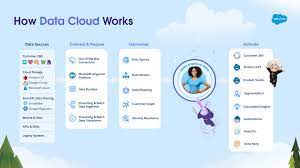
Salesforce Data Cloud organizes and unifies data across Salesforce and other external data sources.  After ingestion, it can drive personalization and engagement. Components of Salesforce Data Cloud to explore. Data Cloud expands Salesforce capabilities by using the best pieces of the developer-friendly Salesforce Platform and adding a highly scalable infrastructure. Data Cloud is an evolution of Customer Data Platform—which was originally designed for marketers but now caters to broader use cases beyond marketing.  The magic of Data Cloud is in creating experiences that wow customers. Key features and components of Salesforce Data Cloud include: Like Related Posts Who is Salesforce? Who is Salesforce? Here is their story in their own words. From our inception, we’ve proudly embraced the identity of Read more Salesforce Marketing Cloud Transactional Emails Salesforce Marketing Cloud Transactional Emails are immediate, automated, non-promotional messages crucial to business operations and customer satisfaction, such as order Read more Salesforce Unites Einstein Analytics with Financial CRM Salesforce has unveiled a comprehensive analytics solution tailored for wealth managers, home office professionals, and retail bankers, merging its Financial Read more AI-Driven Propensity Scores AI plays a crucial role in propensity score estimation as it can discern underlying patterns between treatments and confounding variables Read more
Read More
revenue cloud

CPQ Revenue Cloud Billing Salesforce

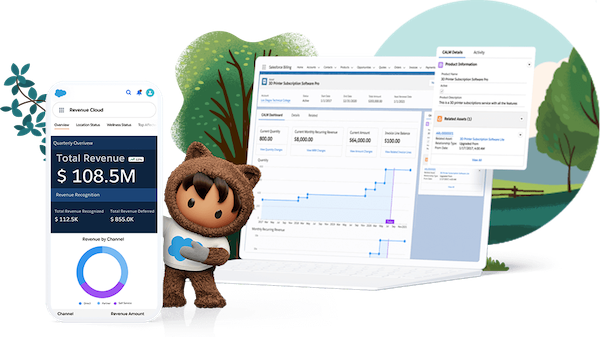
Unleash the Power of Salesforce CPQ for Seamless Product Configuration: CPQ Revenue Cloud Billing Salesforce Maximize the potential of Salesforce CPQ to effortlessly configure all your products. Empower sales representatives with the knowledge to provide accurate quotes through guided product discovery, solution selling, and advanced configuration logic. Boost sales productivity by seamlessly integrating configure, price, and quote capabilities into your CRM system. Quickly generate quotes with guided selling flows, product bundles, and discounting rules while ensuring business risk mitigation through built-in controls, approval workflows, and compliance measures. CPQ Revenue Cloud Billing Salesforce: Elevate your sales operations with Salesforce CPQ and Revenue Cloud, driving growth and efficiency across all sales channels while ensuring seamless customer interactions and comprehensive revenue management. Like1 Related Posts Who is Salesforce? Who is Salesforce? Here is their story in their own words. From our inception, we’ve proudly embraced the identity of Read more Salesforce Marketing Cloud Transactional Emails Salesforce Marketing Cloud Transactional Emails are immediate, automated, non-promotional messages crucial to business operations and customer satisfaction, such as order Read more Salesforce Unites Einstein Analytics with Financial CRM Salesforce has unveiled a comprehensive analytics solution tailored for wealth managers, home office professionals, and retail bankers, merging its Financial Read more AI-Driven Propensity Scores AI plays a crucial role in propensity score estimation as it can discern underlying patterns between treatments and confounding variables Read more
Read More
Salesforce Security and Privacy

Salesforce Security and Privacy

Tailor Salesforce security and privacy add-on solutions to fit your specific company needs, covering essential aspects such as monitoring and masking sensitive data, implementing backups to prevent accidental or malicious data loss, and ensuring compliance with evolving privacy, encryption, and data residency regulations. Maintaining data privacy and compliance is made easier with user-friendly tools that streamline processes in Salesforce. Reduce compliance costs and enhance customer data protection by automating data subject requests, managing consent efficiently, and consolidating identities into a single profile. Simplify privacy management while safeguarding customer data effectively. Protecting data in production involves various strategies to meet legal obligations and minimize risk. Utilize methods such as randomization for unique data, hardcoding for static values, and deletion when data is unnecessary. Additionally, minimize storage in your production org by automatically deleting old records and files, removing audit data, and implementing hard deletion when appropriate. Automate data subject requests to save time and ensure efficient processing. Create policies to fulfill Right To Be Forgotten and Data Subject Access Requests automatically, monitor request progress, and utilize Privacy Hold to prevent data anonymization or deletion. Streamline customer consent management with Preference Manager, capturing customer preferences to maintain compliance and trust. Use customizable templates for consent forms, enable customers to update preferences easily, and integrate responses into the Salesforce Consent Data Model for consistency. Secure access management and unify customer identities across diverse sources. Administer customer profiles seamlessly within Salesforce, tailor customer journeys across various channels, and enhance personalization. Implement Passwordless Login for a simplified registration and access experience, catering to mobile-first markets and enhancing user convenience. Enable Social Sign On to streamline registration using familiar social credentials, reducing friction and improving the overall user experience. Maximize ROI with Salesforce’s Success Ecosystem, offering support, expert guidance, and resources to unlock the full potential of your investment. Salesforce prioritizes security and transparency, providing robust data processing mechanisms and privacy commitments to ensure compliance with data protection laws. As the leading CRM platform, Salesforce empowers organizations to build trust while leveraging data intelligence to enhance customer experiences. Embrace a Zero Trust security strategy, grounded in the principle of least privilege, to fortify your organization’s security posture. Implementing Zero Trust requires continuous authentication and restricting access to essential resources, mitigating the risk of unauthorized network access. Adhere to the Principle of Least Privilege within your Salesforce org by granting minimal permissions necessary for users’ roles. Conduct regular privilege audits to prevent over-privileged users and maintain compliance with security best practices. Stay informed about upcoming changes, such as the end-of-life of permissions on profiles, and explore additional security measures to strengthen your Salesforce instance’s security further. Ensure data security at rest with encryption-enabled databases and adherence to regional data laws, such as GDPR. Salesforce’s secure server environment and robust firewall technologies protect customer data from external intruders. In order to keep your data secure and private, prioritize data privacy and security in your Salesforce implementation by leveraging tailored solutions, adopting best practices, and fostering collaboration between your organization, Salesforce, and security teams. For assistance doing an audit of your system’s security or adding security features, contact Tectonic today. Content updated March 2024. Like1 Related Posts Who is Salesforce? Who is Salesforce? Here is their story in their own words. From our inception, we’ve proudly embraced the identity of Read more Salesforce Marketing Cloud Transactional Emails Salesforce Marketing Cloud Transactional Emails are immediate, automated, non-promotional messages crucial to business operations and customer satisfaction, such as order Read more Salesforce Unites Einstein Analytics with Financial CRM Salesforce has unveiled a comprehensive analytics solution tailored for wealth managers, home office professionals, and retail bankers, merging its Financial Read more AI-Driven Propensity Scores AI plays a crucial role in propensity score estimation as it can discern underlying patterns between treatments and confounding variables Read more

Read More
Marketing Cloud Admins

Marketing Cloud Admins

Salesforce Marketing Cloud Administrators play a key role in ensuring the success of an organization’s marketing efforts. Their responsibilities span system configuration, data management, campaign development, and execution. These professionals need a blend of technical expertise, strategic thinking, and keen attention to detail to effectively manage and optimize the Marketing Cloud environment. System Configuration and AdministrationMarketing Cloud Admins are responsible for setting up and configuring user accounts, defining roles and permissions, and customizing the system to meet specific organizational needs. They stay current on Salesforce updates, conducting system audits to maintain security and performance. Admins also oversee platform customization, aligning it with business goals. Data Management and SegmentationEffective data management is crucial for personalized marketing. Admins manage data imports, exports, and integration with other systems, ensuring data cleanliness and compliance with privacy regulations. They create audience segments based on specific criteria to enable targeted campaigns. Campaign Development and ExecutionAdmins work closely with marketing teams to develop and execute email, SMS, and social media campaigns. They set up customer journeys, implement automation, and ensure campaigns are delivered as planned. Monitoring performance and analyzing metrics allows admins to optimize campaigns and provide insights for future strategies. Integration and AutomationAdmins integrate Marketing Cloud with CRM systems, e-commerce platforms, and third-party apps. They streamline workflows by automating processes through tools like Journey Builder and Automation Studio, ensuring data consistency and efficiency. Troubleshooting and SupportAdmins provide technical support and troubleshoot issues related to system errors, data synchronization, and campaign delivery. They collaborate with Salesforce support to resolve complex problems, ensuring smooth operations and minimal downtime. Training and DocumentationTraining users on Marketing Cloud tools and developing comprehensive documentation are also key responsibilities. Admins ensure users are well-versed in the platform’s features and best practices, helping maintain consistent performance across teams. Monitoring and ReportingAdmins track key performance indicators (KPIs) and generate reports to analyze campaign success. By using tools like Analytics Builder, they offer data-driven insights that help improve marketing strategies and align them with business objectives. Skills Required for Salesforce Marketing Cloud AdminsAdmins must have strong technical aptitude, familiarity with Salesforce tools like Email Studio and Journey Builder, and proficiency in SQL, HTML, and APIs for system integration. Problem-solving skills are critical for diagnosing and resolving issues, and data management expertise is essential for organizing and analyzing marketing data. FAQs: If you are in need of Marketing Cloud assistance, contact Tectonic today. Content updated September 2024. Like Related Posts Who is Salesforce? Who is Salesforce? Here is their story in their own words. From our inception, we’ve proudly embraced the identity of Read more Salesforce Marketing Cloud Transactional Emails Salesforce Marketing Cloud Transactional Emails are immediate, automated, non-promotional messages crucial to business operations and customer satisfaction, such as order Read more Salesforce Unites Einstein Analytics with Financial CRM Salesforce has unveiled a comprehensive analytics solution tailored for wealth managers, home office professionals, and retail bankers, merging its Financial Read more AI-Driven Propensity Scores AI plays a crucial role in propensity score estimation as it can discern underlying patterns between treatments and confounding variables Read more

Read More

GDPR Compliance Checklist for US Companies

The GDPR is a comprehensive data privacy law from the EU, designed to enhance data protection and give individuals greater control over their personal information. Non-compliance with the GDPR can result in substantial fines, reaching up to 4% of global revenue or €20 million, depending on the severity of the violation.

Read More
salesforce private lending

Private Lending Simplified

Private Lending Simplified: Unlocking Success with Salesforce In the dynamic world of private lending, technology is transforming the way lenders operate. Salesforce stands out as a powerful platform, enabling private lenders to optimize processes, enhance borrower relationships, and drive sustainable growth. Let’s explore how Salesforce can simplify private lending and boost efficiency. The Landscape of Private Lending and Its Challenges Private lending refers to providing loans to individuals or businesses outside of traditional banks. While this approach offers flexibility and faster approvals, it also comes with challenges such as: Given these complexities, lenders need robust tools to manage the entire loan lifecycle effectively. The Role of Loan Management Software in Private Lending Loan management software is indispensable for automating and streamlining lending operations. Salesforce, with its flexible loan management capabilities, is particularly well-suited for private lenders. Key functionalities include: 1. Automated Underwriting Salesforce enables automated underwriting by using predefined rules and algorithms to evaluate borrower eligibility. This speeds up decision-making, reduces manual errors, and ensures consistency. 2. Loan Processing A centralized system in Salesforce allows lenders to track applications, manage documentation, and communicate with borrowers, ensuring no step in the process is overlooked. 3. Loan Servicing Post-loan disbursement, Salesforce’s integration capabilities support repayment tracking, automated reminders, and delinquency management, ensuring seamless loan servicing. Why Private Lenders Turn to Salesforce Salesforce empowers private lenders with tools designed to optimize every stage of the lending process. 1. Customizable Solutions Salesforce’s flexibility allows lenders to create workflows tailored to different loan types, whether it’s mortgage servicing or merchant cash advance (MCA) underwriting. 2. Advanced Data Management With secure, cloud-based infrastructure, Salesforce ensures easy access to data anytime, anywhere. This not only enhances decision-making through analytics but also supports regulatory compliance. 3. Enhanced Customer Relationship Management (CRM) Strong borrower relationships are key to private lending success. Salesforce’s CRM tools help lenders manage interactions from initial inquiries to post-loan follow-ups, ensuring clients feel supported throughout their journey. 4. Seamless Integration Salesforce integrates effortlessly with other financial tools, such as microfinance platforms and construction loan management software, creating a unified ecosystem for managing diverse loan portfolios. Choosing the Right Loan Management Solution When adopting Salesforce or similar platforms for private lending, consider the following: For private lenders, specialized solutions like Fundingo, built on Salesforce, can take operational efficiency to the next level. Conclusion Salesforce is transforming private lending by simplifying operations and strengthening lender-borrower relationships. With tools to manage the entire loan lifecycle—from underwriting to servicing—private lenders can increase efficiency, maintain compliance, and enhance customer satisfaction. Adopting advanced technologies like Salesforce positions private lenders for long-term success in an increasingly competitive market. Are you ready to harness the power of Salesforce for your private lending business? Let’s connect and explore how Tectonic can streamline your processes. Like Related Posts Who is Salesforce? Who is Salesforce? Here is their story in their own words. From our inception, we’ve proudly embraced the identity of Read more Salesforce Marketing Cloud Transactional Emails Salesforce Marketing Cloud Transactional Emails are immediate, automated, non-promotional messages crucial to business operations and customer satisfaction, such as order Read more Salesforce Unites Einstein Analytics with Financial CRM Salesforce has unveiled a comprehensive analytics solution tailored for wealth managers, home office professionals, and retail bankers, merging its Financial Read more AI-Driven Propensity Scores AI plays a crucial role in propensity score estimation as it can discern underlying patterns between treatments and confounding variables Read more

Read More
Zendesk Launches AI Agent Builder

Scaling Your Salesforce Team with Staff Augmentation

As the demand for Salesforce experts continues to grow, businesses face challenges such as long hiring cycles, high recruitment costs, and skill shortages. These make it difficult to build a high-performing Salesforce team. However, there’s a smarter way to access top talent without the complexities of permanent hiring. The Power of Staff Augmentation Rather than relying on traditional Salesforce staffing firms, businesses can leverage staff augmentation to bring in experienced Salesforce professionals for short-term projects or ongoing support. This flexible approach helps organizations scale efficiently, reduce costs, and remain competitive. In this insight, we’ll explore how Salesforce staff augmentation enables businesses to build elite Salesforce teams and best practices for managing an augmented workforce. What Is Salesforce Staff Augmentation? Salesforce staff augmentation is a strategic staffing solution where companies hire external professionals to fill skill gaps temporarily or for specific projects. Instead of enduring lengthy hiring processes, firms can quickly onboard experienced Salesforce experts who match their project needs. Unlike outsourcing, which delegates entire projects to external agencies, staff augmentation keeps you in control—augmented professionals work alongside your internal team, ensuring seamless collaboration. Why Businesses Choose Staff Augmentation for Salesforce Teams Salesforce implementations, migrations, and customizations require specialized expertise. Companies are turning to staff augmentation because it offers a faster, more flexible alternative to traditional staffing agencies. Key Benefits: ✔ Immediate access to experts – No months-long recruitment process.✔ Cost efficiency – Avoid full-time salaries, benefits, and training expenses.✔ Scalability – Expand or reduce your team based on demand.✔ Expertise on demand – Get access to specialized skills without long-term commitments.✔ Seamless integration – Augmented staff work within your team, ensuring continuity. This model is ideal for companies facing fluctuating workloads, large-scale Salesforce projects, or critical skill gaps. Building a High-Performing Salesforce Team with Staff Augmentation Step 1: Identify the Skills You Need Before bringing in Salesforce professionals, define your requirements: By outlining these needs, you can ensure a smooth augmentation process and find professionals who align with your goals. Step 2: Choose the Right Staff Augmentation Partner Selecting a trusted staff augmentation provider is essential. Instead of relying on Salesforce staffing agencies, which often lack flexibility, choose a partner that provides on-demand Salesforce talent for both short-term and long-term projects. When evaluating partners, look for:✔ Salesforce talent expertise✔ Proven track record in placements✔ Flexible engagement models (short-term, long-term, or project-based)✔ Seamless onboarding and integration support By collaborating with a seasoned provider like Tectonic, companies can easily tap into pre-screened Salesforce professionals who match their project needs. Step 3: Ensure a Smooth Onboarding Process Once you’ve hired augmented staff, an effective onboarding process ensures smooth teamwork:✅ Provide access to essential tools and systems.✅ Define roles, responsibilities, and expectations.✅ Foster collaboration between in-house and augmented staff.✅ Assign mentors or key contacts for guidance. Structured onboarding enables augmented professionals to quickly contribute and stay aligned with your business objectives. Step 4: Continuously Evaluate and Optimize To maximize effectiveness, companies should regularly assess augmented professionals’ performance and impact: Optimizing your staff augmentation strategy over time ensures a high-performing Salesforce team that adapts to evolving business needs. Best Practices for Managing an Augmented Salesforce Team Unlike traditional Salesforce staffing firms, staff augmentation integrates professionals into daily operations rather than just placing hires. Encourage Collaboration Between In-House and Augmented Staff To ensure smooth communication and team cohesion:✔ Use collaboration tools like Slack, Microsoft Teams, or Salesforce Chatter.✔ Hold daily or weekly stand-ups to align goals.✔ Foster an inclusive culture where augmented staff feel valued.✔ Maintain clear guidelines for data access and security. Utilize Training and Upskilling Opportunities To maximize value, provide augmented staff with:✔ Salesforce training sessions and learning resources.✔ Opportunities to participate in internal knowledge-sharing.✔ Updates on new Salesforce features and releases. Upskilling both in-house and augmented professionals ensures your team remains highly skilled and adaptable. Overcoming Common Challenges in Staff Augmentation 1. Ensuring Smooth Team Integration 💡 Solution: Encourage open communication and structured onboarding to help new professionals integrate seamlessly. 2. Managing Security and Compliance Risks 💡 Solution: Implement Salesforce security best practices, such as role-based access control and Salesforce Shield to protect sensitive data. 3. Keeping External Talent Engaged and Motivated 💡 Solution: Provide incentives, involvement in key meetings, and professional development opportunities. 4. Addressing Communication Barriers 💡 Solution: Use structured meetings, clear guidelines, and collaboration tools to ensure seamless coordination. By leveraging Salesforce Shield, businesses can enhance security while ensuring compliance for external staff. Final Thoughts: Is Staff Augmentation Right for You? If your business needs immediate access to Salesforce expertise without long-term commitments, Salesforce staff augmentation is the perfect solution. By: …you can build a high-performing Salesforce team that drives your business forward. 💡 Need Salesforce specialists? Tectonic is a trusted Salesforce staff augmentation provider helping businesses scale efficiently and affordably. 📩 Ready to augment your Salesforce team? Contact us today to see how staff augmentation can transform your business! Like Related Posts Who is Salesforce? Who is Salesforce? Here is their story in their own words. From our inception, we’ve proudly embraced the identity of Read more Salesforce Marketing Cloud Transactional Emails Salesforce Marketing Cloud Transactional Emails are immediate, automated, non-promotional messages crucial to business operations and customer satisfaction, such as order Read more Salesforce Unites Einstein Analytics with Financial CRM Salesforce has unveiled a comprehensive analytics solution tailored for wealth managers, home office professionals, and retail bankers, merging its Financial Read more AI-Driven Propensity Scores AI plays a crucial role in propensity score estimation as it can discern underlying patterns between treatments and confounding variables Read more

Read More
salesforce shield encryption

Salesforce Shield Key Management Service

The Salesforce Shield Key Management Service (KMS) empowers users to control and manage the lifecycle of their encryption keys, offering options like Salesforce-generated keys, Bring Your Own Key (BYOK), and Cache-Only Key Service, all while ensuring data encryption and security.  Key Features and Options: Like Related Posts Who is Salesforce? Who is Salesforce? Here is their story in their own words. From our inception, we’ve proudly embraced the identity of Read more Salesforce Marketing Cloud Transactional Emails Salesforce Marketing Cloud Transactional Emails are immediate, automated, non-promotional messages crucial to business operations and customer satisfaction, such as order Read more Salesforce Unites Einstein Analytics with Financial CRM Salesforce has unveiled a comprehensive analytics solution tailored for wealth managers, home office professionals, and retail bankers, merging its Financial Read more AI-Driven Propensity Scores AI plays a crucial role in propensity score estimation as it can discern underlying patterns between treatments and confounding variables Read more

Read More
gettectonic.com