KPIs Archives - gettectonic.com - Page 4
Salesforce Success Story

Case Study: Salesforce Health Services Modernization

Modernizing Public Health using Salesforce Client is the largest tribally-operated health care system in the United States, with almost 160 full-time providers and over 2,200 health services employees. Committed to improving patient access, this Tribal Nation has invested substantially in technology, building new facilities and expanding existing locations. The primary hospital and nine health centers are dedicated to providing world-class patient care. Salesforce Health Services Modernization “The Gadugi Portal and Salesforce technology is helping us get to our citizens quicker by streamlining the application process, and enabling us to have updated records that are online and easily accessible to our citizens to truly help them recover in their greatest time of need” Client Implemented – Case Study: Salesforce Health Services Modernization The Problem: The Solution: The Results: Ready to explore a Salesforce implementation with Health Cloud, MuleSoft, and Experience Cloud for your government or public sector entity? Contact Tectonic today. Like1 Related Posts Who is Salesforce? Who is Salesforce? Here is their story in their own words. From our inception, we’ve proudly embraced the identity of Read more Salesforce Marketing Cloud Transactional Emails Salesforce Marketing Cloud Transactional Emails are immediate, automated, non-promotional messages crucial to business operations and customer satisfaction, such as order Read more Salesforce Unites Einstein Analytics with Financial CRM Salesforce has unveiled a comprehensive analytics solution tailored for wealth managers, home office professionals, and retail bankers, merging its Financial Read more AI-Driven Propensity Scores AI plays a crucial role in propensity score estimation as it can discern underlying patterns between treatments and confounding variables Read more

Read More
MuleSoft Certifications Now Unified with Salesforce Certifications

MuleSoft Certifications Now Unified with Salesforce Certifications

MuleSoft Certifications Now Unified with Salesforce Certifications As of May 6, 2024, MuleSoft certifications have been officially integrated into the Salesforce Certification program, with management now handled through Webassessor. This move simplifies the certification process, enabling professionals to manage both their Salesforce and MuleSoft credentials within a single platform, streamlining maintenance and tracking. This article delves into the merging of MuleSoft certifications with Salesforce’s Trailhead platform, highlighting what this means for professionals in both ecosystems. The update offers a significant improvement in managing certifications, particularly for those working across both platforms, as Salesforce has owned MuleSoft since 2018. We’ll cover what this change entails for current certification holders, key dates in the transition, and the new opportunities this unified platform brings—including new certifications. What is MuleSoft? MuleSoft is a leading integration platform that enables businesses to connect applications, data, and devices seamlessly. As an Integration Platform as a Service (iPaaS), MuleSoft facilitates the integration of cloud-based and on-premise applications, ensuring smooth workflows across various systems. Acquired by Salesforce in 2018, MuleSoft powers the integration layer of the Salesforce ecosystem, playing a crucial role in enabling businesses to unify their systems and create connected experiences. With the increasing demand for digital transformation and connected systems, MuleSoft expertise is becoming ever more valuable in the job market. MuleSoft Certifications and Training MuleSoft certifications validate expertise in designing, building, and managing integrations using the Anypoint Platform. Prior to this transition, MuleSoft certifications were handled through the MuleSoft Training portal, which was separate from Salesforce’s broader certification system. While this independent platform was functional, it required separate accounts and processes, making exam registration and certification management more cumbersome. By integrating MuleSoft certifications into Trailhead, Salesforce has simplified this process, offering a unified, more user-friendly experience for managing certifications. Transition Timeline The following key dates marked the transition: What This Means for Current MuleSoft Certification Holders For those already certified through MuleSoft, the migration to Salesforce’s certification system should have occurred automatically. MuleSoft credentials were transferred to their Trailblazer profiles for anyone with existing Webassessor accounts. A confirmation email was sent to ensure that the transition was successful. For those without a Webassessor account, one was created on their behalf, with login details provided via email by April 2024. Certification Maintenance MuleSoft certification holders with maintenance pending as of January 1, 2024, are not required to complete additional tasks through the old system. The expectation is that certification holders will have ample time to familiarize themselves with the new Trailhead process before maintenance requirements are introduced in 2025. New Certifications on Trailhead With the migration, certifications such as the MuleSoft Certified Catalyst Specialist and MuleSoft Certified Hyperautomation Specialist have also been integrated into Trailhead. Though not entirely new, these certifications were part of the legacy MuleSoft program, originally launched in late 2022 and early 2023. Summary The integration of MuleSoft certifications into Salesforce’s Trailhead platform marks a significant step towards a unified, more efficient credentialing process. This transition simplifies certification management, making it easier for professionals to stay current across both platforms. By merging these certifications, Salesforce is empowering professionals to fully leverage the combined capabilities of Salesforce and MuleSoft, further enhancing their skill sets in an increasingly interconnected digital landscape. Content updated September 2024. Like Related Posts Who is Salesforce? Who is Salesforce? Here is their story in their own words. From our inception, we’ve proudly embraced the identity of Read more Salesforce Marketing Cloud Transactional Emails Salesforce Marketing Cloud Transactional Emails are immediate, automated, non-promotional messages crucial to business operations and customer satisfaction, such as order Read more Salesforce Unites Einstein Analytics with Financial CRM Salesforce has unveiled a comprehensive analytics solution tailored for wealth managers, home office professionals, and retail bankers, merging its Financial Read more AI-Driven Propensity Scores AI plays a crucial role in propensity score estimation as it can discern underlying patterns between treatments and confounding variables Read more

Read More
Salesforce Einstein Features

Salesforce Einstein Features

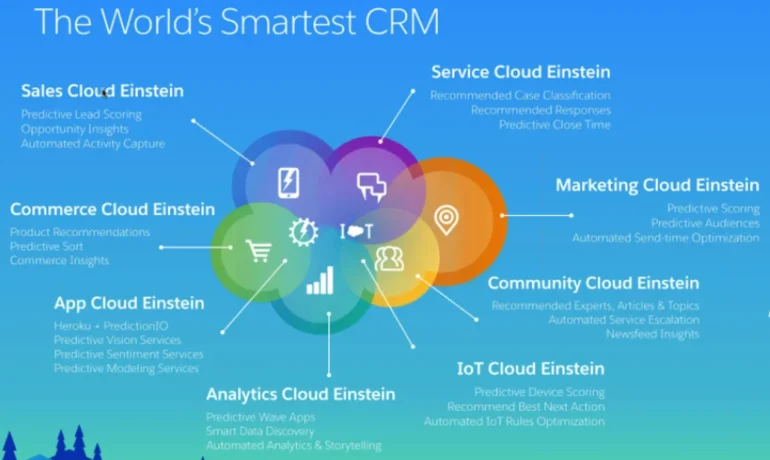
Salesforce Einstein Discover the power of the #1 AI for CRM with Einstein. Built into the Salesforce Platform, Einstein uses powerful machine learning and large language models to personalize customer interactions and make employees more productive. With Einstein powering the Customer 360, teams can accelerate time to value, predict outcomes, and automatically generate content within the flow of work. Einstein is for everyone, empowering business users, Salesforce Admins and Developers to embed AI into every experience with low code. Salesforce Einstein Features. Einstein Copilot Sales Actions: Sell faster with an AI assistant in the flow of work.Call Exploration: Ask Einstein to synthesize important call information in seconds. Ask Einstein to identify important takeaways and customer sentiment, so you have the context you need to move deals forward.

 Sales Summaries: Summarize records to identify likelihood the deal will close, the competitors involved, key activities, and more. Forecast Guidance: Ask Einstein to inform your forecast and help you identify which deals need your attention. Close Plan: Generate a customized action plan personalized to your customer and sales process. Increase conversion rates with step-by-step guidance and milestones grounded in CRM data. Salesforce Einstein Features Sales Generative AI features: ° Knowledge Creation: ° Search Answers for Agents and Customers: Einstein Copilot Service Actions: Streamline service operations by drafting Knowledge articles and surfacing answers, grounded in knowledge, to the most commonly asked questions. Summarize support interactions to save agent time and formalize institutional knowledge. Surface generated answers to agents’ & customers’ questions that are grounded in your trusted Knowledge base directly into your search page. Search Answers for Agents is included in the Einstein for Service Add-on SKU and Search Answers for Customers is included in the Einstein 1 Service Edition.
Empower agents to deliver more personalized service and reach resolutions faster with an AI assistant built into the flow of work. You can leverage out-of-the-box actions like summarize conversations or answer questions with Knowledge or you can build custom actions to fit your unique business needs. Service Salesforce Einstein Features This Release Einstein CopilotSell faster with an AI assistant. No data requirements
Included in Einstein 1 Sales Edition. Einstein Copilot: Sales ActionsSell faster with an AI assistant.No data requirements. 
 Call explorer and meeting follow-up requires Einstein Conversation Insights.
Included in Einstein 1 Sales Edition. Generative AIBoost productivity by automating time-consuming tasks.No data requirements. 
 Call summaries and call explorer requires Einstein Conversation Insights.
Included in Einstein 1 Sales Edition. Einstein will use a global model until enough data is available for a local model. For a local model: ≥1,000 lead records created and ≥120 of those converted in the last 6 monthsEinstein Automated Contacts Automatically add new
contacts & events to your CRM≥ 30 business accounts. If you use Person Accounts, >= 50 percent of accounts must be business accounts Einstein Recommended ConnectionsGet insights about your teams network to see who knows your customers and can help out ona deal ≥ 2 users to be connected to Einstein Activity Capture
and Inbox (5 preferred) Einstein Forecasting Easily predict sales forecasts inside
of Salesforce Collaborative Forecasting enabled; use a standard fiscal year; measure forecasts by opportunity revenue; forecast hierarchy must include at least one forecasting enabled user who reports to a forecast manager; opportunities must be in Salesforce ≥ 24 months;Einstein Email Insights Prioritize your inbox with actionable intelligence Einstein Activity Capture enabledEinstein Activity Metiics (Activity 360) Get insight into the activities you enter
manually and automatically from Einstein
Activity Capture Einstein Activity Capture enabled Sales Analytics Get insights into the most common sales KPIs No data requirements. User specific requirements like browser and device apply Einstein Conveisation Insights Gain actionable insights from your sales calls with conversational intelligenceCall or video recordings from Lightning Dialer, Service Cloud Voice, Zoom and other supported CTI audio and video partners.Buyer Assistant Replace web-to-lead forms with real-time conversations. No data requirements – Sales Cloud UE or Sales Engagement. Einstein Opportunity ScoringEinstein Activity CaptuiePrioritize the opportunities most likely to convertAutomatically capture data & add to your CRMEinstein will use a global model until enough data is available for a local model. For a local model: ≥ 200 closed won and ≥ 200 closed lost opportunities in the last 2 years, each with a lifespan of at least 2 days≥ 30 accounts, contacts, or leads; Requires Gmail, Microsoft Exchange 2019, 2016, or 2013 Einstein Relationship Insights Speed prospecting with AI that researches for you. No data requirements. Einstein Next Best Action Deliver optimal recommendations at the point of maximumimpactNo data requirements. User specific requirements like browser and device apply Sales AIGenerate emails, prioritize leads & opportunities most likely to convert, uncover pipeline trends, predict sales forecasts, automate data capture, and more with Einstein for Sales. Generative AIPrompt BuilderEinstein Lead ScoringEinstein Opportunity ScoringEinstein Activity CaptureEinstein Automated ContactsEinstein Recommended ConnectionsEinstein ForecastingEinstein Email InsightsEinstein Activity Metrics (Activity 360)Sales AnalyticsEinstein Conversation InsightsBuyer Assistant Sales AIGenerative AI: 
Feature Why is it so Great? What do I need? Automate common questions and business processes to solve customer requests fasterBoost productivity by auto-generating service replies, summarizing conversations during escalations andtransfers or closed interactions, drafting knowledge articles, and surfacing relevant answers grounded inknowledge for agents’ and customers’ commonly asked questions. Deliver optimal recommendations at the point of maximum impactEliminate the guesswork with AI-powered recommendations for everyoneDecrease time spent on manual data entry for incoming cases and improve case field accuracy and completionAutomate case triage and solve customer requests fasterDecrease time spent selecting field values needed to close a case with chat conversations and improved field accuracySurface the best articles in real time to solve any customer’s questionEliminate time spent typing responses to the most common customer questionsGet insights into contact center operations, understand customers, and deliver enhanced customerexperiencesChat or Messaging channels, minimum of 20 examples for most languagesNo data requirements. User specific requirements like browser and device apply Make sure that your dataset has the minimum records to build a successful recommendation. Recipient Records need a minimum of 100 records,Recommended Item Records need a minimum of 10 records, andPositive Interaction Examples need a minimum of 400

Read More
Harnessing Sales Data

Harnessing Sales Data

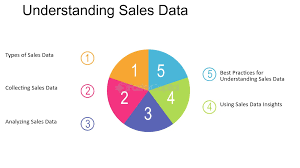
Harnessing Sales Data for Better Insights and Rapid Deal Closure Sales data is a critical asset for gaining insights and closing deals swiftly. With the ever-expanding data footprint, including customer response rates, leads in the pipeline, and quota attainment, tracking these metrics is essential. Ignoring them can be detrimental, as nearly all sales professionals recognize the importance of real-time data in meeting customer expectations, according to the Trends in Data and Analytics for Sales Report. However, concerns about data setup for generative AI and data accuracy persist. Sixty-three percent of sales professionals report that their company’s data isn’t optimized for AI, and only 42% are confident in their data’s accuracy. The demand for sales data has become a focal point for sales leaders and representatives, who increasingly rely on data to enhance customer engagement and productivity through trusted sources and AI integration. What is Sales Data? Sales data encompasses two main categories: external data, which includes information about prospects such as demographics, interests, behavior, and engagement; and internal sales data, including deal attributes and sales performance metrics. This data helps inform deal actions, assess progress toward sales targets or key performance indicators (KPIs), and supports tools like AI to enhance efficiency. Why is Sales Data Important? Sales data provides a measurable framework for all sales activities, enabling the setting of performance benchmarks and targets. It helps identify risks in the pipeline and highlights opportunities for upselling or fostering competition among sales reps. The data is also crucial for leveraging generative AI, which can automate tasks such as email drafting and sales pitch creation, provided the data is accurate and well-organized. Types of Sales Data Collecting and Utilizing Sales Data To effectively collect and utilize sales data, invest in a CRM system that serves as a centralized data repository with analytics capabilities. Automate data collection within the CRM, integrate data from other tools, and prioritize the security of sensitive information. Visualizing data through dashboards can help track progress toward business goals and make informed decisions. Real-Life Application: A Case Study A global consulting firm used sales data to enhance win rates and accelerate deal velocity. By integrating CRM analytics with data from various sources, the firm identified key deal attributes impacting success and adjusted strategies accordingly. The use of AI-driven “opportunity scores” further enabled the firm to monitor deal health and optimize resource allocation. Essential Tools for Harnessing Sales Data Turning Sales Data into Actionable Insights Regularly reviewing CRM-generated insights and adjusting strategies based on these insights is crucial for closing more deals and delivering consistent value to customers. By focusing on data-driven decision-making, sales teams can stay competitive and meet evolving customer needs. Like Related Posts Who is Salesforce? Who is Salesforce? Here is their story in their own words. From our inception, we’ve proudly embraced the identity of Read more Salesforce Marketing Cloud Transactional Emails Salesforce Marketing Cloud Transactional Emails are immediate, automated, non-promotional messages crucial to business operations and customer satisfaction, such as order Read more Salesforce Unites Einstein Analytics with Financial CRM Salesforce has unveiled a comprehensive analytics solution tailored for wealth managers, home office professionals, and retail bankers, merging its Financial Read more AI-Driven Propensity Scores AI plays a crucial role in propensity score estimation as it can discern underlying patterns between treatments and confounding variables Read more

Read More
Salesforce's Get Ready for AI Report

Salesforce’s Get Ready for AI Report

Welcome to the future of business – Get Ready for AI is for analytics and data leaders. The tools for those who are interested in positioning themselves for AI success. From strategy to governance, you’ll learn what’s top-of-mind with other thought leaders, and see what actions you can take to be a more effective leader in a rapidly changing technology and business environment.  Salesforce’s Get Ready for AI Report This insight introduces four topics that are essential for data leaders beginning their AI journey: Access the full report here. Salesforce’s Get Ready for AI Report Data is at the center of any AI initiative, and organizations that are leading the way are focused on ensuring their data sources are current, authoritative, and complete. From talent, to strategy, to infrastructure, organizations that are prioritizing data across every business unit are ready to ride the AI wave. Positioning themselves for a significant competitive advantage over their peers. Salesforce’s Get Ready for AI Report As with any digital transformation, success depends on an enterprise-wide commitment. Data leaders are in a unique position to help guide their organizations through this transition, and achieve the benefits that AI can deliver. Like1 Related Posts Who is Salesforce? Who is Salesforce? Here is their story in their own words. From our inception, we’ve proudly embraced the identity of Read more Salesforce Marketing Cloud Transactional Emails Salesforce Marketing Cloud Transactional Emails are immediate, automated, non-promotional messages crucial to business operations and customer satisfaction, such as order Read more Salesforce Unites Einstein Analytics with Financial CRM Salesforce has unveiled a comprehensive analytics solution tailored for wealth managers, home office professionals, and retail bankers, merging its Financial Read more AI-Driven Propensity Scores AI plays a crucial role in propensity score estimation as it can discern underlying patterns between treatments and confounding variables Read more

Read More
ai powered insights

AI Powered Insights

AI-Powered Marketing Insights: Transform Data Into Action Unlock the Full Potential of Your Data with AI In today’s fast-paced marketing world, raw data alone isn’t enough—you need AI-driven insights to uncover hidden opportunities, predict customer behavior, and optimize campaigns in real time. Why AI-Powered Insights Matter ✔ Predictive Analytics – Anticipate customer actions before they happen.✔ Real-Time Optimization – Adjust strategies on the fly for maximum impact.✔ Deeper Personalization – Tailor messaging based on AI-detected patterns. Key AI Tools in Salesforce Marketing Cloud 1. Einstein Marketing Insights (EMI) 🔍 Monitor KPIs with AI-Powered Bots 2. Einstein Copy Insights ✉ Optimize Email Subject Lines with NLP 3. Einstein Lead Scoring 🎯 Prioritize High-Value Leads 4. Einstein Messaging Insights ⚠ Detect Anomalies in Real Time How to Leverage AI for Smarter Marketing Step 1: Set Clear KPIs Step 2: Test & Optimize Continuously Step 3: Act on Real-Time Alerts Step 4: Align Sales & Marketing with AI Insights The Future of Marketing is AI-Driven Companies using AI-powered insights see:📈 Higher email open rates (up to 35% improvement)🎯 Better lead prioritization (2x more conversions)⏱ Faster decision-making (real-time adjustments vs. guesswork) Ready to supercharge your marketing? Start integrating Einstein AI today and turn data into your competitive edge. 🚀 Need help setting up AI-driven insights? Contact us today. Content updated August 2024. Like Related Posts Who is Salesforce? Who is Salesforce? Here is their story in their own words. From our inception, we’ve proudly embraced the identity of Read more Salesforce Marketing Cloud Transactional Emails Salesforce Marketing Cloud Transactional Emails are immediate, automated, non-promotional messages crucial to business operations and customer satisfaction, such as order Read more Salesforce Unites Einstein Analytics with Financial CRM Salesforce has unveiled a comprehensive analytics solution tailored for wealth managers, home office professionals, and retail bankers, merging its Financial Read more AI-Driven Propensity Scores AI plays a crucial role in propensity score estimation as it can discern underlying patterns between treatments and confounding variables Read more

Read More
Salesforce Pro Suite

Salesforce Pro Suite

Revolutionizing CRM: Introducing Salesforce Pro Suite In today’s dynamic business technology landscape, Salesforce has established itself as a leader in customer relationship management (CRM) solutions. The launch of Salesforce Pro Suite marks a significant milestone in their mission to empower businesses with cutting-edge tools designed to optimize operations, enhance customer engagement, and drive growth. This article explores the features, benefits, and potential of Salesforce Pro Suite, showcasing why it stands out as a transformative solution for businesses of all sizes. What is Salesforce Pro Suite? Salesforce Pro Suite is a comprehensive collection of integrated tools and services designed to augment the capabilities of Salesforce’s CRM platform. Tailored for modern businesses—from startups to large enterprises—it incorporates advanced functionalities such as artificial intelligence (AI), automation, and data analytics to boost productivity, foster collaboration, and facilitate informed decision-making. Unlock growth and deepen customer relationships with Pro Suite—the all-in-one CRM suite with marketing, sales, service, and commerce tools that scale with your business. Get the flexibility to automate tasks and customize your CRM to fit your specific needs with Pro Suite. Key Features of Salesforce Pro Suite Benefits of Salesforce Pro Suite Use Cases of Salesforce Pro Suite What Can You Do with Pro Suite? Conclusion Salesforce Pro Suite represents a significant advancement in CRM technology, offering a comprehensive suite of tools that cater to the diverse needs of modern businesses. By harnessing AI, automation, and advanced analytics, Pro Suite empowers organizations to optimize operations, enhance customer engagement, and make informed, data-driven decisions. Whether you’re a small startup or a large enterprise, Salesforce Pro Suite provides the scalability, flexibility, and security required to thrive in today’s competitive landscape. Like Related Posts Who is Salesforce? Who is Salesforce? Here is their story in their own words. From our inception, we’ve proudly embraced the identity of Read more Salesforce Marketing Cloud Transactional Emails Salesforce Marketing Cloud Transactional Emails are immediate, automated, non-promotional messages crucial to business operations and customer satisfaction, such as order Read more Salesforce Unites Einstein Analytics with Financial CRM Salesforce has unveiled a comprehensive analytics solution tailored for wealth managers, home office professionals, and retail bankers, merging its Financial Read more AI-Driven Propensity Scores AI plays a crucial role in propensity score estimation as it can discern underlying patterns between treatments and confounding variables Read more

Read More
Salesforce AI Introduces SFR-Judge

Steps to AI Implementation

“You don’t have to sell people on the potential. What you do have to sell people on is how do we go about it.”— Deep Srivastav, Data Leadership Collaborative Developing an Effective AI Strategy: A Seven-Step Framework A well-defined AI strategy is the foundation for success. It provides clarity on vision, purpose, and goals while ensuring teams understand the steps needed to get there. By adopting a data-driven approach with measurable objectives and key performance indicators (KPIs), businesses can foster seamless collaboration and maximize AI’s impact. Key Steps to Building a Successful AI Strategy 1. Define Clear Business Objectives Start by aligning AI initiatives with overarching business goals. Clearly outline what success looks like and identify areas where AI can drive the most value. 2. Assess Your Data Readiness Evaluate the quality, quantity, and accessibility of your data. Identify gaps that could impact AI performance and ensure you have a strong data foundation for accurate insights. 3. Identify and Prioritize AI Use Cases Determine which business processes can benefit from AI, balancing short-term wins with long-term strategic projects. Focus on use cases that align with your objectives and offer the highest return on investment. 4. Build a Multidisciplinary Team AI success requires expertise across multiple domains. Assemble a team that includes data scientists, business strategists, engineers, and ethics specialists to guide AI development and deployment. 5. Choose the Right AI Technologies Select AI tools and platforms that match your business needs. Consider scalability, security, integration capabilities, and ease of deployment when evaluating your technology stack. 6. Pilot with Proof-of-Concept Projects Start small by running controlled pilot projects to test feasibility, validate assumptions, and refine your approach. This minimizes risk while providing valuable insights before scaling AI across the organization. 7. Monitor, Evaluate, and Improve AI is not a one-time implementation—it requires continuous monitoring and refinement. Track performance, gather stakeholder feedback, and iterate based on data-driven insights to optimize outcomes. Key Considerations for AI Implementation ✅ Ethical AI & Bias MitigationEstablish guidelines to ensure AI operates fairly, transparently, and responsibly, addressing potential biases and privacy concerns. ✅ Change Management & Stakeholder Buy-inEffectively communicate AI’s role within the organization, ensuring employees understand its benefits and adapt to new workflows. ✅ Security & ComplianceImplement robust security measures to safeguard data and adhere to industry regulations, ensuring responsible AI adoption. By following these steps, organizations can create an AI strategy that not only drives innovation but also delivers measurable business impact while mitigating risks. The key to AI success isn’t just recognizing its potential—it’s about executing it the right way. Like Related Posts Who is Salesforce? Who is Salesforce? Here is their story in their own words. From our inception, we’ve proudly embraced the identity of Read more Salesforce Unites Einstein Analytics with Financial CRM Salesforce has unveiled a comprehensive analytics solution tailored for wealth managers, home office professionals, and retail bankers, merging its Financial Read more AI-Driven Propensity Scores AI plays a crucial role in propensity score estimation as it can discern underlying patterns between treatments and confounding variables Read more Tectonic’s Successful Salesforce Track Record Salesforce Technology Services Integrator – Tectonic has successfully delivered Salesforce in a variety of industries including Public Sector, Hospitality, Manufacturing, Read more

Read More
How to Implement AI for Business Transformation

How to Implement AI for Business Transformation

Harnessing the Power of AI for Business Transformation The age of artificial intelligence (AI) is here. How to Implement AI for Business Transformation? Once a niche technology confined to research labs and the realm of science fiction, AI has now become a mainstream force. Today, an estimated 35% of businesses are leveraging AI to enhance products, boost efficiency, and gain a competitive edge. However, for companies yet to begin their AI journey, the path to implementation can seem daunting. So how can organizations navigate the complexities of AI and unlock its potential to drive success? This comprehensive guide is designed to empower businesses to confidently adopt AI. We’ll break down what AI is, assess your organization’s readiness, help you develop a robust AI strategy, and explore how to implement and integrate AI across operations. Ultimately, this insight will show you how to embrace AI for continuous innovation, helping automate tasks, uncover insights, and future-proof your business. AI Era Demands an Intelligent Data Infrastructure AI consulting services and digital transformation partners like Tectonic underscore the technology’s immense value, helping organizations evaluate, implement, and scale AI initiatives. However, knowing where to start and who to trust can be challenging. This guide will provide best practices for planning and executing AI projects, helping you make informed decisions when selecting solutions and partners. By the end, your organization will be equipped with the knowledge and confidence needed to make AI a powerful competitive advantage. Understanding the AI Landscape Before diving into AI implementation, it’s important to understand what artificial intelligence is and the wide array of applications it offers. What is Artificial Intelligence? Artificial intelligence (AI) refers to software and machines designed to perform tasks that typically require human intelligence—such as visual perception, speech recognition, decision-making, and language translation. AI is already deeply integrated into many everyday products and services, including: Machine Learning Basics At the core of most AI systems is machine learning (ML), which involves training algorithms on vast datasets, enabling them to learn from examples without being explicitly programmed for every scenario. There are three main types of machine learning: Beyond ML, fields like natural language processing (NLP) focus on understanding human language, while computer vision analyzes visual content such as images and video. Real-World AI Applications Understanding the fundamentals of AI helps organizations align their needs with its capabilities. Common business use cases for AI include: Armed with this knowledge, businesses can better evaluate how AI fits into their goals and operations. Developing a Comprehensive AI Strategy Once you understand the AI landscape, the next step is developing a strategic plan to guide implementation. Establishing an AI Vision and Objectives AI adoption must align with clear financial and operational goals. Leadership teams should identify: Aligning stakeholders and executive leaders around specific use cases will drive urgency, investment, and commitment. AI Ethics and Governance AI adoption also requires guidelines for ethical usage, transparency, and accountability. Organizations should consider: Establishing these frameworks early ensures responsible and transparent AI usage. Resourcing an AI Program AI implementation requires the right talent and resources. Budget considerations should include: A Phased AI Adoption Roadmap Rather than attempting to scale AI all at once, organizations should adopt a phased approach: This roadmap balances short-term impact with long-term scalability. Choosing the Right AI Implementation Approach With your strategy in place, the next decision is how to implement AI. Three primary approaches are: The choice depends on your organization’s internal capabilities, desired level of customization, and timeline. Integrating AI into Your Operations Successful AI implementation requires careful planning and integration with existing operations. Develop an Integration Plan Consider how AI will interact with existing systems and workflows: Address Security and Privacy Ensure that AI systems comply with data privacy regulations and security protocols, especially when handling sensitive information. Drive Adoption Through Training Help staff understand how AI will augment their roles by providing training on how the algorithms work and how to interact with AI systems effectively. Monitor for Model Decay Implement processes to monitor and retrain models as needed to ensure continued performance and reliability. Embracing AI for Continuous Improvement AI should be viewed as an ongoing investment, driving continuous improvement across the organization. Encourage a Data-Driven Culture Empower teams to identify new AI use cases and experiment with AI-driven solutions. Provide the tools and frameworks to facilitate this culture of innovation. Foster Responsible AI Ensure that AI systems are transparent, accountable, and designed to augment human decision-making responsibly. Commit to Reskilling As AI capabilities evolve, continually upskill employees to ensure your workforce remains at the forefront of technological advancements. Unlocking the Future of AI The potential of AI to revolutionize businesses is clear. However, achieving success requires more than just technical capabilities. It demands thoughtful planning, strategic alignment, and a commitment to continuous improvement. By following this guide, your organization can confidently implement AI to unlock powerful data-driven insights, automate tasks, and achieve lasting competitive advantage. The future of AI is full of possibilities—are you ready to seize them? Tectonic is ready to help. How to Implement AI for Business Transformation Like Related Posts Who is Salesforce? Who is Salesforce? Here is their story in their own words. From our inception, we’ve proudly embraced the identity of Read more Salesforce Unites Einstein Analytics with Financial CRM Salesforce has unveiled a comprehensive analytics solution tailored for wealth managers, home office professionals, and retail bankers, merging its Financial Read more AI-Driven Propensity Scores AI plays a crucial role in propensity score estimation as it can discern underlying patterns between treatments and confounding variables Read more Tectonic’s Successful Salesforce Track Record Salesforce Technology Services Integrator – Tectonic has successfully delivered Salesforce in a variety of industries including Public Sector, Hospitality, Manufacturing, Read more

Read More
Sales Forecast Report in Power BI

Sales Forecast Report in Power BI

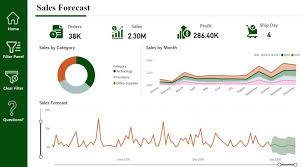
To predict future sales, a time series forecasting model was created in Power BI. The model used past sales data to predict sales for the next 15 days. Visuals were included to compare forecasts with actual sales, and the results closely aligned with historical trends.

Read More

Bridging the Gap Between Sales and Marketing

Bridging the Gap Between Sales and Marketing with Salesforce Implementation Sales and marketing teams often struggle to align their goals and strategies, leading to inefficiencies and missed revenue opportunities. A powerful way to overcome this challenge is by leveraging Salesforce implementation services, which connect these departments, enhance collaboration, and drive business success. Seamless Communication for Better Collaboration Effective communication is essential for synchronizing sales and marketing efforts. Salesforce serves as a unified platform, allowing teams to share information, access real-time data, and track progress effortlessly. This streamlined communication minimizes confusion, keeps objectives aligned, and boosts overall productivity. By working within a shared system, sales and marketing professionals can co-develop marketing initiatives, promotions, and sales plans, fostering teamwork and eliminating departmental silos. Salesforce’s collaborative tools ensure that teams stay connected and work toward common goals efficiently. Data-Driven Decision-Making In today’s business landscape, data is a critical driver of success. Salesforce equips organizations with advanced analytics tools, providing insights into customer behavior and market trends. These data-driven capabilities empower sales and marketing teams to: With Salesforce, businesses can adopt a proactive approach rather than reacting to market shifts, ensuring sustained growth and competitiveness. Enhancing Customer Experience Delivering a seamless customer journey is key to standing out in a competitive market. When sales and marketing teams align through Salesforce, they can: ✅ Customize marketing campaigns using sales-driven insights, leading to higher engagement.✅ Personalize sales interactions by leveraging marketing data to understand customer needs.✅ Consolidate customer information for a 360-degree view, ensuring consistent, tailored interactions across all touchpoints. This synchronization leads to higher customer satisfaction, improved retention, and increased revenue. Optimizing Lead Management Efficient lead handling is crucial for driving conversions. Salesforce streamlines this process by enabling: With Salesforce’s automation tools, teams can work together strategically to convert prospects into loyal customers. Performance Tracking & Accountability Measuring performance is essential for continuous improvement. Salesforce’s robust reporting tools empower teams to: 📊 Monitor KPIs, such as conversion rates and campaign performance.📊 Access real-time insights via customizable dashboards.📊 Make data-backed decisions to refine sales and marketing strategies. By fostering transparency and accountability, these insights drive teams to optimize performance and meet business objectives effectively. The Power of Salesforce for Business Growth Salesforce implementation is a game-changer for aligning sales and marketing teams, enabling: ✔ Enhanced communication and collaboration✔ Smarter, data-driven decision-making✔ Stronger customer relationships✔ Streamlined lead management✔ Comprehensive performance tracking By leveraging Salesforce’s powerful capabilities, businesses can break down silos, enhance efficiency, and drive sustained growth. Integrating Salesforce isn’t just about technology—it’s about creating a collaborative, high-performing environment that propels organizations toward success. Like Related Posts Who is Salesforce? Who is Salesforce? Here is their story in their own words. From our inception, we’ve proudly embraced the identity of Read more Salesforce Marketing Cloud Transactional Emails Salesforce Marketing Cloud Transactional Emails are immediate, automated, non-promotional messages crucial to business operations and customer satisfaction, such as order Read more Salesforce Unites Einstein Analytics with Financial CRM Salesforce has unveiled a comprehensive analytics solution tailored for wealth managers, home office professionals, and retail bankers, merging its Financial Read more AI-Driven Propensity Scores AI plays a crucial role in propensity score estimation as it can discern underlying patterns between treatments and confounding variables Read more

Read More
Salesforce Success Story

Case Study: Large Restaurant Entity-Salesforce Sales/Service/Experience Clouds

An American chain store of bakery-cafe fast food restaurants with over 2,000 locations, all of which operate in 48 states, the District of Columbia and Canada. The restaurant offers a sit-down restaurants (some with drive-throughs) where customers can enjoy a variety of freshly made sandwiches on your choice of bread, accompanied by soup or salad. Salesforce Case Study: Transforming  a Large Restaurant Entity by leveraging Salesforce. Sales Cloud Service Cloud Experience Cloud Implementation PROBLEM SOLUTION RESULTS . Like2 Related Posts Who is Salesforce? Who is Salesforce? Here is their story in their own words. From our inception, we’ve proudly embraced the identity of Read more Salesforce Marketing Cloud Transactional Emails Salesforce Marketing Cloud Transactional Emails are immediate, automated, non-promotional messages crucial to business operations and customer satisfaction, such as order Read more Salesforce Unites Einstein Analytics with Financial CRM Salesforce has unveiled a comprehensive analytics solution tailored for wealth managers, home office professionals, and retail bankers, merging its Financial Read more AI-Driven Propensity Scores AI plays a crucial role in propensity score estimation as it can discern underlying patterns between treatments and confounding variables Read more

Read More
Big Data and Data Visualization

Big Data and Data Visualization Explained

Data Visualization: Turning Complex Data into Clear Insights Data visualization is the practice of converting information into visual formats, such as maps or graphs, to make data more accessible and understandable. The primary purpose of data visualization is to highlight patterns, trends, and outliers within large data sets, allowing users to quickly glean insights. The term is often used interchangeably with information graphics, information visualization, and statistical graphics. The Role of Data Visualization in Data Science Data visualization is a crucial step in the data science process. After data is collected, processed, and modeled, it must be visualized to draw meaningful conclusions. It’s also a key component of data presentation architecture, a discipline focused on efficiently identifying, manipulating, formatting, and delivering data. Importance Across Professions Data visualization is essential across various fields. Teachers use it to display student performance, computer scientists to explore AI advancements, and executives to communicate information to stakeholders. In big data projects, visualization tools are vital for quickly summarizing large datasets, helping businesses make informed decisions. In advanced analytics, visualization is equally important. Data scientists use it to monitor and ensure the accuracy of predictive models and machine learning algorithms. Visual representations of complex algorithms are often easier to interpret than numerical outputs. Historical Context of Data Visualization Data visualization has evolved significantly over the centuries, long before the advent of modern technology. Today, its importance is more pronounced, as it enables quick and effective communication of information in a universally understandable manner. Why Data Visualization Matters Data visualization provides a straightforward way to communicate information, regardless of the viewer’s expertise. This universality makes it easier for employees to make decisions based on visual insights. Visualization offers numerous benefits for businesses, including: Advantages of Data Visualization Key benefits include: Challenges and Disadvantages Despite its advantages, data visualization has some challenges: Data Visualization in the Era of Big Data With the rise of big data, visualization has become more critical. Companies leverage machine learning to analyze vast amounts of data, and visualization tools help present this data in a comprehensible way. Big data visualization often employs advanced techniques, such as heat maps and fever charts, beyond the standard pie charts and graphs. However, challenges remain, including: Examples of Data Visualization Techniques Early computer-based data visualizations often relied on Microsoft Excel to create tables, bar charts, or pie charts. Today, more advanced techniques include: Common Use Cases for Data Visualization Data visualization is widely used across various industries, including: The Science Behind Data Visualization The effectiveness of data visualization is rooted in how humans process information. Daniel Kahneman and Amos Tversky’s research identified two methods of information processing: Visualization Tools and Vendors Data visualization tools are widely used for business intelligence reporting. These tools generate interactive dashboards that track performance across key metrics. Users can manipulate these visualizations to explore data in greater depth, and indicators alert them to data updates or important events. Businesses might use visualization of data software to monitor marketing campaigns or track KPIs. As tools evolve, they increasingly serve as front ends for sophisticated big data environments, assisting data engineers and scientists in exploratory analysis. Popular data visualization tools include Domo, Klipfolio, Looker, Microsoft Power BI, Qlik Sense, Tableau, and Zoho Analytics. While Microsoft Excel remains widely used, newer tools offer more advanced capabilities. Data visualization is a vital subset of the broader field of data analytics, offering powerful tools for understanding and leveraging business data across all sectors. Like Related Posts Who is Salesforce? Who is Salesforce? Here is their story in their own words. From our inception, we’ve proudly embraced the identity of Read more Salesforce Marketing Cloud Transactional Emails Salesforce Marketing Cloud Transactional Emails are immediate, automated, non-promotional messages crucial to business operations and customer satisfaction, such as order Read more Salesforce Unites Einstein Analytics with Financial CRM Salesforce has unveiled a comprehensive analytics solution tailored for wealth managers, home office professionals, and retail bankers, merging its Financial Read more AI-Driven Propensity Scores AI plays a crucial role in propensity score estimation as it can discern underlying patterns between treatments and confounding variables Read more

Read More
gettectonic.com