Testing Archives - gettectonic.com - Page 19
Salesforce Queues

Salesforce Queues Explained

A Comprehensive Guide to Salesforce Queues Salesforce Queues play a pivotal role in streamlining the prioritization, distribution, and assignment of records among teams with shared workloads. This guide provides step-by-step instructions for setting up your initial queue. For utilizing queues for distribution. Read on for Salesforce Queues. Understanding Salesforce Queues Role Salesforce Queues enable users to prioritize, distribute, and assign records, making them ideal for teams sharing workloads. By bringing together groups of users, queues effectively manage shared work and ensure visibility into pending tasks, even during team members’ absences. Records are held in queues until a team member claims ownership, either individually or on behalf of another user. This is a powerful way that Salesforce prevents leads and cases from falling through the cracks. Key Features of a Salesforce Queue Components of a Salesforce Queue Salesforce Queues consist of several elements to ensure seamless operation: Adding Salesforce Records to Queues Records are added to queues by updating the record owner, utilizing automatic assignment rules, or through manual updates. These assignment rules, whether automatic or manual, define criteria for routing records based on their attributes. Queues vs. Groups in Salesforce Salesforce Queues and Groups serve distinct purposes: Creating a Salesforce Queue: Lead Queue Example Here’s how to create a lead queue for EMEA Leads: Testing and Reporting with Salesforce Queues Expanding Usage to Various Teams Salesforce Queues can manage various record types, including cases, leads, tasks, contact requests, orders, service contracts, knowledge articles, and custom objects. Different teams can benefit from queues for high-priority cases, new projects, webinar follow-up tasks, and more. Limitations and Summary While Salesforce Queues offer flexibility with multiple queues, it’s essential to avoid overwhelming users. They provide collaborative benefits and versatile applications across diverse teams, making them a valuable tool for managing shared workloads and enhancing productivity. Like Related Posts Who is Salesforce? Who is Salesforce? Here is their story in their own words. From our inception, we’ve proudly embraced the identity of Read more Salesforce Marketing Cloud Transactional Emails Salesforce Marketing Cloud Transactional Emails are immediate, automated, non-promotional messages crucial to business operations and customer satisfaction, such as order Read more Salesforce Unites Einstein Analytics with Financial CRM Salesforce has unveiled a comprehensive analytics solution tailored for wealth managers, home office professionals, and retail bankers, merging its Financial Read more AI-Driven Propensity Scores AI plays a crucial role in propensity score estimation as it can discern underlying patterns between treatments and confounding variables Read more

Read More
What is Omni-Channel Salesforce

What is Omni-Channel Salesforce?

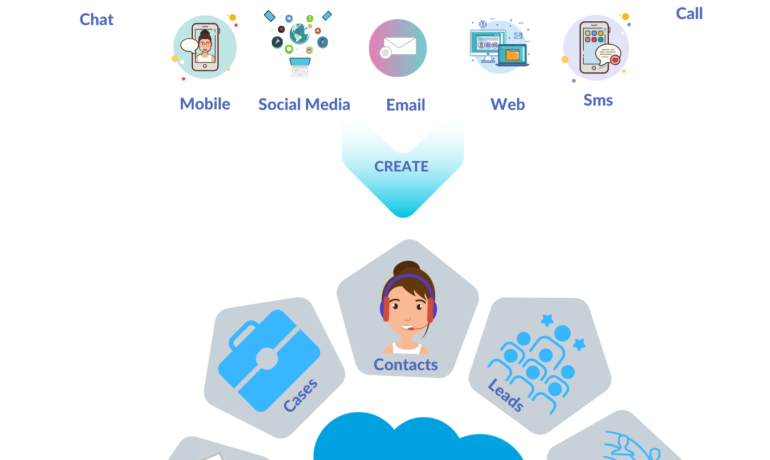
What is Omni-Channel Salesforce? Omni-Channel is a Salesforce feature designed for Customer Service and Console applications that automates the routing of various work items, such as Leads and Cases, to agents. It ensures that work items are assigned to agents based on their capacity, priority, skill set, and other criteria. Features of Omni-Channel Benefits Omni-Channel in Salesforce Enhanced Omni-Channel Setting Up and Using Omni-Channel Key Differences: Multichannel vs. Omni-Channel Route Work with Omni-Channel Omni-Channel is a flexible, customizable feature, and you can configure it declaratively—that is, without writing code. Use Omni-Channel to manage the priority of work items, which makes it a cinch to route important work items to agents quickly. Manage your agents’ capacity to take on work items so that they’re given only the number of assignments that they can handle. You can also define which agents can work on different types of assignments. For example, you can create one group of agents to respond to leads and sales inquiries, and another group that helps customers with support questions. Omni-Channel routes work requests to the most available and qualified support agents in the app. You can also provide real-time operational intelligence to support supervisors with Omni Supervisor. Agents no longer have to pick and choose work assignments manually from a queue, which saves everyone in your call center time, effort, and brainpower. Because it’s easier for agents to work on their assignments, they can assist your customers faster and more effectively and close assignments more quickly. Routing logic is applied when work is assigned to an owner. If field values on the work item are changed after the item is routed, the routing logic isn’t reapplied. Omni-Channel is supported in both Lightning Experience (recommended) and Salesforce Classic. You can run Omni-Channel in both standard and console apps. Route Work with Omni-Channel Use Omni-Channel to route work items to queues, agents, skills, and even Einstein Bots (on supported channels). Depending on your business needs, you can use different ways to route work, including Omni-Channel flows. Omni-Channel routes work based on the defined routing logic. When an agent is assigned a work item, they can accept it to begin working on it or decline it. When a work item is declined, Omni-Channel releases the agent’s capacity consumed by the work item. But the declined work item remains owned by the declining agent until the work is routed again. If the agent declines a work item or doesn’t accept the work item in the specified time period, Omni-Channel doesn’t try to route that work item to that agent again. If an agent accepts the work, they can transfer the work to another agent. NOTE We recommend using Enhanced Omni-Channel. Enhanced Omni-Channel features better and more extensive experiences for agents and supervisors than Standard Omni-Channel, and future Omni-Channel features are developed on Enhanced Omni-Channel. See Compare Standard and Enhanced Omni-Channel and Enable Omni-Channel. Set Up Omni-Channel Set up Omni-Channel to route any type of incoming work item to the most qualified, available support agents in your call center. Omni-Channel integrates seamlessly into both console and standard apps. NOTE We recommend using Enhanced Omni-Channel. Enhanced Omni-Channel features better and more extensive experiences for agents and supervisors than Standard Omni-Channel, and future Omni-Channel features are developed on Enhanced Omni-Channel. See Compare Standard and Enhanced Omni-Channel and Enable Omni-Channel. Test Your Omni-Channel Implementation Now that you’ve got Omni-Channel set up and enabled, test your implementation to make sure it’s working correctly. To test your implementation, route a work item to yourself. Sit back and relax. You’ll see an incoming request notification in Omni-Channel within a few seconds. Manage Agents, Queues, and Skills with Omni Supervisor Manage agents, queues, and skills in Omni Supervisor. Get to Know the Omni Supervisor TabsSupervisors can check the health of their call center in real time using the Agents, Queues Backlog, Assigned Work, and Skills Backlog tabs in Omni Supervisor. These tabs let supervisors see which work items are open and active, who’s assigned to what, and other details such as open capacities and average wait times for customers. Provide Customer Support for Real-Time Channels with Omni-Channel Service customers using their preferred means of real-time communication, including phone, messaging, or chat in standard and enhanced channels. You can accept and manage these types of support requests in Omni-Channel. If needed, while helping a customer, you can reach out to your supervisor to get support. Use the Omni-Channel Component to Work with CustomersTo begin receiving inbound requests from customers or to make outbound contacts, log in to the Omni-Channel component and update your status to indicate that you’re available. If you don’t see the Omni-Channel component in your app, check with your admin. Use the Omni-Channel Component to Work with Customers To begin receiving inbound requests from customers or to make outbound contacts, log in to the Omni-Channel component and update your status to indicate that you’re available. If you don’t see the Omni-Channel component in your app, check with your admin. When you mark your status as available in Omni-Channel, you begin receiving work requests, like phone calls. Work items assigned to you appear in Omni-Channel until you complete, transfer, or decline them. TIP By default, phone calls are taken through the same speakers and microphone your system device uses. To take calls through different audio devices, click the Settings icon on the Omni-Channel component and choose your preferred devices under Input and Output. The devices you choose are only set only for your current browser. For example, if you choose a device for Google Chrome, that device isn’t set for Mozilla Firefox. This feature isn’t available in Apple Safari browser. If you set up a service channel to use the tab-based capacity model, Omni-Channel determines agent capacity based on the open tabs. Each tab is a session for a specific work item. To close the work item and remove it from your Omni-Channel instance, close the tab for that item. The tab-based capacity model releases an agent’s capacity

Read More

Heatmaps for Email Explained

Unlocking the Power of Heatmaps for Email: A Game-Changer for Marketers In the ever-evolving world of digital marketing, understanding how your audience interacts with your emails is crucial. One of the most powerful tools for gaining these insights is the email heatmap. Heatmaps provide a visual representation of how recipients engage with your email content, helping you optimize your campaigns for better performance. In this article, we’ll explore what email heatmaps are, how they work, and why they’re a must-have tool for marketers. What Are Email Heatmaps? An email heatmap is a visual tool that uses color gradients to show how recipients interact with your email. It highlights areas of the email that receive the most attention (e.g., clicks, hover time) and those that are ignored. The “hot” areas (usually red or orange) indicate high engagement, while “cold” areas (blue or green) show low engagement. Heatmaps are generated using data from email opens, clicks, and mouse movements, providing actionable insights into user behavior. How Do Email Heatmaps Work? Email heatmaps are created by tracking recipient interactions with your email. Here’s how they work: Why Are Email Heatmaps Important? Email heatmaps offer several benefits for marketers: 1. Understand User Behavior 2. Optimize Email Design 3. Improve Click-Through Rates (CTR) 4. Enhance Personalization 5. Boost Conversions Key Insights You Can Gain from Email Heatmaps 1. Most-Engaged Sections 2. Scroll Depth 3. CTA Performance 4. Image Engagement 5. Mobile vs. Desktop Behavior How to Use Heatmaps to Improve Your Email Campaigns 1. Place Key Content Above the Fold 2. Optimize CTA Placement 3. Simplify Email Layouts 4. Test Subject Lines and Preheaders 5. Personalize Content Tools for Creating Email Heatmaps Several tools can help you generate and analyze email heatmaps: Best Practices for Using Email Heatmaps The Future of Email Heatmaps As AI and machine learning continue to advance, email heatmaps will become even more sophisticated. Future developments may include: Conclusion Email heatmaps are a powerful tool for understanding and optimizing recipient engagement. By leveraging heatmap insights, marketers can create more effective email campaigns, improve user experiences, and drive better results. Whether you’re a seasoned marketer or just starting out, incorporating heatmaps into your email strategy is a smart move that can take your campaigns to the next level. Start using email heatmaps today and unlock the full potential of your email marketing efforts! Content updated March 2025. Like Related Posts Who is Salesforce? Who is Salesforce? Here is their story in their own words. From our inception, we’ve proudly embraced the identity of Read more Salesforce Marketing Cloud Transactional Emails Salesforce Marketing Cloud Transactional Emails are immediate, automated, non-promotional messages crucial to business operations and customer satisfaction, such as order Read more Salesforce Unites Einstein Analytics with Financial CRM Salesforce has unveiled a comprehensive analytics solution tailored for wealth managers, home office professionals, and retail bankers, merging its Financial Read more AI-Driven Propensity Scores AI plays a crucial role in propensity score estimation as it can discern underlying patterns between treatments and confounding variables Read more

Read More
Salesforce Certifications

Writing Apex Code

Apex is a strongly typed, object-oriented programming language. Apex allows developers to execute flow and transaction control statements on the Lightning platform server in conjunction with calls to the Lightning Platform​ API. Writing Apex code makes valuable Salesforce tools available. Using syntax that looks like Java and acts like database stored procedures, Apex enables developers to add business logic to most system events, including button clicks, related record updates, and Visualforce pages. Apex code can be initiated by Web service requests and from triggers on objects. Writing Apex Code Apex is more similar to Java than javascript. There are different types of tools are available to write the code in Apex: How do you open the Apex code? Click Debug | Open Execute Anonymous Window to open the Enter Apex Code window and to open the code editor in a new browser window. To automatically open the resulting debug log when execution is complete, select Open Log. Note You can’t use the keyword static in anonymous code. The Developer Console There are several development environments for developing Apex code. The Developer Console and the Salesforce extensions for Visual Studio Code allow you to write, test, and debug your Apex code. The code editor in the user interface enables only writing code and doesn’t support debugging. The Developer Console is an integrated development environment with a collection of tools you can use to create, debug, and test applications in your Salesforce organization. The Developer Console supports these tasks: Like Related Posts Who is Salesforce? Who is Salesforce? Here is their story in their own words. From our inception, we’ve proudly embraced the identity of Read more Salesforce Marketing Cloud Transactional Emails Salesforce Marketing Cloud Transactional Emails are immediate, automated, non-promotional messages crucial to business operations and customer satisfaction, such as order Read more Salesforce Unites Einstein Analytics with Financial CRM Salesforce has unveiled a comprehensive analytics solution tailored for wealth managers, home office professionals, and retail bankers, merging its Financial Read more AI-Driven Propensity Scores AI plays a crucial role in propensity score estimation as it can discern underlying patterns between treatments and confounding variables Read more

Read More

Salesforce Integration: Enhancing Your CRM Capabilities

Salesforce is the world’s leading CRM platform, empowering businesses to streamline operations, enhance customer relationships, and drive growth. However, to maximize its potential, integrating Salesforce with third-party applications is essential. By connecting Salesforce with various external tools—such as MailChimp, QuickBooks, WhatsApp, and LinkedIn—organizations can improve efficiency, automate workflows, and unify data across departments. But how can businesses successfully integrate these applications into their Salesforce environment, and what challenges might they face? Let’s explore. What is Salesforce Integration? Salesforce integration refers to the process of connecting Salesforce with third-party applications to facilitate seamless data flow and process automation. These integrations leverage APIs to establish communication between systems, ensuring a unified experience across different business functions such as HR, finance, marketing, and sales. Why is Salesforce Integration Important? Integrating Salesforce with other systems offers several advantages, including: Common Salesforce Integrations and Use Cases Salesforce can be integrated with a variety of platforms to enhance functionality. Some key use cases include: Challenges in Salesforce App Integration While Salesforce integrations bring numerous benefits, they also come with challenges: Tools for Successful Salesforce Integration To facilitate smooth integrations, businesses can leverage the following tools: 1. Salesforce Native Tools These tools enable direct integrations with Salesforce products. Examples include: 2. App-Native Tools Many external applications offer built-in integrations with Salesforce, such as: 3. Third-Party Middleware For more complex integrations, middleware platforms help bridge gaps between systems: Best Practices for Salesforce Integration To ensure a smooth and successful integration, businesses should follow these best practices: Final Thoughts: Should You Integrate Salesforce with Third-Party Apps? Absolutely. Integrating Salesforce with external applications enhances its capabilities, drives efficiency, and unlocks new business opportunities. However, it’s crucial to implement these integrations through a certified Salesforce partner to minimize risks and ensure seamless execution. By following best practices and using the right tools, businesses can maximize their CRM investment and drive long-term success. FAQs Have more questions about Salesforce integration? Get in touch with our certified Salesforce consultants to explore the best integration solutions for your business. Like Related Posts Who is Salesforce? Who is Salesforce? Here is their story in their own words. From our inception, we’ve proudly embraced the identity of Read more Salesforce Marketing Cloud Transactional Emails Salesforce Marketing Cloud Transactional Emails are immediate, automated, non-promotional messages crucial to business operations and customer satisfaction, such as order Read more Salesforce Unites Einstein Analytics with Financial CRM Salesforce has unveiled a comprehensive analytics solution tailored for wealth managers, home office professionals, and retail bankers, merging its Financial Read more AI-Driven Propensity Scores AI plays a crucial role in propensity score estimation as it can discern underlying patterns between treatments and confounding variables Read more

Read More
Headless Commerce is the Future of E-Commerce

Headless Commerce is the Future of E-Commerce

Why Headless Commerce is the Future of E-Commerce You’ve likely heard it said time and again: the future of e-commerce is headless. But why is this prediction so widespread? Why are 35% of businesses expected to adopt a headless architecture by 2025? high-code headless solutions and commerce-oriented analytics platforms come into play. Headless commerce is the future of e-commerce. Headless commerce refers to a system where the frontend of your website—encompassing the storefront and user experience—is decoupled from the backend, which handles data, functionality, and business logic. Recent statistics reveal that businesses adopting headless commerce have reduced time to market by 50%, increased site performance by 30%, and decreased the time spent on upgrades and bug fixes by 34%. Headless Commerce – Future of E-Commerce There are four key ways in which headless commerce enhances performance: 1. Personalization at Scale Headless architecture centralizes customer data and separates content creation from delivery, enabling businesses to personalize content and experiences more effectively across multiple touchpoints. 2. Greater Control Over Experiences Decoupling the frontend from the backend gives businesses full control over website functionality, performance, SEO, design, and layout. Changes can be made to the frontend without impacting backend systems, allowing for greater flexibility and responsiveness. 3. Enhanced Performance and Flexibility With smaller, more focused frontends, data loading becomes more efficient, resulting in faster site performance and optimized media. Headless architecture also allows for seamless integration with third-party systems, enabling businesses to adapt and evolve as needed. 4. Fostering a Culture of Experimentation The flexibility and control offered by headless commerce equip teams with the tools to experiment regularly and rigorously. This fosters a culture of experimentation, which can drive continuous improvement and innovation. While the first three benefits of headless commerce are valuable on their own, it’s the ability to support a culture of experimentation that truly sets headless apart. When these advantages come together, businesses can achieve a cumulative impact that significantly enhances their performance. Let’s explore how an experimental mindset can unlock the full potential of headless commerce. Nurturing a Culture of Experimentation with Headless Commerce The agility and efficiency of a headless approach empower e-commerce brands to build a culture centered on testing and optimizing customer experiences. However, experimentation inherently involves risk. Any new experience introduced to your website will affect its performance and user experience—ideally for the better, but there are no guarantees. The challenge, then, is how to mitigate those risks effectively. The good news is that a culture of experimentation and calculated risk-taking provides brands with continuous data-gathering opportunities, leading to better decision-making and improved outcomes. The key is ensuring that your business has complete data visibility. To minimize risks during testing and address potential issues quickly, you need full visibility into how every change impacts your site and customer experience. This allows your team to identify what’s working, troubleshoot what isn’t, and make informed decisions based on real-time insights. Rapid deployment of new experiences can then become a true competitive advantage, enabling you to leverage data-backed insights to enhance your digital offerings. Experimenting Safely with Headless Commerce To illustrate this, imagine a scenario where you’re A/B testing on your headless site. Suppose you discover that your checkout abandonment rate is higher than the industry average, and you hypothesize that a lengthy checkout process is to blame. You decide to run an A/B test comparing two versions of the checkout flow to see if a shorter process yields better results. However, deploying this test introduces an unexpected error in one variation, skewing your results. Without visibility into site errors, you might not even realize the issue, leading to confusing or inconclusive test outcomes. This is where high-code headless solutions and commerce-oriented analytics platforms come into play. They provide the necessary visibility and monitoring to support a culture of experimentation while minimizing risks. A platform like Noibu, a performance and error monitoring solution designed specifically for e-commerce, can help you navigate these challenges with agility. By continuously monitoring your site, Noibu detects any issues that arise during changes, alerts your team, and provides detailed technical insights to address the root cause quickly. This ensures that your experiments remain unaffected, allowing you to test freely without fearing conversion drops or revenue loss. This type of software acts as a safety net, promoting extensive experimentation by monitoring your site for potential errors and encouraging calculated risk-taking. Case Study: Ribble Cycles and the Benefits of Headless Commerce Ribble Cycles transitioned to a headless architecture and experienced greater freedom and control. Matthew Lawson, Chief Digital Officer, shares, “Choosing a headless/composable architecture for Ribble Cycles has given us unparalleled flexibility and control… [allowing] us to decouple the front end from backend services, enabling rapid iteration and unique, customer-centric features.” To mitigate the risks associated with site changes, Ribble Cycles turned to Noibu, an error-detection platform that allowed them to experiment and test solutions with reduced risk. “While headless brings risks, such as unforeseen impacts from changes, we mitigate these with advanced analytics and monitoring tools like Noibu,” Lawson notes. “These tools help us detect and resolve issues in real time, reinforcing a positive risk-taking culture and driving better results for our brand and customers.” With complete visibility into the impact of their experiments, Lawson’s team is now in control and reaping the rewards of their headless commerce strategy. “Best decision we have made,” adds Lawson. “We have a roadmap to take it even further.” Like Related Posts Who is Salesforce? Who is Salesforce? Here is their story in their own words. From our inception, we’ve proudly embraced the identity of Read more Salesforce Marketing Cloud Transactional Emails Salesforce Marketing Cloud Transactional Emails are immediate, automated, non-promotional messages crucial to business operations and customer satisfaction, such as order Read more Salesforce Unites Einstein Analytics with Financial CRM Salesforce has unveiled a comprehensive analytics solution tailored for wealth managers, home office professionals, and retail bankers, merging its Financial Read more AI-Driven Propensity Scores AI plays a crucial role in propensity score estimation as

Read More
Salesforce Omni-Channel

Salesforce Omni-Channel

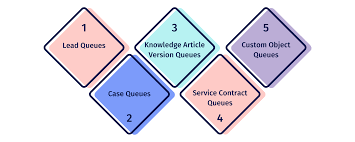
Omni-Channel in Salesforce is a feature embedded within the Customer Service and Console, facilitating the automated routing of various work items like Leads and Cases to agents. This feature intelligently distributes work items based on agent capacity, priority, skillset, and other factors. The multichannel approach emphasizes customer engagement, whereas the omnichannel strategy prioritizes customer experience. Multichannel endeavors to engage customers across various channels to enhance interaction, a fundamental metric in this approach. Routing Work with Omni-Channel: Omni-Channel is a versatile, customizable feature that can be configured without coding. It enables the management of work item priorities, ensuring prompt assignment of critical tasks to agents. Agents’ workload can be optimized to match their capacity, ensuring they handle an appropriate number of assignments. Moreover, agents can be designated for specific types of tasks, streamlining workflows. Omni-Channel routes work requests to available and qualified support agents within the application. Real-time operational insights are provided to supervisors through Omni Supervisor, eliminating the need for manual assignment selection. This efficiency saves time, effort, and enhances productivity, enabling agents to assist customers promptly and effectively. Important Note: Routing logic is applied upon work item assignment, and subsequent changes to field values do not trigger reapplication of routing logic. Omni-Channel is compatible with both Lightning Experience (preferred) and Salesforce Classic, functioning seamlessly in standard and console apps. Enhanced Omni-Channel is recommended over Standard Omni-Channel due to its superior features and ongoing development focus. It offers enhanced experiences for agents and supervisors, aligning with future Omni-Channel advancements. Set Up and Testing: Utilize Omni-Channel to route work items to queues, agents, skills, and Einstein Bots (on supported channels). Configuration options include Omni-Channel flows, catering to diverse business needs. Ensure successful implementation by setting up Omni-Channel to route incoming work items to qualified and available support agents seamlessly across console and standard apps. Subsequently, test the implementation to verify its functionality. Agent and Supervisor Management: Leverage Omni Supervisor to manage agents, queues, and skills efficiently. This tool provides comprehensive oversight, optimizing resource allocation and performance tracking. Customer Support and Benefits: Deliver real-time customer support across preferred communication channels, such as phone, messaging, or chat. Omni-Channel enhances customer insights, satisfaction, agent productivity, and operational cost-effectiveness, differentiating your business in the competitive landscape. Limitation Awareness: In instances where Omni-Channel agents encounter “LIMIT_EXCEEDED” errors, it may indicate queue capacity constraints. Monitoring queue load and managing work item volume is essential to prevent disruptions in routing and ensure uninterrupted service delivery. Like Related Posts Who is Salesforce? Who is Salesforce? Here is their story in their own words. From our inception, we’ve proudly embraced the identity of Read more Salesforce Marketing Cloud Transactional Emails Salesforce Marketing Cloud Transactional Emails are immediate, automated, non-promotional messages crucial to business operations and customer satisfaction, such as order Read more Salesforce Unites Einstein Analytics with Financial CRM Salesforce has unveiled a comprehensive analytics solution tailored for wealth managers, home office professionals, and retail bankers, merging its Financial Read more AI-Driven Propensity Scores AI plays a crucial role in propensity score estimation as it can discern underlying patterns between treatments and confounding variables Read more
Read More

Migrate to Salesforce

How is data migrated to Salesforce? You can migrate data by importing or inserting records from another Salesforce legacy source, organization, or other external source into a new target organization. It’s important to import object data in a particular order to maintain record relationships. Salesforce Data Migration Tools. The tools that perform data migration are of the ETL type (extract, transform and load) and there are a wide variety available. Some are suitable for beginners or non-programmers, while others may be preferred by developers. How long does Salesforce migration take? Based on our previous experiences, the typical timeframe for a Salesforce data migration process ranges from 20 days to approximately 2.5 months. Automated data migration tools are available to import and export data between different Salesforce orgs. How difficult is Salesforce data migration? In the grand scheme of things migration is a more challenging project and will vary greatly depending on the format, accuracy, and size of the data source or sources. What are the phases of Salesforce data migration? The three general phases of the migration project are preparation, migration, and user acceptance testing. Preparation is the most critical step. First off you have to develop a data migration plan complete with timelines, dependencies, and milestones. Preparation of the data and cleansing and mapping to Salesforce are topics for an entire additional article. Then the migration itself begins and everyone involved must be aware of any downtime this could create. Finally once the data has been migrated to Salesforce you have to ensure it is transferred correctly and check it for accuracy. You can migrate data by importing or inserting records from another Salesforce legacy source organization or other external source into a new org as well. If this primer has you concerned about your Salesforce data migration project, contact Tectonic today. Like Related Posts Who is Salesforce? Who is Salesforce? Here is their story in their own words. From our inception, we’ve proudly embraced the identity of Read more Salesforce Marketing Cloud Transactional Emails Salesforce Marketing Cloud Transactional Emails are immediate, automated, non-promotional messages crucial to business operations and customer satisfaction, such as order Read more Salesforce Unites Einstein Analytics with Financial CRM Salesforce has unveiled a comprehensive analytics solution tailored for wealth managers, home office professionals, and retail bankers, merging its Financial Read more AI-Driven Propensity Scores AI plays a crucial role in propensity score estimation as it can discern underlying patterns between treatments and confounding variables Read more
Read More
public sector and tribal governent

What is BI in Salesforce?

Salesforce BI helps to create fast, digestible reports to help you make informed decisions at the right time. Salesforce Einstein is a leading business intelligence software solution that will help streamline your operations. Read on in this insight to learn how Salesforce BI capabilities including Tableau rank in the Gartner Magic Quadrant. Make the right decision every time using analytics that go beyond business intelligence software. See why Gartner named Salesforce (Tableau) a Leader in the Gartner® Magic Quadrant™ for Analytics and Business Intelligence Platforms for the 11th consecutive year. Data and analytics leaders must use analytics and BI platforms to support the needs of IT, analysts, consumers and data scientists. While integration with cloud ecosystems and business applications is a key selection requirement, buyers also need platforms to support openness and interoperability. Analytics and business intelligence (ABI) platforms enable less technical users, including business people, to model, analyze, explore, share and manage data, and collaborate and share findings, enabled by IT and augmented by artificial intelligence (AI). For several years, the Magic Quadrant for Analytic and Business Intelligence Platforms has emphasized visual self-service for end users augmented by AI to deliver automated insights. While this remains a significant use case, the ABI platform market will increasingly need to focus on the needs of the analytic content consumer and business decision makers. To achieve this, automated insights must be relevant in context of a user’s goals, actions and workflow. Many platforms are adding capabilities for users to easily compose low-code or no-code automation workflows and applications. This blend of capabilities is helping to expand the vision for analytics beyond simply delivering datasets and presenting dashboards. Today’s ABI platforms can deliver enriched contextualized insights, refocus attention on decision-making processes and ultimately take actions that will deliver business value. In addition to the increasing consumer design focus trend, we see other key market trends, including the need for improved governance of analytic content creation and dissemination, and the demand for a headless, open architecture. For example, a headless ABI platform would decouple the metrics store from the front-end presentation layer, enabling more interoperability with competitive products. ABI platform functionality includes the following 12 critical capabilities, which have been updated to reflect areas of market change, differentiation and customer demand: Gartner added three new critical capabilities as part of our metrics store evaluation criteria this year:  ABI platforms have always been about measurement. For decades, the slicing and dicing of measures by their dimensional attributes was synonymous with the act of performing business intelligence. However, over the last decade, the focus on metrics and measurement was overshadowed by data visualization. As data visualization became the most conspicuous capability, some business executives began to conflate ABI platforms with data visualization — as if ABI platforms are glorified chart wizards. This misconception minimizes much of the work performed and the business value delivered by ABI platforms. Establishing metrics stores as a critical capability to execute makes it clear that defining and communicating performance measures throughout an organization is one of the key purposes of an ABI platform. Analytics collaboration is a combination of many features (such as Slack/Teams integration, action frameworks) that collectively improve an organization’s ability to make decisions with consensus. Data science integration reflects the increasing likelihood that a business analyst may want to use data science to test certain hypotheses, and that data scientists will need to leverage features such as data prep and data visualization. In addition, Gartner is changing “catalogs” to “analytic catalogs” to emphasize a set of requirements that are not being met by ABI platform vendors today. Most large enterprises have thousands of reports built across multiple ABI platforms, but consumers in these organizations have no easy way to access these reports. The name change to analytic catalogs reflects the need for ABI platform vendors to deliver analytic content with the consumer in mind. Three critical capabilities were removed from our evaluation criteria: security, natural language generation (NLG; rolled into data storytelling) and cloud analytics (which will no longer be considered a platform capability, but instead a go-to-market strategy covered in the Magic Quadrant). And one of the security sub-criteria, about the granularity of authorization (e.g., row-based security) has been moved to the enterprise reporting capability. Salesforce (Tableau) Tableau, a Salesforce company, is a Leader in this Magic Quadrant. Its products are mainly focused on visual-based exploration that enables business users to access, prepare, analyze and present findings in their data. CRM Analytics, formerly Tableau CRM, provides augmented analytics capabilities for analysts and citizen data scientists. Tableau has global operations and serves clients of all sizes. In 2022, Tableau reinforced its augmented consumer vision to provide contextualized insights with deeper integration with Salesforce Data Cloud. IT also improved decision intelligence by bringing domain-aware insights into action with Revenue Intelligence and other Salesforce-native apps. The extensible design and x-platform integrations (Salesforce Flow, MuleSoft, UiPath and Looker) further enable composable analytics to bring insights into workflow with agility. Strengths Cautions Like Related Posts Who is Salesforce? Who is Salesforce? Here is their story in their own words. From our inception, we’ve proudly embraced the identity of Read more Salesforce Marketing Cloud Transactional Emails Salesforce Marketing Cloud Transactional Emails are immediate, automated, non-promotional messages crucial to business operations and customer satisfaction, such as order Read more Salesforce Unites Einstein Analytics with Financial CRM Salesforce has unveiled a comprehensive analytics solution tailored for wealth managers, home office professionals, and retail bankers, merging its Financial Read more AI-Driven Propensity Scores AI plays a crucial role in propensity score estimation as it can discern underlying patterns between treatments and confounding variables Read more

Read More
Progressive Profiling in Salesforce Marketing Cloud

Progressive Profiling in Salesforce Marketing Cloud

In the world of marketing, the primary focus revolves around data accumulation. The more data collected, the deeper the understanding of prospects or customers, leading to the creation of a more comprehensive individual profile. Enter Progressive Profiling in Salesforce Marketing Cloud. Progressive profiling emerges as an effective method for data collection, enabling the gradual enrichment of an individual’s profile over time. This approach prevents overwhelming data collection methods that could potentially drive prospects away. Or at least prevent them from filling out your forms. While Progressive Profiling is a built-in feature in Pardot, Marketing Cloud Consultants and Admins often seek ways to implement it. In this insight, we’ll demonstrate how to achieve Progressive Profiling in Marketing Cloud through a custom solution on CloudPages, deviating from conventional Smart Capture Forms. Progressive Profiling in Salesforce Marketing Cloud: Use Case Let’s outline the use case: a landing page/cloud page that unfolds as follows: First Visit: Display a simple form with fields for First Name, Last Name, and Email Address. Second Visit: Present the same form but accompany it with a ‘Welcome Back’ message. Third Visit: If the prospect submits the form and returns later, showcase a different form with additional fields like company name and service feedback, posing the question, “do you like our service?” How Progressive Profiling Works First Visit: Set a cookie when a user visits the landing page. Second Visit: Check for the existence of a cookie; if present, display the welcome message with the form. Third Visit and Beyond: Upon form submission, add values to a data extension (including the cookie). Subsequent visits involve checking for the cookie’s presence in the data extension, revealing different form fields if applicable. Setting Up Progressive Profiling in Marketing Cloud Step 1: Create a Data Extension Establish a data extension to store form values. Step 2: Create the CloudPage Utilize the provided code snippet. Step 3: Test the Progressive Profiling A demo video showcases the testing process. Considerations GDPR and Privacy: Adhere to GDPR laws; ensure explicit consent for placing cookies and tracking individuals. Consult your legal team for additional disclaimer requirements. Google Chrome Same Site Cookie Change: Be mindful of changes in Google Chrome’s Same Site Cookie policy, adjusting the code in SSJS accordingly to comply with Chrome version 76 or later. Cache and Browser Changes: Note that clearing the cache or switching browsers generates a new cookie, displaying the original form. This insight hopes to elucidate the implementation of Progressive Profiling in Marketing Cloud through a custom solution on CloudPages, leveraging SSJS and other elements. While gaining Progressive Profiling functionality, strategic consideration of the fields to request at each stage is crucial before implementing any technology. Like Related Posts Who is Salesforce? Who is Salesforce? Here is their story in their own words. From our inception, we’ve proudly embraced the identity of Read more Salesforce Marketing Cloud Transactional Emails Salesforce Marketing Cloud Transactional Emails are immediate, automated, non-promotional messages crucial to business operations and customer satisfaction, such as order Read more Salesforce Unites Einstein Analytics with Financial CRM Salesforce has unveiled a comprehensive analytics solution tailored for wealth managers, home office professionals, and retail bankers, merging its Financial Read more AI-Driven Propensity Scores AI plays a crucial role in propensity score estimation as it can discern underlying patterns between treatments and confounding variables Read more

Read More
Sending Emails Through Salesforce

Journey Builder or Automation Studio

Both Journey Builder and Automation Studio are robust tools available to Marketing Cloud customers. However, determining when to use each one and how they complement each other can sometimes be confusing. Automation Studio primarily focuses on ETL (Extract, Transform, Load) processes in marketing automation. It enables marketers to integrate data from various systems and automate tasks for segmentation and email campaign deployment. With Automation Studio, marketers can create highly advanced automated segmentation using data filters and queries, making it ideal for repetitive processes. It also allows users to execute SQL queries to retrieve and store data extension information. On the other hand, Journey Builder is a user-friendly, drag-and-drop tool designed for creating personalized, engagement-based customer journeys. It facilitates individualized, multi-channel communications at scale and provides goal and success measurements for monitoring and management. Unlike Automation, Journey Builder offers more opportunities for testing strategies and optimizing messages based on real-time engagement and interaction. One key difference between the two tools is that Journey Builder offers built-in goal reporting, providing real-time insights into campaign performance and customer engagement. Another distinction is that while Automation Studio relies on batch processing, Journey Builder allows individuals to enter journeys on an individual level, enabling real-time monitoring and action based on customer behavior. To decide which tool to use, consider the following questions: In many cases, it’s not a matter of choosing between Journey Builder vs Automation Studio but rather leveraging both tools together. By combining the powerful segmentation capabilities of Automation Studio with the personalized journey creation features of Journey Builder, marketers can deliver highly targeted and personalized messaging to their customers. Automation Studio is best for complex segmentation at scale, while Journey Builder guides customers through customized journeys based on Marketing Cloud data. Ultimately, using both tools together allows marketers to create seamless, personalized experiences for their customers. Like1 Related Posts Who is Salesforce? Who is Salesforce? Here is their story in their own words. From our inception, we’ve proudly embraced the identity of Read more Salesforce Marketing Cloud Transactional Emails Salesforce Marketing Cloud Transactional Emails are immediate, automated, non-promotional messages crucial to business operations and customer satisfaction, such as order Read more Salesforce Unites Einstein Analytics with Financial CRM Salesforce has unveiled a comprehensive analytics solution tailored for wealth managers, home office professionals, and retail bankers, merging its Financial Read more AI-Driven Propensity Scores AI plays a crucial role in propensity score estimation as it can discern underlying patterns between treatments and confounding variables Read more

Read More
Salesforce Einstein and Einstein Automate

Say Hello to Einstein Automate

Einstein Automate is a robust end-to-end automation solution within Salesforce, offering increased productivity benefits for individuals, account executives, and businesses alike. A central element, Salesforce Flow, transforms business processes by facilitating seamless interactions for both customers and employees. The incorporation of Flow Builder ensures the creation of automated business processes is both easy and efficient, enabling streamlined enterprise-scale automation from testing to monitoring. With low to no code potential. Salesforce Flow distinguishes itself with user-friendly features, employing easy-to-use visual elements and reusable building blocks. Combined with Automate, enables the creation of large-scale automations within Salesforce. The solution bridges disconnected systems and integrates siloed data sources into a cohesive workflow, leading to improved customer experiences and enhanced business agility through guided interactions for the sales team. Sales reps are engaged in non-selling activities up to 66% of the work day. That’s totally no bueno. Get them back on track and shorten sales cycles with Einstein Automate. The introduction of Einstein Automate from Salesforce brings notable benefits. Studies reveal that automating manual processes with tools like Salesforce Flow and Automate saves employees four hours per week, enabling a shift of focus toward higher-value, deal closing tasks. Einstein Automate facilitates the automation of repetitive tasks, provides self-service portals, guides employee workflows, and activates intelligent recommendations for next-best actions on leads and accounts. The platform offers reusable building blocks, including logic, data, action, and screen components, which can be employed to construct business logic. Automate enables the creation of workflows across Salesforce and external systems, utilizing platform events, External Services, and MuleSoft. Screen flows can be designed to guide user interactions and collect user inputs. Einstein Automate streamlines process lifecycle management, encompassing low-code debugging, troubleshooting, performance monitoring, and usage analysis. Businesses can benefit from pre-built automation components and configure industry best practices through Salesforce’s AppExchange of pre-built solutions. One great feature is Einstein Automated Contacts. As a comprehensive add-on solution for Salesforce, Einstein Automate empowers businesses to improve productivity, efficiency, and customer experiences by seamlessly automating manual processes. For a deeper understanding of how Salesforce’s Einstein Automate and Flow can optimize your Salesforce instance, connect with Tectonic. We predict there are great things on the Salesforce road map for Einstein Automate and Flow. Content updated June 2025, Shannan Hearne. Like Related Posts Who is Salesforce? Who is Salesforce? Here is their story in their own words. From our inception, we’ve proudly embraced the identity of Read more Salesforce Marketing Cloud Transactional Emails Salesforce Marketing Cloud Transactional Emails are immediate, automated, non-promotional messages crucial to business operations and customer satisfaction, such as order Read more Salesforce Unites Einstein Analytics with Financial CRM Salesforce has unveiled a comprehensive analytics solution tailored for wealth managers, home office professionals, and retail bankers, merging its Financial Read more AI-Driven Propensity Scores AI plays a crucial role in propensity score estimation as it can discern underlying patterns between treatments and confounding variables Read more

Read More
gettectonic.com