
Salesforce Einstein Archives - gettectonic.com - Page 5
Einstein Prediction Builder

Einstein Prediction Builder

Einstein Prediction Builder, a sophisticated yet user-friendly tool from Salesforce Einstein, empowers users to generate predictions effortlessly, without requiring machine learning expertise or coding skills. This capability enables businesses to augment their operations with foresight-driven insights. As of the Spring ’20 release, all Enterprise Edition and above orgs can build one free prediction with Einstein Prediction Builder. Consider the potential business outcomes unlocked by leveraging Einstein Prediction Builder. Let’s delve into a hypothetical scenario: Meet Mr. Claus, the owner of ‘North Claus,’ a business that began as a modest family venture but gradually expanded its footprint. As ‘North Claus’ burgeoned across 10 countries, Mr. Claus recognized the need for Business Intelligence (BI) to navigate market dynamics effectively. BI entails gathering insights to forecast and comprehend market shifts—an imperative echoed by Jack Ma’s famous adage, “Adopt and change before any major trends and changes.” Intrigued by the prospect of BI, especially amidst the disruptive backdrop of Covid-19, Mr. Claus embarked on a journey to implement it in his company. The Formation of Business Intelligence: In today’s digital landscape, businesses amass vast amounts of data from diverse sources such as sales, customer interactions, and website traffic. This data serves as the bedrock for deriving actionable insights, enabling organizations to formulate forward-looking strategies. However, developing robust BI capabilities poses several challenges: Mr. Claus grappled with these challenges as he endeavored to develop BI independently. Recognizing the complexity involved, he turned to Salesforce, particularly intrigued by Einstein Prediction Builder. Einstein Prediction Builder Trailhead Understanding Einstein Prediction Builder: Einstein Prediction Builder, available in various Salesforce editions, leverages checkbox and formula fields to generate predictions. Before utilizing Prediction Builder, certain prerequisites must be met: Creating Einstein Predictions: To initiate the creation of Einstein Predictions, users navigate to Setup and access the Einstein Prediction Builder. The guided Setup simplifies the process, guiding users through relevant data inputs at each step. Once configured, predictions can be enabled, disabled, or cloned as needed. Key Features and Applications: Einstein Predictions integrate seamlessly with Salesforce Lightning, providing predictive insights directly on record pages. These predictions offer invaluable guidance on various aspects, such as sales opportunities and payment delays. Additionally, Prediction Builder facilitates packaging of predictions for seamless deployment across orgs and supports integration with external platforms like Tableau. Prediction Builder equips businesses with the intelligence needed to anticipate market trends, optimize workflows, and enhance customer interactions. As Mr. Claus discovered, embracing predictive analytics can revolutionize decision-making and drive sustainable growth. Like1 Related Posts Who is Salesforce? Who is Salesforce? Here is their story in their own words. From our inception, we’ve proudly embraced the identity of Read more Salesforce Marketing Cloud Transactional Emails Salesforce Marketing Cloud Transactional Emails are immediate, automated, non-promotional messages crucial to business operations and customer satisfaction, such as order Read more Salesforce Unites Einstein Analytics with Financial CRM Salesforce has unveiled a comprehensive analytics solution tailored for wealth managers, home office professionals, and retail bankers, merging its Financial Read more AI-Driven Propensity Scores AI plays a crucial role in propensity score estimation as it can discern underlying patterns between treatments and confounding variables Read more

Read More
Salesforce Einstein Features

Salesforce Einstein Features

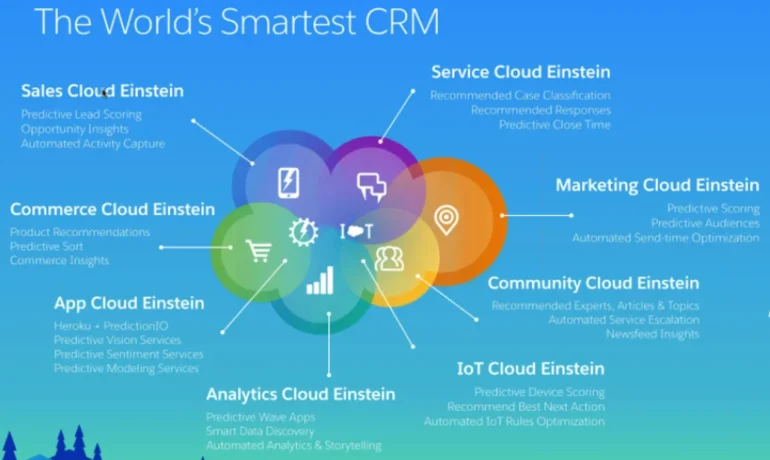
Salesforce Einstein Discover the power of the #1 AI for CRM with Einstein. Built into the Salesforce Platform, Einstein uses powerful machine learning and large language models to personalize customer interactions and make employees more productive. With Einstein powering the Customer 360, teams can accelerate time to value, predict outcomes, and automatically generate content within the flow of work. Einstein is for everyone, empowering business users, Salesforce Admins and Developers to embed AI into every experience with low code. Salesforce Einstein Features. Einstein Copilot Sales Actions: Sell faster with an AI assistant in the flow of work.Call Exploration: Ask Einstein to synthesize important call information in seconds. Ask Einstein to identify important takeaways and customer sentiment, so you have the context you need to move deals forward.

 Sales Summaries: Summarize records to identify likelihood the deal will close, the competitors involved, key activities, and more. Forecast Guidance: Ask Einstein to inform your forecast and help you identify which deals need your attention. Close Plan: Generate a customized action plan personalized to your customer and sales process. Increase conversion rates with step-by-step guidance and milestones grounded in CRM data. Salesforce Einstein Features Sales Generative AI features: ° Knowledge Creation: ° Search Answers for Agents and Customers: Einstein Copilot Service Actions: Streamline service operations by drafting Knowledge articles and surfacing answers, grounded in knowledge, to the most commonly asked questions. Summarize support interactions to save agent time and formalize institutional knowledge. Surface generated answers to agents’ & customers’ questions that are grounded in your trusted Knowledge base directly into your search page. Search Answers for Agents is included in the Einstein for Service Add-on SKU and Search Answers for Customers is included in the Einstein 1 Service Edition.
Empower agents to deliver more personalized service and reach resolutions faster with an AI assistant built into the flow of work. You can leverage out-of-the-box actions like summarize conversations or answer questions with Knowledge or you can build custom actions to fit your unique business needs. Service Salesforce Einstein Features This Release Einstein CopilotSell faster with an AI assistant. No data requirements
Included in Einstein 1 Sales Edition. Einstein Copilot: Sales ActionsSell faster with an AI assistant.No data requirements. 
 Call explorer and meeting follow-up requires Einstein Conversation Insights.
Included in Einstein 1 Sales Edition. Generative AIBoost productivity by automating time-consuming tasks.No data requirements. 
 Call summaries and call explorer requires Einstein Conversation Insights.
Included in Einstein 1 Sales Edition. Einstein will use a global model until enough data is available for a local model. For a local model: ≥1,000 lead records created and ≥120 of those converted in the last 6 monthsEinstein Automated Contacts Automatically add new
contacts & events to your CRM≥ 30 business accounts. If you use Person Accounts, >= 50 percent of accounts must be business accounts Einstein Recommended ConnectionsGet insights about your teams network to see who knows your customers and can help out ona deal ≥ 2 users to be connected to Einstein Activity Capture
and Inbox (5 preferred) Einstein Forecasting Easily predict sales forecasts inside
of Salesforce Collaborative Forecasting enabled; use a standard fiscal year; measure forecasts by opportunity revenue; forecast hierarchy must include at least one forecasting enabled user who reports to a forecast manager; opportunities must be in Salesforce ≥ 24 months;Einstein Email Insights Prioritize your inbox with actionable intelligence Einstein Activity Capture enabledEinstein Activity Metiics (Activity 360) Get insight into the activities you enter
manually and automatically from Einstein
Activity Capture Einstein Activity Capture enabled Sales Analytics Get insights into the most common sales KPIs No data requirements. User specific requirements like browser and device apply Einstein Conveisation Insights Gain actionable insights from your sales calls with conversational intelligenceCall or video recordings from Lightning Dialer, Service Cloud Voice, Zoom and other supported CTI audio and video partners.Buyer Assistant Replace web-to-lead forms with real-time conversations. No data requirements – Sales Cloud UE or Sales Engagement. Einstein Opportunity ScoringEinstein Activity CaptuiePrioritize the opportunities most likely to convertAutomatically capture data & add to your CRMEinstein will use a global model until enough data is available for a local model. For a local model: ≥ 200 closed won and ≥ 200 closed lost opportunities in the last 2 years, each with a lifespan of at least 2 days≥ 30 accounts, contacts, or leads; Requires Gmail, Microsoft Exchange 2019, 2016, or 2013 Einstein Relationship Insights Speed prospecting with AI that researches for you. No data requirements. Einstein Next Best Action Deliver optimal recommendations at the point of maximumimpactNo data requirements. User specific requirements like browser and device apply Sales AIGenerate emails, prioritize leads & opportunities most likely to convert, uncover pipeline trends, predict sales forecasts, automate data capture, and more with Einstein for Sales. Generative AIPrompt BuilderEinstein Lead ScoringEinstein Opportunity ScoringEinstein Activity CaptureEinstein Automated ContactsEinstein Recommended ConnectionsEinstein ForecastingEinstein Email InsightsEinstein Activity Metrics (Activity 360)Sales AnalyticsEinstein Conversation InsightsBuyer Assistant Sales AIGenerative AI: 
Feature Why is it so Great? What do I need? Automate common questions and business processes to solve customer requests fasterBoost productivity by auto-generating service replies, summarizing conversations during escalations andtransfers or closed interactions, drafting knowledge articles, and surfacing relevant answers grounded inknowledge for agents’ and customers’ commonly asked questions. Deliver optimal recommendations at the point of maximum impactEliminate the guesswork with AI-powered recommendations for everyoneDecrease time spent on manual data entry for incoming cases and improve case field accuracy and completionAutomate case triage and solve customer requests fasterDecrease time spent selecting field values needed to close a case with chat conversations and improved field accuracySurface the best articles in real time to solve any customer’s questionEliminate time spent typing responses to the most common customer questionsGet insights into contact center operations, understand customers, and deliver enhanced customerexperiencesChat or Messaging channels, minimum of 20 examples for most languagesNo data requirements. User specific requirements like browser and device apply Make sure that your dataset has the minimum records to build a successful recommendation. Recipient Records need a minimum of 100 records,Recommended Item Records need a minimum of 10 records, andPositive Interaction Examples need a minimum of 400

Read More
Einstein Copilot - A Valued Team Member

Einstein Copilot – A Valued Team Member

What Can Salesforce Einstein Copilot AI Really Do? Einstein Copilot – A Valued Team Member To find out, let’s virtually attend a live demo of the service March 2024. The short answer to the question is “whatever your business needs,” but with a common caveat in AI demos: beware of hallucinations. Keeping Data SafeLet’s rewind a bit. Back in September, Salesforce unveiled Einstein Copilot at Dreamforce, emphasizing customer data safety as a key selling point. Salesforce CEO Marc Benioff stated, “Your data isn’t our product.” Then, in February, the product entered public beta. Salesforce re-emphasized that the Einstein Trust Layer, designed to protect customer data, was a critical reason why customers could trust the responses and actions of Salesforce Einstein Copilot. At the demo safety was again a primary focus. Salesforce Product Management leads Gary Brandeleer and Jaswinder Rattanpal highlighted that Einstein is designed to differentiate between sensitive and non-sensitive data and to verify if the end-user has appropriate access rights for their query. These measures prevent leaks of confidential information and also minimize the impact of any potential “hallucinations” by compartmentalizing data. Rattanpal offered a word of caution: “While we have these amazing tools, be careful because we are not at a stage when they can be 100% trusted. Always have a human in the loop, especially when dealing with information that may become public.” Maximizing EfficiencySalesforce’s emphasis on data safety is wise, and its more than 150,000 customers worldwide will appreciate it. However, the real appeal of Einstein Copilot lies in the efficiency it offers. This efficiency stems from two key principles that drive Salesforce’s approach to AI. The first principle is that AI copilots fundamentally change how humans interact with software. Instead of navigating through clicks and menus, users can ask questions and receive answers directly, making software interaction more conversational. This shift can potentially transform software development and reduce the time required to complete tasks, particularly in sales, marketing, and customer service. Users can access Einstein across Salesforce’s interface. One click launches the assistant, which can execute tasks while the user attends to other duties. This reduces the time spent sifting through information to find answers. During the demo, Rattanpal showcased how Einstein could summarize an account’s financial history and populate different fields with data from a single prompt. Customization and AvailabilityThe second principle is the mix of customization and availability. Salesforce aims to allow users to deploy Einstein Copilot across any desired modules and to customize these deployments to suit each customer’s specific needs. Recognizing that its vast customer base has diverse requirements, Salesforce makes Einstein flexible yet grounded in a safety-first approach. Admins can customize Einstein using Copilot Builder, Prompt Builder, and Model Builder, each offering different levels of customization. Standard actions, like “write an email,” require minimal development, while custom actions typically involve more intricate setups. More Than a Copilot: A CoworkerThese capabilities often make Einstein feel more like a valued team member than a mere copilot. During the demo, Brandeleer showed how Einstein could determine whether a sales opportunity was worth pursuing—a subjective query that Einstein backed with a dozen data-driven reasons. This level of analysis, which would take a human hours or days to compile, underscores Einstein’s potential to exceed human efficiency and objectivity. When an AI can provide better answers to subjective questions than a human, it transcends being a simple tool. If it can effectively manage hallucinations, the question becomes: what can’t Einstein do? Salesforce Einstein Copilot stands out not only for its robust data safety measures but also for the significant efficiency and customization it offers. With its advanced capabilities, Einstein has the potential to revolutionize how businesses handle routine and complex tasks, making it an invaluable asset for any organization. Like1 Related Posts Who is Salesforce? Who is Salesforce? Here is their story in their own words. From our inception, we’ve proudly embraced the identity of Read more Salesforce Marketing Cloud Transactional Emails Salesforce Marketing Cloud Transactional Emails are immediate, automated, non-promotional messages crucial to business operations and customer satisfaction, such as order Read more Salesforce Unites Einstein Analytics with Financial CRM Salesforce has unveiled a comprehensive analytics solution tailored for wealth managers, home office professionals, and retail bankers, merging its Financial Read more AI-Driven Propensity Scores AI plays a crucial role in propensity score estimation as it can discern underlying patterns between treatments and confounding variables Read more
Read More
Custom Copilot Actions

Custom Copilot Actions

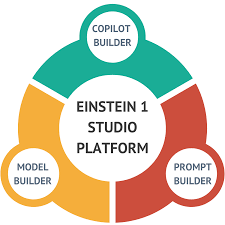
How to Create a Custom Copilot Action Custom Copilot Actions allow you to extend Copilot’s functionality within Salesforce, enabling users to perform tasks specific to your business needs. By utilizing invocable Apex classes, autolaunched flows, and prompt templates, you can build custom actions tailored to your organization’s requirements. Extend your unified copilot with custom actions. Before You Begin: Steps to Create a Custom Copilot Action: Testing and Deployment: Understanding Einstein Copilot Einstein Copilot is Salesforce’s AI assistant designed to enhance productivity and user experience across various applications and departments. Admins can configure and deploy Copilots to empower users with AI capabilities, streamlining workflows and increasing efficiency. Out-of-the-Box Actions: In the Spring ’24 release, Einstein Copilot offers several out-of-the-box actions, including: Customization and Future Development: Admins can create custom actions to tailor Copilot’s capabilities to their organization’s specific requirements. Custom actions enable tasks such as updating records and integrating with external systems, enhancing productivity and efficiency. When you create a custom action, you build it on top of platform functionality you want to make available in Einstein Copilot, such as invocable Apex classes, autolaunched flows, or prompt templates. Adding custom actions lets you customize your copilot and get more mileage out of your current Salesforce platform capabilities. Access to a custom copilot action depends on the type of Salesforce action it references. For example, if a custom action was built using a flow, the custom action adheres to the permissions, field-level security, and sharing settings configured in the flow. Use Cases and Considerations: Typical Use Cases: Considerations: Building Custom Copilot Actions: Power of Custom Actions: Custom actions extend Copilot’s capabilities, offering a wide range of use cases and functionalities. Actions can be built using flows, prompts, or Apex, providing flexibility and customization options. Descriptive Instructions: Accurate descriptions of actions, inputs, and outputs are essential for Copilot’s understanding and execution. Clear instructions provide context and improve response accuracy. Best Practices: Einstein Copilot, coupled with custom actions, empowers organizations to optimize workflows and drive efficiency. By following best practices and leveraging the full potential of Copilot, Salesforce admins can enhance user experiences and unlock new levels of productivity. Explore these features within your organization to realize the benefits of Salesforce Einstein Copilot Custom Actions. Assign an action to your copilot from the Copilot Actions page, the record page for an action, or the Copilot Action Library tab of the actions panel in the Copilot Builder. Your copilot must be deactivated. To test your action and preview how the output appears in a copilot conversation, open the copilot in the Copilot Builder and start a preview conversation. Enter utterances that you expect to trigger your action, and then make adjustments to the copilot action instructions based on your results. What powers Einstein Copilot custom actions? By facilitating the flow of work through smart, AI-driven actions, Einstein Copilot enhances efficiency and decision-making. Here’s how organizations can harness its power through the design of custom actions, ensuring their operations are as streamlined and effective as possible. Like1 Related Posts Who is Salesforce? Who is Salesforce? Here is their story in their own words. From our inception, we’ve proudly embraced the identity of Read more Salesforce Marketing Cloud Transactional Emails Salesforce Marketing Cloud Transactional Emails are immediate, automated, non-promotional messages crucial to business operations and customer satisfaction, such as order Read more Salesforce Unites Einstein Analytics with Financial CRM Salesforce has unveiled a comprehensive analytics solution tailored for wealth managers, home office professionals, and retail bankers, merging its Financial Read more AI-Driven Propensity Scores AI plays a crucial role in propensity score estimation as it can discern underlying patterns between treatments and confounding variables Read more

Read More
What is Einstein Used for in Salesforce?

What is Einstein Used for in Salesforce?

Salesforce Einstein is an AI-powered platform that can be used in various ways to enhance customer experiences and streamline business operations: SalesSalesforce Einstein can help sales teams better understand customers, improve conversion rates, and close deals more quickly. For instance, it can generate sales call summaries, draft emails using customer data, and provide real-time predictions. Customer ServiceEinstein helps customer service agents resolve cases faster and provide customers with relevant information during interactions. MarketingSalesforce Einstein enables marketers to create personalized experiences and send the right content to the right customer at the right time. ITSalesforce empowers IT teams to embed intelligence across the business and create smarter apps for customers and employees. CommerceSalesforce assists retailers by recommending the best products to each customer. Salesforce also includes features to protect data privacy and security, such as the Tectonic GPT Trust Layer, which provides AI bias detection, data security, and regulatory compliance. Salesforce Einstein is the first all-inclusive AI for CRM. It’s an integrated set of AI technologies that makes the Customer Success Platform smarter and brings AI to Salesforce users everywhere. Salesforce is the only comprehensive AI for CRM. It is: Tectonic and Salesforce allow businesses to become AI-first, providing the ability to anticipate customer needs, improve service efficiency, and enable smarter, data-driven decision-making. Sales teams can anticipate next opportunities and exceed customer needs,Service teams can proactively resolve issues before they occur,Marketing teams can create predictive journeys and personalize experiences like never before,IT teams can embed intelligence everywhere and create smarter apps. AI that works for your business.Drive business productivity and personalization with predictive AI, generative AI, and agents across the Customer 360 platform. Create and deploy assistive AI experiences natively in Salesforce, allowing your customers and employees to converse directly with Agentforce to solve issues faster and work smarter. Empower service reps, agents, marketers, and others with AI tools safely grounded in your customer data to make every customer experience more impactful. What is Salesforce Einstein?As of 2024, this groundbreaking AI-based product remains a leader in the CRM industry since its release in 2016. It combines a range of AI technologies, including advanced machine learning, natural language processing (NLP), predictive analytics, and image recognition, enabling businesses to improve productivity and sustain growth. Salesforce AI BenefitsThe most significant benefits of AI are the time and efficiency gains it offers to business processes. By automating tasks, employees can focus on more strategic work. Additionally, automating repetitive tasks reduces errors and enhances operational efficiency. Saleesforce provides robust reporting features that generate valuable insights to support decision-making, helping businesses understand customer needs and identify opportunities. From a customer perspective, Salesforce ensures more meaningful and personalized experiences through advanced NLP capabilities and machine learning to better understand customer behavior. Salesforce AI FeaturesSalesforce is a feature-rich platform that leverages AI’s capabilities in Natural Language Processing, Machine Learning, and image processing. Some of the key features include: Salesforce PricingCosts depend on the required features and the size of the business. Pricing starts at $50 per user per month, with potential increases based on the specific capabilities needed. Salesforce Tectonic ChallengesAlthough Salesforce Tectonic offers numerous benefits, companies may face challenges during integration, such as aligning it with existing systems and ensuring proper training for employees to maximize its use. How to Prepare for Salesforce Tectonic IntegrationUsing an implementation partner like Tectonic can help ensure seamless integration. A partner will assess your current Salesforce setup, recommend the right features, and guide you through the integration process. ConclusionSalesforce is a cutting-edge platform that empowers businesses to transform operations with comprehensive AI capabilities. It provides tailored solutions for sales, service, marketing, and commerce teams, enabling better customer interactions, data-driven decision-making, and increased productivity. With the right implementation partner like Tectonic, businesses can seamlessly integrate and leverage Tectonic to stay ahead in a competitive landscape. Content updated November 2024. Like1 Related Posts Who is Salesforce? Who is Salesforce? Here is their story in their own words. From our inception, we’ve proudly embraced the identity of Read more Salesforce Marketing Cloud Transactional Emails Salesforce Marketing Cloud Transactional Emails are immediate, automated, non-promotional messages crucial to business operations and customer satisfaction, such as order Read more Salesforce Unites Einstein Analytics with Financial CRM Salesforce has unveiled a comprehensive analytics solution tailored for wealth managers, home office professionals, and retail bankers, merging its Financial Read more AI-Driven Propensity Scores AI plays a crucial role in propensity score estimation as it can discern underlying patterns between treatments and confounding variables Read more

Read More
Einstein Trust Layer explained

Einstein Trust Layer Explained

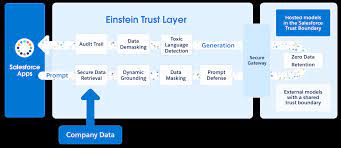
The Einstein Trust Layer, seamlessly integrated into the Salesforce Platform, serves as a secure AI architecture designed to meet enterprise security standards. This foundational layer prioritizes stringent security measures, allowing teams to harness the power of generative AI without compromising customer data. Simultaneously, it empowers companies to make the most of their trusted data, thereby enhancing the precision of generative AI responses. Key features of the Einstein Trust Layer include: Integrated and Grounded: An inherent component of every Einstein Copilot, the Trust Layer ensures that generative prompts are firmly rooted and enriched in trusted company data. Its integration with Salesforce Data Cloud establishes a seamless connection, reinforcing the reliability and relevance of generative responses. Zero-Data Retention and PII Protection: Companies can trust that their data will never be retained by third-party Large Language Model (LLM) providers. The Trust Layer incorporates masking techniques for personally identifiable information (PII), ensuring an added layer of data privacy. Toxicity Awareness and Compliance-Ready AI Monitoring: A dedicated safety-detector LLM within the Trust Layer acts as a guard against toxicity, assessing risks to brand reputation by scoring AI generations. This scoring mechanism instills confidence in the safety of responses. Moreover, each AI interaction is meticulously recorded in a secure, monitored audit trail, providing companies with visibility and control over how their data is utilized and ensuring compliance readiness. In alignment with Microsoft’s introduction of Copilot solutions powered by generative AI, Salesforce is leveraging the capabilities of Large Language Models (LLMs) to empower professionals in sales, marketing, and customer service. Building on Salesforce’s existing suite of Einstein AI features, the company unveiled “Einstein 1” this year—a next-generation suite of tools empowering users to seamlessly integrate AI into their everyday workflows. At the core of this advancement is the Einstein Copilot solution, complemented by the new Copilot studio and the Einstein Trust Layer. Like2 Related Posts Who is Salesforce? Who is Salesforce? Here is their story in their own words. From our inception, we’ve proudly embraced the identity of Read more Salesforce Marketing Cloud Transactional Emails Salesforce Marketing Cloud Transactional Emails are immediate, automated, non-promotional messages crucial to business operations and customer satisfaction, such as order Read more Salesforce Unites Einstein Analytics with Financial CRM Salesforce has unveiled a comprehensive analytics solution tailored for wealth managers, home office professionals, and retail bankers, merging its Financial Read more AI-Driven Propensity Scores AI plays a crucial role in propensity score estimation as it can discern underlying patterns between treatments and confounding variables Read more
Read More
Salesforce Logo

Spring ’24 Enhancements to Salesforce Analytics, Data Cloud, Einstein, and Net Zero Cloud

Discover the Spring ’24 Enhancements to Analytics Data Cloud Einstein and Net Zero Cloud Enhancements to Salesforce Analytics, Data Cloud, Einstein, and Net Zero Cloud in Spring’24. Reports and Dashboards for Data Cloud Enhancements Analytics Create custom report types, more core semantics, calculated insights, and date and time formulas. Analytics Collection Components Analytics Curate related analytics assets for better organization and easier consumption. Embed a specific collection directly into Lightning pages to easily access the insights you need right in your workflow. Enhanced Dashboard Customization Analytics Easily create and remember custom colors for widgets. Save hours in development time by applying layouts and colors to all widgets in a dashboard with just a few clicks. Revenue Intelligence Enhancements Analytics A new streamlined setup helps you get started even faster, and a library of KPI components lets you further customize Forecast Insights. To better understand conversation rates, use the new Win Rate Funnel view. Data Graphs Data Cloud Combine multiple data model objects and calculated insights into a unified view. New Profile API improves query performance to power near real-time use cases across Customer 360. Bring Your Own Lake with Snowflake Data Cloud Share data between Data Cloud and Snowflake with zero-ETL. With Data Federation, you can now share your data bidirectionally and access Snowflake datasets in Salesforce to enrich your unified customer profiles and unlock new insights. Bring Your Own Lake with Google BigQuery Data Cloud Share data between Data Cloud and Google BigQuery with zero-ETL. With seamless data access, you can enrich your unified customer profiles with BigQuery datasets, helping you unlock new insights and better power your Google Analytics and AI models. Streaming Data Ingest for Salesforce CRM Connector Data Cloud Ingest changes to Salesforce standard and custom objects in near real-time with streaming data ingest for the Salesforce CRM Connector. Now, existing batch ingestion checks for more frequent updates to your Salesforce objects. Einstein Copilot Einstein Embed Einstein Copilot—a conversational AI assistant—across all Salesforce applications to help teams be more productive. Automate steps or tasks with out-of-the-box actions, or create custom actions that call flows, Apex, or MuleSoft APIs. Prompt Builder Einstein Create, test, and refine prompt templates easily without code. Ground prompts with dynamic CRM data, including merge fields and flows. Invoke prompted workflows across the Einstein 1 Platform through Flow, Lightning Web Components, and Apex. ESG (Environmental, Social, and Governance) Disclosure Authoring with Generative AI Net Zero Cloud Use Einstein to generate more efficient Corporate Sustainability Reporting Directive (CSRD), Global Reporting Initiative (GRI), and Carbon Disclosure Project (CDP) reports. Einstein can access and use the internal information you’ve uploaded to Net Zero Cloud to write and answer specific questions required for these reporting standards. Disclosure and Compliance Hub Plugin for Microsoft Word Net Zero Cloud Net Zero Cloud now provides sustainability managers more flexibility to support multiple authoring formats using Microsoft Word Office 365. Multiuser collaboration, easy navigation, and rich text support create a cleaner and easier experience. Marginal Abatement Cost Visualizations Net Zero Cloud With marginal abatement cost visualizations, customers can gain insights into required investments for various programs and forecast future emissions based on the cost to offset carbon. Sustainability Program Visualizations Net Zero Cloud Visualize the combined effects of multiple environmental, social, and corporate governance (ESG) initiatives and gain a deeper understanding into different ESG projects and specific metrics within these projects. Improved Emissions Factors Management Net Zero Cloud Automatically integrate emissions factors from Net Zero Marketplace into Net Zero Cloud to easily manage and apply the data, for improved transparency and visibility in one location. Stay tuned to Tectonic’s Insights for more details and news from Salesforce. Enhancements to Salesforce Analytics, Data Cloud, Einstein, and Net Zero Cloud. Like1 Related Posts Who is Salesforce? Who is Salesforce? Here is their story in their own words. From our inception, we’ve proudly embraced the identity of Read more Salesforce Marketing Cloud Transactional Emails Salesforce Marketing Cloud Transactional Emails are immediate, automated, non-promotional messages crucial to business operations and customer satisfaction, such as order Read more Salesforce Unites Einstein Analytics with Financial CRM Salesforce has unveiled a comprehensive analytics solution tailored for wealth managers, home office professionals, and retail bankers, merging its Financial Read more AI-Driven Propensity Scores AI plays a crucial role in propensity score estimation as it can discern underlying patterns between treatments and confounding variables Read more
Read More
Einstein 1 Unveiled

Salesforce Einstein 1 Platform

Welcome to the dawn of a bold new era in enterprise Artificial Intelligence, where the world demands a platform unlike any other. Enter Salesforce Einstein 1, the pinnacle of innovation, designed to navigate terabytes of disparate data seamlessly, offer freedom in AI model selection, and integrate directly into your workflow—all while upholding customer trust. Einstein 1 Platform serves as the nexus of your data, AI, CRM, development, and security needs, consolidating them into a singular, robust framework. This empowers IT, administrators, and developers alike with an adaptable AI platform, facilitating rapid development of transformative applications and automation. Within Einstein 1 lies an array of artificial intelligence tools, reflecting the modular architecture of the core Salesforce platform. From standardized to custom solutions, Einstein 1 caters to diverse needs. Examples include out-of-the-box AI features like sales email generation in Sales Cloud and service replies in Service Cloud. Since its unveiling as Genie, now Data Cloud, at Dreamforce ‘22, Salesforce has propelled this product to the forefront of its mission. The conversation has shifted from Customer 360 to encompass AI + CRM + Data—a strategic pivot poised for success in 2024 and beyond. But what does this transformation entail? Data Cloud has been a focal point of Salesforce’s narrative, hailed as a groundbreaking CDP innovation. The recent Q4 earnings call unveiled remarkable achievements: Gartner’s endorsement further solidifies Salesforce’s position, elevating it as a leader in the Magic Quadrant, surpassing rivals like Twilio and Adobe. This achievement is remarkable given Salesforce’s relatively recent CDP certification from the CDP Institute. However, understanding the significance of Data Cloud amidst a sea of CRM solutions may elude many. Yet, the resurgence of data underscores its importance. CRMs, while pivotal for sales, support, and marketing functions, fall short in managing the breadth of modern data collection, storage, and dissemination. Enter the CDP—a dedicated platform for aggregating customer data across every touchpoint throughout the customer lifecycle. Unlike CRMs, which traditionally served as the single source of truth, CDPs offer a comprehensive view, ingesting data from myriad sources. Two key attributes distinguish CDPs and Data Cloud: Yet, amidst this data revolution, the role of artificial intelligence cannot be understated. Einstein 1, formerly known as Salesforce Customer 360, epitomizes this synergy between AI, CRM, and Data. Einstein 1 boasts a diverse array of AI tools, from pre-built features to customizable solutions housed within the Einstein 1 Studio. This enables users to craft tailored AI functionality, seamlessly integrated with Salesforce’s ecosystem. Moreover, Salesforce’s agnostic approach to LLMs empowers users to harness the full potential of AI. Whether leveraging Salesforce’s proprietary LLM or integrating third-party or proprietary models, Einstein 1 ensures flexibility and innovation. As AI continues to permeate every facet of business and personal life, Salesforce’s strategic focus on Data Cloud and Einstein could propel the company to unprecedented growth. In the ever-evolving landscape of enterprise AI, Salesforce remains at the forefront, poised to redefine the future of customer engagement and business intelligence. Like Related Posts Who is Salesforce? Who is Salesforce? Here is their story in their own words. From our inception, we’ve proudly embraced the identity of Read more Salesforce Marketing Cloud Transactional Emails Salesforce Marketing Cloud Transactional Emails are immediate, automated, non-promotional messages crucial to business operations and customer satisfaction, such as order Read more Salesforce Unites Einstein Analytics with Financial CRM Salesforce has unveiled a comprehensive analytics solution tailored for wealth managers, home office professionals, and retail bankers, merging its Financial Read more AI-Driven Propensity Scores AI plays a crucial role in propensity score estimation as it can discern underlying patterns between treatments and confounding variables Read more
Read More
Salesforce Copilot

What is Einstein Copilot for Salesforce?

What Is Einstein Copilot for Salesforce? Salesforce Copilot service operates similarly to other generative AI tools in the customer experience landscape. Users can instruct the tool to automatically respond to customer queries with pertinent, personalized answers based on company data. Is Copilot Safe to Use? Concerned about the safety of using Copilot? Rest assured, you have the ultimate control over your data. Your data remains private and is not shared with a third party unless you have expressly granted permission to do so. Moreover, Microsoft does not utilize your data to train or enhance Copilot or its AI features unless you have provided explicit consent for such purposes. Einstein Copilot represents a cutting-edge generative AI-powered conversational assistant integrated seamlessly into every Salesforce application. It enhances workflow efficiency, driving substantial gains in productivity. Einstein Copilot Studio empowers organizations to tailor their Einstein Copilot for specific business needs, offering a customizable solution. Both Einstein Copilot and Einstein Copilot Studio incorporate the Einstein Trust Layer, ensuring the protection of sensitive data while enabling companies to use their trusted data to enhance generative AI responses. Prominent businesses like AAA, Heathrow Airport, and KPMG US leverage Einstein to enhance productivity, boost revenue, and create personalized experiences. Shouldn’t you? Like1 Related Posts AI-Driven Propensity Scores AI plays a crucial role in propensity score estimation as it can discern underlying patterns between treatments and confounding variables Read more Salesforce AI Einstein Next Best Action Salesforce AI Einstein Next Best Action is a feature designed to identify the most effective actions available to agents and Read more Einstein Relationship Insights ERI, serves as an AI-powered research assistant, enhancing sales processes. ERI operates as a desktop plugin with a browser extension, Read more Joined Datasets in B2B Marketing Analytics B2BMA empowers users to generate additional datasets using the data manager. This process involves creating datasets in various ways, such Read more
Read More

Prompt Builder Einstein

Prompt Builder in Salesforce Einstein: Revolutionizing AI-Powered Automation Salesforce Einstein has introduced a groundbreaking feature called Prompt Builder, designed to simplify and enhance the way businesses leverage generative AI for automation and productivity. Prompt Builder empowers users to create, customize, and deploy AI-driven prompts without needing deep technical expertise. This tool is part of Salesforce’s broader vision to make AI accessible and actionable for everyone. Let’s explore what Prompt Builder is, how it works, and why it’s a game-changer for businesses. What is Prompt Builder? Prompt Builder is a no-code/low-code tool within Salesforce Einstein that allows users to create and manage AI prompts for generative AI models. These prompts can be used to automate tasks, generate content, and provide intelligent responses across Salesforce applications. With Prompt Builder, businesses can harness the power of AI to improve efficiency, enhance customer experiences, and drive innovation. Key Features of Prompt Builder How Does Prompt Builder Work? Use Cases for Prompt Builder 1. Customer Service 2. Sales and Marketing 3. Content Creation 4. Internal Productivity Benefits of Prompt Builder How to Get Started with Prompt Builder The Future of Prompt Builder As generative AI continues to evolve, Prompt Builder is expected to become even more powerful. Future developments may include: Conclusion Salesforce Einstein’s Prompt Builder is a transformative tool that democratizes the use of generative AI for businesses. By enabling users to create, customize, and deploy AI-driven prompts with ease, Prompt Builder empowers organizations to automate tasks, enhance customer experiences, and drive innovation. Whether you’re in sales, marketing, customer service, or any other field, Prompt Builder can help you unlock the full potential of AI. Start exploring Prompt Builder today and revolutionize the way you work with AI! Content updated November 2024. Like Related Posts Who is Salesforce? Who is Salesforce? Here is their story in their own words. From our inception, we’ve proudly embraced the identity of Read more Salesforce Marketing Cloud Transactional Emails Salesforce Marketing Cloud Transactional Emails are immediate, automated, non-promotional messages crucial to business operations and customer satisfaction, such as order Read more Salesforce Unites Einstein Analytics with Financial CRM Salesforce has unveiled a comprehensive analytics solution tailored for wealth managers, home office professionals, and retail bankers, merging its Financial Read more AI-Driven Propensity Scores AI plays a crucial role in propensity score estimation as it can discern underlying patterns between treatments and confounding variables Read more

Read More
Salesforce Einstein AI Trust Layer

Einstein AI Trust Layer Explained

The Einstein Trust Layer is a secure AI architecture. It is natively built into the Salesforce Platform. Designed for enterprise security standards the Einstein Trust Layer continues to allow teams to benefit from generative AI. Without compromising their customer data, while at the same time letting companies use their trusted data to improve generative AI responses: Trusted AI starts with securely grounded prompts. A prompt is a canvas to provide detailed context and instructions to Large Language Models. The Einstein Trust layer allows you to responsibly ground all of your prompts in customer data and mask that data when the prompt is shared with Large Language Models*. With our Zero Retention architecture, none of your data is stored outside of Salesforce. Salesforce gives customers control over the use of their data for AI. Whether using our own Salesforce-hosted models or external models that are part of our Shared Trust Boundary, like OpenAI, no context is stored. The large language model forgets both the prompt and the output as soon as the output is processed. Like1 Related Posts Who is Salesforce? Who is Salesforce? Here is their story in their own words. From our inception, we’ve proudly embraced the identity of Read more Salesforce Marketing Cloud Transactional Emails Salesforce Marketing Cloud Transactional Emails are immediate, automated, non-promotional messages crucial to business operations and customer satisfaction, such as order Read more Salesforce Unites Einstein Analytics with Financial CRM Salesforce has unveiled a comprehensive analytics solution tailored for wealth managers, home office professionals, and retail bankers, merging its Financial Read more AI-Driven Propensity Scores AI plays a crucial role in propensity score estimation as it can discern underlying patterns between treatments and confounding variables Read more
Read More
Salesforce Einstein Commerce

Salesforce Einstein Commerce

Elevate Your Commerce Store Experience with Commerce Einstein Transform your commerce store with the advanced capabilities of Commerce Einstein, which includes features like Goals and Recommendations, the Commerce Concierge bot, Smart Promotions, and SEO-optimized meta tags. Salesforce Einstein Commerce, Enhance Store Performance with Goals and Recommendations Achieve key performance objectives for your store such as increased site conversion, higher site traffic, and greater average order value. Utilize an intuitive framework powered by AI recommendations to implement intelligent actions quickly and efficiently, facilitating the setup and growth of your store. Track progress with insights from Data Cloud. This feature is available for B2B Commerce and D2C Commerce in the Enterprise, Unlimited, and Developer editions. Access it through the Goals and Recommendations option in the Commerce App Navigation menu. Optimize Shopping Experience with the Commerce Concierge Bot Enhance the shopping experience by providing conversational product recommendations and reordering capabilities with the Commerce Concierge bot. Build a new bot using the Commerce Concierge template to connect your store to a new Einstein bot, or upgrade an existing bot with new Commerce Concierge bot blocks. This allows customers to authenticate, manage multiple accounts, reorder, and utilize Einstein’s generative AI features. Craft Intelligent Promotions with Einstein Create promotions effortlessly using Einstein and reliable data from Commerce Cloud. Employ natural language instructions and generative AI to quickly generate both simple and advanced promotions, making your promotional efforts smarter and more effective. Enhance SEO with Einstein Meta Tags Boost your SEO performance by using Einstein’s generative AI to create Page Title Tags and Page Meta Descriptions for products. This enriches search engines with relevant information, improving your store’s visibility. Alternatively, you can manually create and manage page meta tags through the SEO tab on a product record. Reduce Return Rates with Einstein Return Insights Analyze return reasons to refine product listings and minimize return rates. Einstein helps you identify up to 20 high return-rate products and provides analyzed and categorized return reasons, enabling you to make strategic improvements. Facilitate Product Discovery with AI-Powered Search (Generally Available) Improve your customers’ product discovery experience with Einstein semantic search. Using natural language processing, this feature interprets queries to deliver relevant results, accommodating synonyms, alternative spellings, typos, and more. For example, it matches terms like “couch” and “sofa” or “jumper” and “sweater,” aligning with the searcher’s intent. Enhance your commerce store with these innovative features from Commerce Einstein to drive growth, improve customer experience, and optimize operational efficiency. Like Related Posts Who is Salesforce? Who is Salesforce? Here is their story in their own words. From our inception, we’ve proudly embraced the identity of Read more Salesforce Marketing Cloud Transactional Emails Salesforce Marketing Cloud Transactional Emails are immediate, automated, non-promotional messages crucial to business operations and customer satisfaction, such as order Read more Salesforce Unites Einstein Analytics with Financial CRM Salesforce has unveiled a comprehensive analytics solution tailored for wealth managers, home office professionals, and retail bankers, merging its Financial Read more AI-Driven Propensity Scores AI plays a crucial role in propensity score estimation as it can discern underlying patterns between treatments and confounding variables Read more

Read More
Jan '24 Einstein Data Cloud Updates

January ’24 Einstein Data Cloud Updates

Utilize Generative AI to Target Audiences Effectively Harness the power of generative AI with Einstein Segment Creation in Data Cloud to create precise audience segments. Describe your target audience, and Einstein Segment Creation swiftly produces a segment using trusted customer data available in Data Cloud. This segment can be easily edited and fine-tuned as necessary. Jan ’24 Einstein Data Cloud Updates. Where: This enhancement is applicable to Data Cloud in Developer, Enterprise, Performance, and Unlimited editions. Einstein generative AI is accessible in Lightning Experience. When: This functionality is rolling out gradually, starting in Spring ’24. How: In Data Cloud, create a new segment and choose Einstein Segment Creation. In the Einstein panel, input a description of your segment using simple text, review the draft, and make adjustments as needed. Gain Insights into Segment Performance with Segment Intelligence Analyze segment data efficiently with Segment Intelligence, an in-platform intelligence tool for Data Cloud for Marketing. Offering a straightforward setup process, out-of-the-box data connectors, and pre-built visualizations, Segment Intelligence aids in optimizing segments and activations across various channels, including Marketing Cloud Engagement, Google Ads, Meta Ads, and Commerce Cloud. Where: This update applies to Data Cloud in Developer, Enterprise, Performance, and Unlimited editions. Utilizing Segment Intelligence requires a Data Cloud Starter license. When: For details regarding timing and eligibility, contact your Salesforce account executive. How: To configure Segment Intelligence, navigate to Salesforce Setup. To view Segment Intelligence dashboards, go to Data Cloud and select the Segment Intelligence tab. Activate Audiences on Google DV360 and LinkedIn Effortlessly activate audiences on Google DV360 and LinkedIn as native activation destinations in Data Cloud. Directly use segments for targeted advertising campaigns and insights reporting. Where: This change is applicable to Data Cloud in Developer, Enterprise, Performance, and Unlimited editions. Requires an Ad Audiences license. When: This functionality is available starting in March 2024. Enhance Identity Resolution with More Frequent Ruleset Processing Experience more timely ruleset processing as rulesets now run automatically whenever your data changes. This improvement eliminates the need to wait for a daily ruleset run, ensuring efficient and cost-effective processing. Where: This update applies to Data Cloud in Developer, Enterprise, Performance, and Unlimited editions. Refine Identity Resolution Match Rules with Fuzzy Matching Extend the use of fuzzy matching to more fields, allowing fuzzy matching on any text field in your identity resolution match rules. Up to two fuzzy match fields, other than first name, can be used in a match rule, with a total of six fuzzy match fields in any ruleset. Enhance match rules by updating to the “Fuzzy Precision – High” method for fields like last name, city, and account. Where: This enhancement applies to Data Cloud in Developer, Enterprise, Performance, and Unlimited editions. Salesforce Einstein’s AI Capabilities Salesforce Einstein stands out as a comprehensive AI solution for CRM. Notable features include being data-ready, eliminating the need for data preparation or model management. Simply input data into Salesforce, and Einstein seamlessly operates. Additionally, Salesforce introduces the Data Cloud, formerly known as Genie, as a significant AI-powered product. This platform, combining Data Cloud and AI in Einstein 1, empowers users to manage unstructured data efficiently. The introduction of the Data Cloud Vector Database allows for the storage and retrieval of unstructured data, enabling Einstein Copilot to search and interpret vast amounts of information. Salesforce also unveils Einstein Copilot Search, currently in closed beta, enhancing AI search capabilities to respond to complex queries from users. Jan ’24 Einstein Data Cloud Updates This groundbreaking offering addresses the challenge of managing unstructured data, a substantial portion of business data, and complements it with the capability to use familiar automation tools such as Flow and Apex to monitor and trigger workflows based on changes in this data. Overall, Salesforce aims to revolutionize how organizations handle unstructured data with these innovative additions to the Data Cloud. Like2 Related Posts Salesforce Unites Einstein Analytics with Financial CRM Salesforce has unveiled a comprehensive analytics solution tailored for wealth managers, home office professionals, and retail bankers, merging its Financial Read more AI-Driven Propensity Scores AI plays a crucial role in propensity score estimation as it can discern underlying patterns between treatments and confounding variables Read more Salesforce AI Einstein Next Best Action Salesforce AI Einstein Next Best Action is a feature designed to identify the most effective actions available to agents and Read more Capture Initial Traffic Source With Google Analytics To ensure the proper sequencing of Tags, modify the Tag sequencing in the Google Analytics preview Tag settings. The custom Read more
Read More
gettectonic.com